
maven依赖

 1 <dependency>
 2     <groupId>io.springfox</groupId>
 3     <artifactId>springfox-swagger2</artifactId>
 4     <version>2.2.2</version>
 5 </dependency>
 6 <dependency>
 7     <groupId>io.springfox</groupId>
 8     <artifactId>springfox-swagger-ui</artifactId>
 9     <version>2.2.2</version>
10 </dependency>
SWAGGERCONFIG
 1 @Configuration
 2 @EnableSwagger2
 3 public class Swagger2 {
 4
 5     @Bean
 6     public Docket createRestApi() {
 7         return new Docket(DocumentationType.SWAGGER_2)
 8                 .apiInfo(apiInfo())
 9                 .select()
10                 .apis(RequestHandlerSelectors.basePackage("com.didispace.web"))//扫描包
            //.apis(RequestHandlerSelectors.withMethodAnnotation(ApiOperation.class)) //被注解的方法
11                 .paths(PathSelectors.any())
12                 .build();
13     }
14
15     private ApiInfo apiInfo() {
16         return new ApiI标题")
18                 .description("---一个说明-----")
19                 .termsOfServiceUrl("http://blog.didispace.com/")
20                 .contact("程序猿")
21                 .version("1.0")
22                 .build();
23     }
24
25 }
Controller中使用
 1 package com.qzt360.controller;
 2
 3 import io.swagger.annotations.*;
 4 import org.springframework.web.bind.annotation.RequestMapping;
 5 import org.springframework.web.bind.annotation.RequestMethod;
 6 import org.springframework.web.bind.annotation.RestController;
 7
 8 @Api(tags = "接口描述")
 9 @ApiResponses(value = { @ApiResponse(code = 200, message = "Successful — 请求已完成"),
10         @ApiResponse(code = 400, message = "请求中有语法问题,或不能满足请求"),
11         @ApiResponse(code = 401, message = "未授权客户机访问数据"),
12         @ApiResponse(code = 404, message = "服务器找不到给定的资源;文档不存在"),
13         @ApiResponse(code = 500, message = "服务器不能完成请求") })
14 @RestController
15 @RequestMapping("/t")
16 public class TestController {
17     //限定请求方式一
18     @ApiOperation(value = "用途、作用", notes = "说明", httpMethod = "GET")
19     // 参数方式一
20     @ApiImplicitParams({
21             @ApiImplicitParam(name = "str", value = "用户标识", required = true, paramType = "query", dataType = "String") })
22     @RequestMapping("t01")
23     public String testSw(String str) {
24         return "zshiygcshi" + str;
25     }
26
27     @ApiOperation(value = "cshi", notes = "新增注册")
28     @ApiImplicitParams({
29             @ApiImplicitParam(name = "str", value = "参数的汉字说明、解释", required = true, paramType = "query", dataType = "String") })
30     //限定请求方式二
31     @RequestMapping(value = "t02", method = { RequestMethod.GET, RequestMethod.POST })
32     public String testSw02(String str) {
33         return "zshiygcshi" + str;
34     }
35
36     @ApiOperation(value = "cshi", notes = "新增注册", httpMethod = "POST")
37     @RequestMapping("t03")
38     // 参数方式二
39     public String testSw03(@ApiParam(name = "测试", value = "cd") String str) {
40         return "zshiygcshi" + str;
41     }
42 }
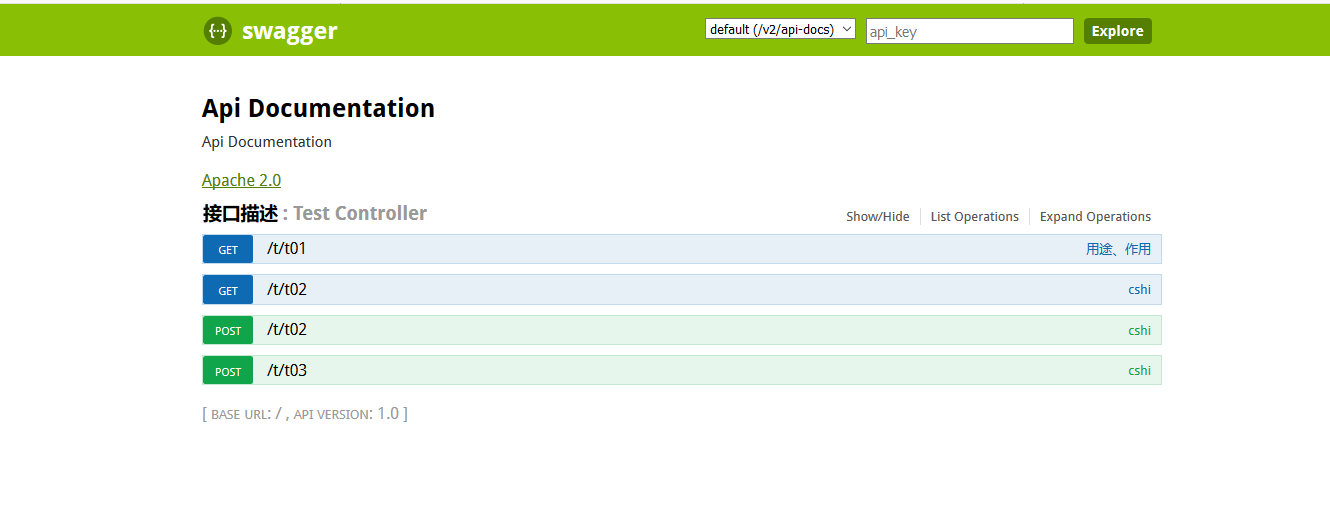
完成上述代码添加上,启动Spring Boot程序,访问:http://localhost:8080/swagger-ui.html
效果图
线上环境在配置类中加
.paths(PathSelectors.none())//如果是线上环境,添加路径过滤,设置为全部都不符合
主要注解说明:
Swagger2 基本使用:
- @Api 描述类/接口的主要用途
- @ApiOperation 描述方法用途
- @ApiImplicitParam 描述方法的参数
- @ApiImplicitParams 描述方法的参数(Multi-Params)
- @ApiIgnore 忽略某类/方法/参数的文档
1. @Api:用在请求的类上,说明该类的作用
@Api:用在请求的类上,说明该类的作用
    tags="说明该类的作用"
    value="该参数没什么意义,所以不需要配置

示例:

@Api(tags="APP用户注册Controller")
2、@ApiOperation:用在请求的方法上,说明方法的作用
@ApiOperation:"用在请求的方法上,说明方法的作用"
    value="说明方法的作用"
    notes="方法的备注说明"
示例:
@ApiOperation(value="用户注册",notes="手机号、密码都是必输项,年龄随边填,但必须是数字")3、@ApiImplicitParams:用在请求的方法上,包含一组参数说明
 1 @ApiImplicitParams:用在请求的方法上,包含一组参数说明
 2     @ApiImplicitParam:用在 @ApiImplicitParams 注解中,指定一个请求参数的配置信息
 3         name:参数名
 4         value:参数的汉字说明、解释
 5         required:参数是否必须传
 6         paramType:参数放在哪个地方
 7             · header --> 请求参数的获取:@RequestHeader
 8             · query --> 请求参数的获取:@RequestParam
 9             · path(用于restful接口)--> 请求参数的获取:@PathVariable
10             · body(不常用)
11             · form(不常用)
12         dataType:参数类型,默认String,其它值dataType="Integer"
13         defaultValue:参数的默认值
14
15 示列:
16
17 @ApiImplicitParams({
18     @ApiImplicitParam(name="mobile",value="手机号",required=true,paramType="form"),
19     @ApiImplicitParam(name="password",value="密码",required=true,paramType="form"),
20     @ApiImplicitParam(name="age",value="年龄",required=true,paramType="form",dataType="Integer")
21 })
4、@ApiResponses:用于请求的方法上,表示一组响应
@ApiResponses:用于请求的方法上,表示一组响应
    @ApiResponse:用在@ApiResponses中,一般用于表达一个错误的响应信息
        code:数字,例如400
        message:信息,例如"请求参数没填好"
        response:抛出异常的类
示例:
@ApiOperation(value = "select1请求",notes = "多个参数,多种的查询参数类型")
@ApiResponses({
    @ApiResponse(code=400,message="请求参数没填好"),
    @ApiResponse(code=404,message="请求路径没有或页面跳转路径不对")
})
5、@ApiModel:用于响应类上,表示一个返回响应数据的信息
@ApiModel:用于响应类上,表示一个返回响应数据的信息
            (这种一般用在post创建的时候,使用@RequestBody这样的场景,
            请求参数无法使用@ApiImplicitParam注解进行描述的时候)
    @ApiModelProperty:用在属性上,描述响应类的属性
遇到问题:
Spring Boot 配置静态资源处理
- 先讲几点有关嵌入式 Tomcat 运行的事项
- request.getSession().getServletContext().getRealPath(“/”),这个不用多说了,总之很重要,先将其简称为 docBase,即 “文档根目录”
- 当项目中不存在 src/main/webapp 目录时,docBase 为C盘临时目录,例如 C:\Users\Administrator\AppData\Local\Temp\tomcat-docbase.2872246570823772896.8080\
- 当项目中存在 src/main/webapp 目录时
- 如果该目录存在于 Maven 项目父模块中,则 docBase 为父模块的 src/main/webapp
- 如果 Maven 项目父模块缺少该目录,此时,即使子模块存在 src/main/webapp 目录,也视为不见,docBase 为C盘临时目录
综上,如果我们想要通过 “文档根目录” 来定位到某些资源的话,首先要保证存在 src/main/webapp 目录,否则,建议直接定位到 classpath 下的资源(即 src/main/resource 目录下的资源),具体配置如下
1.不存在 @EnableWebMVC
- Spring Boot 的 @EnableAutoConfiguration 会触发自动配置类 WebMvcAutoConfiguration,该类配置了一些默认的静态资源映射
- 自动映射 localhost:8080/** 为
- classpath:/resources/
- classpath:/static/
- classpath:/public/
- classpath:/META-INF/resources/
- 自动映射 localhost:8080/webjars/** 为
- classpath:/META-INF/resources/webjars/
- 自动映射 localhost:8080/** 为
此时,我们不需要多作些什么,只需要将静态资源放入 src/main/resources 目录下的 resources、static 或 public 文件夹下,可直接通过 url 定位相关资源,例如 localhost:8080/index.html 定位到 src/main/resources/static/index.html
但是,如果使用了以下的自定义配置,则以上默认配置统统无效
@Configuration
public class GoWebMvcConfigurerAdapter extends WebMvcConfigurerAdapter {

    @Override
    public void addResourceHandlers(ResourceHandlerRegistry registry) {
        //配置静态资源处理
        registry.addResourceHandler("/**")
                .addResourceLocations("classpath:/resources2/")
                .addResourceLocations("classpath:/static2/")
                .addResourceLocations("classpath:/public2/")
                .addResourceLocations("classpath:/META-INF/resources2/");
    }

}
2.如果存在 @EnableWebMVC
如果使用了 @EnableWebMvc,那么自动配置类 WebMvcAutoConfiguration 会失效,因此官方默认的 /static, /public, META-INF/resources, /resources 都不复存在
这种情况下,我们只能手动添加以下配置,切记,如果不添加 classpath 前缀,
则定位到 “文档根目录”(一般是 src/main/webapp 目录)下的资源,此时,我们可以将静态资源放入 src/main/webapp 目录下的 resources、static 或 public 文件夹下
,然后通过 url 直接定位相关资源,例如 localhost:8080/index.html 定位到 src/main/webapp/static/index.html
 1 @Configuration
 2 public class GoWebMvcConfigurerAdapter extends WebMvcConfigurerAdapter {
 3
 4     @Override
 5     public void addResourceHandlers(ResourceHandlerRegistry registry) {
 6         //配置静态资源处理
 7         registry.addResourceHandler("/**")
 8                 .addResourceLocations("resources/")
 9                 .addResourceLocations("static/")
10                 .addResourceLocations("public/")
11                 .addResourceLocations("META-INF/resources/");
12     }

 浙公网安备 33010602011771号