
VRRP+MSTP实验
搭建简易的VRRP+MSTP实验
虚拟VIP配合多生成树协议
实验拓扑
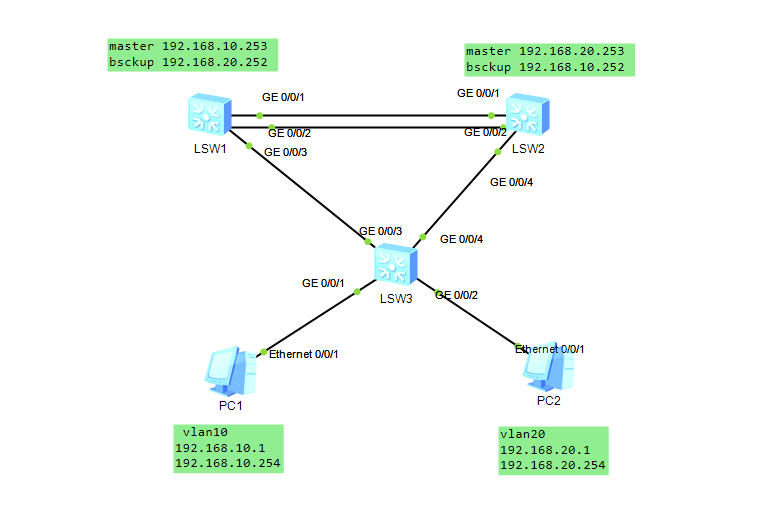
LSW3上的配置
先创建vlan10、20
vlan batch 10 20

然后在接口下划分trunk、access模式
interface GE0/0/1
 port link-type access
 port default vlan 10
interface GE0/0/2
 port link-type access
 port default vlan 20
interface GE/0/3
 port link-type trunk
 port trunk allow-pass vlan 10 20
interface GE0/0/4
 port link-type trunk
 port trunk allow-pass vlan 10 20

 配置mstp
 stp mode mstp
 stp region-configuration
 region-name liu
 instance 10 vlan 10
 instance 20 vlan 20
 active region-configuration

 验证
[Huawei]display stp  instance 10 brief
 MSTID  Port                        Role  STP State     Protection
  10    GigabitEthernet0/0/1        DESI  LEARNING        NONE
  10    GigabitEthernet0/0/3        MAST  FORWARDING      NONE
  10    GigabitEthernet0/0/4        ALTE  DISCARDING      NONE
[Huawei]
LSW1上的配置
先创建vlan10、20
vlan batch 10 20

配置链路聚合和trunk口
interface Eth-Trunk1
trunkport int g0/0/1
trunkport int g0/0/2
interface Eth-Trunk1
port link-type trunk
port trunk allow-pass vlan 10 20
interface GigabitEthernet0/0/3
port link-type trunk
port trunk allow-pass vlan 10 20

配置mstp
stp mode mstp
stp region-configuration
region-name liu
instance 10 vlan 10
instance 20 vlan 20
active region-configuration
stp instance 10 root primary
stp instance 20 root secondary

配置VRRP
interface Vlanif10
ip address 192.168.10.253 255.255.255.0
vrrp vrid 10 virtual-ip 192.168.10.254
vrrp vrid 10 priority 120
interface Vlanif20
ip address 192.168.20.252 255.255.255.0
vrrp vrid 20 virtual-ip 192.168.20.254
 vrrp vrid 20 priority 100

 验证
 [Huawei]display vrrp brief
VRID  State        Interface                Type     Virtual IP
----------------------------------------------------------------
10    Master       Vlanif10                 Normal   192.168.10.254
20    Master       Vlanif20                 Normal   192.168.20.254
----------------------------------------------------------------
配置完SW2 VLAN20就会变成BackUP
LSW2上的配置
先创建vlan10、20
vlan batch 10 20

配置链路聚合和trunk口

interface Eth-Trunk1
trunkport int g0/0/1
trunkport int g0/0/2
interface Eth-Trunk1
port link-type trunk
port trunk allow-pass vlan 10 20
interface GigabitEthernet0/0/3
port link-type trunk
port trunk allow-pass vlan 10 20

配置mstp
stp mode mstp
stp region-configuration
region-name liu
instance 10 vlan 10
instance 20 vlan 20
active region-configuration
stp instance 20 root primary
stp instance 10 root secondary

配置VRRP
interface Vlanif20
ip address 192.168.20.253 255.255.255.0
vrrp vrid 20 virtual-ip 192.168.20.254
vrrp vrid 20 priority 120
interface Vlanif10
ip address 192.168.10.252 255.255.255.0
vrrp vrid 10 virtual-ip 192.168.10.254
vrrp vrid 10 priority 100

验证
[Huawei]display vrrp brief
VRID  State        Interface                Type     Virtual IP
----------------------------------------------------------------
10    Backup       Vlanif10                 Normal   192.168.10.254
20    Master       Vlanif20                 Normal   192.168.20.254
----------------------------------------------------------------
Total:2     Master:1     Backup:1     Non-active:0
PC1测试连通性
PC>ping 192.168.20.1

Ping 192.168.20.1: 32 data bytes, Press Ctrl_C to break
From 192.168.20.1: bytes=32 seq=1 ttl=127 time=235 ms
From 192.168.20.1: bytes=32 seq=2 ttl=127 time=93 ms
From 192.168.20.1: bytes=32 seq=3 ttl=127 time=110 ms

--- 192.168.20.1 ping statistics ---
  3 packet(s) transmitted
  3 packet(s) received
  0.00% packet loss
  round-trip min/avg/max = 93/146/235 ms

PC>ping 192.168.20.254

Ping 192.168.20.254: 32 data bytes, Press Ctrl_C to break
From 192.168.20.254: bytes=32 seq=1 ttl=255 time=78 ms

--- 192.168.20.254 ping statistics ---
  1 packet(s) transmitted
  1 packet(s) received
  0.00% packet loss
  round-trip min/avg/max = 78/78/78 ms
 浙公网安备 33010602011771号