
vue使用webpack封装组件上传到npm库
vue使用webpack封装组件上传到npm
组件上传npm,建议使用简易版webpack
1. 为什么使用简易版?因为好配置,包体积小
vue init webpack-simple dong-components// dong-components是名称,请选择npm里面没有的名称
2.创建components文件夹,里面放自己的组件,在跟目录下新建index.js作为入口文件
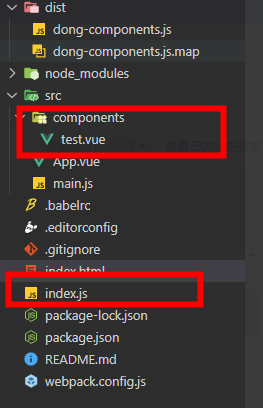
3.index.js文件的内容
import Test from './src/components/test.vue'

import _Vue from 'vue'

// vue 插件模式需要暴露一个install方法
// 判断是否存在vue
const components = [
    Test
]
const install = (Vue) => {
    if (!Vue) {
        window.Vue = Vue = _Vue
    }
    components.forEach((elem, i) => {
        Vue.component(elem.name, elem);
    })
}

export default install
4.package.json里面要改的
{
  "name": "dong-components", // 自己要定义的包名称
  "description": "一个私人工具库",
  "version": "1.0.0",
  "author": "Jundong <360913684@qq.com>",
  "license": "MIT",
  "private": false, // 注意:一定要设置false
  "scripts": {
    "dev": "cross-env NODE_ENV=development webpack-dev-server --open --hot",
    "build": "cross-env NODE_ENV=production webpack --progress --hide-modules"
  },
  "dependencies": {
    "vue": "^2.5.11"
  },
  "browserslist": [
    "> 1%",
    "last 2 versions",
    "not ie <= 8"
  ],
  "devDependencies": {
    "babel-core": "^6.26.0",
    "babel-loader": "^7.1.2",
    "babel-preset-env": "^1.6.0",
    "babel-preset-stage-3": "^6.24.1",
    "cross-env": "^5.0.5",
    "css-loader": "^0.28.7",
    "file-loader": "^1.1.4",
    "node-sass": "^4.5.3",
    "sass-loader": "^6.0.6",
    "vue-loader": "^13.0.5",
    "vue-template-compiler": "^2.4.4",
    "webpack": "^3.6.0",
    "webpack-dev-server": "^2.9.1"
  },
  "keywords": [
    "dong-components" // npm搜索你的库的关键词
  ],
  "main": "dist/dong-components.js",//打包后的文件夹里面的js文件
  "files": [
    "dist",
    "src"
  ]
}
5.webpack.config.js要改的
var path = require('path')
var webpack = require('webpack')
const NODE_ENV = process.env.NODE_ENV; // 这个是增加的

module.exports = {
  module: {
    rules: [
      {
        test: /\.css$/,
        use: [
          'vue-style-loader',
          'css-loader'
        ],
      },
      {
        test: /\.scss$/,
        use: [
          'vue-style-loader',
          'css-loader',
          'sass-loader'
        ],
      },
      {
        test: /\.sass$/,
        use: [
          'vue-style-loader',
          'css-loader',
          'sass-loader?indentedSyntax'
        ],
      },
      {
        test: /\.vue$/,
        loader: 'vue-loader',
        options: {
          loaders: {
            // Since sass-loader (weirdly) has SCSS as its default parse mode, we map
            // the "scss" and "sass" values for the lang attribute to the right configs here.
            // other preprocessors should work out of the box, no loader config like this necessary.
            'scss': [
              'vue-style-loader',
              'css-loader',
              'sass-loader'
            ],
            'sass': [
              'vue-style-loader',
              'css-loader',
              'sass-loader?indentedSyntax'
            ]
          }
          // other vue-loader options go here
        }
      },
      {
        test: /\.js$/,
        loader: 'babel-loader',
        exclude: /node_modules/
      },
      {
        test: /\.(png|jpg|gif|svg)$/,
        loader: 'file-loader',
        options: {
          name: '[name].[ext]?[hash]'
        }
      }
    ]
  },
  resolve: {
    alias: {
      'vue$': 'vue/dist/vue.esm.js'
    },
    extensions: ['*', '.js', '.vue', '.json']
  },
  devServer: {
    historyApiFallback: true,
    noInfo: true,
    overlay: true
  },
  performance: {
    hints: false
  },
  devtool: '#eval-source-map',
  entry: NODE_ENV == 'development' ? './src/main.js' : './index.js',// index.js是入口文件
  output: {
    path: path.resolve(__dirname, './dist'),
    publicPath: '/dist/',// 路径
    filename: 'dong-components.js',// 打包之后的名称
    library: 'dong-components', // 指定的就是你使用require时的模块名
    libraryTarget: 'umd', // 指定输出格式
    umdNamedDefine: true // 会对 UMD 的构建过程中的 AMD 模块进行命名。否则就使用匿名的 define
  }
}

if (process.env.NODE_ENV === 'production') {
  module.exports.devtool = '#source-map'
  module.exports.plugins = (module.exports.plugins || []).concat([
    new webpack.DefinePlugin({
      'process.env': {
        NODE_ENV: '"production"'
      }
    }),
    new webpack.optimize.UglifyJsPlugin({
      sourceMap: true,
      compress: {
        warnings: false
      }
    }),
    new webpack.LoaderOptionsPlugin({
      minimize: true
    })
  ])
}
6.index.html修改为
<!DOCTYPE html>
<html lang="en">
  <head>
    <meta charset="utf-8">
    <title>dong-components</title>
  </head>
  <body>
    <div id="app"></div>
    <script src="/dist/dong-components.js"></script>
  </body>
</html>
7.npm run build 打包
npm run build
8.npm的登录以及上传
做这个操作之前请先去注册npm账号,并验证自己邮箱的信息,要不然后面上传会出问题报403,,400的问题
npm login // npm 登录
npm publish // npm 发布包
npm version patch // 更新版本号
npm publish // 重新上传
npm unpublish dong-components@1.0.1 //撤销某个版本
npm init -y //初始化package
注意点:
在使用npm登录的时候,密码是不显示出来的,不要以为自己没输入密码!!!!

 浙公网安备 33010602011771号