


配置java环境
Objective
Install Java 2 SDK, Standard Edition, and configure the “Path” and “Classpath” properties of operating systems to run ‘java’, ‘javac’ and other j2sdk commands correctly in console windows.
Directions
1、Install java 2 SDK, Standard Edition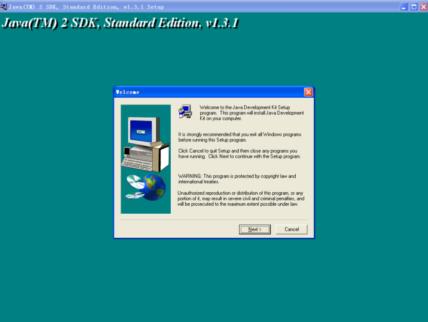
as default options
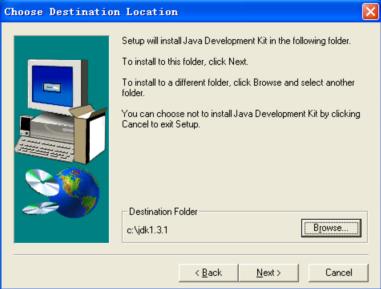
the installation directory is as follow:

2、configure the Path and Classpath properties of OS with two methods
A. configuration method:
start->configure->control panel ->system->advance->environment variables
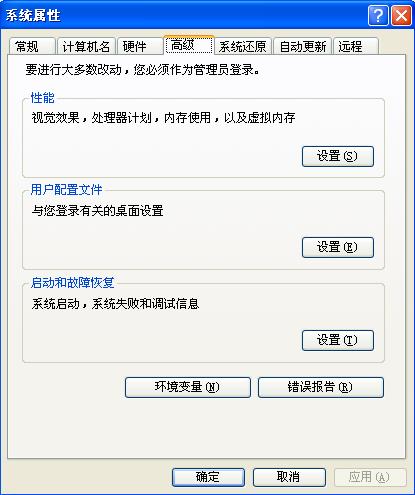

Edit Path property:
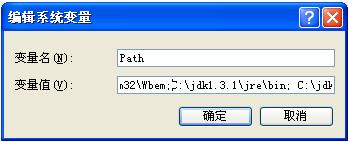
Add at the beginning of the value row “C:\jdk1.3.1\jre\bin;C:\jdk1.3.1\bin;”
create or edit classpath property:
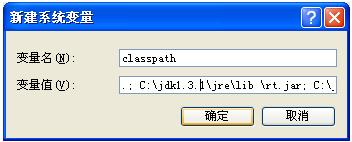
Add at the beginning of the value row “.;C:\jdk1.3.1\jre\lib \rt.jar;C:\jdk1.3.1\jre\lib;C:\jdk1.3.1\lib;”
choose ok.
B. configure method:
create bat file and run it in console windows before using j2sdk tools, set131.bat as example。
the set131.bat file:
set PATH=C:\jdk1.3.1\jre\bin;C:\jdk1.3.1\bin;%PATH%
set CLASSPATH=.;C:\jdk1.3.1\jre\lib\rt.jar;C:\jdk1.3.1\jre\lib;C:\jdk1.3.1\lib;%CLASSPATH%
Testing
in windows2000/xp/2003 operating systems: start->run:enter ’cmd’ command and choose Ok:
enter ‘java’ and return :

enter ‘javac’ and return :

running the simple program in the directory “examples”
the commands as follow:
cd D:\java\lab\lab1 \examples
javac Welcome.java (compile the java file)
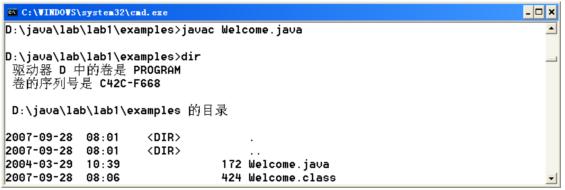
java Welcome (run the class file)


 浙公网安备 33010602011771号