
JSP笔记
JSP笔记
1. JSP介绍
1.1 JSP是什么
JSP全称Java Server Pages,是一种动态网页开发技术。它使用JSP标签在HTML网页中插入Java代码。标签通常以<%开头,以%>结束。JSP本质上还是Servlet。
JSP与HTML的区别
- HTML只能展现静态的数据
- JSP通过嵌入Java代码,可以展现动态的数据
1.2. JSP原理
IDEA使用Tomcat,会在IDEA的tomcat中产生一个work目录,用以部署应用
C:\Users\ASUS\AppData\Local\JetBrains\IntelliJIdea2020.2\tomcat\Unnamed_javaweb-session-cookie\work\Catalina\localhost\sc\org\apache\jsp
可以看到 jsp转换成产生了java文件和class文件,即 java程序源码文件和类文件

浏览器向服务器发送请求,不管访问什么资源,都是在访问Servlet!
public final class index_jsp extends org.apache.jasper.runtime.HttpJspBase
public abstract class HttpJspBase extends HttpServlet implements HttpJspPage
观察index_jsp的继承关系,发现:jsp被转换成的Java代码中,继承了HttpServlet,本质上还是一个Servlet!
Jsp转换成的class中有方法
//初始化
public void _jspInit() {
}
//销毁
public void _jspDestroy() {
}
//Service方法,参数为Request和Response
public void _jspService(final javax.servlet.http.HttpServletRequest request, final javax.servlet.http.HttpServletResponse response)
其中,_jspService方法做的事情有
-
判断请求,类似Servlet的Service方法
-
内置了一些对象
//定义的对象 final javax.servlet.jsp.PageContext pageContext; //页面上下文 javax.servlet.http.HttpSession session = null; //Session final javax.servlet.ServletContext application; //ServletContext对象,改名了 final javax.servlet.ServletConfig config; //ServletConfig对象 javax.servlet.jsp.JspWriter out = null; //Writer对象,out final java.lang.Object page = this; //自身对象 javax.servlet.jsp.JspWriter _jspx_out = null; javax.servlet.jsp.PageContext _jspx_page_context = null; //传递进来的对象 HttpServletRequest request //请求 HttpServletResponse response //响应 -
输出页面前增加的代码
response.setContentType("text/html"); //设置响应的页面类型 pageContext = _jspxFactory.getPageContext(this, request, response, null, true, 8192, true); _jspx_page_context = pageContext; application = pageContext.getServletContext(); config = pageContext.getServletConfig(); session = pageContext.getSession(); out = pageContext.getOut(); _jspx_out = out; -
将HTML代码使用out.write输出,将Java代码原封不动地输出
<html>
<head>
    <title>Title</title>
</head>
<body>
    <%
        String name = "祈鸢";
    %>
    name:<%=name%>
</body>
</html>
out.write("\r\n"); out.write("\r\n"); out.write("<html>\r\n"); out.write("<head>\r\n"); out.write(" <title>Title</title>\r\n"); out.write("</head>\r\n"); out.write("<body>\r\n"); out.write(" "); String name = "祈鸢"; out.write("\r\n"); out.write(" name:"); out.print(name); out.write("\r\n"); out.write("</body>\r\n"); out.write("</html>\r\n");
JSP页面产生的过程
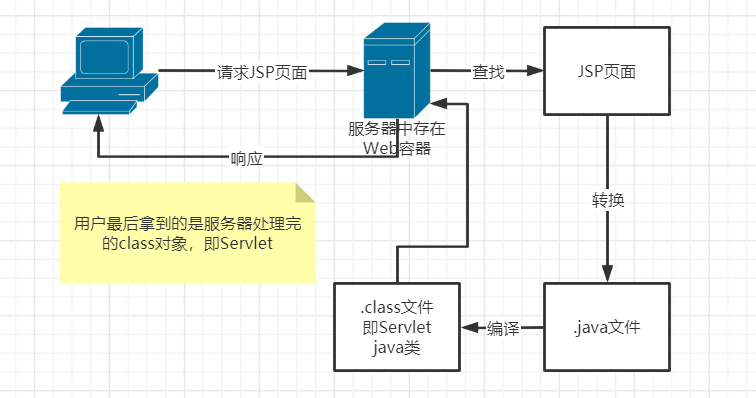
2. JSP语法
JSP作为Java技术一种应用,支持所有的Java语法,同时还有一些扩充的语法。
Tips:热部署,通过Add Framework创建项目,或导入War包时选择war exploded。
2.1 JSP表达式
  <%--JSP表达式
  将程序的输出,输出到客户端
  <%= 变量或表达式%>
  --%>
  <%=new java.util.Date()%>
2.2 JSP脚本片段
  <%--JSP脚本片段
  可以<% %>中写Java代码
  --%>
  <%
    int sum = 0;
    for (int i = 0; i <= 100; i++) {
      sum += i;
    }
    out.println("<h1>Sum=" + sum + "</h1>");
  %>
Tips:JspWriter的write()和print()的区别
public void print(Object obj) {
	write(String.valueOf(obj));
}
//int i = 97;
//write(i) -> a
//print(i) -> 97
2.3 脚本片段再实现
  <%--脚本片段再实现--%>
  <%
    int x = 10;
    out.println(x);
  %>
  <p>这是一个JSP文档</p>
  <%
    int y = 20;
    out.println(y);
  %>
  <%--分割线--%>
  <hr>
  <%--在代码中嵌入HTML元素--%>
  <%
    for (int i = 0; i < 5; i++) {
  %>
  <h2>HELLO,WORLD <%=i%></h2>
  <%
    }
  %>
2.4 JSP声明
通过<%! %>标签可以将内容的作用域提升到该JSP类中,而不是其中的_jspService方法。
  <%--定义到Service方法之外,使用<%! %>标签--%>
  <%!
    static {
      System.out.println("FQQY");
    }
    private int globalVar = 0;
    public void qy(){
      System.out.println("FQQY");
    }
  %>
3. JSP指令
通过<%@ %>可以设置JSP的一些属性
<%@ page contentType="text/html;charset=UTF-8" language="java" %>
<%--跳转错误页面--%>
<%@ page errorPage="500.jsp" %>
跳转错误页面也可以在web.xml中通过状态码对应页面的方式设置
<error-page>
    <error-code>404</error-code>
    <location>/404.jsp</location>
</error-page>
<error-page>
    <error-code>500</error-code>
    <location>/500.jsp</location>
</error-page>
通过指令实现页面的组合
<%--@include会将页面结合,将被包含页面的内容放到包含它的页面中去,可能会有重定义问题--%>
<%@include file="common/header.jsp"%>
<h2>主体</h2>
<%@include file="common/footer.jsp"%>
<hr>
<%--JSP标签--%>
<%--jsp:include通过拼接页面实现,本质是三个,命名空间不同--%>
<jsp:include page="/common/header.jsp"/>
<h2>主体</h2>
<jsp:include page="/common/footer.jsp"/>
重定义问题的原因查看_jsp.java可知,使用@include时,被转换的Java程序中,service方法中定义了一个变量多次;使用jsp:include时,service方法中会引用其他页面,命名空间不同。
@include:— — — ;jsp:include:↓ — ↓。
4. 内置对象
JSP内置对象有9个,分别是
- pageContext //存数据
- request //存数据
- response
- session //存数据
- application(ServletContext)//存数据
- config(ServletConfig)
- out
- page
- exception
4.1 作用域
在pageContext1.jsp中用不同的对象存入以下数据
<%--内置对象--%>
<%
    pageContext.setAttribute("name1","qy"); //保存的数据在一个页面中有效
    request.setAttribute("name2","qy");
	//保存的数据在一次请求中有效,请求转发也会携带这个数据
    session.setAttribute("name3","qy");
	//保存的数据在一次会话中有效,从打开浏览器到关闭浏览器
    application.setAttribute("name4","qy");
	//保存的数据在服务器中有效,从打开服务器到关闭服务器
%>
同时使用pageContext取出来
<%--通过pageContext来取--%>
<%
    // 从底层找到高层,类似JVM双亲委派机制
    // 作用域pageContext -> request -> session -> application
    String name1 = (String) pageContext.getAttribute("name1");
    String name2 = (String) pageContext.getAttribute("name2");
    String name3 = (String) pageContext.getAttribute("name3");
    String name4 = (String) pageContext.getAttribute("name4");
    String name5 = (String) pageContext.getAttribute("name5");
%>
<%--使用EL表达式输出--%>
<h1>取出的值为</h1>
<h3>${name1}</h3>
<h3>${name2}</h3>
<h3>${name3}</h3>
<h3>${name4}</h3>
此时4个值都能取出来。
而在pageContext2.jsp中,不定义数据,直接使用相同的代码取数据,此时只有name3和name4成功取出。因为只有保存在会话Session和服务器application中的数据能被pageContext2.jsp访问到。
通过使用带scope参数的setAttribute,可以通过pageContext将数据存到不同的作用域中,
pageContext.setAttribute(String name, object o, int scope)的源码如下
    public void setAttribute(final String name, final Object o, final int scope) {
        if (name == null) {
            throw new NullPointerException(Localizer.getMessage("jsp.error.attribute.null_name"));
        }
        if (o == null) {
            removeAttribute(name, scope);
        } else {
            switch (scope) {
            case PAGE_SCOPE: // 1
                attributes.put(name, o); //存入pageContext中
                break;
            case REQUEST_SCOPE: // 2
                request.setAttribute(name, o); //存入request中
                break;
            case SESSION_SCOPE: // 3
                if (session == null) {
                    throw new IllegalStateException(Localizer
                            .getMessage("jsp.error.page.noSession"));
                }
                session.setAttribute(name, o); //存入session中
                break;
            case APPLICATION_SCOPE: // 4
                context.setAttribute(name, o); //存入ServletContext中
                break;
            default:
                throw new IllegalArgumentException("Invalid scope");
            }
        }
    }
4.2 前台转发
<%
    pageContext.forward("/index.jsp");// 等同于
    //request.getRequestDispatcher("/index.jsp").forward(request,response);
%>
JSP文件同上,在pageContext1.jsp中存完数据后将请求转发到pageContext2.jsp
<%
    pageContext.setAttribute("name1","qy"); //保存的数据在一个页面中有效
    request.setAttribute("name2","qy");
	//保存的数据在一次请求中有效,请求转发也会携带这个数据
    session.setAttribute("name3","qy");
	//保存的数据在一次会话中有效,从打开浏览器到关闭浏览器
    application.setAttribute("name4","qy");
	//保存的数据在服务器中有效,从打开服务器到关闭服务器
    pageContext.forward("/pageContext2.jsp");
%>
此时访问pageContext1.jsp,存完数据后会跳转到pageContext2.jsp,注意,这个请求转发会转发request和response,所以跳转到的pageContext2.jsp可以取到存在request中的qy2。
request:客户端向服务器发送请求产生的数据,用户用完就没用了。如提示信息。
session:客户端向服务器发送请求产生的数据,用户用完还有用。如购物车信息。
application(ServletContext):客户端向服务器发送请求产生的数据,一个用户用完还有其他用户需要使用。如聊天信息。
5. JSP标签、JSTL标签、EL表达式
<!--jstl表达式依赖-->
<dependency>
    <groupId>javax.servlet.jsp.jstl</groupId>
    <artifactId>jstl-api</artifactId>
    <version>1.2</version>
</dependency>
<!--standard标签库依赖-->
<dependency>
    <groupId>org.apache.taglibs</groupId>
    <artifactId>taglibs-standard-impl</artifactId>
    <version>1.2.5</version>
    <scope>runtime</scope>
</dependency>
<!--EL表达式不需要导包-->
5.1 EL表达式
EL表达式:${}
作用:
- 获取数据
- 执行运算
- 获取Web开发的常用对象
5.2 JSP标签
在jsptag.jsp中使用JSP标签进行携带参数的转发
<h1>这里是JSPTAG1</h1>
<%--相当于localhost:8080/jsptag.jsp?name=qy&age=20--%>
<jsp:forward page="/jsptag2.jsp">
    <jsp:param name="name" value="qy"/>
    <jsp:param name="age" value="20"/>
</jsp:forward>
在jsptag2.jsp中取参数
<h1>这里是JSPTAG2</h1>
<%--取参数,EL表达式获取不了request对象--%>
名字:<%=request.getParameter("name")%>
年龄:<%=request.getParameter("age")%>
还有之前的< jsp:include >也是JSP标签,先掌握这三个即可。
5.3 JSTL标签
JSTL标签库的使用就是为了弥补HTML标签的不足。它自定义了许多标签供使用,标签的功能和Java代码一样!
核心标签(掌握部分),还有SQL标签,XML标签等
<%@ taglib prefix="c" uri="http://java.sun.com/jsp/jstl/core" %>
解决问题:无法解析uri...。服务器Tomcat中的lib没有jstl-api-1.2.jar和taglibs-standard-impl-1.2.5.jar包,需要手动复制粘贴过去。
Java代码和JSTL标签实现同一功能,使用< c:if >和< c:out >判断,同if
<h4>if测试</h4>
<hr>
<form action="coreif.jsp" method="get">
    <%--EL表达式获取表单中的数据
        ${param.参数名}  --%>
    <input type="text" name="username" value="${param.username}">
    <input type="submit" value="登录">
</form>
<%--java版
<%
    //如果是管理员则登录成功
    if(("qy").equals(request.getParameter("username")))
        out.write("登陆成功");
%>
--%>
<%--JSTL版--%>
<c:if test="${param.username == 'qy'}" var="isAdmin">
    <c:out value="管理员登陆"></c:out>
</c:if>
<c:out value="${isAdmin}"></c:out>
使用< c:choose >和< c:when >判断,同switch
<%--使用c:set存数据--%>
<c:set var="score" value="85"/>
<%--使用c:choose和c:when做判断--%>
<c:choose>
    <c:when test="${score>=90}">
        成绩优秀
    </c:when>
    <c:when test="${score>=80}">
        成绩良好
    </c:when>
    <c:when test="${score<80}">
        成绩不太行
    </c:when>
</c:choose>
使用< c:foreach >遍历,同for循环
<%
    ArrayList<String> people = new ArrayList<>();
    people.add("qy1");
    people.add("qy2");
    people.add("qy3");
    people.add("qy4");
    people.add("qy5");
    request.setAttribute("list",people);
%>
<%--var:遍历得到的对象,items:要遍历的对象容器--%>
<c:forEach var="people" items="${list}">
    <c:out value="${people}"/> <br/>
</c:forEach>
<%--begin: i=? end: i<=? step: i+=? --%>
<c:forEach var="people" items="${list}" begin="1" end="3" step="2">
    <c:out value="${people}"/> <br/>
</c:forEach>
JSP就到这里吧,折磨🤦。

 浙公网安备 33010602011771号