
编写msyql8.0.21 数据库批量备份脚本
编写msyql8.0.21 数据库批量备份脚本
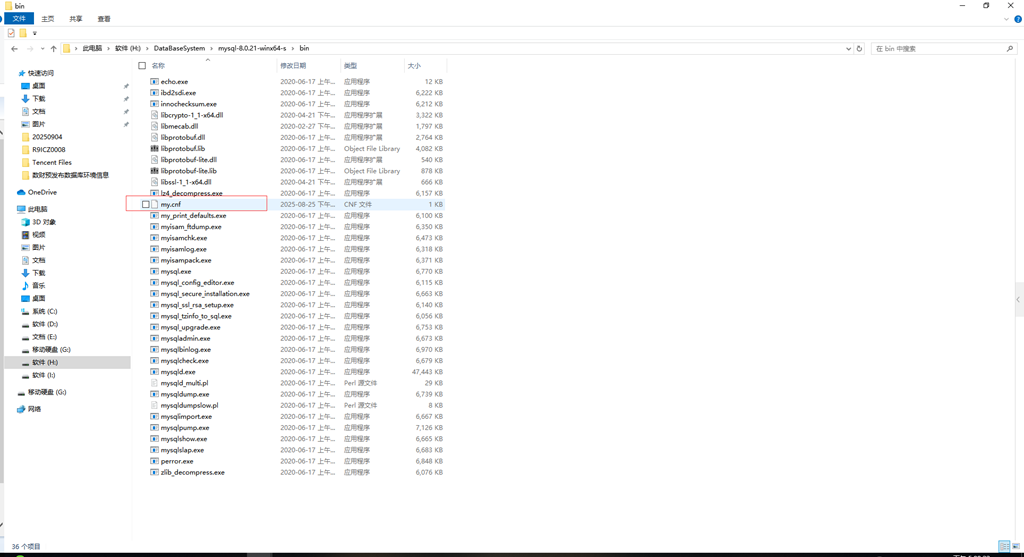
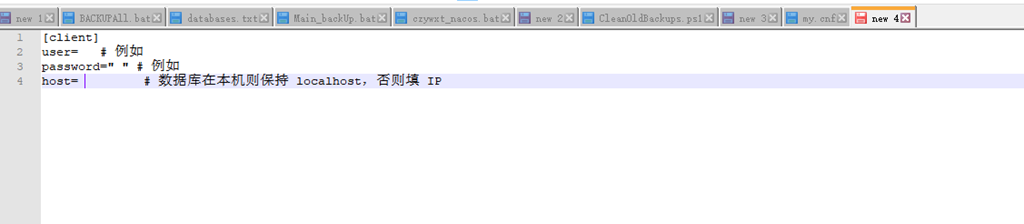
一:编写mysql数据库备份my.cnf文件
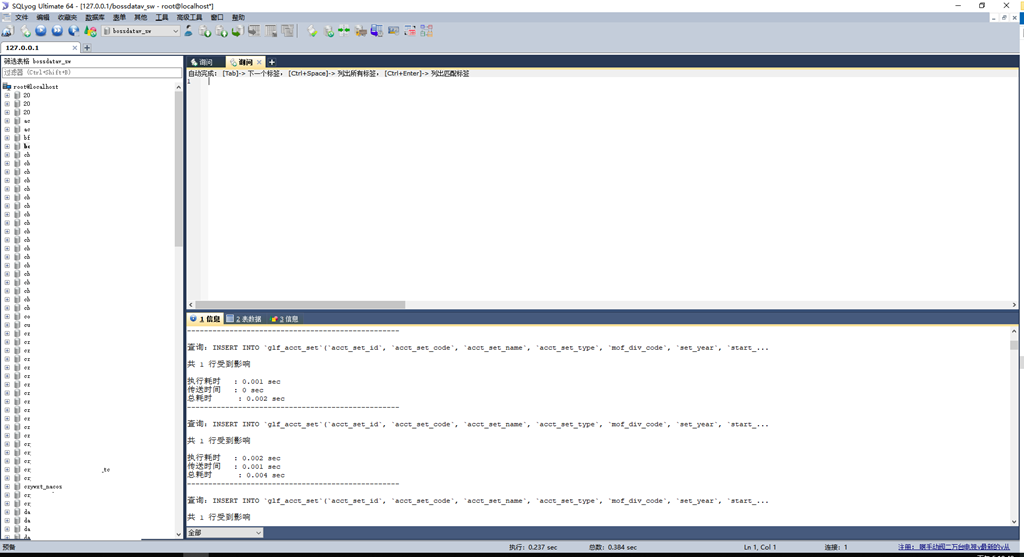
二、编写数据库导出脚本
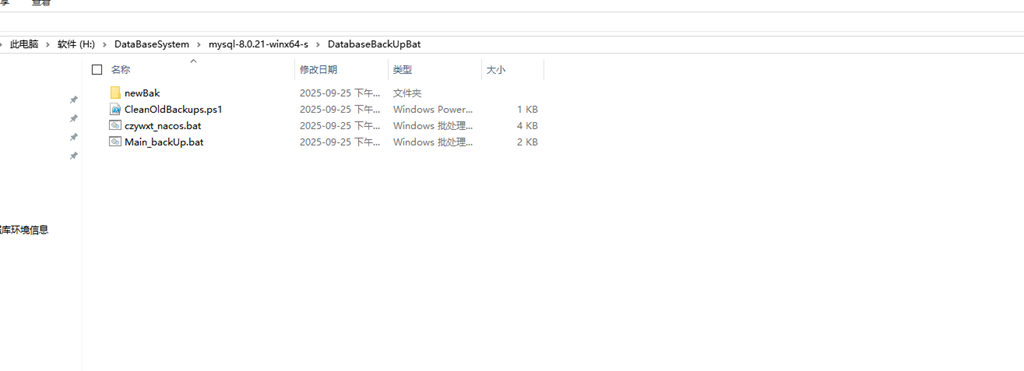
czywxt_nacos.bat
@echo off
chcp 65001 > nul
title MySQL Backup for czywxt_nacos
setlocal disabledelayedexpansion

:: 配置项(绝对路径)
set "MYSQL_BIN=H:\DataBaseSystem\mysql-8.0.21-winx64-s\bin"
set "DATABASE=czywxt_nacos"
set "BACKUP_DIR=G:\MySQLBackups"
set "PASSWORD_FILE=H:\DataBaseSystem\mysql-8.0.21-winx64-s\bin\my.cnf"
set "7ZIP_PATH=C:\Program Files\7-Zip\7z.exe"
set "CLEAN_PS_SCRIPT=H:\DataBaseSystem\mysql-8.0.21-winx64-s\DatabaseBackUpBat\CleanOldBackups.ps1"


:: 步骤1:检查MySQL连接
echo Checking MySQL server connection status...
"%MYSQL_BIN%\mysqladmin.exe" --defaults-file="%PASSWORD_FILE%" ping > nul 2>&1
if %errorlevel% neq 0 (
    echo Error: MySQL server is not running or connection failed.
    endlocal
    exit /b 1
)
echo MySQL server is connectable.


:: 步骤2:生成时间戳(用PowerShell避免批处理语法冲突)
for /f "delims=" %%a in ('powershell -Command "(Get-Date).ToString('yyyy-MM-dd_HHmmss')"') do set "TIMESTAMP=%%a"


:: 步骤3:创建备份目录
if not exist "%BACKUP_DIR%" (
    mkdir "%BACKUP_DIR%"
    echo Backup directory created: %BACKUP_DIR%
) else (
    echo Using existing backup directory: %BACKUP_DIR%
)


:: 步骤4:执行备份
echo Starting backup for database: %DATABASE%
set "SQL_FILE=%BACKUP_DIR%\%DATABASE%_%TIMESTAMP%.sql"
"%MYSQL_BIN%\mysqldump.exe" --defaults-file="%PASSWORD_FILE%" --databases "%DATABASE%" --result-file="%SQL_FILE%"
if %errorlevel% neq 0 (
    echo Error: mysqldump failed.
    endlocal
    exit /b 1
)
echo SQL backup created: %SQL_FILE%


:: 步骤5:压缩备份
set "ZIP_FILE=%BACKUP_DIR%\%DATABASE%_%TIMESTAMP%.zip"
:: 尝试PowerShell压缩
powershell Compress-Archive -Path "%SQL_FILE%" -DestinationPath "%ZIP_FILE%" -Force 2> nul
if %errorlevel% equ 0 (
    echo Compressed via PowerShell: %ZIP_FILE%
    del "%SQL_FILE%"
    echo Deleted original SQL file: %SQL_FILE%
) else (
    :: 尝试7-Zip
    if exist "%7ZIP_PATH%" (
        "%7ZIP_PATH%" a -tzip "%ZIP_FILE%" "%SQL_FILE%" -y > nul
        if %errorlevel% equ 0 (
            echo Compressed via 7-Zip: %ZIP_FILE%
            del "%SQL_FILE%"
            echo Deleted original SQL file: %SQL_FILE%
        ) else (
            echo Warning: Compression failed. SQL file retained.
            goto CLEANUP
        )
    ) else (
        echo Warning: 7-Zip not found. SQL file retained.
        goto CLEANUP
    )
)


:: 步骤6:清理旧备份
:CLEANUP
echo Cleaning up backup files older than 10 days...
powershell -ExecutionPolicy Bypass -File "H:\DataBaseSystem\mysql-8.0.21-winx64-s\DatabaseBackUpBat\CleanOldBackups.ps1" "G:\MySQLBackups" "czywxt_nacos"


:: 步骤7:完成提示(删除pause,自动退出)
echo --------------------------------------------------
if exist "%ZIP_FILE%" (
    echo Backup completed successfully.
    echo Current backup: %ZIP_FILE%
) else (
    echo Backup completed with warnings.
    echo SQL file retained: %SQL_FILE%
)
echo Operation time: %TIMESTAMP%

endlocal
CleanOldBackups.ps1
# 接收批处理传递的2个参数:1.备份目录 2.数据库名
param(
    [string]$BackupDir,
    [string]$DbName
)

# 清理10天前的指定数据库ZIP备份
$oldDate = (Get-Date).AddDays(-10)
Get-ChildItem -Path $BackupDir -Filter "$DbName_*.zip" -File | Where-Object { $_.CreationTime -lt $oldDate } | ForEach-Object {
    Remove-Item $_ -Force
    Write-Host "Deleted old backup: $($_.FullName)"
}
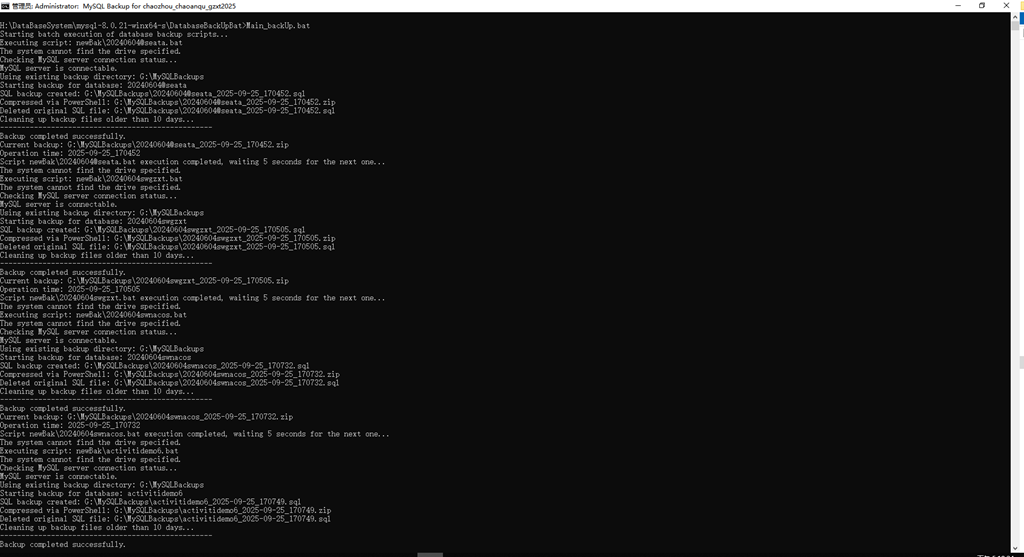
Main_backUp.bat
@echo off
:: 设置控制台为UTF-8编码,避免中文乱码
:: Set console to UTF-8 encoding to avoid garbled characters
chcp 65001 > nul
:: echo 开始批量执行数据库备份脚本...
echo Starting batch execution of database backup scripts...

:: 定义待执行脚本所在的子文件夹(相对路径)
:: Define the subfolder where the scripts to be executed are stored (relative path)
set "TARGET_FOLDER=newBak"

:: 遍历子文件夹中的所有 .bat 文件
:: Traverse all .bat files in the subfolder
for %%f in ("%TARGET_FOLDER%\*.bat") do (
::  echo 正在执行脚本:%%f
    echo Executing script: %%f
    :: Call the sub-script (wait for it to complete before executing the next one)
	:: 调用子脚本(等待其执行完毕后再执行下一个)
    call "%%f"
	:: echo 脚本 %%f 执行完毕,等待 5 秒继续下一个...
    echo Script %%f execution completed, waiting 5 seconds for the next one...
    :: Pause for 5 seconds to reduce server/database load
	:: 暂停5秒,减轻服务器/数据库压力
    timeout /t 5 /nobreak > nul
)

:: echo 所有备份脚本执行完毕!
echo All backup scripts have been executed!
三、用java diam批量生成数据库bat脚本
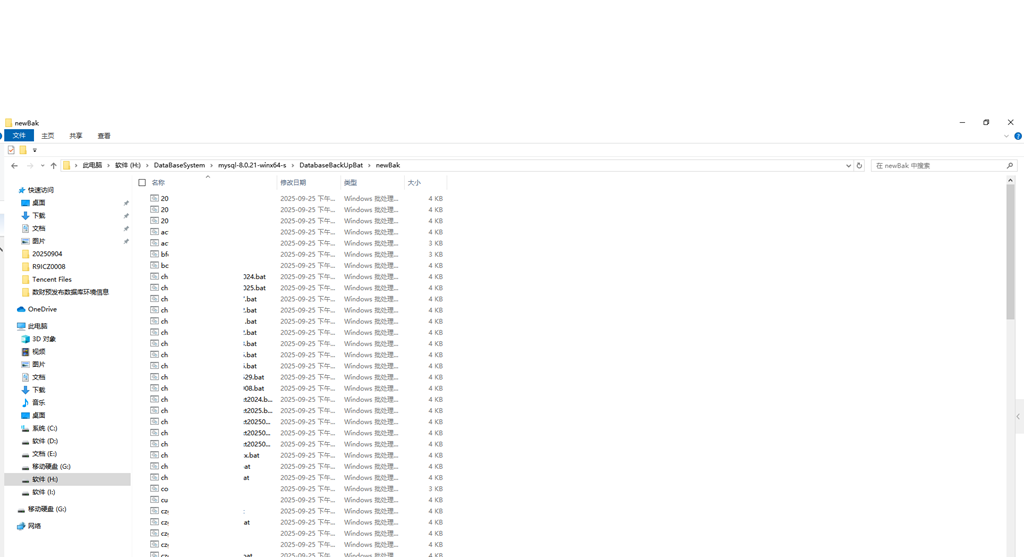
package Test;
import java.io.BufferedReader;
import java.io.BufferedWriter;
import java.io.IOException;
import java.nio.file.Files;
import java.nio.file.Path;
import java.nio.file.Paths;
import java.util.ArrayList;
import java.util.List;
/**
 * 编写mysql 数据库 备份的bat脚本
 */
public class GenerateBatFiles {
    public static void main(String[] args) {
        // ==================== 1. 配置路径与参数 ====================
        String templateFilePath = "H:\\DataBaseSystem\\mysql-8.0.21-winx64-s\\DatabaseBackUpBat\\czywxt_nacos.bat";
        String outputDirectory = "H:\\DataBaseSystem\\mysql-8.0.21-winx64-s\\DatabaseBackUpBat\\newBak";
        String originalDbName = "czywxt_nacos"; // 模板中要替换的`set DATABASE=`原始值
        String originalTitleDb = "czywxt_nacos"; // 模板中`title`里的原始数据库名
        // 固定备份目录(与模板中一致,无需修改)
        String fixedBackupDir = "G:\\MySQLBackups";
        // 固定PS清理脚本路径(与模板中一致,无需修改)
        String fixedCleanPsPath = "H:\\DataBaseSystem\\mysql-8.0.21-winx64-s\\DatabaseBackUpBat\\CleanOldBackups.ps1";


        // ==================== 2. 读取模板文件内容 ====================
        List<String> templateLines = new ArrayList<>();
        try (BufferedReader reader = Files.newBufferedReader(Paths.get(templateFilePath))) {
            String line;
            while ((line = reader.readLine()) != null) {
                templateLines.add(line);
            }
        } catch (IOException e) {
            System.err.println("Failed to read template file: " + e.getMessage());
            return;
        }


        // ==================== 3. 定义要遍历的数据库名列表 ====================
        List<String> databaseNames = new ArrayList<>();
        // 此处需完整复制 DatabaseListExample 中的数据库名列表 ↓↓↓
//         databaseNames.add("zoo");
         databaseNames.add("预算2007");

        // ==================== 4. 遍历数据库名,生成对应BAT文件 ====================
        for (String targetDbName : databaseNames) {
            Path outputFilePath = Paths.get(outputDirectory, targetDbName + ".bat");
            try (BufferedWriter writer = Files.newBufferedWriter(outputFilePath)) {
                for (String line : templateLines) {
                    // ---- 替换逻辑1:处理title行,动态替换数据库名 ----
                    if (line.trim().startsWith("title") && line.contains(originalTitleDb)) {
                        line = "title MySQL Backup for " + targetDbName + "";
                    }
                    // ---- 替换逻辑2:处理set DATABASE行,动态替换数据库名 ----
                    else if (line.trim().startsWith("set \"DATABASE=" + originalDbName + "\"")) {
                        line = "set \"DATABASE=" + targetDbName + "\"";
                    }

                    // 替换3:清理步骤的PowerShell命令(替换最后一个数据库名参数)
                    else if (line.trim().startsWith("powershell -ExecutionPolicy Bypass -File")
                             && line.contains(fixedCleanPsPath)
                             && line.contains(originalDbName)) {
                        // 原命令格式:powershell -ExecutionPolicy Bypass -File "PS路径" "备份目录" "原数据库名"
                        // 替换为:powershell -ExecutionPolicy Bypass -File "PS路径" "备份目录" "目标数据库名"
                        line = String.format(
                            "powershell -ExecutionPolicy Bypass -File \"%s\" \"%s\" \"%s\"",
                            fixedCleanPsPath,
                            fixedBackupDir,
                            targetDbName
                        );
                    }
                    // (`chcp 65001` 会被自动保留,因为模板包含这一行,直接写入新文件)
                    writer.write(line);
                    writer.newLine();
                }
                System.out.println("Successfully generated: " + outputFilePath);
            } catch (IOException e) {
                System.err.println("Failed to generate file " + outputFilePath + ": " + e.getMessage());
            }
        }
    }
}
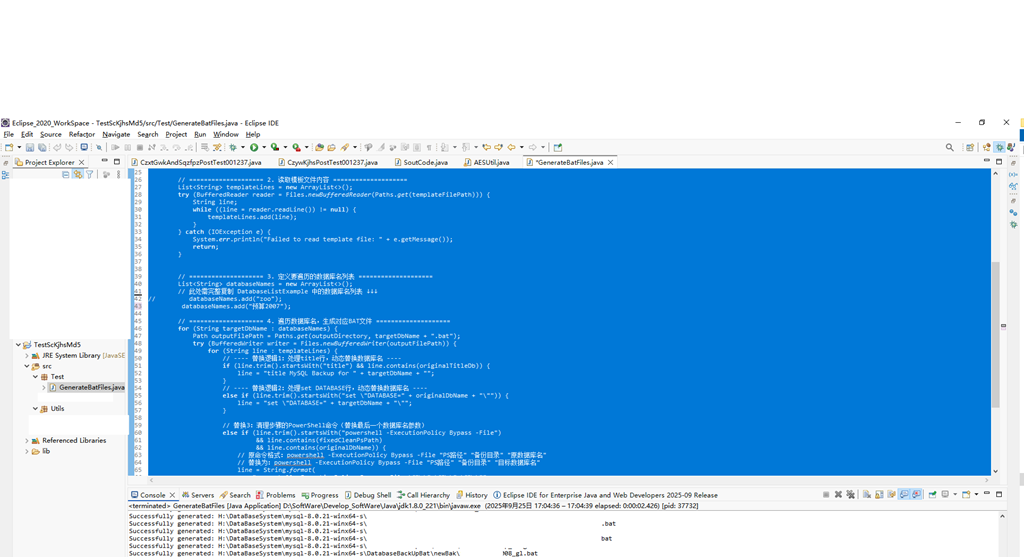
四、运行bat文件
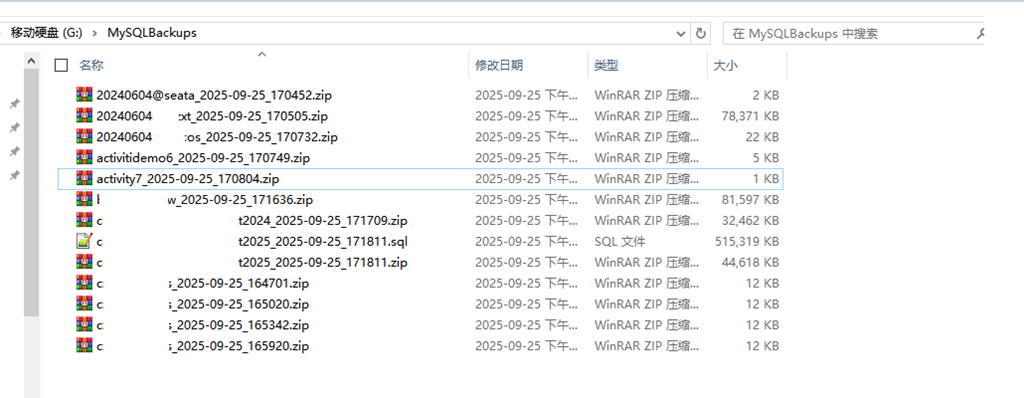
数据备份情况
BACKUP.bat
@echo off
setlocal enabledelayedexpansion

:: 配置项(修正路径拼写)
set "MYSQL_BIN=H:\DataBaseSystem\mysql-8.0.21-winx64-s\bin"
set "BACKUP_DIR=G:\Document\Mysql_BACKUP_DIR\MySQL_Backups\"  :: 修正 Decument → Document
set "PASSWORD_FILE=%MYSQL_BIN%\my.cnf"

:: 生成时间戳
for /f "tokens=2-4 delims=/ " %%a in ('date /t') do set "DATE=%%c-%%a-%%b"
set "TIMESTAMP=%DATE%_%time:~0,2%%time:~3,2%%time:~6,2%"

:: 创建备份目录(若不存在)
if not exist "%BACKUP_DIR%" mkdir "%BACKUP_DIR%"

:: 获取所有数据库列表(排除系统库)
"%MYSQL_BIN%\mysql.exe" --defaults-file="%PASSWORD_FILE%" --execute="SHOW DATABASES;" --skip-column-names > "%BACKUP_DIR%\databases.txt"

:: 循环备份每个数据库
for /F "tokens=*" %%A in (%BACKUP_DIR%\databases.txt) do (
  if not "%%A"=="information_schema" (
    if not "%%A"=="performance_schema" (
      if not "%%A"=="mysql" (
        if not "%%A"=="sys" (
          echo Backing up %%A...
          :: 执行备份(带密码文件)
          "%MYSQL_BIN%\mysqldump.exe" --defaults-file="%PASSWORD_FILE%" --databases %%A --result-file="%BACKUP_DIR%\%%A_%TIMESTAMP%.sql"

          :: 检查备份文件是否存在,再压缩
          if exist "%BACKUP_DIR%\%%A_%TIMESTAMP%.sql" (
              powershell Compress-Archive -Path "%BACKUP_DIR%\%%A_%TIMESTAMP%.sql" -DestinationPath "%BACKUP_DIR%\%%A_%TIMESTAMP%.zip" -Force
          ) else (
              echo Warning: 备份文件 %%A_%TIMESTAMP%.sql 未找到,跳过压缩!
          )
        )
      )
    )
  )
)

:: 删除临时文件
del "%BACKUP_DIR%\databases.txt"
echo All backups completed at %TIMESTAMP%
endlocal
BACKUPAll.bat
@echo off
:: 设置UTF-8编码,解决中文乱码问题
chcp 936 >nul 2>&1

setlocal enabledelayedexpansion

:: 配置项(请根据实际情况修改)
set "MYSQL_BIN=H:\DataBaseSystem\mysql-8.0.21-winx64-s\bin"
set "BACKUP_DIR=G:\Document\Mysql_BACKUP_DIR\MySQL8.0.21_Backups\"
:: 确保该文件包含正确的登录信息
set "PASSWORD_FILE=%MYSQL_BIN%\my.cnf"

:: 检查MySQL是否可连接(替代服务检查,支持命令行启动的情况)
echo 正在检查MySQL服务器连接状态...
"%MYSQL_BIN%\mysqladmin.exe" --defaults-file="%PASSWORD_FILE%" ping >nul 2>&1
if %errorlevel% equ 0 (
    echo MySQL服务器可正常连接,将进行备份操作...
) else (
    echo 错误:MySQL服务器未启动或无法连接,请检查服务状态。
    endlocal
    exit /b 1
)

:: 生成时间戳(处理上午9点前的显示问题)
for /f "tokens=2-4 delims=/ " %%a in ('date /t') do set "DATE=%%c-%%a-%%b"
set "HOUR=%time:~0,2%"
:: 将空格替换为0,解决0-9点显示问题
set "HOUR=!HOUR: =0!"
set "TIMESTAMP=%DATE%_%HOUR%%time:~3,2%%time:~6,2%"

:: 创建备份目录(若不存在)
if not exist "%BACKUP_DIR%" (
    mkdir "%BACKUP_DIR%"
    echo 已创建备份目录:%BACKUP_DIR%
)

:: 获取所有数据库列表(排除系统库)
"%MYSQL_BIN%\mysql.exe" --defaults-file="%PASSWORD_FILE%" --execute="SHOW DATABASES;" --skip-column-names > "%BACKUP_DIR%\databases.txt"

:: 循环备份每个数据库
for /F "tokens=*" %%A in (%BACKUP_DIR%\databases.txt) do (
    :: 排除系统数据库
    if not "%%A"=="information_schema" if not "%%A"=="performance_schema" if not "%%A"=="mysql" if not "%%A"=="sys" (
        echo 正在备份数据库:%%A...
        :: 执行备份
        "%MYSQL_BIN%\mysqldump.exe" --defaults-file="%PASSWORD_FILE%" --databases %%A --result-file="%BACKUP_DIR%\%%A_%TIMESTAMP%.sql"

        :: 检查备份文件并压缩
        if exist "%BACKUP_DIR%\%%A_%TIMESTAMP%.sql" (
            powershell Compress-Archive -Path "%BACKUP_DIR%\%%A_%TIMESTAMP%.sql" -DestinationPath "%BACKUP_DIR%\%%A_%TIMESTAMP%.zip" -Force
            if !errorlevel! equ 0 (
			:: 压缩成功后删除原始SQL文件
                del "%BACKUP_DIR%\%%A_%TIMESTAMP%.sql"
                echo 数据库 %%A 备份并压缩完成
            ) else (
                echo 警告:数据库 %%A 压缩失败,保留原始SQL文件
            )
        ) else (
            echo 错误:数据库 %%A 备份失败,未生成备份文件
        )
    )
)

:: 清理临时文件
if exist "%BACKUP_DIR%\databases.txt" del "%BACKUP_DIR%\databases.txt"

:: 删除10天前的备份文件
echo 正在清理10天前的备份文件...
forfiles /p "%BACKUP_DIR%" /s /m *.zip /d -10 /c "cmd /c echo 删除旧备份:@path && del @path"

echo 所有操作完成,备份时间:%TIMESTAMP%
endlocal
为人:谦逊、激情、博学、审问、慎思、明辨、 笃行
学问:纸上得来终觉浅,绝知此事要躬行
为事:工欲善其事,必先利其器。
态度:道阻且长,行则将至;行而不辍,未来可期
.....................................................................
------- 桃之夭夭,灼灼其华。之子于归,宜其室家。 ---------------
------- 桃之夭夭,有蕡其实。之子于归,宜其家室。 ---------------
------- 桃之夭夭,其叶蓁蓁。之子于归,宜其家人。 ---------------
=====================================================================
* 博客文章部分截图及内容来自于学习的书本及相应培训课程以及网络其他博客,仅做学习讨论之用,不做商业用途。
* 如有侵权,马上联系我,我立马删除对应链接。 * @author Alan -liu * @Email no008@foxmail.com
转载请标注出处! ✧*꧁一品堂.技术学习笔记꧂*✧. ---> https://www.cnblogs.com/ios9/
学问:纸上得来终觉浅,绝知此事要躬行
为事:工欲善其事,必先利其器。
态度:道阻且长,行则将至;行而不辍,未来可期
.....................................................................
------- 桃之夭夭,灼灼其华。之子于归,宜其室家。 ---------------
------- 桃之夭夭,有蕡其实。之子于归,宜其家室。 ---------------
------- 桃之夭夭,其叶蓁蓁。之子于归,宜其家人。 ---------------
=====================================================================
* 博客文章部分截图及内容来自于学习的书本及相应培训课程以及网络其他博客,仅做学习讨论之用,不做商业用途。
* 如有侵权,马上联系我,我立马删除对应链接。 * @author Alan -liu * @Email no008@foxmail.com
转载请标注出处! ✧*꧁一品堂.技术学习笔记꧂*✧. ---> https://www.cnblogs.com/ios9/

 浙公网安备 33010602011771号