Maven配置单仓库与多仓库的实现(Nexus)
更新时间:2023年01月16日 10:14:56 作者:我认不到你
本文主要介绍了Maven配置单仓库与多仓库的实现(Nexus),文中通过示例代码介绍的非常详细,对大家的学习或者工作具有一定的参考学习价值,需要的朋友们下面随着小编来一起学习学习吧

+
目录
单仓库
当只配置一个仓库时,操作比较简单,直接在Maven的settings.xml文件中进行全局配置即可,以阿里云的镜像为例:
|
1
2
3
4
5
6
7
8 |
<mirrors>
<mirror>
<id>alimaven</id>
<name>aliyun maven</name>
<url>http://maven.aliyun.com/nexus/content/groups/public/</url>
<mirrorOf>central</mirrorOf>
</mirror>
</mirrors>
|
只用新增一个mirror配置即可。要做到单一仓库,设置mirrorOf到*。
mirrorOf中配置的星号,表示匹配所有的artifacts,也就是everything使用这里的代理地址。上面的mirrorOf配置了具体的名字,指的是repository的名字。
镜像配置说明:
1、id:
镜像的唯一标识;
2、name:
名称描述;
3、url:
地址;
4、mirrorOf:
指定镜像规则,什么情况下从镜像仓库拉取。其中, *: 匹配所有,所有内容都从镜像拉取;
external:*:
除了本地缓存的所有从镜像仓库拉取;
repo,repo1:
repo或者repo1,这里的repo指的仓库ID;
*,!repo1:
除了repo1的所有仓库;
多仓库
先看看我的settings配置文件
|
1
2
3
4
5
6
7
8
9
10
11
12
13
14
15
16
17
18
19
20
21
22
23
24
25
26
27
28
29
30
31
32
33
34
35
36
37
38
39
40
41
42
43
44
45
46
47
48
49
50
51
52
53
54
55
56
57
58
59
60
61
62
63
64
65
66 |
<?xml version="1.0" encoding="UTF-8"?>
<settings xmlns="http://maven.apache.org/SETTINGS/1.0.0"
xmlns:xsi="http://www.w3.org/2001/XMLSchema-instance"
xsi:schemaLocation="http://maven.apache.org/SETTINGS/1.0.0 http://maven.apache.org/xsd/settings-1.0.0.xsd">
<localRepository>D:\idea\Maven\apache-maven-3.8.4\maven-repo</localRepository>
<pluginGroups>
</pluginGroups>
<proxies>
</proxies>
<servers>
<server>
<id>kd-nexus</id>
<username>账号</username>
<password>密码</password>
</server>
<server>
<id>nexus</id>
<username>账号</username>
<password>密码</password>
</server>
</servers>
<mirrors>
<mirror>
<id>kd-nexus</id>
<mirrorOf>*</mirrorOf>
<name>kd-nexus maven</name>
<url>http://ip:8081/repository/maven-public/</url>
</mirror>
<mirror>
<id>nexus</id>
<mirrorOf>*</mirrorOf>
<name>nexus maven</name>
<url>http://ip:8081/repository/maven-public/</url>
</mirror>
<mirror>
<id>alimaven</id>
<mirrorOf>central</mirrorOf>
<name>aliyun maven</name>
<url>http://maven.aliyun.com/nexus/content/repositories/central/</url>
</mirror>
</mirrors>
<profiles>
<profile>
<id>jdk-1.8</id>
<activation>
<activeByDefault>true</activeByDefault>
<jdk>1.8</jdk>
</activation>
<properties>
<maven.compiler.source>1.8</maven.compiler.source>
<maven.compiler.target>1.8</maven.compiler.target>
<maven.compiler.compilerVersion>1.8</maven.compiler.compilerVersion>
</properties>
</profile>
</profiles>
<activeProfiles>
<activeProfile>jdk-1.8</activeProfile>
</activeProfiles>
</settings>
|
刚开始我以为这样就可以了,如果在kd-nexus找不到jar包,会自动去nexus里面找jar包,可现实是maven只会在kd-nexus中找,找不到就报错,根本不会在之后的仓库中取寻找
因为:
虽然mirrors可以配置多个子节点,但是它只会使用其中的一个节点,即**默认情况下配置多个mirror的情况下,只有第一个生效,**只有当前一个mirror
无法连接的时候,才会去找后一个;而我们想要的效果是:当a.jar在第一个mirror中不存在的时候,maven会去第二个mirror中查询下载,但是maven不会这样做!
多仓库配置
那么针对多仓库的配置是否再多配置几个mirror就可以了?如此配置并不会生效。
正确的操作是在profiles节点下配置多个profile,而且配置之后要激活。
|
1
2
3
4
5
6
7
8
9
10
11
12
13
14
15
16
17
18
19
20
21
22
23
24
25
26
27
28
29
30
31
32
33
34
35
36
37
38
39
40
41
42
43
44
45
46
47
48
49
50 |
<profiles>
<profile>
<id>boundlessgeo</id>
<repositories>
<repository>
<id>boundlessgeo</id>
<url>https://repo.boundlessgeo.com/main/</url>
<releases>
<enabled>true</enabled>
</releases>
<snapshots>
<enabled>true</enabled>
<updatePolicy>always</updatePolicy>
</snapshots>
</repository>
</repositories>
</profile>
<profile>
<id>aliyun</id>
<repositories>
<repository>
<id>aliyun</id>
<url>http://maven.aliyun.com/nexus/content/groups/public/</url>
<releases>
<enabled>true</enabled>
</releases>
<snapshots>
<enabled>true</enabled>
<updatePolicy>always</updatePolicy>
</snapshots>
</repository>
</repositories>
</profile>
<profile>
<id>maven-central</id>
<repositories>
<repository>
<id>maven-central</id>
<url>http://central.maven.org/maven2/</url>
<releases>
<enabled>true</enabled>
</releases>
<snapshots>
<enabled>true</enabled>
<updatePolicy>always</updatePolicy>
</snapshots>
</repository>
</repositories>
</profile>
<profiles>
|
通过配置activeProfiles子节点激活:
|
1
2
3
4
5 |
<activeProfiles>
<activeProfile>boundlessgeo</activeProfile>
<activeProfile>aliyun</activeProfile>
<activeProfile>maven-central</activeProfile>
</activeProfiles>
|
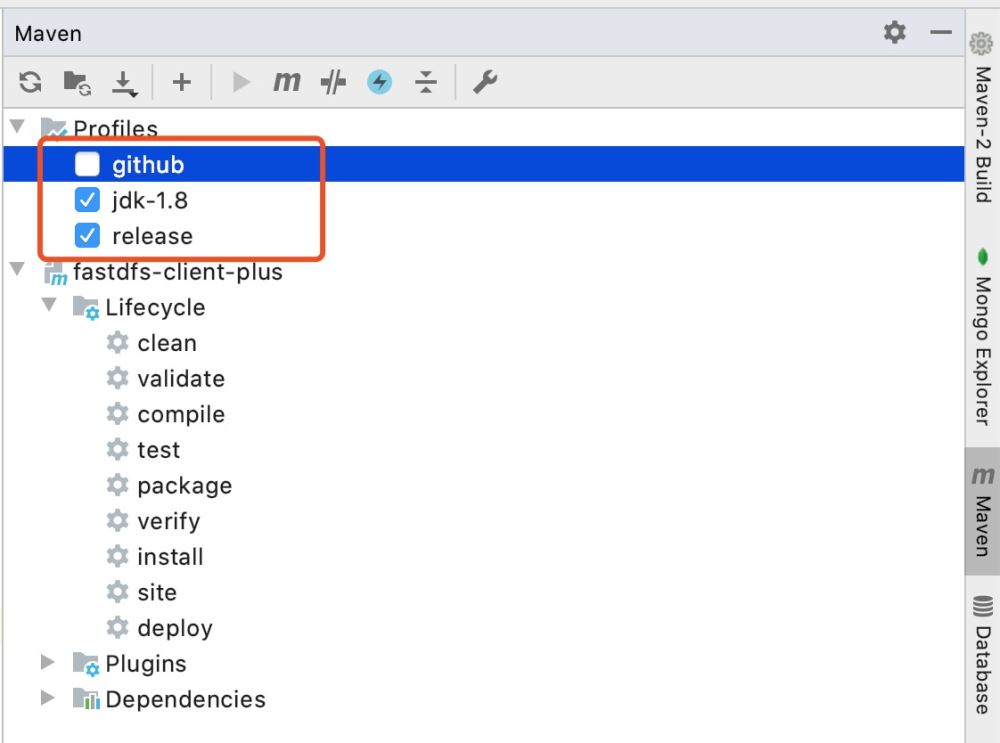
打包时,勾选所使用的profile即可。如果使用Maven命令打包执行命令格式如下:
1.如果aliyun仓库的id设置为central,则会覆盖maven里默认的远程仓库。
2.aliyun的仓库也可以不用配置,直接在mirrors标签内配置一个镜像仓库,mirrors镜像仓库mirrorOf的值设置为central,则也可以实现覆盖默认的仓库。
好了你既然看到这里了,那么上诉可能基本没效果,问就是我导包也没成功,现提供两个解决方案
前提
idea每次修改完settings之后,需要重新点击一下,更新一下文件配置
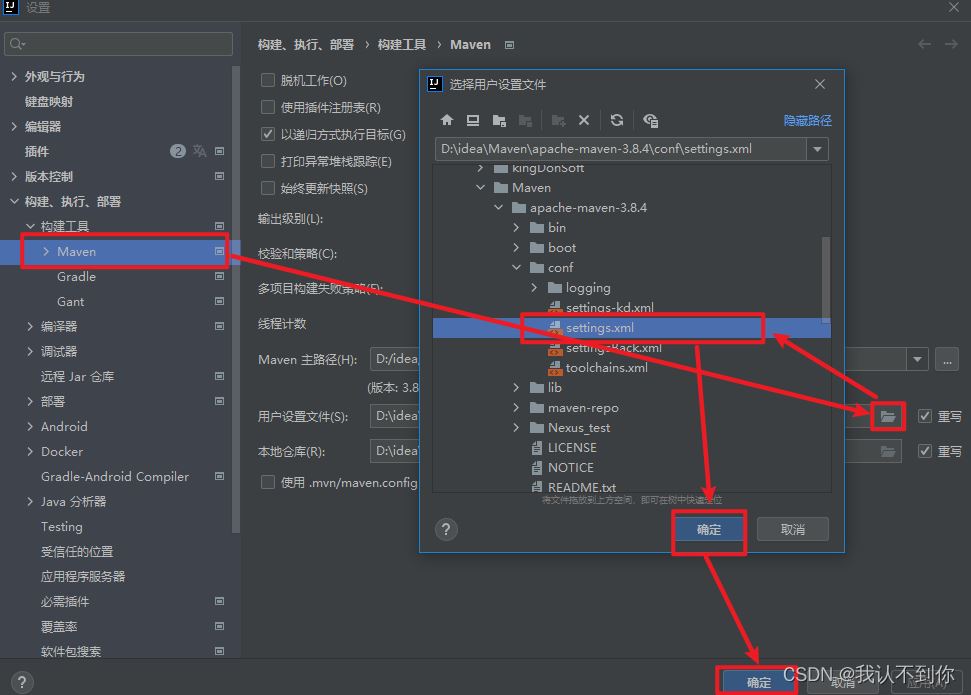
一、挨个导包
首先kd-nexus先导一下包
|
1
2
3
4
5
6
7
8
9
10
11
12
13
14 |
<mirrors>
<mirror>
<id>kd-nexus</id>
<mirrorOf>*</mirrorOf>
<name>kd-nexus maven</name>
<url>http://ip:8081/repository/maven-public/</url>
</mirror>
<mirror>
<id>nexus</id>
<mirrorOf>*</mirrorOf>
<name>nexus maven</name>
<url>http://ip:8081/repository/maven-public/</url>
</mirror>
</mirrors>
|
之后修改maven配置,导一下nexus的包
|
1
2
3
4
5
6
7
8
9
10
11
12
13
14 |
<mirrors>
<mirror>
<id>nexus</id>
<mirrorOf>*</mirrorOf>
<name>nexus maven</name>
<url>http://ip:8081/repository/maven-public/</url>
</mirror>
<mirror>
<id>kd-nexus</id>
<mirrorOf>*</mirrorOf>
<name>kd-nexus maven</name>
<url>http://ip:8081/repository/maven-public/</url>
</mirror>
</mirrors>
|
二、手动导包(解决一切导包问题,就是过程很麻烦)
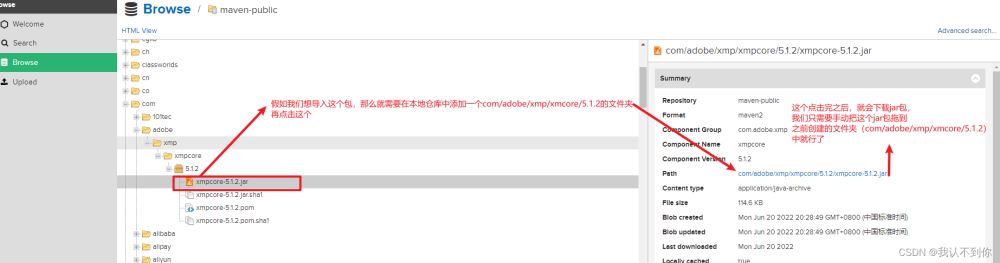
本地maven仓库:如果连这个都不清楚,看nexus完全没意义
|
1
2 |
就是localRepository标签中的文件地址
<localRepository>D:\idea\Maven\apache-maven-3.8.4\maven-repo</localRepository>
|
不知道Nexus怎么搭建的家人们,可以看一下这篇文章:使用Nexus搭建Maven私服教程(附:nexus上传、下载教程)
到此这篇关于Maven配置单仓库与多仓库的实现(Nexus)的文章就介绍到这了,更多相关Maven


 浙公网安备 33010602011771号