
Pwp(动态表单及其静态表单)的附件上传、excel数据导入表技术总结
Pwp(动态表单及其静态表单)的附件上传、excel数据导入表技术总结
一 :静态表单vop方式的附件上传
1:主界面数据列表的附件上传
1-1:示例图:
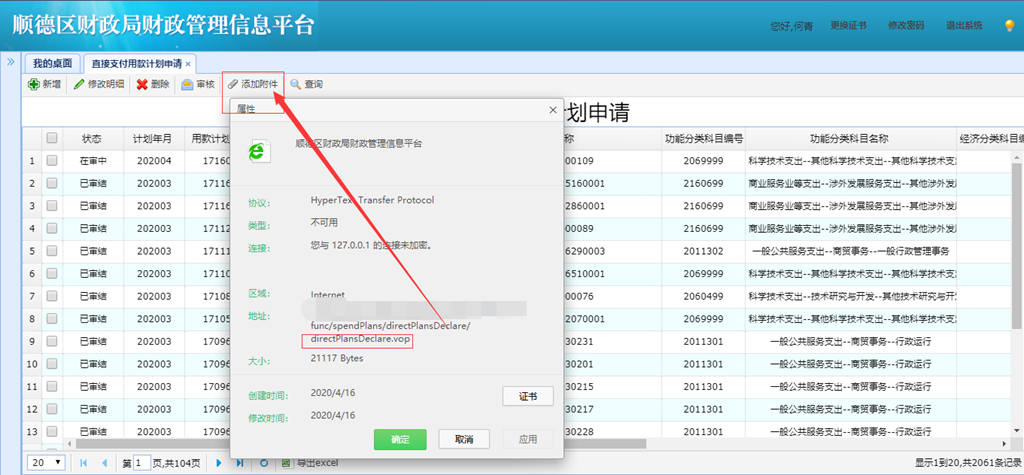
1-2: 上逻辑代码
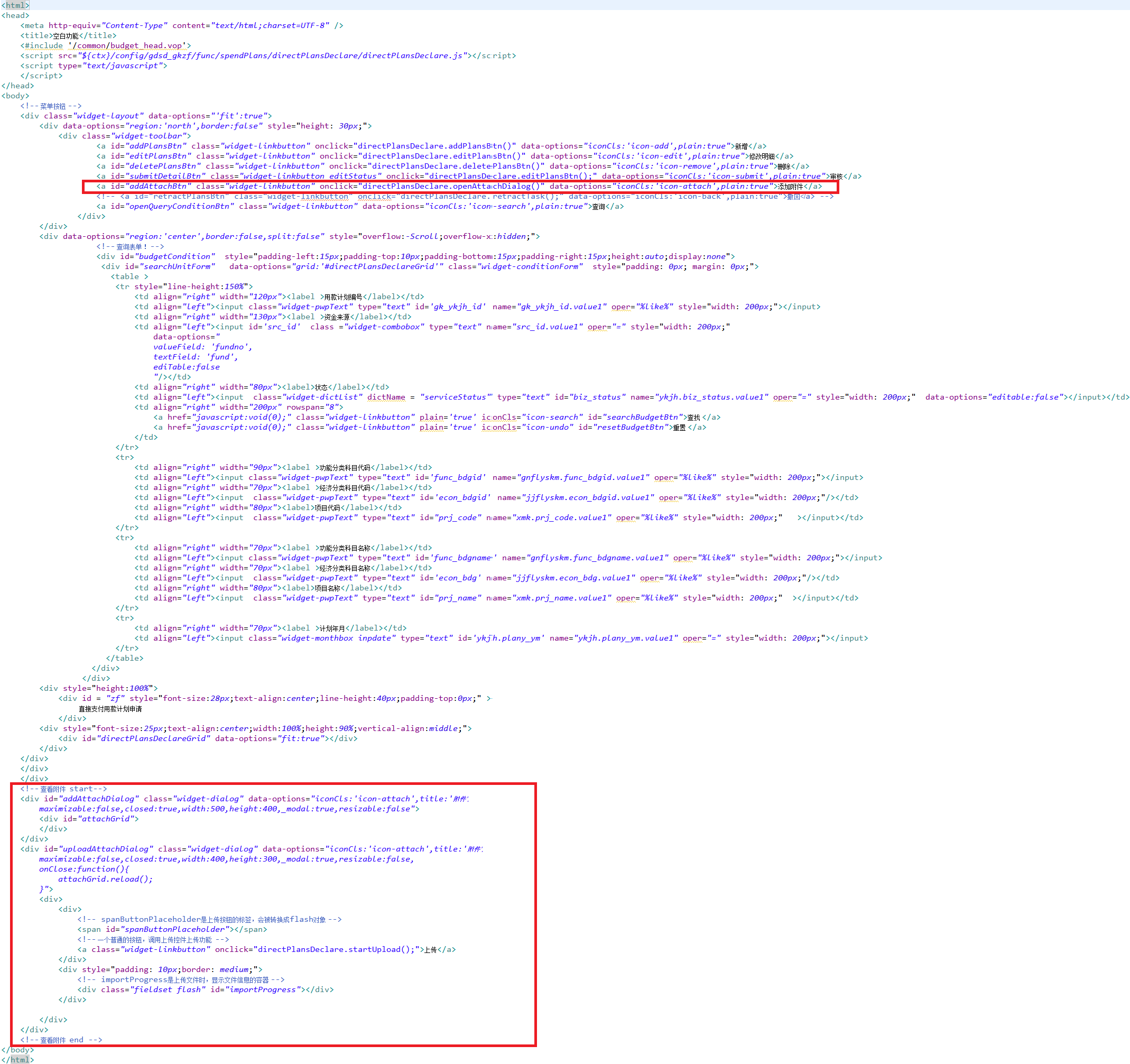
1:看vop界面代码
<a id="addAttachBtn" class="widget-linkbutton" onclick="directPlansDeclare.openAttachDialog()" data-options="iconCls:'icon-attach',plain:true">添加附件</a>
弹出框界面代码:
<!-- 查看附件  start-->
	<div id="addAttachDialog" class="widget-dialog" data-options="iconCls:'icon-attach',title:'附件',
		maximizable:false,closed:true,width:500,height:400,_modal:true,resizable:false">
		<div id="attachGrid">
		</div>
	</div>
	<div id="uploadAttachDialog" class="widget-dialog" data-options="iconCls:'icon-attach',title:'附件',
		maximizable:false,closed:true,width:400,height:300,_modal:true,resizable:false,
		onClose:function(){
			attachGrid.reload();
		}">
		<div>
			<div>
				<!-- spanButtonPlaceholder是上传按钮的标签,会被转换成flash对象 -->
			    <span id="spanButtonPlaceholder"></span>
			    <!-- 一个普通的按钮,调用上传控件上传功能  -->
			    <a class="widget-linkbutton" onclick="directPlansDeclare.startUpload();">上传</a>
			</div>
			<div style="padding: 10px;border: medium;">
			    <!-- importProgress是上传文件时,显示文件信息的容器 -->
			    <div class="fieldset flash" id="importProgress"></div>
		  	</div>

		</div>
	</div>
	<!-- 查看附件  end -->
2:js代码逻辑实现:
//-------------------------初始化对象


//附件对象
            window.addAttachDialog=$("#addAttachDialog").getWidget();
            window.uploadAttachDialog=$("#uploadAttachDialog").getWidget();
            window.attachBind=$W.databind.arrayDatabind({
                id:'attachBind',
                name:'附件查看',
                binds:["#attachGrid"],
                pagePath:"/gdsd_base/srv/attach",
                beforeLoad:function (param) {
                    var rows=directPlansDeclareGrid.getSelections();
                    if(rows.length==1  ){
                        var and = QueryParam.newAnd();
                        and.addCondition(QueryParam.newCondition("businessid", Conditions.OPER_EQUAL,rows[0].id));
                        and.addCondition(QueryParam.newCondition("tablemapping", Conditions.OPER_EQUAL,"gk_ykjh"));
                        param.conditions=and;
                    }else{
                        if(rows.length>1){
                            $.messager.alert("消息","请先选择一条记录","info");
                        }
                    }

                }
            });
            window.attachGrid=$('#attachGrid').widgets({
                xtype:"datagrid",
                singleSelect:true,
                idField:'id',
                rownumbers:true,
                pagination:true,
                fitColumns:false,
                fit:true,
                border:true,
                autoload:true,
                columns:[[{field:'id',title:'id',width:100,align:'left',hidden:true},
                        {field:'businessid',title:'业务表ID',width:100,align:'left',hidden:true},
                        {field:'tablemapping',title:'文件所属表名',width:100,align:'left',hidden:true},
                        {field:'filename',title:'文件名',width:300,align:'left'},
                        {field:'filepath',title:'文件路径',width:100,align:'left',hidden:true},
                        {field:'oper',title:'操作',width:130,align:'center',
                            formatter: function(value,row,index){
                                var src="<a class='widget-linkbutton' data-options=\"iconCls:'icon-download',plain:true\" onclick=\"directPlansDeclare.startDownload("+row.id+")\">下载</a>";
                                var rows =window.directPlansDeclareGrid.getSelections();
                                if( rows.length>0){
                                    if(row.creator==loginAccount.accountCode &&  rows[0].biz_status == "0"){
                                        src+="<a class='widget-linkbutton' data-options=\"iconCls:'icon-remove',plain:true\" onclick=\"directPlansDeclare.deleteAttach("+row.id+",'"+row.filename+"',"+index+")\">删除</a>";
                                    }
                                }
                                return src;
                            }
                        }
                        ]],
                        toolbar:[{
                            id:"upload",
                            iconCls:"icon-upload",
                            text:"上传",
                            handler:function(){
                                var rows=directPlansDeclareGrid.getSelections();
                                if(rows.length==1 && rows[0].biz_status=='0'){
                                    uploadAttachDialog.open();
                                }else{
                                    if(rows.length>1){
                                        $.messager.alert("消息","请先选择一条记录","info");
                                    }else{
                                        $.messager.alert("消息","只有草稿状态才能上传附件","info");
                                    }
                                }
                            }
                        }]
              });
            var post_params={
                    moduleId : "gdsd_gkzf.spendPlans.gk_ykjh" //模块名,最后会获取模块对应的表名保存进数据库
                    //colMapping : "FIELD" //字段映射,针对附件可能对应业务表中某一个字段
                };
            window.pwpUpload = $('#spanButtonPlaceholder').widgets({
                xtype : 'pwpUpload',
                upload_url : ctx + "/services/action/gdsd_base/func/action/uploadAction", //上传服务action
                post_params : post_params,
                custom_settings : {
                    uploadSuccessCallback : function(file, serverData) {
                        var rows=directPlansDeclareGrid.getSelections();
                        if(rows.length==1 && rows[0].biz_status=='0'){
                            var param={
                                    id:serverData,
                                    businessid:rows[0].id
                                };
                                attachBind.submit(param); //上传成功后,将业务数据与附件进行绑定
                        }else{
                            if(rows.length>1){
                                $.messager.alert("消息","请先选择一条记录","info");
                            }else{
                                $.messager.alert("消息","只有草稿状态才能上传附件","info");
                            }
                        }
                    },
                    progressTarget : "importProgress"//文件信息容器
                }
            });
        },


//----------------------------操作方法

//打开附件列表对话框
        openAttachDialog:function(){
            var rows=directPlansDeclareGrid.getSelections();
            if(rows.length==1){
                var zcjhSphz_id=rows[0].gk_ykjh_id;//用款计划书单号
                 if(zcjhSphz_id!=undefined&&zcjhSphz_id!=""){
                    attachGrid.load();
                    addAttachDialog.open();
                 }else{
                     $.messager.alert("消息","请先保存数据再添加附件");
                 }
            }else{
                $.messager.alert("消息","请先选择一条记录","info");
            }

        },
        //附件上传操作(上传)
        startUpload:function() {
            window.pwpUpload.startUpload();
        },
        //附件下载操作(下载)
        startDownload:function(attach_id){
            if(attach_id!=undefined&&attach_id!=""){
                window.location.href = ctx + "/services/action/uicore/func/action/downloadAction?id="+attach_id;
            }
        },

        //附件下载操作(删除)
        deleteAttach:function(attach_id,filename,index){
            if(attach_id!=undefined&&attach_id!=""){
                $.messager.confirm('确认','确认删除附件 【'+filename+'】吗?',function(y){
                    if (y){
                        var param={
                            id:attach_id
                        };
                        attachBind.submit("delete",param,function(result){
                            if(result){
                                attachGrid.deleteRow(index);
                                $.messager.alert("消息","删除成功","info");
                            }else{
                                $.messager.alert("消息","删除失败","error");
                            }
                        });
                    }
                });
            }
        },


2:明细界面数据列表的附件上传
1:示例图
2:详细代码描述
1:vop静态表单明细界面逻辑代码:
<!-- 菜单栏 上传附件代码-->
 <a id="addAttachBtn" class="widget-linkbutton" onclick="directPlansDetail.openAttachDialog()" data-options="iconCls:'icon-attach',plain:true">添加附件</a>


<!---弹出框  组件代码--->


<!-- 查看附件 -->
    <div id="addAttachDialog" class="widget-dialog" data-options="iconCls:'icon-attach',title:'附件',
        maximizable:false,closed:true,width:500,height:400,_modal:true,resizable:false">
        <div id="attachGrid">
        </div>
    </div>
    <div id="uploadAttachDialog" class="widget-dialog" data-options="iconCls:'icon-attach',title:'附件',
        maximizable:false,closed:true,width:400,height:300,_modal:true,resizable:false,
        onClose:function(){
            attachGrid.reload();
        }">
        <div>
            <div>
                <!-- spanButtonPlaceholder是上传按钮的标签,会被转换成flash对象 -->
                <span id="spanButtonPlaceholder"></span>
                <!-- 一个普通的按钮,调用上传控件上传功能  -->
                <a class="widget-linkbutton" onclick="directPlansDetail.startUpload();">上传</a>
            </div>
            <div style="padding: 10px;border: medium;">
                <!-- importProgress是上传文件时,显示文件信息的容器 -->
                <div class="fieldset flash" id="importProgress"></div>
              </div>

        </div>
    </div>
2:JS实现逻辑:
//--------------------绑定对象

            window.attachBind=$W.databind.arrayDatabind({
                id:'attachBind',
                name:'附件查看',
                binds:["#attachGrid"],
                pagePath:"/gdsd_base/srv/attach",
                beforeLoad:function (param) {
                    var and = QueryParam.newAnd();
                    and.addCondition(QueryParam.newCondition("businessid", Conditions.OPER_EQUAL,window.zcjh_id));
                    and.addCondition(QueryParam.newCondition("tablemapping", Conditions.OPER_EQUAL,"gk_ykjh"));
                    param.conditions=and;
                }
            });
            window.attachGrid=$('#attachGrid').widgets({
                xtype:"datagrid",
                singleSelect:true,
                idField:'id',
                rownumbers:true,
                pagination:true,
                fitColumns:false,
                fit:true,
                border:true,
                autoload:true,
                columns:[[{field:'id',title:'id',width:100,align:'left',hidden:true},
                        {field:'businessid',title:'业务表ID',width:100,align:'left',hidden:true},
                        {field:'tablemapping',title:'文件所属表名',width:100,align:'left',hidden:true},
                        {field:'filename',title:'文件名',width:300,align:'left'},
                        {field:'filepath',title:'文件路径',width:100,align:'left',hidden:true},
                        {field:'oper',title:'操作',width:130,align:'center',
                            formatter: function(value,row,index){
                                var src="<a class='widget-linkbutton' data-options=\"iconCls:'icon-download',plain:true\" onclick=\"directPlansDetail.startDownload("+row.id+")\">下载</a>";
                                var rowData =directPlansDetailGrid.getData();
                                if(rowData.rows.length>0){
                                    if(row.creator==loginAccount.accountCode && rowData.rows[0].biz_status == "0"){
                                        src+="<a class='widget-linkbutton' data-options=\"iconCls:'icon-remove',plain:true\" onclick=\"directPlansDetail.deleteAttach("+row.id+",'"+row.filename+"',"+index+")\">删除</a>";
                                    }
                                }
                                return src;
                            }
                        }
                        ]],
                        toolbar:[{
                            id:"upload",
                            iconCls:"icon-upload",
                            text:"上传",
                            handler:function(){
                                if(isEdit=="true"){
                                    uploadAttachDialog.open();
                                }
                            }
                        }]
              });

            var post_params={
                moduleId : "gdsd_gkzf.spendPlans.gk_ykjh" //模块名,最后会获取模块对应的表名保存进数据库
                //colMapping : "FIELD" //字段映射,针对附件可能对应业务表中某一个字段
            };
            /*//如果有业务id则赋值
            if(gk_ykjh_id!=undefined && gk_ykjh_id!=""){
                post_params.businessId=gk_ykjh_id  //业务ID,在实际业务中,很可能业务表单暂时还没有保存,这个值不存在,所以可以不填
            }*/
            window.pwpUpload = $('#spanButtonPlaceholder').widgets({
                xtype : 'pwpUpload',
                upload_url : ctx + "/services/action/gdsd_base/func/action/uploadAction", //上传服务action
                post_params : post_params,
                custom_settings : {
                    uploadSuccessCallback : function(file, serverData) {
                        var param={
                            id:serverData,
                            businessid:zcjh_id
                        };
                        attachBind.submit(param); //上传成功后,将业务数据与附件进行绑定
                    },
                    progressTarget : "importProgress"//文件信息容器
                }
            });
//打开附件列表对话框
        openAttachDialog:function(){
            var zcjhSphz_id=$("#zcjh_id").text();//用款计划书单号
             if(zcjhSphz_id!=undefined&&zcjhSphz_id!=""){
                attachGrid.load();
                addAttachDialog.open();
             }else{
                 $.messager.alert("消息","请先保存数据再添加附件");
             }
        },
        //附件上传操作(上传)
        startUpload:function() {
            pwpUpload.startUpload();
        },
        //附件下载操作(下载)
        startDownload:function(attach_id){
            if(attach_id!=undefined&&attach_id!=""){
                window.location.href = ctx + "/services/action/uicore/func/action/downloadAction?id="+attach_id;
            }
        },

        //附件下载操作(删除)
        deleteAttach:function(attach_id,filename,index){
            if(attach_id!=undefined&&attach_id!=""){
                $.messager.confirm('确认','确认删除附件 【'+filename+'】吗?',function(y){
                    if (y){
                        var param={
                            id:attach_id
                        };
                        attachBind.submit("delete",param,function(result){
                            if(result){
                                attachGrid.deleteRow(index);
                                $.messager.alert("消息","删除成功","info");
                            }else{
                                $.messager.alert("消息","删除失败","error");
                            }
                        });
                    }
                });
            }
        },


二 :动态表单vopx方式的附件上传
1:主界面操作方式
1:示例图:
1:vopx 界面代码实现方式:
进行公用界面 querypage的继承操作
<page  inheritFrom="/config/gdsd_base/func/common/queryPage/queryPage">
</page>
菜单栏上增加 查看附件/或者添加附件的按钮
this.btn_attach_event_click();
上述增加的方法会在下图文件中生成
2:逻辑代码:
JS 实现逻辑代码
//  :查看附件,上传附件 。 控件初始化方法    20200616 刘军 新增组件功能
    __getAttachWindowConfig : function(){
            var _this = this;
            var rows=this.datagrid1.getSelections();
            if(rows){
                if(rows.length == '1'){
                    var row=rows[0];
                    var biz_status ='9'; //row.biz_status;//因该功能是用款计划查询功能,其数据为列表形式。此处只能查看附件,不能上传附件。故其状态始终不能为草稿状态。因此,设其初始化值为9
                    var businessId = row.id;//业务表ID
                    var config = {
                            outer : _this,
                            businessId : businessId,
                            moduleId : "gdsd_gkzf.spendPlans.gk_ykjh",
                            allowUpload : function(){
                                if(biz_status == 0){//草稿、在审中状态或有新附件可以上传
                                    return true;
                                }else{
                                    return false;
                                }
                            },
                            allowRemove : function(){
                                if((biz_status == 0) &&!_this.onlyRead){//草稿、在审中可以删除
                                    return true;
                                }else{
                                    return false;
                                }
                            },
                            afterUpload : function(file, serverData){

                            }
                    };
                    return this.getAttachWindowConfig(config);
                }else{
                    $.alert("请选择一行查看附件的用款计划信息。");
                    return false;
                }
            }else{
                $.alert("请选择需要查看附件的用款计划信息。");
                return false;
            }
    }


2:明细界面操作方式:
1:示例图:
1····
2:逻辑代码:
····1
为人:谦逊、激情、博学、审问、慎思、明辨、 笃行
学问:纸上得来终觉浅,绝知此事要躬行
为事:工欲善其事,必先利其器。
态度:道阻且长,行则将至;行而不辍,未来可期
.....................................................................
------- 桃之夭夭,灼灼其华。之子于归,宜其室家。 ---------------
------- 桃之夭夭,有蕡其实。之子于归,宜其家室。 ---------------
------- 桃之夭夭,其叶蓁蓁。之子于归,宜其家人。 ---------------
=====================================================================
* 博客文章部分截图及内容来自于学习的书本及相应培训课程以及网络其他博客,仅做学习讨论之用,不做商业用途。
* 如有侵权,马上联系我,我立马删除对应链接。 * @author Alan -liu * @Email no008@foxmail.com
转载请标注出处! ✧*꧁一品堂.技术学习笔记꧂*✧. ---> https://www.cnblogs.com/ios9/
学问:纸上得来终觉浅,绝知此事要躬行
为事:工欲善其事,必先利其器。
态度:道阻且长,行则将至;行而不辍,未来可期
.....................................................................
------- 桃之夭夭,灼灼其华。之子于归,宜其室家。 ---------------
------- 桃之夭夭,有蕡其实。之子于归,宜其家室。 ---------------
------- 桃之夭夭,其叶蓁蓁。之子于归,宜其家人。 ---------------
=====================================================================
* 博客文章部分截图及内容来自于学习的书本及相应培训课程以及网络其他博客,仅做学习讨论之用,不做商业用途。
* 如有侵权,马上联系我,我立马删除对应链接。 * @author Alan -liu * @Email no008@foxmail.com
转载请标注出处! ✧*꧁一品堂.技术学习笔记꧂*✧. ---> https://www.cnblogs.com/ios9/

 浙公网安备 33010602011771号