
CSS学习笔记(一)-10.盒子模型
网页布局三大核心:盒子模型,浮动,定位。
一、网页布局过程:
1.准备好相关的网页元素,一般都是盒子Box.
2.用CSS设置好盒子的样式,摆放盒子到相应的位置。(核心)
3.往盒子里放东西
二、盒子模型(box model)
把html页面中的布局元素看成一个矩形盒子,一个装内容的容器。
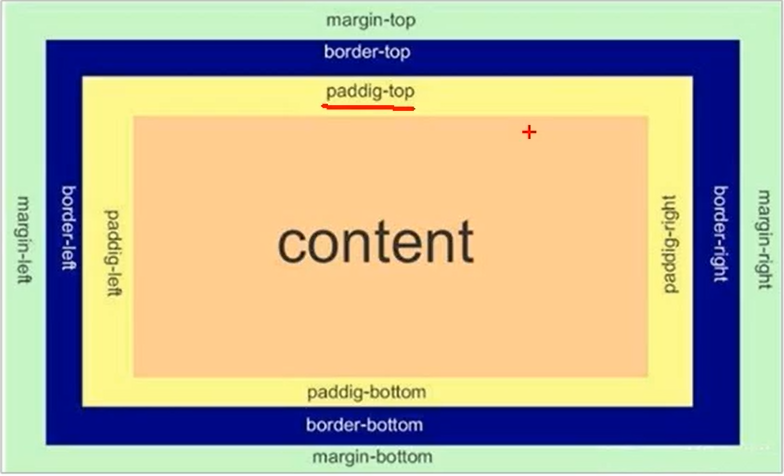
CSS盒子模型就是封装HTML元素,边框,外边距,内边距,实际内容。
border边框
content内容
padding内边距
外边距margin
2.1 border
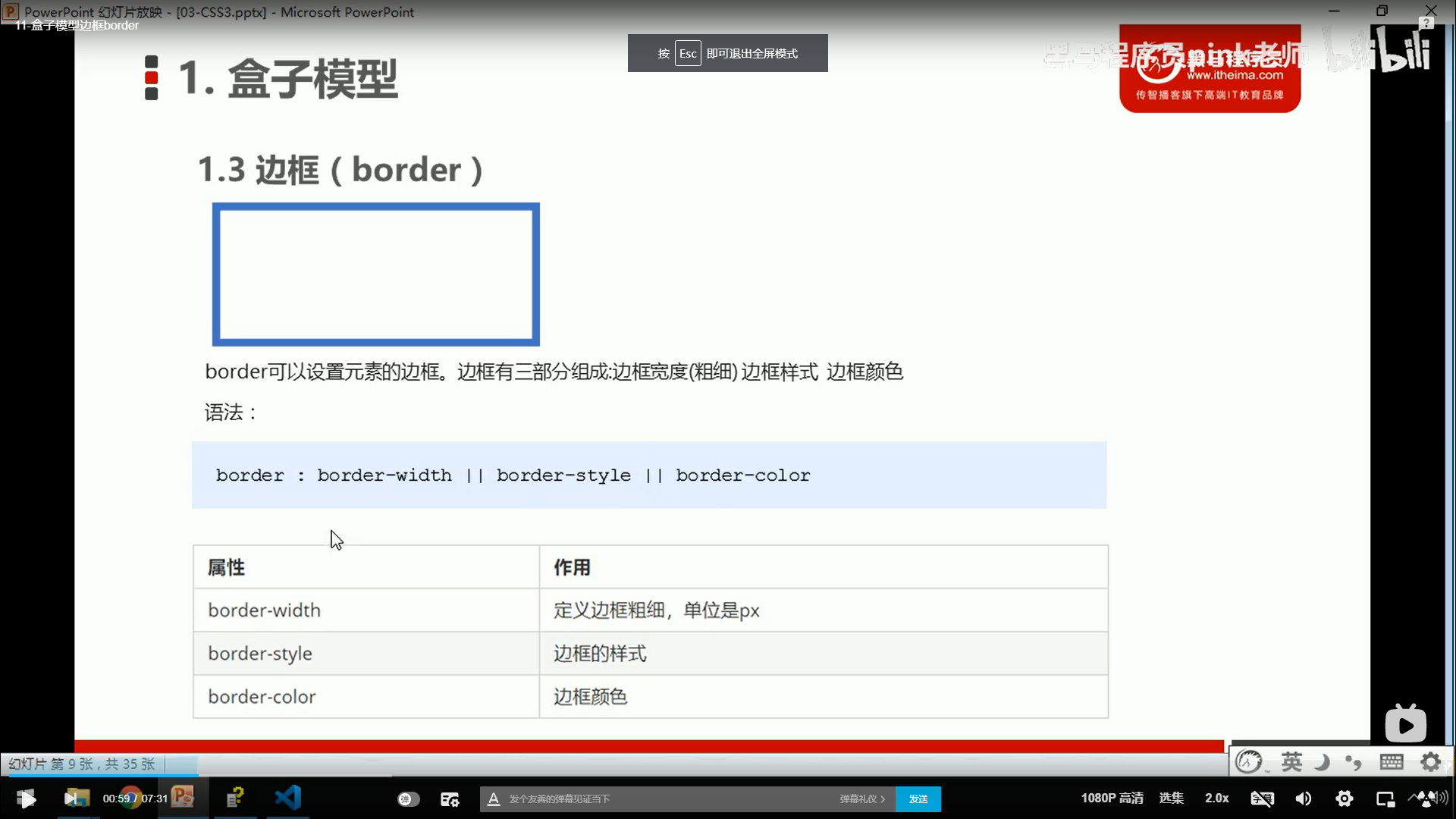
demo:


 1 <!--
 2  * @Author: invoker
 3  * @Github: https://github.com/invoker2021
 4  * @Date: 2021-07-12 22:33:51
 5  * @LastEditors: invoker
 6  * @LastEditTime: 2021-07-12 22:36:19
 7  * @Description:
 8  * @FilePath: \css\盒子模型-边框.html
 9 -->
10 <!DOCTYPE html>
11 <html lang="en">
12
13 <head>
14     <meta charset="UTF-8">
15     <meta http-equiv="X-UA-Compatible" content="IE=edge">
16     <meta name="viewport" content="width=device-width, initial-scale=1.0">
17     <title>盒子模型-边框</title>
18     <style>
19         div {
20             width: 300px;
21             height: 300px;
22             border-width: 5px;
23             border-style: solid;
24             /* border-style:dashed; */
25             /* border-style:dotted; */
26             border-color: red;
27         }
28     </style>
29 </head>
30
31 <body>
32     <div></div>
33 </body>
34
35 </html>
简写:
 1 <!--
 2  * @Author: invoker
 3  * @Github: https://github.com/invoker2021
 4  * @Date: 2021-07-12 22:33:51
 5  * @LastEditors: invoker
 6  * @LastEditTime: 2021-07-12 22:38:29
 7  * @Description:
 8  * @FilePath: \css\盒子模型-边框.html
 9 -->
10 <!DOCTYPE html>
11 <html lang="en">
12
13 <head>
14     <meta charset="UTF-8">
15     <meta http-equiv="X-UA-Compatible" content="IE=edge">
16     <meta name="viewport" content="width=device-width, initial-scale=1.0">
17     <title>盒子模型-边框</title>
18     <style>
19         div {
20             width: 300px;
21             height: 300px;
22             /* border-width: 5px;
23             /* border-style: solid; */
24             /* border-style:dashed; */
25             /* border-style:dotted; */
26             /* border-color: red; */
27             border: 3px dashed pink;
28         }
29     </style>
30 </head>
31
32 <body>
33     <div></div>
34 </body>
35
36 </html>
指定上下左右边框的样式
 1 <!--
 2  * @Author: invoker
 3  * @Github: https://github.com/invoker2021
 4  * @Date: 2021-07-12 22:33:51
 5  * @LastEditors: invoker
 6  * @LastEditTime: 2021-07-12 22:40:33
 7  * @Description:
 8  * @FilePath: \css\盒子模型-边框.html
 9 -->
10 <!DOCTYPE html>
11 <html lang="en">
12
13 <head>
14     <meta charset="UTF-8">
15     <meta http-equiv="X-UA-Compatible" content="IE=edge">
16     <meta name="viewport" content="width=device-width, initial-scale=1.0">
17     <title>盒子模型-边框</title>
18     <style>
19         div {
20             width: 300px;
21             height: 300px;
22             /* border-width: 5px;
23             /* border-style: solid; */
24             /* border-style:dashed; */
25             /* border-style:dotted; */
26             /* border-color: red; */
27             /* border: 3px dashed pink; */
28             border-top: 2px dashed pink;
29             border-left: 3px solid red;
30             border-bottom: 4px dotted blue;
31             border-right: 5px dotted green;
32         }
33     </style>
34 </head>
35
36 <body>
37     <div></div>
38 </body>
39
40 </html>
指定上下左右边框样式的简写,但要注意,border写在border-top前面蔡可以生效,这个原理利用了border的层叠特性,下面的和上面的代码如果有冲突,执行下面代码。
 1 <!--
 2  * @Author: invoker
 3  * @Github: https://github.com/invoker2021
 4  * @Date: 2021-07-12 22:33:51
 5  * @LastEditors: invoker
 6  * @LastEditTime: 2021-07-12 22:43:52
 7  * @Description:
 8  * @FilePath: \css\盒子模型-边框.html
 9 -->
10 <!DOCTYPE html>
11 <html lang="en">
12
13 <head>
14     <meta charset="UTF-8">
15     <meta http-equiv="X-UA-Compatible" content="IE=edge">
16     <meta name="viewport" content="width=device-width, initial-scale=1.0">
17     <title>盒子模型-边框</title>
18     <style>
19         div {
20             width: 300px;
21             height: 300px;
22             /* border-width: 5px;
23             /* border-style: solid; */
24             /* border-style:dashed; */
25             /* border-style:dotted; */
26             /* border-color: red; */
27             /* border: 3px dashed pink; */
28             /* border-top: 2px dashed pink;
29             border-left: 3px solid red;
30             border-bottom: 4px dotted blue;
31             border-right: 5px dotted green; */
32             border: 3px dotted pink;
33             border-top: 2px solid red;
34         }
35     </style>
36 </head>
37
38 <body>
39     <div></div>
40 </body>
41
42 </html>
border-collapse:collapse;
将相邻盒子的边框合并在一起。
1 <!-- 2 * @Author: invoker 3 * @Github: https://github.com/invoker2021 4 * @Date: 2021-07-12 22:49:06 5 * @LastEditors: invoker 6 * @LastEditTime: 2021-07-12 22:59:37 7 * @Description: 8 * @FilePath: \css\盒子模型-边框-合并.html 9 --> 10 11 <!DOCTYPE html> 12 <html lang="en"> 13 14 <head> 15 <meta charset="UTF-8"> 16 <meta http-equiv="X-UA-Compatible" content="IE=edge"> 17 <meta name="viewport" content="width=device-width, initial-scale=1.0"> 18 <title>盒子模型-边框-合并</title> 19 <style> 20 table { 21 width: 500px; 22 height: 200px; 23 } 24 25 thead>tr>td { 26 height: 40px; 27 } 28 29 table, 30 td { 31 border: 1px solid pink; 32 border-collapse: collapse; 33 font-size: 14px; 34 text-align: center; 35 } 36 </style> 37 </head> 38 39 <body> 40 <!-- 表格合并 --> 41 <table align="center" cellspacing='0'> 42 <thead> 43 <tr> 44 <td colspan='8' align="center"><strong>个人简历</strong></td> 45 </tr> 46 </thead> 47 <tbody> 48 <tr> 49 <td>姓 名</td> 50 <td>invoker</td> 51 <td>性 别</td> 52 <td>男</td> 53 <td rowspan="3" width='60'>照 片</td> 54 </tr> 55 <tr> 56 <td>年 龄</td> 57 <td>28</td> 58 <td>email</td> 59 <td>invoker2021@126.com</td> 60 </tr> 61 <tr> 62 <td>住 址</td> 63 <td>xxxx市xxx区xxx小区</td> 64 <td>电 话</td> 65 <td>159xxxxxx4</td> 66 </tr> 67 </tbody> 68 </table> 69 </body> 70 71 </html>
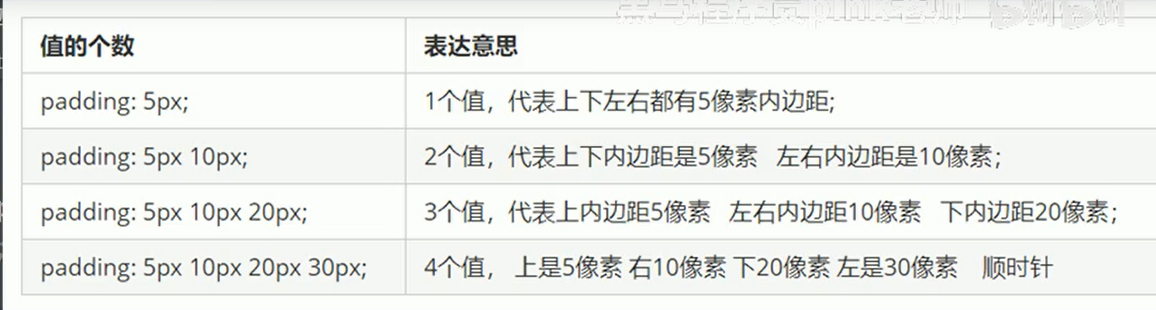
2.2 padding 边框与内容之间的距离
padding-left:20px;
padding-right:20px;
padding-top:20px;
padding-bottom:20px;
写法一:
 1 <!--
 2  * @Author: invoker
 3  * @Github: https://github.com/invoker2021
 4  * @Date: 2021-07-12 22:33:51
 5  * @LastEditors: invoker
 6  * @LastEditTime: 2021-07-12 23:10:54
 7  * @Description:
 8  * @FilePath: \css\盒子模型-边框.html
 9 -->
10 <!DOCTYPE html>
11 <html lang="en">
12
13 <head>
14     <meta charset="UTF-8">
15     <meta http-equiv="X-UA-Compatible" content="IE=edge">
16     <meta name="viewport" content="width=device-width, initial-scale=1.0">
17     <title>盒子模型-边框</title>
18     <style>
19         div {
20             width: 300px;
21             height: 300px;
22             /* border-width: 5px;
23             /* border-style: solid; */
24             /* border-style:dashed; */
25             /* border-style:dotted; */
26             /* border-color: red; */
27             /* border: 3px dashed pink; */
28             /* border-top: 2px dashed pink;
29             border-left: 3px solid red;
30             border-bottom: 4px dotted blue;
31             border-right: 5px dotted green; */
32             border: 10px solid pink;
33             /* border-top: 2px solid red; */
34             padding-left: 20px;
35             padding-top: 20px;
36             padding-bottom: 20px;
37             padding-right: 20px;
38         }
39     </style>
40 </head>
41
42 <body>
43     <div>我是div,这个是我的内容>我是div,这个是我的内容>我是div,这个是我的内容>我是div,这个是我的内容</div>
44 </body>
45
46 </html>
写法二(简写):
 1 <!--
 2  * @Author: invoker
 3  * @Github: https://github.com/invoker2021
 4  * @Date: 2021-07-13 09:11:23
 5  * @LastEditors: invoker
 6  * @LastEditTime: 2021-07-13 09:17:31
 7  * @Description:
 8  * @FilePath: \css\盒子模型案例.html
 9 -->
10 <!DOCTYPE html>
11 <html lang="en">
12
13 <head>
14     <meta charset="UTF-8">
15     <meta http-equiv="X-UA-Compatible" content="IE=edge">
16     <meta name="viewport" content="width=device-width, initial-scale=1.0">
17     <title>盒子模型案例</title>
18     <style>
19         .nav {
20             border-top: 3px solid #ff8500;
21             border-bottom: 1px solid #edeef0;
22             height: 41px;
23             background-color: #fcfcfc;
24             color: #4c4c4c;
25         }
26
27         .nav a {
28             text-decoration: none;
29             line-height: 41px;
30             color: #4c4c4c;
31             padding: 0 20px;
32             display: inline-block;
33         }
34
35         .nav a:hover {
36             color: #ff8500;
37             background-color: #eee;
38         }
39     </style>
40 </head>
41
42 <body>
43     <div class="nav">
44         <a href="#">xx导航栏</a>
45         <a href="#">手机xx网</a>
46         <a href="#">移动客户端</a>
47         <a href="#">微博</a>
48         <a href="#">关于我</a>
49     </div>
50
51 </body>
52
53 </html>
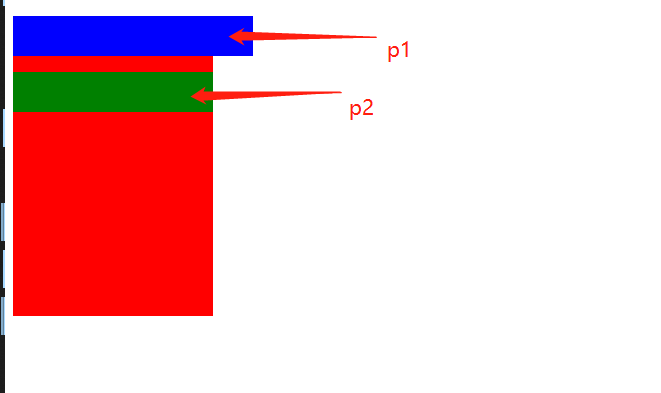
2.4 如何盒子本身没有指定height和width属性,Padding就不会撑开盒子的大小。
 1 <!--
 2  * @Author: invoker
 3  * @Github: https://github.com/invoker2021
 4  * @Date: 2021-07-13 11:19:49
 5  * @LastEditors: invoker
 6  * @LastEditTime: 2021-07-13 11:22:45
 7  * @Description:
 8  * @FilePath: \css\盒子没有指定height和width则padding不会改变盒子大小.html
 9 -->
10 <!DOCTYPE html>
11 <html lang="en">
12
13 <head>
14     <meta charset="UTF-8">
15     <meta http-equiv="X-UA-Compatible" content="IE=edge">
16     <meta name="viewport" content="width=device-width, initial-scale=1.0">
17     <title>盒子没有指定height和width则padding不会改变盒子大小</title>
18     <style>
19         div {
20             height: 300px;
21             width: 200px;
22             background-color: red;
23         }
24
25         .p1 {
26             width: 100%;
27             padding: 20px;
28             background-color: blue;
29         }
30
31         .p2 {
32             padding: 20px;
33             background-color: green;
34         }
35     </style>
36 </head>
37
38 <body>
39     <div>
40         <p class='p1'></p>
41         <p class='p2'></p>
42     </div>
43 </body>
44
45 </html>
p1指定了宽,p2未指定宽,效果就不一样。
3.外边距(margin)
3.1 margin的用法同Padding
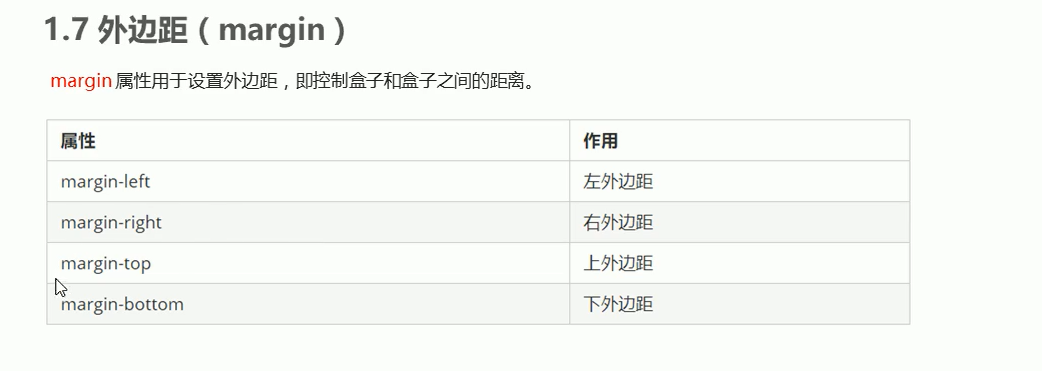
用法同padding.可以使用margin-left,margin-right,margin-top,margin-bottom,也可以单独使用margin.
3.2 块级盒子水平居中显示。
第一步:需要设置盒子的宽度
第二步:盒子左右外边距设置为auto
三种方式:
方式1:
margin-left:auto;
margin-right:auto;
方式2:
margin:auto;
方式3:
margin: 0 auto;
一般使用方式三。
让一个块级盒子水平居中。
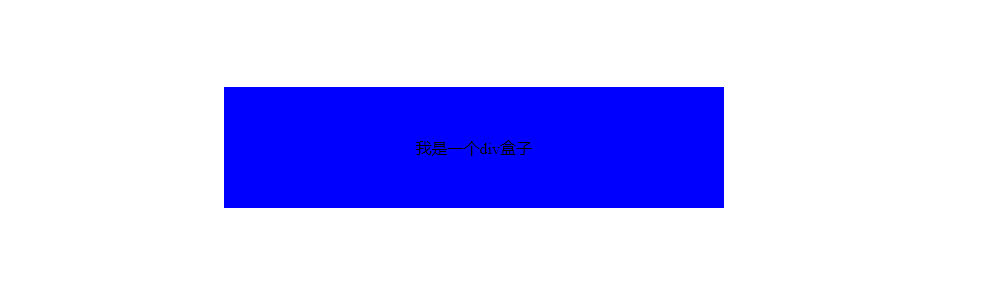
 1 <!--
 2  * @Author: invoker
 3  * @Github: https://github.com/invoker2021
 4  * @Date: 2021-07-13 11:35:45
 5  * @LastEditors: invoker
 6  * @LastEditTime: 2021-07-13 11:40:00
 7  * @Description:
 8  * @FilePath: \css\外边距的使用.html
 9 -->
10 <!DOCTYPE html>
11 <html lang="en">
12
13 <head>
14     <meta charset="UTF-8">
15     <meta http-equiv="X-UA-Compatible" content="IE=edge">
16     <meta name="viewport" content="width=device-width, initial-scale=1.0">
17     <title>外边距的使用</title>
18     <style>
19         /* 块级盒子水平居中 */
20
21         .header {
22             width: 400px;
23             margin: 100px auto;
24             padding: 50px;
25             background-color: blue;
26         }
27     </style>
28 </head>
29
30 <body>
31     <div class='header'>我是一个div盒子</div>
32 </body>
33
34 </html>
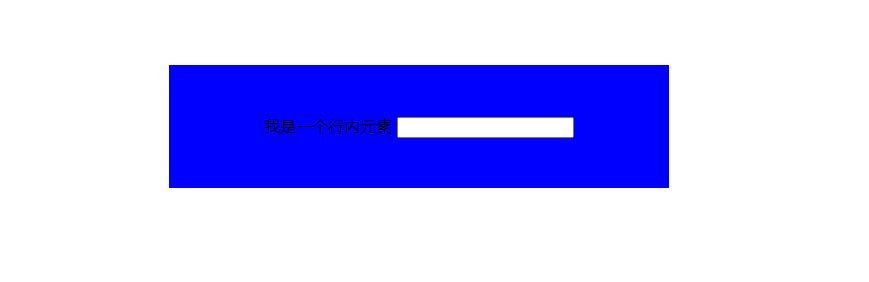
3.3 行内元素和行内块元素水平居中对齐的方式是给其父元素使用text-align:center
代码如下:
 1 <!--
 2  * @Author: invoker
 3  * @Github: https://github.com/invoker2021
 4  * @Date: 2021-07-13 11:35:45
 5  * @LastEditors: invoker
 6  * @LastEditTime: 2021-07-13 11:53:40
 7  * @Description:
 8  * @FilePath: \css\外边距的使用.html
 9 -->
10 <!DOCTYPE html>
11 <html lang="en">
12
13 <head>
14     <meta charset="UTF-8">
15     <meta http-equiv="X-UA-Compatible" content="IE=edge">
16     <meta name="viewport" content="width=device-width, initial-scale=1.0">
17     <title>外边距的使用</title>
18     <style>
19         /* 块级盒子水平居中 */
20
21         .header {
22             width: 400px;
23             margin: 100px auto;
24             padding: 50px;
25             background-color: blue;
26             text-align: center;
27         }
28     </style>
29 </head>
30
31 <body>
32     <!-- <div class='header'>我是一个div盒子</div>
33      -->
34
35     <div class='header'>
36         <span>我是一个行内元素</span>
37         <input type="text">
38     </div>
39 </body>
40
41 </html>
本文来自博客园,作者:kaer_invoker,转载请注明原文链接:https://www.cnblogs.com/invoker2021/p/15004461.html

 浙公网安备 33010602011771号