
Vuejs学习笔记(一)-10.v-on监听指令的使用
v-on是事件监听指令,用于监听标签的一些列操作,如点击操作,如果坚挺到有点击操作,可以执行对应的内部方法。
一、事件监听基本使用代码如下,
1.做事件监听时,如果没有参数,在html中调用方法时,可以不使用括号()
2.事件监听的写法1是v-on:click="methodName"
3.事件监听的写法2(语法糖写法)是@click="methodName"
 1 <!--
 2 @author:invoker
 3 @project:project_lianxi
 4 @file: 01-事件监听的使用.html
 5 @contact:invoker2021@126.com
 6 @descript:
 7 @Date:2021/7/1 11:08
 8 @version: html5
 9 -->
10
11 <!DOCTYPE html>
12 <html lang="en">
13 <head>
14   <meta charset="UTF-8">
15   <title>01-事件监听的使用</title>
16 </head>
17 <body>
18 <div id="app">
19   <h2>{{ counter }}</h2>
20   <button v-on:click="increment">+</button>
21   <button @click="decrement">-</button>
22 </div>
23
24 <script src="../js/vue.js"></script>
25 <script>
26
27   const app = new Vue({
28     el: '#app',
29     data: {
30       message: 'hello',
31       counter:0
32     },
33     methods:{
34       increment(){
35         this.counter++
36       },
37       decrement(){
38         this.counter--
39       }
40     }
41   })
42 </script>
43 </body>
44 </html>
二、事件监听有参数
事件监听对应的方法有参数时的玩法如下:
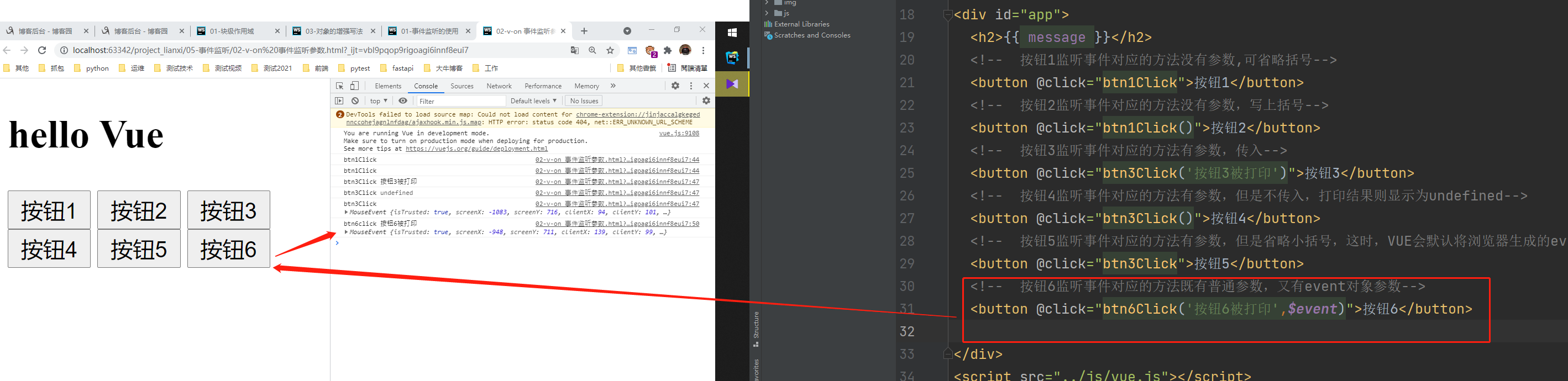
代码如下:
 1 <!--
 2 @author:invoker
 3 @project:project_lianxi
 4 @file: 02-v-on 事件监听参数.html
 5 @contact:invoker2021@126.com
 6 @descript:
 7 @Date:2021/7/1 11:17
 8 @version: html5
 9 -->
10
11 <!DOCTYPE html>
12 <html lang="en">
13 <head>
14   <meta charset="UTF-8">
15   <title>02-v-on 事件监听参数</title>
16 </head>
17 <body>
18 <div id="app">
19   <h2>{{ message }}</h2>
20   <!--  按钮1监听事件对应的方法没有参数,可省略括号-->
21   <button @click="btn1Click">按钮1</button>
22   <!--  按钮2监听事件对应的方法没有参数,写上括号-->
23   <button @click="btn1Click()">按钮2</button>
24   <!--  按钮3监听事件对应的方法有参数,传入-->
25   <button @click="btn3Click('按钮3被打印')">按钮3</button>
26   <!--  按钮4监听事件对应的方法有参数,但是不传入,打印结果则显示为undefined-->
27   <button @click="btn3Click()">按钮4</button>
28   <!--  按钮5监听事件对应的方法有参数,但是省略小括号,这时,VUE会默认将浏览器生成的event事件对象作为参数传入到函数中-->
29   <button @click="btn3Click">按钮5</button>
30   <!--  按钮6监听事件对应的方法既有普通参数,又有event对象参数-->
31   <button @click="btn6Click('按钮6被打印',$event)">按钮6</button>
32
33 </div>
34 <script src="../js/vue.js"></script>
35 <script>
36
37   const app = new Vue({
38     el: '#app',
39     data: {
40       message: 'hello Vue'
41     },
42     methods: {
43       btn1Click() {
44         console.log('btn1Click');
45       },
46       btn3Click(params1) {
47         console.log('btn3Click', params1);
48       },
49       btn6Click(param1,event){
50         console.log('btn6click',param1,event);
51       }
52     }
53   })
54 </script>
55 </body>
56 </html>
三、v-on的修饰符1 stop阻止向上级组件冒泡
场:1:在一个div标签内有一个button标签。如果div标签和button标签都被监听,那么点击button标签时会触发div标签的监听事件。
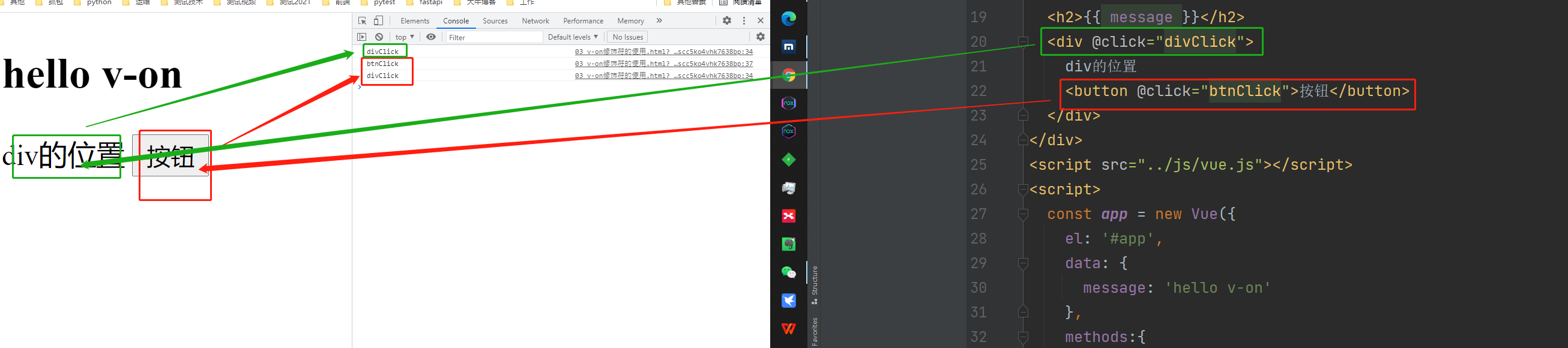
代码如下:
 1 <!--
 2 @author:invoker
 3 @project:project_lianxi
 4 @file: 03 v-on修饰符的使用.html
 5 @contact:invoker2021@126.com
 6 @descript:
 7 @Date:2021/7/1 11:43
 8 @version: html5
 9 -->
10
11 <!DOCTYPE html>
12 <html lang="en">
13 <head>
14   <meta charset="UTF-8">
15   <title>03 v-on修饰符的使用</title>
16 </head>
17 <body>
18 <div id="app">
19   <h2>{{ message }}</h2>
20   <div @click="divClick">
21     div的位置
22     <button @click="btnClick">按钮</button>
23   </div>
24 </div>
25 <script src="../js/vue.js"></script>
26 <script>
27   const app = new Vue({
28     el: '#app',
29     data: {
30       message: 'hello v-on'
31     },
32     methods:{
33       divClick(){
34         console.log('divClick');
35       },
36       btnClick(){
37         console.log('btnClick');
38       }
39     }
40   })
41 </script>
42 </body>
43 </html>
场景2:在一个div标签内有一个button标签。如果div标签和button标签都被监听,希望点击button标签时不会触发div标签的监听事件。此时需要用到修饰符stop.
使用修饰符stop后,效果是点击button按钮时,会停止向上级div传递点击操作。达到了只监听本按钮的效果。
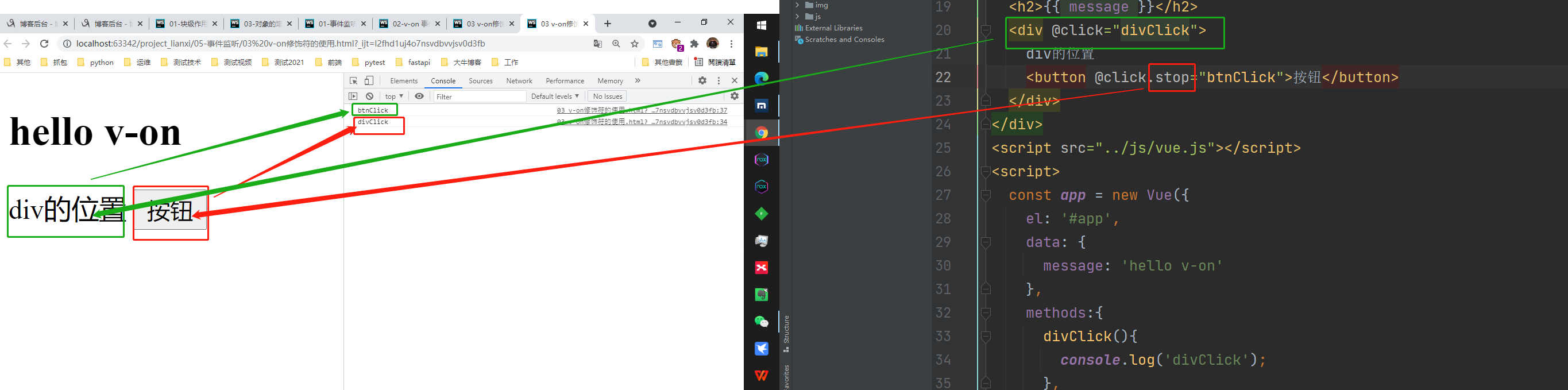
代码如下:
 1 <!--
 2 @author:invoker
 3 @project:project_lianxi
 4 @file: 03 v-on修饰符的使用.html
 5 @contact:invoker2021@126.com
 6 @descript:
 7 @Date:2021/7/1 11:43
 8 @version: html5
 9 -->
10
11 <!DOCTYPE html>
12 <html lang="en">
13 <head>
14   <meta charset="UTF-8">
15   <title>03 v-on修饰符的使用</title>
16 </head>
17 <body>
18 <div id="app">
19   <h2>{{ message }}</h2>
20   <div @click="divClick">
21     div的位置
22     <button @click.stop="btnClick">按钮</button>
23   </div>
24 </div>
25 <script src="../js/vue.js"></script>
26 <script>
27   const app = new Vue({
28     el: '#app',
29     data: {
30       message: 'hello v-on'
31     },
32     methods:{
33       divClick(){
34         console.log('divClick');
35       },
36       btnClick(){
37         console.log('btnClick');
38       }
39     }
40   })
41 </script>
42 </body>
43 </html>
四、事件监听修饰符2 prevent 阻止默认行为
用于阻止标签的默认动作
代码如下:
 1 <!--
 2 @author:invoker
 3 @project:project_lianxi
 4 @file: 03 v-on修饰符的使用.html
 5 @contact:invoker2021@126.com
 6 @descript:
 7 @Date:2021/7/1 11:43
 8 @version: html5
 9 -->
10
11 <!DOCTYPE html>
12 <html lang="en">
13 <head>
14   <meta charset="UTF-8">
15   <title>03 v-on修饰符的使用</title>
16 </head>
17 <body>
18 <div id="app">
19   <!--  说明,submit按钮默认事件是点击后跳转到action对应的页面-->
20   <form action="https://www.baidu.com">
21     <input type="submit" value="没有修饰符的提交">
22   </form>
23   <!--  如果使用prevent修饰符,则改变了form中submit的默认事件,变成了自定义方法的执行submitClick-->
24   <form action="https://www.baidu.com">
25     <input type="submit" value="有修饰符的提交" @click.prevent="submitClick">
26   </form>
27 </div>
28 <script src="../js/vue.js"></script>
29 <script>
30   const app = new Vue({
31     el: '#app',
32     data: {
33       message: 'hello v-on'
34     },
35     methods: {
36       submitClick() {
37         console.log('submitClick');
38       }
39     }
40   })
41 </script>
42 </body>
43 </html>
五、事件监听修饰符3 键盘监听
代码如下:
 1 <!--
 2 @author:invoker
 3 @project:project_lianxi
 4 @file: 03 v-on修饰符的使用.html
 5 @contact:invoker2021@126.com
 6 @descript:
 7 @Date:2021/7/1 11:43
 8 @version: html5
 9 -->
10
11 <!DOCTYPE html>
12 <html lang="en">
13 <head>
14   <meta charset="UTF-8">
15   <title>03 v-on修饰符的使用</title>
16 </head>
17 <body>
18 <div id="app">
19   <h2>{{ message }}</h2>
20   <!--  监听键盘-->
21   <!--  1.监听回车按钮-->
22   <input type="text" @keyup.enter="keyUp">
23 </div>
24 <script src="../js/vue.js"></script>
25 <script>
26   const app = new Vue({
27     el: '#app',
28     data: {
29       message: 'hello v-on'
30     },
31     methods: {
32       keyUp() {
33         console.log('keyUp');
34       }
35     }
36   })
37 </script>
38 </body>
39 </html>
本文来自博客园,作者:kaer_invoker,转载请注明原文链接:https://www.cnblogs.com/invoker2021/p/14958119.html

 浙公网安备 33010602011771号