
前端三剑客 html css js
前端三剑客
HTML
基本格式
<!DOCTYPE html>
<html lang="en">
<head>
    <meta charset="UTF-8">
    <title>lbw的直播间</title>
</head>
<body>

</body>
</html>
参数说明:
title -> 浏览器顶部标题
head -> 头部
body -> 身体 ...
插入图片
<img width="500" src="paimeng.jpg" alt="你好呀旅行者">
img -> 插入图片
width -> 图片宽度
src -> 图片路径
alt -> 图片找不到显示文本
插入 bilibili 视频
<iframe src="//player.bilibili.com/player.html?aid=470153315&bvid=BV1kT411G7Xp&cid=752600652&page=1" scrolling="no" border="0" frameborder="no" framespacing="0" allowfullscreen="true"> </iframe>

找到视频嵌入代码,复制即可
插入网易云音乐
找到音乐HTML代码,复制即可


浏览器顶部图标
<link rel="icon" href="sun.png" type="image/x-icon"/>
字节跳动图标网站:https://iconpark.oceanengine.com/home
- div,span 分割页面,自动换行分区
<body>
	<div>
    	<span>我是第一块的第一部分</span>
        <span>我是第一块的第二部分</span>
    </div>
	<div>
    	<span>我是第二块的第一部分</span>
        <span>我是第二块的第二部分</span>
    </div>
	<div>
    	<span>我是第三块的第一部分</span>
        <span>我是第三块的第二部分</span>
    </div>
</body>
- p 标签给页面分段,用于文本
<p>
    1、20岁出头,没钱、社畜、挤公交、租房,才是我们普通人的常态。
    那些年纪轻轻就开跑车,住豪宅,鼓动你交钱跟他们学赚钱的,一律别信。
    不排除真的有特别优秀的人,但大多数都是精心营造的人设,准备割你韭菜。
</p>
<p>
    2、千万别把「打破阶级壁垒」当目标,它只会加剧你的焦虑、无力。
    不是你买辆小奔驰,微信里加些牛X大佬,就叫打破了,要是它这么轻松就能被打破,社会上就没那么多矛盾了。
    这件事,还是需要时间和运气。
    更值得你去做,也是更容易掌控的,是一些看似琐碎却帮助巨大的小事。
</p>
转义字符

换行,分割线
<p>
    1、20岁出头,没钱、社畜、挤公交、租房,才是我们普通人的常态。<br>
    那些年纪轻轻就开跑车,住豪宅,鼓动你交钱跟他们学赚钱的,一律别信。<br>
    不排除真的有特别优秀的人,但大多数都是精心营造的人设,准备割你韭菜。<hr>
</p>
<p>
    2、千万别把「打破阶级壁垒」当目标,它只会加剧你的焦虑、无力。<br>
    不是你买辆小奔驰,微信里加些牛X大佬,就叫打破了,要是它这么轻松就能被打破,社会上就没那么多矛盾了。<br>
    这件事,还是需要时间和运气。<br>
    更值得你去做,也是更容易掌控的,是一些看似琐碎却帮助巨大的小事。<hr>
</p>
分级标题
<body>
<h1>一级标题</h1>
<h2>二级标题</h2>
<h3>三级标题</h3>
<h4>四级标题</h4>
</body>
超链接
<body>
<a href="https://www.bilibili.com">点击访问小破站</a>
</body>
锚点超链接

类似这个回到顶部的按钮
<div id="test">-----</div>
<div>aaa</div>
<div>aaa</div>
<div>aaa</div>
<div>aaa</div>
<div>aaa</div>
<div>aaa</div>
<a href="#test">回到顶部</a>
列表元素
有序列表:
<ol>
    <li>一号选项</li>
    <li>二号选项</li>
    <li>三号选项</li>
    <li>四号选项</li>
    <li>五号选项</li>
</ol>
无序列表:
<ul>
    <li>一号选项</li>
    <li>二号选项</li>
    <li>三号选项</li>
    <li>四号选项</li>
    <li>五号选项</li>
</ul>
表格(无分割线)(需 CSS)

<body>
    <table>

        <thead>
            <tr>
                <th>学号</th>
                <th>姓名</th>
                <th>性别</th>
                <th>年级</th>
            </tr>
        </thead>

        <tbody>
            <tr>
                <td>0001</td>
                <td>小明</td>
                <td>男</td>
                <td>2019</td>
            </tr>
            <tr>
                <td>0002</td>
                <td>小红</td>
                <td>女</td>
                <td>2020</td>
            </tr>
        </tbody>

    </table>
</body>
表单
<label>
    帐号:
    <input type="text">
</label>
登录页面
<body>
<div>登录我们的网站</div>

<form>
<div>
    <label>
        帐号:
        <input type="text" placeholder="Username...">
    </label>
</div>

<div>
    <label>
        密码:
        <input type="password" placeholder="Password...">
    </label>
</div>

<br>
<a href="https://www.baidu.com">忘记密码</a>
<br>
<br>
<div>
    <input type="submit" value="登录">
</div>
</form>
</body>
多行文本
<body>
<label>
    这是我们的文本框<br>
    <textarea placeholder="文本内容..." cols="10" rows="10"></textarea>
</label>
</body>
单选框
<body>
<label>
    <input type="radio" name="role">
    学生
</label>
<label>
    <input type="radio" name="role">
    老师
</label>
</body>
多选框
<body>
<label>
    <input type="checkbox" >
    学生
</label>
<label>
    <input type="checkbox" >
    老师
</label>
</body>
下拉列表框
<body>
<label>
    登录身份:
    <select>
        <option>学生</option>
        <option>老师</option>
    </select>
</label>
</body>
......
CSS
实现更高度的自定义页面
引入 CSS
外部引入
style.css
body{
    text-align: center;
}
index.html
<head>
    <link href="style.css" rel="stylesheet">
</head>
同文件夹下
内部引入
<head>
    <style>
        body{
            text-align: center;
        }
    </style>
</head>
<body style="text-align: center"> ... </body>
CSS 选择器
标签名选择器
选择所有制定的标签
选中所有 input
input{
    width: 200px;
    font-size: 20px;
    line-height: 40px;
}
id 选择器
只能作用于一个元素
style.css
#title{
    text-align: center;
}
index.html
<!DOCTYPE html>
<html lang="en">
<head>
    <meta charset="UTF-8">
    <title>lbw的直播间</title>
    <link rel="icon" href="sun.png" type="image/x-icon">
    <link href="style.css" rel="stylesheet">

</head>
<body id="title">
<div >hello</div>
<label >
    登录身份:
    <select >
        <option>学生</option>
        <option>老师</option>
    </select>
</label>
</body>
</html>
类选择器
可以作用于多个元素
style.css
.title{
    text-align: center;
}
index.html
<body>
<div  class="title">hello</div>
<label >
    <div class="title">登录身份:</div>
    <select >
        <option>学生</option>
        <option>老师</option>
    </select>
</label>
</body>
组合选择器
注意优先级问题
/*1. 多个选择器共用一个 css 样式*/

.test,#title{
    color: red;
}

/*2. 所有元素选中用符号 * 表示*/

* {
    color: red;
}

/*3. 选择位于某个元素内的某个元素*/

div label {
    color: red;
}
优先级:

自定义最高优先级,在元素后面加 !important:
* {
    color: red;!important;
}
自定义边距
index.html
<body>
<div id="outer">
    <div id="inner">

    </div>
</div>
</body>
style.css
#outer {
    background: palegreen;
    width: 300px;
    height: 300px;
    padding: 10px;
}
#inner {
    background: darkorange;
    width: 100px;
    height: 100px;
}
body {
    margin: 0;
}
漂亮的登录界面
传送门: https://gitee.com/fu-guangjian/front-end-login-template--10
......
JavaScript
前后端交互的解释型语言
前端静态页面的一个补充,让普通页面在后台执行一些程序
一个示例
test.script
const arr = [0, 2, 1, 5, 9, 3, 4, 6, 7, 8]

for (let i = 0; i < arr.length; i++) {
    for (let j = 0; j < arr.length - 1; j++) {
        if(arr[j] > arr[j+1]){
            const tmp = arr[j]
            arr[j] = arr[j+1]
            arr[j+1] = tmp
        }
    }
}

window.alert(arr)
index.html
<head>
    <script src="test.script"></script>
</head>
效果图

定义变量
用 let
变态机制
let a = 10;
a = "hello,world";
window.alert(a)
变量a已经被赋值为数字类型,但是我们依然在后续能将其赋值一个字符串
基本数据类型
Number -> 小数 + 整数
String -> 字符串
Boolean -> 布尔
undefined -> 未定义
null -> 空
NaN -> 非数字
typeof -> 查看当前变量值的类型
test.js
let a = "hello,world";
console.info(typeof a)
a = 10;
console.info(typeof a)
效果图
逻辑运算
test.js
console.info(66 > 77)
console.info(66 < 77)

console.info('10' == 10)
console.info('10' === 10)

console.info(4 & 7)
console.info(4 | 7)

console.info(true || false)

console.info(!0)
console.info(!1)

console.info(!"a")
console.info(!"")

console.info(true || 7)
console.info(7 || true)

console.info(!undefined)
console.info(!null)
console.info(!NaN)

let a = true ? "xx" : 20
console.info(a)
效果图

流程控制
分支
if-else
if("a"){
    console.info("yes")
}else{
    console.info("no")
}
switch
let a = "a"
switch (a){
    case "a":
        console.info("yes")
        break
    case "b":
        console.info("no")
        break
    case "c":
        console.info("no")
        break
    default:
        console.info("no")
}
循环
while
let i = 100
while (i--){
console.info("hello")
}
for
let i = 100
for (let j = 0; j < 10; j++) {
    console.info(i)
}
函数定义
// 定义
function f(){
    console.info("咬打火机")
}
// 调用
f()
函数传参
demo 1
function f(a){
    console.info("得到的实参是:"+a)
    return 666
}
f("hello,world")
demo 2
function f(a="hello,world"){
    console.info("得到的实参是:"+a)
    return 666
}
f()
函数传函数
function f(test){
    test()
}

f(function (){
    console.info("一个匿名函数")
})
lambda 表达式
注意用粗箭头

function f(test){
    test()
}

f(() => console.info("hello,world"))
数组
let arr = [1,"fff",false,undefined,NaN]
console.info(arr[1])
// 直接打印
console.info(arr)

// 用栈方法操作
arr.push("bbb")
console.info(arr.pop())
对象
let obj = {}
obj.name = "刀哥"
obj.age = 15
obj.f = function (){
    console.info("一个函数")
}
console.info(obj.name)
obj.f()
事件
index.html
<input type="password" oninput="console.info('正在输入文本')">
效果图

test.js
function f() {
    window.alert("你输入了一个字符")
}
index.html
<input type="text" placeholder="Username" oninput="f()">
效果图

Document 对象
加载网页,浏览器生成文档对象模型,整个页面所有元素都是 JS 对象,可以在 JS 中操作对象
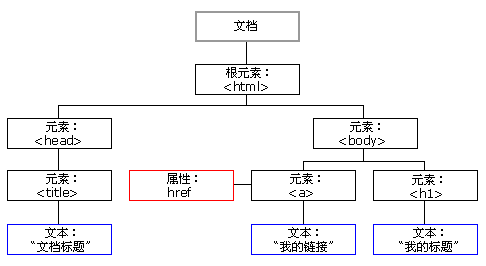
示例 (密码长度小于6不合法)
index.html
    <input type="text" placeholder="Username" oninput="checkIllegal(this)">
    <input type="text" placeholder="Password" oninput="checkIllegal(this)">
style.css
.illegal-pwd{
    border: red 1px solid !important;
    box-shadow: 0 0 5px red;
}
test.js
function checkIllegal(e) {
    if(e.value.length < 6) {
        e.setAttribute("class", "illegal-pwd")
    }else {
        e.removeAttribute("class")
    }
}
效果图

JS 与后端交互
JS 请求会返回百度这个页面的全部HTML代码。
index.html
<input id="button" type="button" onclick="http()">
test.js
let xhr = new XMLHttpRequest();
xhr.open('GET', 'https://www.baidu.com');
xhr.send();
效果图

我们的浏览器在我们输入网址后,也会向对应网站的服务器发起一次HTTP的GET请求。
在浏览器得到页面响应后,会加载当前页面,如果当前页面还引用了其他资源文件,那么会继续向服务器发起请求,直到页面中所有的资源文件全部加载完成后,才会停止。

 浙公网安备 33010602011771号