
安卓day32广播和服务 服务 bind unbind 用服务注册广播接收者 远程服务 AIDL 样式和主题 国际化
一、排坑
无法查看源码
找到Android Studio的生成的配置文件,一般默认的情况下载C盘C:\Users\下面,找到 .Android Studio 2.2(选最高版本)
找到 .Android Studio 2.2文件中的jdk.table.xml文件,在.AndroidStudio2.2\config\options路径下面;
在对应版本的roots节点内加入以下代码
        <sourcePath>
           <root type="composite">
            <root url="file://D:/ec/1414/sources/android-27" type="simple" />
          </root>
        </sourcePath>
onServiceConnected不执行
onServiceConnected在绑定成功时进行回调,但不保证在执行binService后立马回调,我们在onCreate方法中绑定后立马获取service实例,但此时不保证onServiceConnected已经被回调。
把对mService进行引用的操作放在onServicerConnected方法下
onUnbind,onBind方法不执行
在执行了startService、bindService、unbindService之后,再次执行bindService。这时发现Service的onBind方法并没有执行,而是执行的onRebind方法
如果onUnbind方法返回false,则调用bindService的时候onBind不再执行,而且调用unbindService的时候,onUnbind也不会执行。
如果onUnbind方法返回true,再次调用bindService的时候会执行onRebind,再调用unbindService的时候,onUnbind也会执行。
去除空行
替换,勾选Regex
^\s*\n (\s代表任何空白字符,\S代表任何非空白字符,*代表任意个数,\n匹配换行符)
AIDL远程服务 java.lang.SecurityException: Binder invocation to an incorrect interface
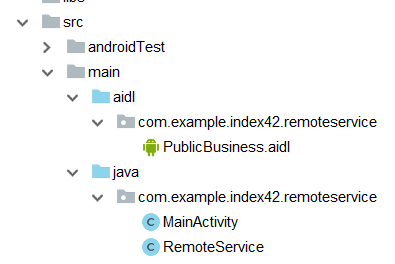
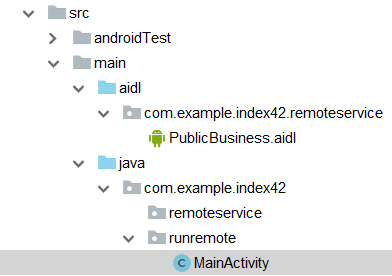
服务端与客户端都要有相同的接口(使用到的),这里的“相同”是指完全相同,包括包名,也就是说要在不同工程下建立相同的包名
先建文件夹再新建aidl文件
服务无法启动java.lang.IllegalArgumentException: Service Intent must be explicit
Android5.0以后,不允许隐式调用服务,所以必须制定要调用的服务所在的包名
intent.setPackage("com.example.index42.remoteservice");
You must supply a layout_width attribute
某些主题缺少某些属性
二、启动服务
https://segmentfault.com/a/1190000005914994
服务两种启动方式
-
startService
-
生命周期
oncreate()--->onstartcommand()--->onstart()--->onDestroy() -
可以多次调用,不会重复创建,oncreate()只会执行一次
-
以start方式开启的服务也只能停止一次,多次调用stopservice()是无效的
-
以start方式开启的服务与UI线程失去关系,即使UI线程被销毁,服务仍然可以正常运行
-
不能调用服务中的方法
bindService
-
-
生命周期
oncreate() --->onbind() -->onunbind()---->ondestry(); -
只能成功绑定和解绑一次
-
与绑定的UI线程同时被销毁(一根绳上的蚂蚱^_^)
- 可以调用服务中的方法
混合开启服务
-
通过startService()方式开启服务(只能通过调用stopService停止)
-
通过bindService进行绑定,以进行服务的方法调用(当需要的时候)
-
通过unbindService进行解绑(不需要调用方法了,在UI线程被销毁之前解绑)
-
通过stopService停止服务
public class MainActivity extends Activity {
    private static final String TAG = "MainActivity";
    private Intent intent;
    private MyServiceConn conn;
    private MyService mService;
    @Override
    protected void onCreate(Bundle savedInstanceState) {
        super.onCreate(savedInstanceState);
        setContentView(R.layout.activity_main);
        intent = new Intent(this, MyService.class);
        conn = new MyServiceConn();
    }
    public void start(View v){
        startService(intent);
    }
    public void stop(View v){
        stopService(intent);
    }
    public void bind(View v){
        //绑定服务
        bindService(intent, conn, BIND_AUTO_CREATE);
        Log.e(TAG, "main bind: " );
    }
    public void unbind(View v){
        //解绑服务
        unbindService(conn);
    }
    class MyServiceConn implements ServiceConnection{
        //服务连接成功时,此方法调用
        @Override
        public void onServiceConnected(ComponentName name, IBinder service) {
            // TODO Auto-generated method stub
            Log.e(TAG, "onServiceConnected: " );
            mService = ((MyService.MyServiceBinder) service).getService();
            mService.doSomething();
        }
        //服务失去连接时,此方法调用
        //当服务异常终止时会调用。注意,解除绑定服务时不会调用
        @Override
        public void onServiceDisconnected(ComponentName name) {
            // TODO Auto-generated method stub
            Log.e(TAG, "onServiceDisconnected: " );
            mService = null;
        }
    }
}
public class MyService extends Service {
    private static final String TAG = "MyService";
    private IBinder mBinder = new MyServiceBinder();
    //绑定时调用
    @Override
    public IBinder onBind(Intent intent) {
        // TODO Auto-generated method stub
        Log.e(TAG, "bind方法: ");
        System.out.println("bind方法");
        return mBinder;
    }
    public class MyServiceBinder extends Binder {
        public MyService getService(){
            return MyService.this;
        }
    }
    public void doSomething(){
        Log.e(TAG, "doSomething: ");
    }
    //解绑时调用
    @Override
    public boolean onUnbind(Intent intent) {
        // TODO Auto-generated method stub
        Log.e(TAG, "unbind方法: ");
        System.out.println("unbind方法");
        mBinder=null;
        return true;
        //return super.onUnbind(intent);
    }
    @Override
    public void onCreate() {
        // TODO Auto-generated method stub
        super.onCreate();
        Log.e(TAG, "create方法: ");
        System.out.println("create方法");
    }
    @Override
    public int onStartCommand(Intent intent, int flags, int startId) {
        // TODO Auto-generated method stub
        Log.e(TAG, "start方法: ");
        System.out.println("start方法");
        return super.onStartCommand(intent, flags, startId);
    }
    @Override
    public void onDestroy() {
        // TODO Auto-generated method stub
        Log.e(TAG, "destroy方法: ");
        System.out.println("destroy方法");
        super.onDestroy();
    }
}
三、办证
public class MainActivity extends Activity {
    private static final String TAG = "MainActivity";
    private Intent intent;
    private MyServiceConn conn;
    PublicBusiness pb;
    @Override
    protected void onCreate(Bundle savedInstanceState) {
        super.onCreate(savedInstanceState);
        setContentView(R.layout.activity_main);
        intent = new Intent(this, LeaderService.class);
        conn = new MyServiceConn();
        //绑定领导服务
        bindService(intent, conn, BIND_AUTO_CREATE);
    }
    public void click(View v){
        //调用服务的办证方法
        pb.QianXian();
    }

    class MyServiceConn implements ServiceConnection{

        //连接服务成功,此方法调用
        @Override
        public void onServiceConnected(ComponentName name, IBinder service) {
            // TODO Auto-generated method stub
            Log.e(TAG, "onServiceConnected: ");
            pb = (PublicBusiness) service;
        }

        @Override
        public void onServiceDisconnected(ComponentName name) {
            // TODO Auto-generated method stub
        }
    }
}
public class LeaderService extends Service {
    private static final String TAG = "LeaderService";
    @Override
    public IBinder onBind(Intent intent) {
        // 返回一个Binder对象,这个对象就是中间人对象
        Log.e(TAG, "onBind: ");
        return new ZhouMi();
    }

    class ZhouMi extends Binder implements PublicBusiness{
        public void QianXian(){
            banZheng();
        }
        public void daMaJiang(){
            Log.e(TAG, "陪李处打麻将: ");
            System.out.println("陪李处打麻将");
        }
    }
    public void banZheng(){
        Log.e(TAG, "李处帮你来办证: ");
        System.out.println("李处帮你来办证");
    }
}
public interface PublicBusiness {
    void QianXian();
}
四、音乐播放器
-
用服务实现音乐播放时,因为音乐播放必须运行在服务进程中,可是音乐服务中的方法,需要被前台Activity所调用,所以需要混合启动音乐服务
-
先start,再bind,销毁时先unbind,在stop
public class MainActivity extends Activity {

    MusicInterface mi;
    @Override
    protected void onCreate(Bundle savedInstanceState) {
        super.onCreate(savedInstanceState);
        setContentView(R.layout.activity_main);
        Intent intent = new Intent(this, MusicService.class);
        //混合调用
        //为了把服务所在进程变成服务进程
        startService(intent);
        //为了拿到中间人对象
        bindService(intent, new MusicServiceConn(), BIND_AUTO_CREATE);
    }

    class MusicServiceConn implements ServiceConnection{

        @Override
        public void onServiceConnected(ComponentName name, IBinder service) {
            // TODO Auto-generated method stub
            mi = (MusicInterface) service;
        }

        @Override
        public void onServiceDisconnected(ComponentName name) {
            // TODO Auto-generated method stub
        }
    }

    //开始播放按钮
    public void play(View v){
        mi.play();
    }
    //暂停播放按钮
    public void pause(View v){
        mi.pause();
    }
}
public class MusicService extends Service{
    private static final String TAG = "MusicService";
    @Override
    public IBinder onBind(Intent intent) {
        // TODO Auto-generated method stub
        return new MusicController();
    }
    //必须继承binder,才能作为中间人对象返回
    class MusicController extends Binder implements MusicInterface{
        public void play(){
            MusicService.this.play();
        }
        public void pause(){
            MusicService.this.pause();
        }
    }
    public void play(){
        Log.e(TAG, "play: ");
        System.out.println("播放音乐");
    }
    public void pause(){
        Log.e(TAG, "pause: ");
        System.out.println("暂停播放");
    }

}
public interface MusicInterface {

    void play();
    void pause();
}
五、使用服务注册广播接收者
- Android四大组件都要在清单文件中注册
- 广播接收者比较特殊,既可以在清单文件中注册,也可以直接使用代码注册
-
有的广播接收者,必须代码注册
- 电量改变
- 屏幕锁屏和解锁
public class MainActivity extends Activity {

    private Intent intent;
    @Override
    protected void onCreate(Bundle savedInstanceState) {
        super.onCreate(savedInstanceState);
        setContentView(R.layout.activity_main);
        intent = new Intent(this, RegisterService.class);
    }


    public void start(View v){
        startService(intent);
    }
    public void stop(View v){
        stopService(intent);
    }
}
public class RegisterService extends Service {
    private static final String TAG = "RegisterService";
    private ScreenReceiver receiver;
    @Override
    public IBinder onBind(Intent intent) {
        // TODO Auto-generated method stub
        return null;
    }

    @Override
    public void onCreate() {
        super.onCreate();
        //1.创建广播接收者对象
        Log.e(TAG, "onCreate: " );
        receiver = new ScreenReceiver();
        //2.创建intent-filter对象
        IntentFilter filter = new IntentFilter();
        filter.addAction(Intent.ACTION_SCREEN_OFF);
        filter.addAction(Intent.ACTION_SCREEN_ON);
        //3.注册广播接收者
        registerReceiver(receiver, filter);
    }
    @Override
    public void onDestroy() {
        super.onDestroy();
        Log.e(TAG, "onDestroy: " );
        //解除注册
        unregisterReceiver(receiver);
    }
}
public class ScreenReceiver extends BroadcastReceiver {
    private static final String TAG = "ScreenReceiver";
    @Override
    public void onReceive(Context context, Intent intent) {
        // TODO Auto-generated method stub
        String action = intent.getAction();
        if(Intent.ACTION_SCREEN_OFF.equals(action)){
            Log.e(TAG, "屏幕关闭: ");
            System.out.println("屏幕关闭");
        }
        else if(Intent.ACTION_SCREEN_ON.equals(action)){
            Log.e(TAG, "屏幕打开: ");
            System.out.println("屏幕打开");
        }
    }
}
六、远程服务
服务和启动它的组件不在同一个进程
- 远程服务只能隐式启动,类似隐式启动Activity,在清单文件中配置Service标签时,必须配置intent-filter子节点,并指定action子节点
AIDL
- Android interface definition language
- 安卓接口定义语言
- 作用:跨进程通信
- 应用场景:远程服务中的中间人对象,其他应用是拿不到的,那么在通过绑定服务获取中间人对象时,就无法强制转换,使用aidl,就可以在其他应用中拿到中间人所实现的接口
服务端
public class RemoteService extends Service {
    private static final String TAG = "RemoteService";
    private furong stub1=new furong();
    @Override
    public IBinder onBind(Intent intent) {
        // TODO Auto-generated method stub
        Log.e(TAG, "onBind: " );
        System.out.println("bind方法");
        return stub1;
    }
    @Override
    public boolean onUnbind(Intent intent) {
        // TODO Auto-generated method stub
        Log.e(TAG, "unbind方法: ");
        System.out.println("unbind方法");
        //mBinder=null;
        stub1=null;
        return true;
        //return super.onUnbind(intent);
    }

    @Override
    public void onRebind(Intent intent) {
        Log.e(TAG, "onRebind: " );
        super.onRebind(intent);
    }

    @Override
    public void onCreate() {
        // TODO Auto-generated method stub
        super.onCreate();
        Log.e(TAG, "create方法: ");
        System.out.println("create方法");
    }
    @Override
    public int onStartCommand(Intent intent, int flags, int startId) {
        // TODO Auto-generated method stub
        Log.e(TAG, "start方法: ");
        System.out.println("start方法");
        return super.onStartCommand(intent, flags, startId);
    }

    class furong extends Stub{

        public void qianXian() {
            // TODO Auto-generated method stub
            banzheng();
        }
        public void basicTypes(int anInt, long aLong, boolean aBoolean,
                              float aFloat, double aDouble, String aString) {
            Log.e(TAG, "Thread: " + Thread.currentThread().getName());
            Log.e(TAG, "basicTypes aDouble: " + aDouble +" anInt: " + anInt+" aBoolean " + aBoolean+" aString " + aString);
            /*返回给调用者当前的线程编号*/
            //return (int) Thread.currentThread().getId();
        }

    }

    public void banzheng(){
        Log.e(TAG, "李局帮你来办证: ");
        System.out.println("李局帮你来办证");
    }
    @Override
    public void onDestroy() {
        // TODO Auto-generated method stub
        Log.e(TAG, "destroy方法: ");
        System.out.println("destroy方法");
        super.onDestroy();
    }
}
interface PublicBusiness {
    /**
     * Demonstrates some basic types that you can use as parameters
     * and return values in AIDL.
     */
     void qianXian();
    void basicTypes(int anInt, long aLong, boolean aBoolean, float aFloat,double aDouble, String aString);
}
<?xml version="1.0" encoding="utf-8"?>
<manifest xmlns:android="http://schemas.android.com/apk/res/android"
    package="com.example.index42.remoteservice">

    <application
        android:allowBackup="true"
        android:icon="@mipmap/ic_launcher"
        android:label="@string/app_name"
        android:roundIcon="@mipmap/ic_launcher_round"
        android:supportsRtl="true"
        android:theme="@style/AppTheme">
        <activity android:name=".MainActivity">
            <intent-filter>
                <action android:name="android.intent.action.MAIN" />

                <category android:name="android.intent.category.LAUNCHER" />
            </intent-filter>
        </activity>
        <service android:name=".RemoteService">
            <intent-filter >
                <action android:name="com.itheima.remote"/>
            </intent-filter>
        </service>
    </application>

</manifest>
客户端
public class MainActivity extends Activity {
    private static final String TAG = "MainActivity";
    private MyserviceConn conn;

    PublicBusiness pb;
    @Override
    protected void onCreate(Bundle savedInstanceState) {
        super.onCreate(savedInstanceState);
        setContentView(R.layout.activity_main);
        conn = new MyserviceConn();
    }

    public void click(View v){
        //启动远程服务
        Intent intent = new Intent();
        intent.setAction("com.itheima.remote");
        intent.setPackage("com.example.index42.remoteservice");
        startService(intent);
    }
    public void click2(View v){
        //停止远程服务
        Intent intent = new Intent();
        intent.setAction("com.itheima.remote");
        intent.setPackage("com.example.index42.remoteservice");
        stopService(intent);
    }
    public void click3(View v){
        Intent intent = new Intent();
        intent.setAction("com.itheima.remote");
        intent.setPackage("com.example.index42.remoteservice");
        bindService(intent, conn, BIND_AUTO_CREATE);
    }

    public void click4(View v){
        unbindService(conn);
        pb=null;
    }
    class MyserviceConn implements ServiceConnection{

        @Override
        public void onServiceConnected(ComponentName name, IBinder service) {
            //把Ibinder中间人对象强转成publicbusiness
            Log.e(TAG, "onServiceConnected: " );
            pb = Stub.asInterface(service);
        }

        @Override
        public void onServiceDisconnected(ComponentName name) {
            // TODO Auto-generated method stub
        }
    }
    public void click5(View v){
        try {
            pb.qianXian();
            try {
                //int pid1 = pb.getPid();
                pb.basicTypes(12, 1223, true, 12.2f, 12.3, "我们的爱,我明白");
                /*打印带有getPid接口和basicTypes接口时服务端的线程号*/
                //Log.d(TAG, "remoteService.getPid(): " + pid1 + " remoteService.basicTypes(): " + pid2);
            } catch (RemoteException e) {
                e.printStackTrace();
            }
        } catch (RemoteException e) {
            // TODO Auto-generated catch block
            e.printStackTrace();
        }
    }
}
<LinearLayout xmlns:android="http://schemas.android.com/apk/res/android"
    xmlns:tools="http://schemas.android.com/tools"
    android:layout_width="match_parent"
    android:layout_height="match_parent"
    tools:context=".MainActivity"
    android:orientation="vertical"
    >

    <Button
        android:layout_width="wrap_content"
        android:layout_height="wrap_content"
        android:text="启动远程服务"
        android:onClick="click"
        />
    <Button
        android:layout_width="wrap_content"
        android:layout_height="wrap_content"
        android:text="停止远程服务"
        android:onClick="click2"
        />
    <Button
        android:layout_width="wrap_content"
        android:layout_height="wrap_content"
        android:text="绑定远程服务"
        android:onClick="click3"
        />
    <Button
        android:layout_width="wrap_content"
        android:layout_height="wrap_content"
        android:text="解绑远程服务"
        android:onClick="click4"
        />
    <Button
        android:layout_width="wrap_content"
        android:layout_height="wrap_content"
        android:text="远程办证"
        android:onClick="click5"
        />

</LinearLayout>
七、支付宝远程服务
- 定义支付宝的服务,在服务中定义pay方法
- 定义中间人对象,把pay方法抽取成接口
- 把抽取出来的接口后缀名改成aidl
- 中间人对象直接继承Stub对象
- 注册这个支付宝服务,定义它的intent-Filter
需要支付的应用
- 把刚才定义好的aidl文件拷贝过来,注意aidl文件所在的包名必须跟原包名一致
- 远程绑定支付宝的服务,通过onServiceConnected方法我们可以拿到中间人对象
- 把中间人对象通过Stub.asInterface方法强转成定义了pay方法的接口
- 调用中间人的pay方法
服务端
public class PayService extends Service {
    private static final String TAG = "PayService";
    @Override
    public IBinder onBind(Intent intent) {
        // TODO Auto-generated method stub
        return new PayPangZhi();
    }

    //中间人对象
    class PayPangZhi extends Stub{

        @Override
        public void pay() throws RemoteException {
            //  调用服务的pay方法
            PayService.this.pay();
        }
    }
    public void pay(){
        Log.e(TAG, "检测运行环境: ");
        Log.e(TAG, "加密用户名密码: ");
        Log.e(TAG, "建立连接: ");
        Log.e(TAG, "上传数据: ");
        Log.e(TAG, "完成支付: ");
    }
}
客户端
public class MainActivity extends Activity {

    PayInterface pi;
    @Override
    protected void onCreate(Bundle savedInstanceState) {
        super.onCreate(savedInstanceState);
        setContentView(R.layout.activity_main);
        Intent intent = new Intent();
        intent.setAction("com.itheima.pangzhi");
        intent.setPackage("com.example.index42.alipay");
        bindService(intent, new ServiceConnection() {
            @Override
            public void onServiceDisconnected(ComponentName name) {
                // TODO Auto-generated method stub
            }
            @Override
            public void onServiceConnected(ComponentName name, IBinder service) {
                // 使用aidl中自动生成的方法来强转
                pi = Stub.asInterface(service);
            }
        }, BIND_AUTO_CREATE);
    }

    public void click(View v){
        //调用远程服务的支付方法
        try {
            pi.pay();
        } catch (RemoteException e) {
            // TODO Auto-generated catch block
            e.printStackTrace();
        }
    }
}
八、样式和主题
<resources>

    <!-- Base application theme. -->
    <style name="AppTheme" parent="Theme.AppCompat.Light.DarkActionBar">
        <!-- Customize your theme here. -->
        <item name="colorPrimary">@color/colorPrimary</item>
        <item name="colorPrimaryDark">@color/colorPrimaryDark</item>
        <item name="colorAccent">@color/colorAccent</item>
    </style>

    <style name="jiangnanstyle">
        <item name="android:layout_width">wrap_content</item>
        <item name="android:layout_height">wrap_content</item>
        <item name="android:textSize">22sp</item>
        <item name="android:textColor">#00ff00</item>
    </style>

    <style name="pangzhi" parent="jiangnanstyle">
        <item name="android:textSize">30sp</item>
    </style>

    <style name="pangzhi.lizhi" parent="jiangnanstyle" >
        <item name="android:textColor">#0000ff</item>
    </style>

    <style name="myTheme" parent="jiangnanstyle">
        <item name="android:background">#ff0000</item>
    </style>

</resources>
<LinearLayout xmlns:android="http://schemas.android.com/apk/res/android"
    xmlns:tools="http://schemas.android.com/tools"
    android:layout_width="match_parent"
    android:layout_height="match_parent"
    tools:context=".MainActivity"
    android:orientation="vertical"
    >

    <TextView
        android:text="@string/hello_world"
           style="@style/jiangnanstyle"
        />
    <TextView
        android:text="@string/hello_world"
           style="@style/pangzhi"
        />
    <TextView
        android:text="@string/hello_world"
           style="@style/pangzhi.lizhi"
        />

    <TextView
        android:text="@string/hello_world"
           style="@style/myTheme"
        />

</LinearLayout>
九、国际化
https://www.cnblogs.com/linfenghp/p/5539864.html

 浙公网安备 33010602011771号