EasyUI DateBox 按钮自定义添加功能
<!DOCTYPE html>
<html>
<head>
	<meta charset="UTF-8">
	<title>DateBox Buttons - jQuery EasyUI Demo</title>
	<link rel="stylesheet" type="text/css" href="../../themes/default/easyui.css">
	<link rel="stylesheet" type="text/css" href="../../themes/icon.css">
	<link rel="stylesheet" type="text/css" href="../demo.css">
	<script type="text/javascript" src="../../jquery.min.js"></script>
	<script type="text/javascript" src="../../jquery.easyui.min.js"></script>
</head>
<body>
	<h2>DateBox Buttons</h2>
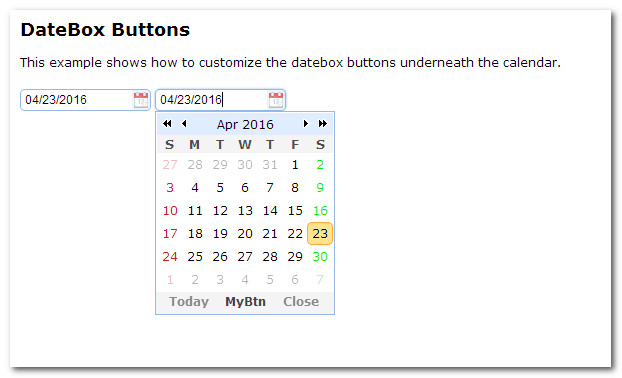
	<p>This example shows how to customize the datebox buttons underneath the calendar.</p>
	<div style="margin:20px 0;"></div>
	<input class="easyui-datebox"></input>
	<input class="easyui-datebox" data-options="buttons:buttons"></input>
	<script>
		var buttons = $.extend([], $.fn.datebox.defaults.buttons);
		buttons.splice(1, 0, {
			text: 'MyBtn',
			handler: function(target){
				alert('click MyBtn');
			}
		});
	</script>
</body>
</html>
作 者:imsoft
Email:imsofter#163.com
出处:http://www.cnblogs.com/imsoft/
本文版权归作者和博客园共有,欢迎转载、交流,但未经作者同意必须保留此段声明,且在文章页面明显位置给出原文链接。如果觉得本文对您有益,欢迎点赞、欢迎探讨。本博客来源于互联网的资源,若侵犯到您的权利,请联系博主予以删除。

 浙公网安备 33010602011771号