
Vue入门
Vue入门
目录
1. 简介
Vue.js是一套构建用户界面的渐进式框架。与其他重量级框架不同的是,Vue 采用自底向上增量开发的设计。Vue 的核心库只关注视图层,并且非常容易学习,非常容易与其它库或已有项目整合。另一方面,Vue 完全有能力驱动采用单文件组件和Vue生态系统支持的库开发的复杂单页应用。
cdn
2. 第一个VUE 程序
安装idea 插件 vue.js
<!DOCTYPE html>
<html lang="en">
<head>
    <meta charset="UTF-8">
    <title>vue</title>
    <script src="https://cdn.jsdelivr.net/npm/vue/dist/vue.js"></script>
</head>
<body>

<div id="app">
    {{message}}
</div>

<script>
    var app = new Vue({
        el:"#app",
        data:{
            message:"hello vue"
        }
    });
</script>
</body>
</html>
vue就是MVVM的实现者,他的核心就是实现了DOM监听和数据绑定
v-bind 指令
带有前缀v-,他们表示vue的特殊特性,这个元素的title和message进行绑定
<!DOCTYPE html>
<html lang="en">
<head>
    <meta charset="UTF-8">
    <title>vue</title>
    <script src="https://cdn.jsdelivr.net/npm/vue/dist/vue.js"></script>
</head>
<body>

<div id="app">
  <span v-bind:title="message">
    鼠标悬停几秒钟查看此处动态绑定的提示信息!
  </span>
</div>

<script>
    var app = new Vue({
        el:"#app",
        data:{
            message:"hello vue"
        }
    });
</script>
</body>
</html>
v-if v-else
<!DOCTYPE html>
<html lang="en">
<head>
    <meta charset="UTF-8">
    <title>vue</title>
    <script src="https://cdn.jsdelivr.net/npm/vue/dist/vue.js"></script>
</head>
<body>

<div id="app">
  <span v-bind:title="message">
    鼠标悬停几秒钟查看此处动态绑定的提示信息!
  </span>

    <h1 v-if="type==='A'">A</h1>
    <h1 v-else-if="type==='B'">B</h1>
    <h1 v-else>C</h1>
</div>

<script>
    var app = new Vue({
        el:"#app",
        data:{
            message:"hello vue",
            type: "A"
        }
    });
</script>
</body>
</html>
v-for
<!DOCTYPE html>
<html lang="en">
<head>
    <meta charset="UTF-8">
    <title>vue</title>
    <script src="https://cdn.jsdelivr.net/npm/vue/dist/vue.js"></script>
</head>
<body>

<div id="app">
    <h1>数组打印</h1>
    <li v-for="item in items">
        {{item.message}}
    </li>

    <hr>
    <h1>对象</h1>
    <li v-for="value in objects">
        {{value}}
    </li>

</div>

<script>
    var app = new Vue({
        el:"#app",
        data: {
            items: [
                {message: "immortal"},
                {message: "mysql"}
            ],
            objects: {
                id: 1,
                name: "immortal",
                age: 12
            }
        }
    });
</script>
</body>
</html>
3. 事件处理
v-on 事件绑定
<!DOCTYPE html>
<html lang="en">
<head>
    <meta charset="UTF-8">
    <title>vue</title>
    <script src="https://cdn.jsdelivr.net/npm/vue/dist/vue.js"></script>
</head>
<body>

<div id="app">
    <button v-on:click="sayhi">click me</button>
</div>

<script>
    var app = new Vue({
        el:"#app",
        data: {
           message: "vue is very easy!"
        },
        methods: {
            sayhi: function (event){
                alert(this.message);
            }
        }
    });
</script>
</body>
</html>
v-model 双向绑定
在表单中使用双向绑定,它负责监听输入执行进行实时更新
注意:v-model会忽略所有表单的value,checked,selected特性,初始值总是Vue示例数据作为来源
<!DOCTYPE html>
<html lang="en">
<head>
    <meta charset="UTF-8">
    <title>vue</title>
    <script src="https://cdn.jsdelivr.net/npm/vue/dist/vue.js"></script>
</head>
<body>

<div id="app">
    <input type="text" v-model="message">
    <hr>
    {{message}}
    <hr>
    <h1>select</h1>
    <select v-model="select">
        <option>A</option>
        <option>B</option>
        <option>C</option>
    </select>

    <h1>选择的是<span>{{select}}</span></h1>
</div>

<script>
    var app = new Vue({
        el:"#app",
        data: {
            message: "vue is very easy!",
            select: "A"
        }
    });
</script>
</body>
</html>
4. Vue组件
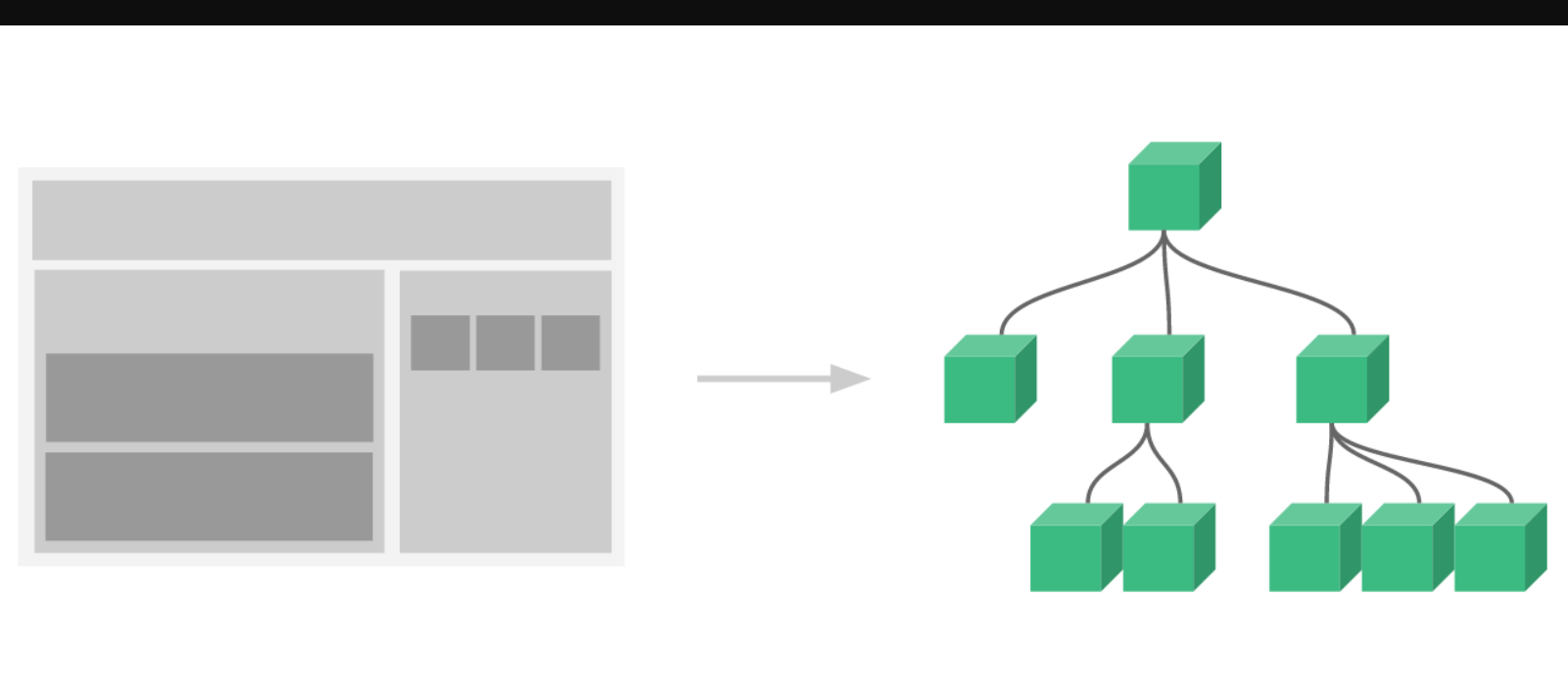
什么是组件
组件是可复用的Vue实例,说白了就是可以重复使用的模板
<!DOCTYPE html>
<html lang="en">
<head>
    <meta charset="UTF-8">
    <title>vue</title>
    <script src="https://cdn.jsdelivr.net/npm/vue/dist/vue.js"></script>
</head>
<body>

<div id="app">
    //这里是自定义组件 绑定数据,传入组件中
    <immortal v-for="item in items" v-bind:item="item"></immortal>
</div>

<script>

    Vue.component('immortal', {
        props: ['item'],
        template: '<li>{{item}}</li>'
    })
    var app = new Vue({
        el:"#app",
        data: {
            items: ['java','mysql','idea']
        }
    });
</script>
</body>
</html>
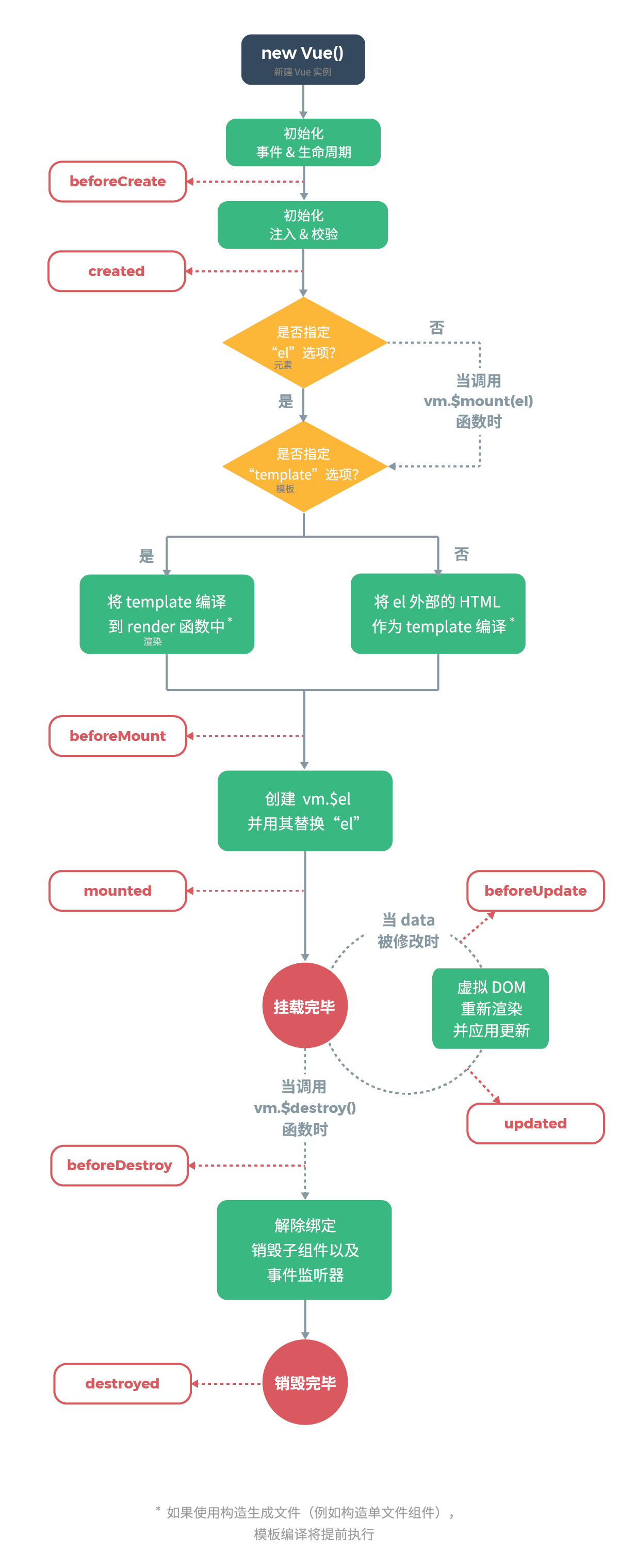
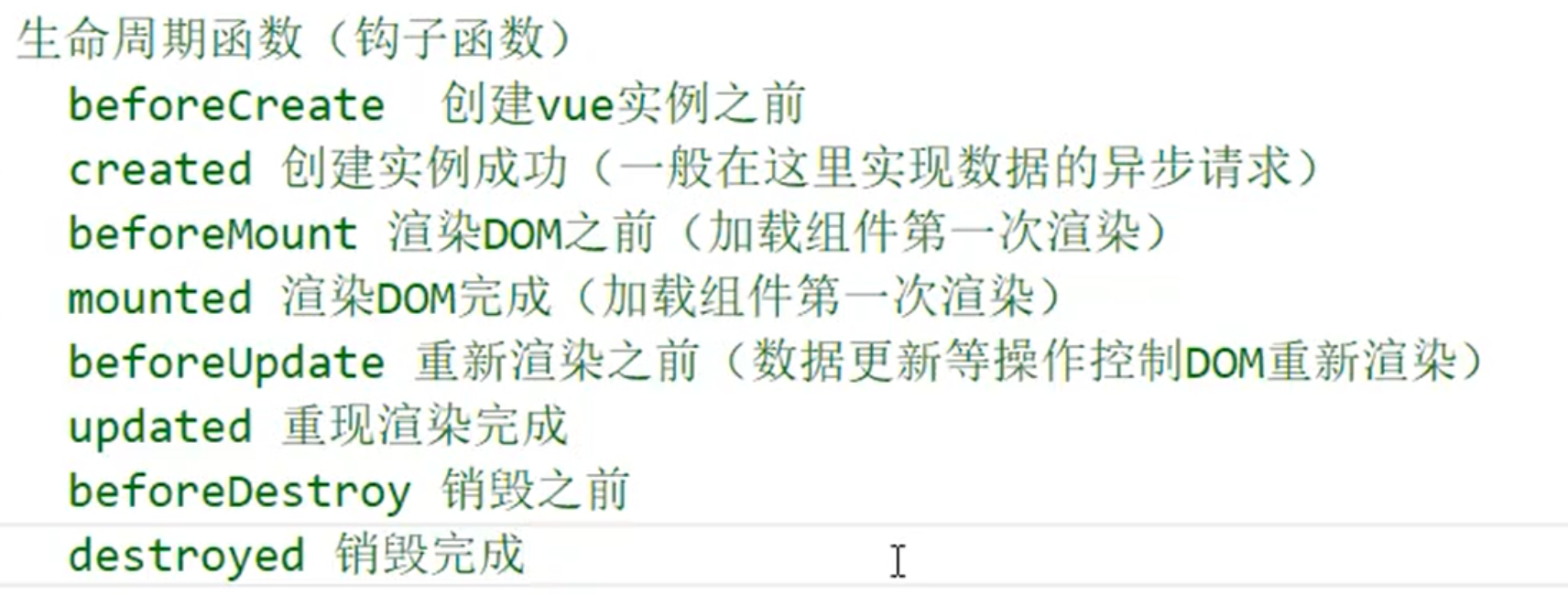
5. Vue生命周期
生命周期初识
钩子函数
6. 网络通信Axios
Axios是一个开源的用在与浏览器中和Node.js中的异步通信框架,它主要实现AJAX异步通信
<!DOCTYPE html>
<html lang="en">
<head>
    <meta charset="UTF-8">
    <title>vue</title>
    <script src="https://cdn.jsdelivr.net/npm/vue/dist/vue.js"></script>
    <script src="https://unpkg.com/axios/dist/axios.min.js"></script>

</head>
<body>

<div id="app">

    <h1>{{info.employee.name}}</h1>
</div>


<script>


    var app = new Vue({
        el:"#app",
        data: {
            items: ['java','mysql','idea']
        },
        data(){
            return{
                info:{}
            }
        },
        beforeCreate(){
            var url = "data.json"
            axios.get(url).then(response=>{
                this.info = response.data;
            });
        }
    });

</script>
</body>
</html>
7. 计算属性 computed
<!DOCTYPE html>
<html lang="en">
<head>
    <meta charset="UTF-8">
    <title>vue</title>
    <script src="https://cdn.jsdelivr.net/npm/vue/dist/vue.js"></script>
    <script src="https://unpkg.com/axios/dist/axios.min.js"></script>

</head>
<body>

<div id="app">
    <h1>{{currentTime1()}}</h1>
    <h1>{{currentTime2}}</h1>
</div>


<script>

    var app = new Vue({
        el:"#app",
        data: {
            items: ['java','mysql','idea']
        },
        methods:{
          currentTime1: function (){
              return Date.now();
          }
        },
        //这里是计算属性,相当mybatis中的缓存 做了增删改查,将会重新缓存
        computed:{
            currentTime2: function (){
                return Date.now();
            }
        }
    });

</script>
</body>
</html>
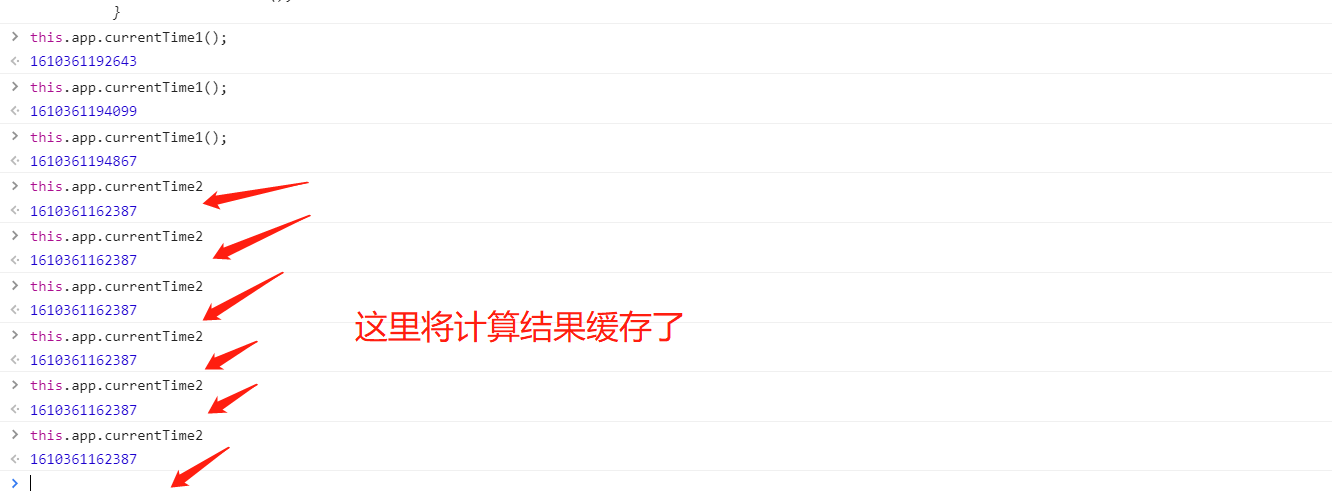
计算属性的主要特征就是为了将经常不变的计算结果进行缓存,节约系统的开销
8. 插槽
slut -_- 哈哈
概念
动态的可拔插,实现复用
<!DOCTYPE html>
<html lang="en">
<head>
    <meta charset="UTF-8">
    <title>vue</title>
    <script src="https://cdn.jsdelivr.net/npm/vue/dist/vue.js"></script>
</head>
<body>

<div id="app">
    <todo>
		<todo-title slot="todo-title" :title="title"></todo-title>
		<todo-items slot="todo-items" v-for="item in todoItems" :item="item"></todo-items>
	</todo>
</div>

<script>
	//定义插槽
	Vue.component("todo",{
		template:
		'<div>'+
			'<slot name="todo-title"></slot>'+
			'<ul>'+
				'<slot name="todo-items"></slot>'+
			'</ul>'+
		'</div>'
	});
	//定义标题组件
	Vue.component("todo-title",{
		props: ['title'],
		template: '<div>{{title}}</div>'
	});
	//定义item组件
	Vue.component("todo-items",{
		props: ['item'],
		template: '<li>{{item}}</li>'
	});
    var app = new Vue({
        el:"#app",
        data: {
           message: "vue is very easy!",
		   title: "study list",
		   todoItems: ['java','mysql','http','https']
        }
    });
</script>
</body>
</html>
9. 自定义事件
通过插槽可以发现,数据在Vue的实例中,但是删除的操作需要在组件中完成,那么组件中要删除Vue实例中的数据过海怎么操作尼?
这就涉及到了参数的传递,和事件分发了,Vue中提供了自定义事件的功能很好的解决了这个问题
使用this.$emit("event name",参数);
<!DOCTYPE html>
<html lang="en">
<head>
    <meta charset="UTF-8">
    <title>vue</title>
    <script src="https://cdn.jsdelivr.net/npm/vue/dist/vue.js"></script>
</head>
<body>

<div id="app">
    <todo>
		<todo-title slot="todo-title" :title="title"></todo-title>
		<todo-items slot="todo-items" v-for="(item,index) in todoItems" :item="item" :index="index" v-on:remove="removeItems(index)"></todo-items>
	</todo>
</div>

<script>
	//定义插槽
	Vue.component("todo",{
		template:
		'<div>'+
			'<slot name="todo-title"></slot>'+
			'<ul>'+
				'<slot name="todo-items"></slot>'+
			'</ul>'+
		'</div>'
	});
	//定义标题组件
	Vue.component("todo-title",{
		props: ['title'],
		template: '<div>{{title}}</div>'
	});
	//定义item组件
	Vue.component("todo-items",{
		props: ['item','index'],
		template: '<li>{{index}} --- {{item}}<button @click="remove">delete</button></li>',
		methods: {
			remove: function(){
				this.$emit("remove");
			}
		}
	});

    var app = new Vue({
        el:"#app",
        data: {
           message: "vue is very easy!",
		   title: "study list",
		   todoItems: ['java','mysql','http','https']
        },
		methods: {
			removeItems: function(index){
				alert("remove: "+ this.todoItems[index]);
				this.todoItems.splice(index,1);
			}
		}
    });
</script>
</body>
</html>

 浙公网安备 33010602011771号