
JDBC
JDBC
java操作数据库
数据库驱动
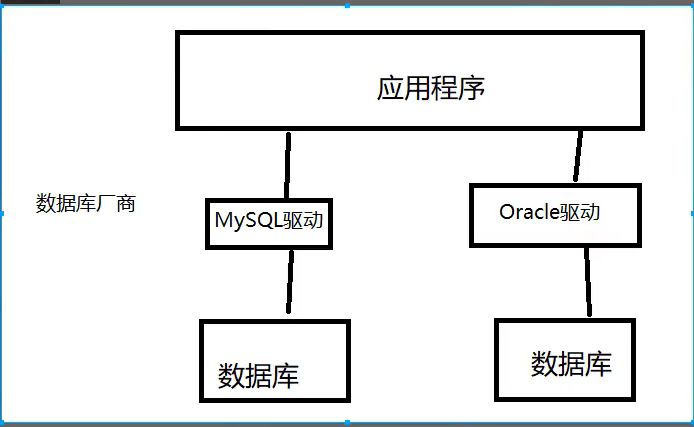
我们程序通过数据库驱动,于数据库打交道
SUN公司为了简化开发人员的统一操作,提供了一个java操作数据库的规范,俗称JDBC
这些规范由数据库厂商实现,开发人员只需要掌握JDBC就可以了
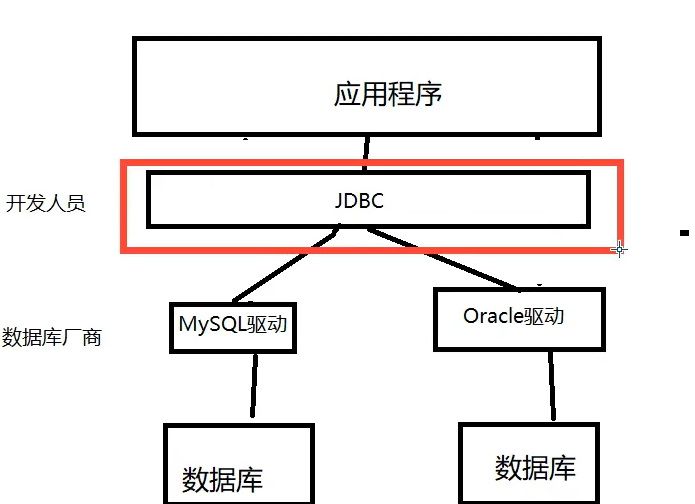
java.sql
javax.sql
<!-- https://mvnrepository.com/artifact/mysql/mysql-connector-java -->
<!-- 导入jar包-->
<dependency>
    <groupId>mysql</groupId>
    <artifactId>mysql-connector-java</artifactId>
    <version>8.0.19</version>
</dependency>
第一个JDBC程序
import java.sql.*;

public class FirstJDBC {
    public static void main(String[] args) throws ClassNotFoundException, SQLException {
        //加载驱动
        Class.forName("com.mysql.jdbc.Driver");
        //新建连接信息
        String url = "jdbc:mysql://localhost:3306/jdbcstudy?useUnicode=true&characterEncoding=utf8&useSSL=true&serverTimezone=Asia/Shanghai";
        String name = "root";
        String pwd = "123456";
        //连接成功,返回数据库对象
        Connection connection = DriverManager.getConnection(url, name, pwd);
        //执行sql的对象
        Statement statement = connection.createStatement();
        //执行sql,可能存在结果,查看返回信息
        String sql = "select * from users;";
        ResultSet resultSet = statement.executeQuery(sql);
        while (resultSet.next()){
            System.out.println(resultSet.getObject("id"));
            System.out.println(resultSet.getObject("NAME"));
            System.out.println(resultSet.getObject("PASSWORD"));
            System.out.println(resultSet.getObject("email"));
            System.out.println("--------------------------------");
        }
        //释放连接
        resultSet.close();
        statement.close();
        connection.close();
    }
}
 		//DriverManager.registerDriver(new com.mysql.jdbc.Driver());
        //加载驱动 推荐使用下面这种写法
        Class.forName("com.mysql.jdbc.Driver");

//com.mysql.jdbc.Driver() 这个类中的静态代码块做了此操作
/**
 * Backwards compatibility to support apps that call <code>Class.forName("com.mysql.jdbc.Driver");</code>.
 */
public class Driver extends com.mysql.cj.jdbc.Driver {
    public Driver() throws SQLException {
        super();
    }

    static {
        System.err.println("Loading class `com.mysql.jdbc.Driver'. This is deprecated. The new driver class is `com.mysql.cj.jdbc.Driver'. "
                + "The driver is automatically registered via the SPI and manual loading of the driver class is generally unnecessary.");
    }
}
//继承父类 先加载父类的静态代码块 com.mysql.cj.jdbc.Driver
public class Driver extends NonRegisteringDriver implements java.sql.Driver {
    //
    // Register ourselves with the DriverManager
    //
    static {
        try {
            java.sql.DriverManager.registerDriver(new Driver());
        } catch (SQLException E) {
            throw new RuntimeException("Can't register driver!");
        }
    }

}
Statement对象
jdbc中的statement对象用于向数据库发送sql语句
编写jdbc工具类
package util;

import java.io.InputStream;
import java.sql.*;
import java.util.Properties;

public class JdbcUtil {
    //驱动
    private static String driver = null;
    //url
    private static String url = null;
    //用户名
    private static String username = null;
    //密码
    private static String password = null;

    //初始化连接数据
    static {
        try {
            //读取properties文件
            InputStream resourceAsStream = JdbcUtil.class.getClassLoader().getResourceAsStream("db.properties");
            Properties properties = new Properties();
            properties.load(resourceAsStream);
            //获取数据
            driver = properties.getProperty("driver");
            url = properties.getProperty("url");
            username = properties.getProperty("username");
            password = properties.getProperty("password");
            //加载驱动
            Class.forName(driver);
        }catch (Exception e){
            e.printStackTrace();
        }
    }
    //获取连接
    public static Connection getConnection() throws SQLException {
        return DriverManager.getConnection(url,username,password);
    }
    //释放连接资源
    public static void release(Connection connection, Statement statement,ResultSet resultset){
        if (resultset != null){
            try {
                resultset.close();
            } catch (SQLException throwables) {
                throwables.printStackTrace();
            }
        }
        if (statement != null){
            try {
                statement.close();
            } catch (SQLException throwables) {
                throwables.printStackTrace();
            }
        }
        if (connection != null){
            try {
                connection.close();
            } catch (SQLException throwables) {
                throwables.printStackTrace();
            }
        }
    }
}
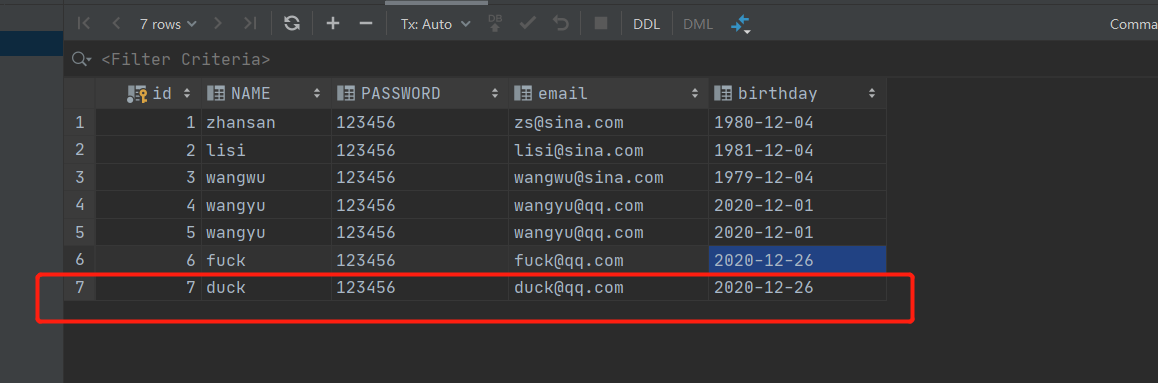
测试 插入 其他省略
import util.JdbcUtil;

import java.sql.Connection;
import java.sql.ResultSet;
import java.sql.SQLException;
import java.sql.Statement;
//测试连接
public class TestInsert {
    public static void main(String[] args){
        Connection connection = null;
        Statement statement = null;
        ResultSet resultSet = null;

        try {
            connection = JdbcUtil.getConnection();
            statement = connection.createStatement();

            String sql = "insert into users(id, NAME, PASSWORD, email, birthday) VALUES (7,'duck','123456','duck@qq.com',now())";

            int i = statement.executeUpdate(sql);

            if (1>0){
                System.out.println("insert success");
            }

        } catch (SQLException throwables) {
            throwables.printStackTrace();
        }finally {
            JdbcUtil.release(connection,statement,resultSet);
        }
    }
}
SQL注入问题
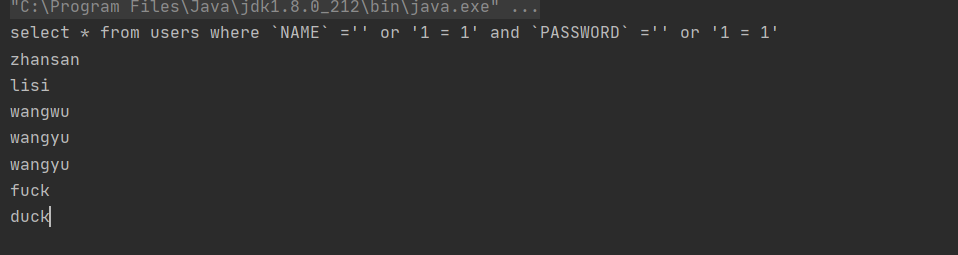
SQL注入即是指web应用程序对用户输入数据的合法性没有判断或过滤不严,攻击者可以在web应用程序中事先定义好的查询语句的结尾上添加额外的SQL语句,在管理员不知情的情况下实现非法操作,以此来实现欺骗数据库服务器执行非授权的任意查询,从而进一步得到相应的数据信息
上代码
import util.JdbcUtil;

import java.sql.Connection;
import java.sql.ResultSet;
import java.sql.SQLException;
import java.sql.Statement;

public class SQlInjection {
    public static void main(String[] args) {
        //拼接违法字符串
        //select * from users where `NAME` ='' or '1 = 1' and `PASSWORD` ='' or '1 = 1'
        login("' or '1 = 1","' or '1 = 1");
    }

    /**
     * 登录
     * @param username
     * @param password
     */
    public static void login(String username,String password){
        Connection connection = null;
        Statement statement = null;
        ResultSet resultSet = null;

        try {
            connection = JdbcUtil.getConnection();
            statement = connection.createStatement();

            String sql = "select * from users where `NAME` ="+"'"+username+"' and `PASSWORD` ="+"'"+password+"'";
            System.out.println(sql);

            resultSet = statement.executeQuery(sql);

            while (resultSet.next()){
                String name = resultSet.getString("NAME");
                System.out.println(name);
            }

        } catch (SQLException throwables) {
            throwables.printStackTrace();
        }finally {
            JdbcUtil.release(connection,statement,resultSet);
        }
    }
}
PrepareStatement
可以防止sql注入
上代码
import util.JdbcUtil;

import java.sql.*;

public class PrepareStatementTest {
    public static void main(String[] args) {
        //一样注入
        login("' or '1 = 1", "' or '1 = 1");
    }

    /**
     * 登录
     * @param username
     * @param password
     */
    public static void login(String username,String password){
        Connection connection = null;
        PreparedStatement preparedStatement = null;
        ResultSet resultSet = null;

        try {
            connection = JdbcUtil.getConnection();

            String sql = "select * from users where NAME = ? and PASSWORD = ?";
            preparedStatement = connection.prepareStatement(sql);

            preparedStatement.setString(1,username);
            preparedStatement.setString(2,password);
            System.out.println(sql);
            resultSet = preparedStatement.executeQuery();

            while (resultSet.next()){
                String name = resultSet.getString("NAME");
                System.out.println(name);
            }

        } catch (SQLException throwables) {
            throwables.printStackTrace();
        }finally {
            JdbcUtil.release(connection,preparedStatement,resultSet);
        }
    }
}
查不出结果
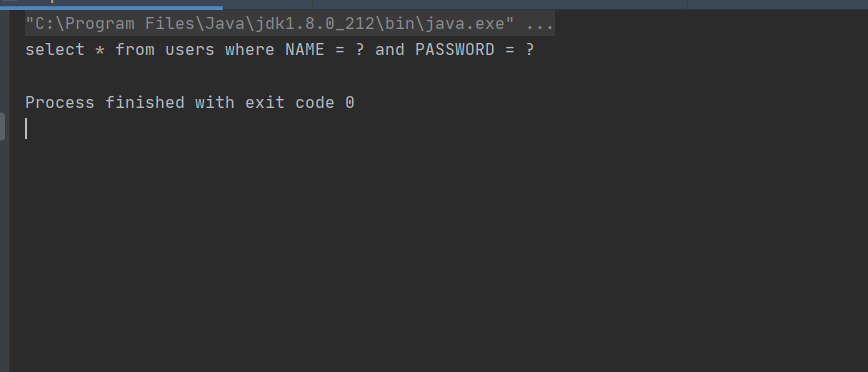
假设其中存在‘’这种字符会直接被转义掉
JDBC操作事务
ACID
原子性:要么都成功要么都失败
一致性:总数不变
隔离性:多个事务互不干扰
持久性:一旦提交不可逆
隔离性产生的问题
脏读:一个事务读取了另一个没有提交的数据
不可重复读:在同一事务内,重复读取表中的数据,表的数据发生了改变
幻读:在一个事务内,读取到了别人插入的数据,导致前后不一致
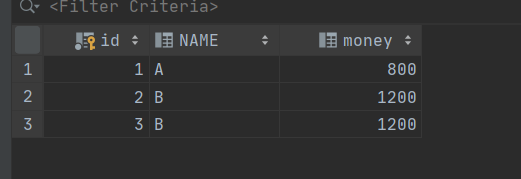
插入测试数据
CREATE TABLE account(
    id Int PRIMARY KEY AUTO_INCREMENT,
    NAME VARCHAR(40),
    money FLOAT
);

/*插入测试数据*/
insert into account(name,money) values('A',1000);
insert into account(name,money) values('B',1000);
insert into account(name,money) values('B',1000);
代码
public class TransactionTest {
    public static void main(String[] args) {
        Connection connection = null;
        PreparedStatement preparedStatement = null;
        ResultSet resultSet = null;

        try {
            //获得连接
            connection = JdbcUtil.getConnection();
            //关闭自动提交 开启事务
            connection.setAutoCommit(false);

            String sql1 = "update account set money = money - 100 where name = 'A'";
            preparedStatement = connection.prepareStatement(sql1);

            preparedStatement.executeUpdate();
            //制造异常
            int num = 1/0;

            String sql2 = "update account set money = money + 100 where name = 'B'";
            preparedStatement = connection.prepareStatement(sql2);

            preparedStatement.executeUpdate();

            connection.commit();
            System.out.println("事务成功");
        } catch (Exception throwables) {
            try {
                connection.rollback();
                System.out.println("rollback()");
            } catch (SQLException e) {
                e.printStackTrace();
            }

        }finally {
            //关闭资源
            JdbcUtil.release(connection,preparedStatement,resultSet);
        }
    }
}
数据库连接池
数据库连接释放是十分耗费系统资源的
池化技术:准备一些资源,过来就连接准备好的
现在开源数据源实现
dbcp
C3P0
Druid 阿里巴巴
DbCP 导入jar包
		 <!-- https://mvnrepository.com/artifact/commons-dbcp/commons-dbcp -->
        <dependency>
            <groupId>commons-dbcp</groupId>
            <artifactId>commons-dbcp</artifactId>
            <version>1.4</version>
        </dependency>
        <!-- https://mvnrepository.com/artifact/org.apache.commons/commons-pool2 -->
        <dependency>
            <groupId>org.apache.commons</groupId>
            <artifactId>commons-pool2</artifactId>
            <version>2.4.2</version>
        </dependency>
编写配置文件
driverClassName=com.mysql.cj.jdbc.Driver
url=jdbc:mysql://localhost:3306/jdbcstudy?useUnicode=true&characterEncoding=utf8&useSSl=true&serverTimezone=Asia/Shanghai
username=root
password=123456

#<!-- 初始化连接 -->
initialSize=10

#最大连接数量
maxActive=50

#<!-- 最大空闲连接 -->
maxIdle=20

#<!-- 最小空闲连接 -->
minIdle=5

#<!-- 超时等待时间以毫秒为单位 6000毫秒/1000等于60秒 -->
maxWait=60000
#JDBC驱动建立连接时附带的连接属性属性的格式必须为这样:【属性名=property;】
#注意:"user" 与 "password" 两个属性会被明确地传递,因此这里不需要包含他们。
connectionProperties=useUnicode=true;characterEncoding=UTF8

#指定由连接池所创建的连接的自动提交(auto-commit)状态。
defaultAutoCommit=true

#driver default 指定由连接池所创建的连接的只读(read-only)状态。
#如果没有设置该值,则“setReadOnly”方法将不被调用。(某些驱动并不支持只读模式,如:Informix)
defaultReadOnly=

#driver default 指定由连接池所创建的连接的事务级别(TransactionIsolation)。
#可用值为下列之一:(详情可见javadoc。)NONE,READ_UNCOMMITTED, READ_COMMITTED, REPEATABLE_READ, SERIALIZABLE
defaultTransactionIsolation=READ_UNCOMMITTED
更改之前的工具类 改变数据源
package util;


import org.apache.commons.dbcp.BasicDataSource;
import org.apache.commons.dbcp.BasicDataSourceFactory;

import javax.sql.DataSource;
import java.io.IOException;
import java.io.InputStream;
import java.sql.*;
import java.util.Properties;

public class JdbcUtilDBCP {
    private static DataSource dataSource = null;
    static{
        try {
            InputStream resourceAsStream = JdbcUtil.class.getClassLoader().getResourceAsStream("dbcpconfig.properties");
            Properties properties = new Properties();
            properties.load(resourceAsStream);
            //使用dbcp工厂 创建数据源
            dataSource = BasicDataSourceFactory.createDataSource(properties);

        } catch (Exception e) {
            e.printStackTrace();
        }
    }

    //获取连接
    public static Connection getConnection() throws SQLException {
        return dataSource.getConnection();
    }
    //释放连接资源
    public static void release(Connection connection, Statement statement, ResultSet resultset){
        if (resultset != null){
            try {
                resultset.close();
            } catch (SQLException throwables) {
                throwables.printStackTrace();
            }
        }
        if (statement != null){
            try {
                statement.close();
            } catch (SQLException throwables) {
                throwables.printStackTrace();
            }
        }
        if (connection != null){
            try {
                connection.close();
            } catch (SQLException throwables) {
                throwables.printStackTrace();
            }
        }
    }

}
C3P0 导入jar包
        <!-- https://mvnrepository.com/artifact/com.mchange/c3p0 -->
        <dependency>
            <groupId>com.mchange</groupId>
            <artifactId>c3p0</artifactId>
            <version>0.9.5.5</version>
        </dependency>
        <!-- https://mvnrepository.com/artifact/com.mchange/mchange-commons-java -->
        <dependency>
            <groupId>com.mchange</groupId>
            <artifactId>mchange-commons-java</artifactId>
            <version>0.2.19</version>
        </dependency>
编写配置文件
<?xml version="1.0" encoding="UTF-8"?>
<c3p0-config>
<!--
c3p0的缺省(默认)配置
如果在代码中"ComboPooledDataSource ds=new ComboPooledDataSource();"这样写就表示使用的是c3p0的缺省(默认)
xml中& 要用这个代替&
-->
<default-config>
<property name="driverClass">com.mysql.cj.jdbc.Driver</property>
<property name="jdbcUrl">jdbc:mysql://localhost:3306/jdbcstudy?useUnicode=true&characterEncoding=utf8&useSSl=true&serverTimezone=Asia/Shanghai</property>
<property name="user">root</property>
<property name="password">123456</property>
<property name="acquiredIncrement">5</property>
<property name="initialPoolSize">10</property>
<property name="minPoolSize">5</property>
<property name="maxPoolSize">20</property>
</default-config>
</c3p0-config>
更改工具类 改成吃c3p0 dataSource = new ComboPooledDataSource();
public class JdbcUtilC3P0 {
    private static DataSource dataSource = null;
    static{
        try {
            dataSource = new ComboPooledDataSource();
        } catch (Exception e) {
            e.printStackTrace();
        }
    }

    //获取连接
    public static Connection getConnection() throws SQLException {
        return dataSource.getConnection();
    }
    //释放连接资源
    public static void release(Connection connection, Statement statement, ResultSet resultset){
        if (resultset != null){
            try {
                resultset.close();
            } catch (SQLException throwables) {
                throwables.printStackTrace();
            }
        }
        if (statement != null){
            try {
                statement.close();
            } catch (SQLException throwables) {
                throwables.printStackTrace();
            }
        }
        if (connection != null){
            try {
                connection.close();
            } catch (SQLException throwables) {
                throwables.printStackTrace();
            }
        }
    }
}

 浙公网安备 33010602011771号