离线开发前先将maven项目的 pom.xml 里声明的依赖下载到本地
mvn dependency:go-offline
再执行打包程序, 将打包过程中的依赖更新一遍
mvn clean package -U
将代码和本地仓库拷贝到离线环境下
设置离线环境下maven的setting.xml
<offline>true</offline>
离线环境打包时使用
mvn clean package -o -DskipTests
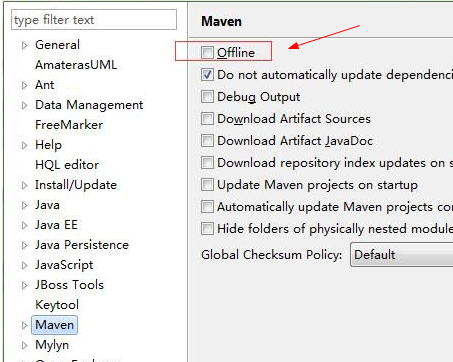
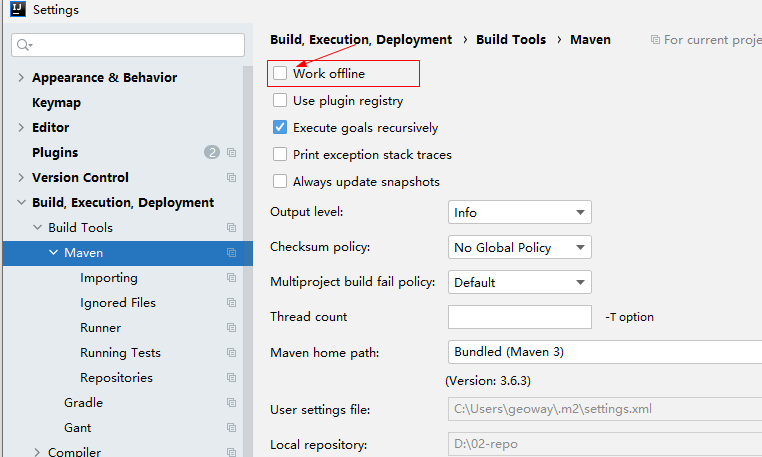
elipse配置idea配置
idea配置
附setting.xml
<?xml version="1.0" encoding="UTF-8"?>
<settings xmlns="http://maven.apache.org/SETTINGS/1.0.0"
	xmlns:xsi="http://www.w3.org/2001/XMLSchema-instance"
	xsi:schemaLocation="http://maven.apache.org/SETTINGS/1.0.0 http://maven.apache.org/xsd/settings-1.0.0.xsd">

	<!-- 本地仓库位置, 默认为"%HOMEPATH%/.m2/repository"文件夹,这里我自定义了位置 -->
	<localRepository>D:/02-repo</localRepository>
	<!--<offine>true</offine>-->

	<mirrors>
		<!-- 仓库镜像 -->
		<mirror>
			<id>central</id>
			<name>central</name>
			<url>http://maven.aliyun.com/nexus/content/groups/public</url>
			<mirrorOf>central</mirrorOf>
		</mirror>
	</mirrors>

	<profiles>
		<!-- JDK配置 -->
		<profile>
			<id>jdk-1.8</id>
			<activation>
				<activeByDefault>true</activeByDefault>
				<jdk>1.8</jdk>
			</activation>
			<properties>
				<maven.compiler.source>1.8</maven.compiler.source>
				<maven.compiler.target>1.8</maven.compiler.target>
				<maven.compiler.compilerVersion>1.8</maven.compiler.compilerVersion>
			</properties>
		</profile>
	</profiles>

	<!-- 每个profile代表一组预设配置, 在maven项目编译时可以指定使用哪一组配置, 这里设置了 jdk-1.8 配置永久激活 -->
	<activeProfiles>
		<activeProfile>jdk-1.8</activeProfile>
	</activeProfiles>

</settings>


 浙公网安备 33010602011771号