下拉列表的接口开发

摘要:

查询合并症的下拉列表

  • 其中涉及到单张表(TbComplication表)

  • 这个接口的设计思路:用户点击下拉列表框时,显示出来的合并症中的内容

  • TbComplicationController

    • @RestController
      @RequestMapping("/business/complication")
      public class TbComplicationController extends BaseController
      {
         @Autowired
         private ITbComplicationService tbComplicationService;
         
         /**
          * 查询合并症的下拉列表
          * @return
          */
         @GetMapping()
         public AjaxResult selectComplicationList(){
             Map<Long, String> longStringMap = tbComplicationService.selectComplicationList();
             return AjaxResult.success(longStringMap);
        }
  • ITbComplicationService

    • /**
      * 查询合并症的下拉列表
      * @return
      */
      public Map<Long,String> selectComplicationList();
  • TbComplicationServiceImpl

    • @Autowired
      private ITbComplicationService iTbComplicationService;

      /**
      * 查询合并症的下拉列表
      * @return
      */
      @Override
      public Map<Long,String> selectComplicationList() {
         Map<Long,String> map = new HashMap<>();

         List<TbComplication> list = iTbComplicationService.list();
         for (TbComplication tbComplication : list) {
             Long complicationId = tbComplication.getComplicationId();
             String complicationName = tbComplication.getComplicationName();
             map.put(complicationId,complicationName);
        }

         return map;
      }


查询文化程度的下拉列表

  • 其中涉及到单张表(TbEducation表)

  • 这个接口的设计思路:用户点击下拉列表框时,显示出来的文化程度中的内容

  • TbEducationController

    • @Autowired
      private ITbEducationService tbEducationService;

      /**
      * 查询文化程度的下拉列表
      * @return
      */
      @GetMapping()
      public AjaxResult selectEducationList(){
         Map<Long, String> longStringMap = tbEducationService.selectEducationList();
         return AjaxResult.success(longStringMap);
      }
  • ITbEducationService

    • /**
      * 查询文化程度的下拉列表
      * @return
      */
      public Map<Long,String> selectEducationList();
  • TbEducationServiceImpl

    • @Autowired
      private ITbEducationService iTbEducationService;

      /**
      * 查询文化程度的下拉列表
      * @return
      */
      @Override
      public Map<Long,String> selectEducationList() {
         Map<Long,String> map = new HashMap<>();

         List<TbEducation> list = iTbEducationService.list();
         for (TbEducation tbEducation : list) {
             Long degreeEducationId = tbEducation.getDegreeEducationId();
             String degreeEducationName = tbEducation.getDegreeEducationName();
             map.put(degreeEducationId,degreeEducationName);
        }

         return map;
      }

查询家族史的下拉列表

  • 其中涉及到单张表( TbFamilyhistory表)

  • 这个接口的设计思路:用户点击下拉列表框时,显示出来的家族史中的内容

  • TbFamilyhistoryController

    • @Autowired
      private ITbFamilyhistoryService tbFamilyhistoryService;

      /**
      * 查询家族史的下拉列表
      * @return
      */
      @GetMapping()
      public AjaxResult selectFamilyhistoryList(){
         Map<Long, String> longStringMap = tbFamilyhistoryService.selectFamilyhistoryList();
         return AjaxResult.success(longStringMap);
      }
  • ITbFamilyhistoryService

    • /**
      * 查询家族史的下拉列表
      * @return
      */
      public Map<Long,String> selectFamilyhistoryList();
  • TbFamilyhistoryServiceIpml

    • /**
      * 查询家族史的下拉列表
      * @return
      */
      @Override
      public Map<Long, String> selectFamilyhistoryList() {
         Map<Long,String> map = new HashMap<>();

         List<TbFamilyhistory> list = iTbFamilyhistoryService.list();
         for (TbFamilyhistory tbFamilyhistory : list) {
             Long familyhistoryId = tbFamilyhistory.getFamilyhistoryId();
             String familyhistoryName = tbFamilyhistory.getFamilyhistoryName();
             map.put(familyhistoryId,familyhistoryName);
        }

         return map;
      }

查询职业的下拉列表

  • 其中涉及到单张表( TbVocation表)

  • 这个接口的设计思路:用户点击下拉列表框时,显示出来的职业中的内容

  • TbVocationController

    • /**
      * 查询职业的下拉列表
      * @return
      */
      @GetMapping()
      public AjaxResult selectFamilyhistoryList(){
         Map<Long, String> longStringMap = tbVocationService.selectVocationList();
         return AjaxResult.success(longStringMap);
      }
  • ITbVocationService

    • /**
      * 查询职业的下拉列表
      * @return
      */
      public Map<Long,String> selectVocationList();
  • TbVocationServiceImpl

    • /**
      * 查询职业的下拉列表
      * @return
      */
      @Override
      public Map<Long, String> selectVocationList() {
         Map<Long,String> map = new HashMap<>();

         List<TbVocation> list = iTbVocationService.list();
         for (TbVocation tbVocation : list) {
             Long vocationId = tbVocation.getVocationId();
             String vocationName = tbVocation.getVocationName();
             map.put(vocationId,vocationName);
        }
         return map;
      }

查询医疗费用支付方式的下拉列表

  • 其中涉及到单张表( TbPay表)

  • 这个接口的设计思路:用户点击下拉列表框时,显示出来的医疗费用支付方式中的内容

  • TbPayController

    • @Autowired
      private ITbPayService tbPayService;


      /**
      * 查询医疗费用支付方式的下拉列表
      * @return
      */
      @GetMapping()
      public AjaxResult selectPayList(){
         Map<Long, String> longStringMap = tbPayService.selectPayList();
         return AjaxResult.success(longStringMap);
      }
  • ITbPayService

    • /**
      * 查询医疗费用支付方式的下拉列表
      * @return
      */
      public Map<Long,String> selectPayList();
  • TbPayServiceImpl

    • @Autowired
      private ITbPayService iTbPayService;


      /**
      * 查询医疗费用支付方式的下拉列表
      * @return
      */
      @Override
      public Map<Long, String> selectPayList() {
         Map<Long,String> map = new HashMap<>();

         List<TbPay> list = iTbPayService.list();
         for (TbPay tbPay : list) {
             Long payId = tbPay.getPayId();
             String payName = tbPay.getPayName();
             map.put(payId,payName);
        }
         return map;
      }

查询患者症状的下拉列表

  • 其中涉及到单张表( TbSymptom表)

  • 这个接口的设计思路:用户点击下拉列表框时,显示出来的患者症状中的内容

  • TbSymptomController

    • @Autowired
      private ITbSymptomService tbSymptomService;


      /**
      * 查询患者症状的下拉列表
      * @return
      */
      @GetMapping()
      public AjaxResult selectSymptomList(){
         Map<Long, String> longStringMap = tbSymptomService.selectSymptomList();
         return AjaxResult.success(longStringMap);
      }
  • ITbSymptomService

    • /**
      * 查询患者症状的下拉列表
      * @return
      */
      public Map<Long,String> selectSymptomList();
  • TbSymptomServiceImpl

    • @Autowired
      private ITbSymptomService iTbSymptomService;


      /**
      * 查询患者症状的下拉列表
      * @return
      */
      @Override
      public Map<Long, String> selectSymptomList() {
         Map<Long,String> map = new HashMap<>();

         List<TbSymptom> list = iTbSymptomService.list();
         for (TbSymptom tbSymptom : list) {
             Long symptomId = tbSymptom.getSymptomId();
             String symptomName = tbSymptom.getSymptomName();
             map.put(symptomId,symptomName);
        }

         return map;
      }


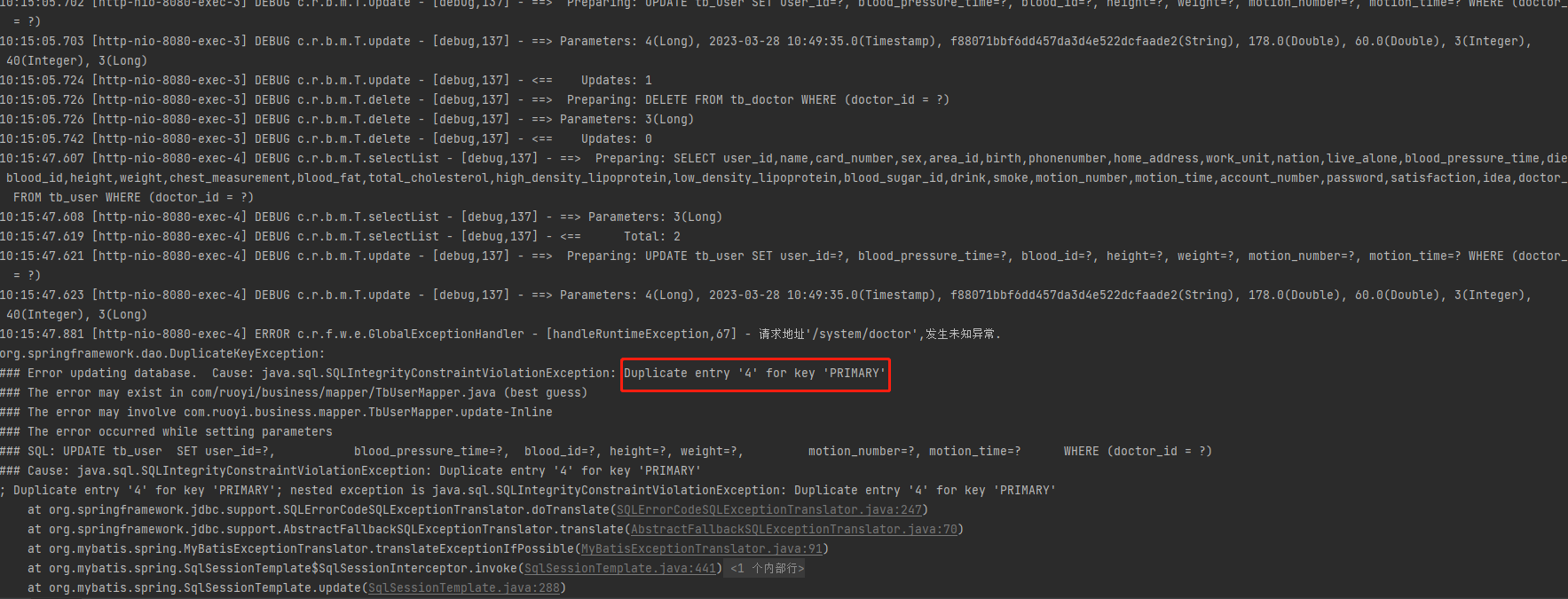
问题及解决

bug:userId为4的重复


问题分析:我在做删除医生接口的时候出现了bug,当一个签约医生的被删除时,原本属于这个签约的患者信息要修改,将这个user表中的doctorId清空。但是一直报这样的错误。

解决:后来我直接用原始的方法,将数据读取,再封装,然后删除数据,最后添加数据。这样就成功了

for (TbUser tbUser : list) {
   LambdaQueryWrapper<TbUser> queryWrapper = new LambdaQueryWrapper<>();
   queryWrapper.eq(TbUser::getUserId,tbUser.getUserId());
   TbUser one = iTbUserService.getOne(queryWrapper);

   //封装数据
   TbUser tbUser1 = new TbUser();
   //拷贝实体类
   BeanUtils.copyProperties(one,tbUser1);
   tbUser1.setDoctorId(null);
   remove1 = iTbUserService.remove(queryWrapper);
   save = iTbUserService.save(tbUser1);
}


总结

今天的学习状态是不错的,到现在接口开发的差不多,就会去考虑到一些细节的地方。就比如今天写的接口,一些下拉列表需要到数据表中去读取的数据的,在写下拉列表中没有出现过出现错误。就是写删除医生接口中出现了一个bug,费了很多的时间。

posted @ 2023-04-04 19:12  葬爱_坤疤  阅读(174)  评论(0)    收藏  举报