
vue省市区三级联动(高仿京东)
原文:https://www.cnblogs.com/silent007/p/9486439.html
该栗子是我直接从公司的项目单独拉出来的(懒得重新写一次了),所以代码会有些冗余,下面直接看效果:
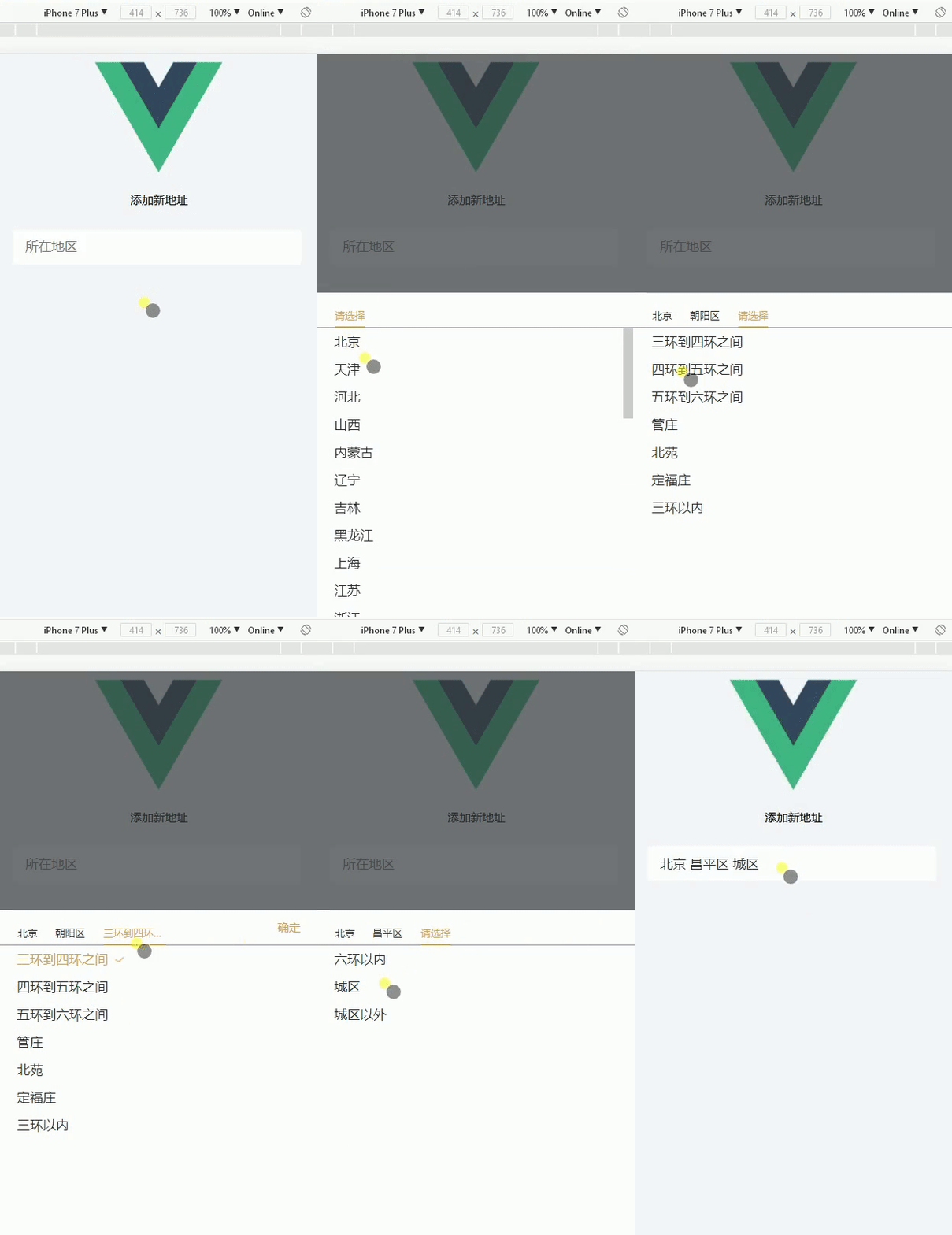
接着上代码:
html:

<template>
  <div>
    <div class="ysc-header">
        <p class="header-title">{{headerTxt}}</p>
    </div>
    <div class="addAddress" @click="choseAdd()">
        <input type="text" placeholder="所在地区" class="txtmangth" disabled="disabled" v-model="userAddress">
    </div>
    <!-- 收货地址三级联动选项 start-->
      <section class="address" :class="{toggHeight:istoggHeight}">
        <section class="title">
          <div class="area" @click="provinceSelected()" :class="[oneac ? 'accolor' : '']">{{Province?Province:'请选择'}}</div>
          <div class="area" @click="citySelected()" :class="[twoac ? 'accolor':'']" v-show="twoshow">{{City?City:'请选择'}}</div>
          <div class="area" @click="districtSelected()" :class="threeac ? 'accolor':''" v-show="threeshow">{{District?District:'请选择'}}</div>
          <div class="determine" v-show="showDeter" @click="determine()">确定</div>
        </section>
        <ul v-show="showProvince" class="proJuli">
          <li class="addList" v-for="(v,k) in info" @click="getProvinceId(v.id, v.name, k)" :key="v.id"  :class="{active : v.selected}"><span>{{v.name}}</span></li>
        </ul>
        <ul v-show="showCity" class="citJuli">
          <li class="addList" v-for="(v,k) in showCityList" @click="getCityId(v.id, v.name, k)"  :key="v.id"  :class="{active : v.selected}"><span>{{v.name}}</span></li>
        </ul>
        <ul v-show="showDistrict" class="disJuli">
          <li class="addList" v-for="(v,k) in showDistrictList" @click="getDistrictId(v.id, v.name, k)" :key="v.id" :class="{active : v.selected}"><span>{{v.name}}</span></li>
        </ul>
      </section>
    <!-- 收货地址三级联动选项 end-->
    <div class="layout" :class="{layoutBg:islayout}" @click="closeAdd()"></div>
  </div>
</template>
script:
<script>
import maps from '../../static/js/map.js'
export default {
  data () {
    return {
      islayout: false,
      istoggHeight: false,
      headerTxt: '添加新地址',
      isBc: false, // 用于控制保存按钮高亮
      toggle: false, // 用于切换默认地址
      showDeter: false,
      oneac: true,
      twoac: false,
      threeac: false,
      twoshow: false,
      threeshow: false,
      userAddress: '',
      oneliIndex: '', // 用于高亮子菜单
      twoliIndex: '',
      titleIndex: Number,
      showProvince: true, // 第一个li默认显示
      showCity: false, // 第二个li默认隐藏
      showDistrict: false, // 第三个li默认隐藏
      showCityList: [],
      showDistrictList: [],
      province: '',
      city: '',
      district: '',
      GetProvinceId: 2,
      District: '',
      Province: '',
      City: '',
      // v-for循环判断是否为当前
      selected: true,
      info: maps.map // 三级联动城市列表
    }
  },
  mounted () {
    document.querySelector('body').style.backgroundColor = '#f5f7fa'
  },
  created () {
    if (this.$route.query.data !== undefined) { // 如果是点击编辑地址过来,则执行...当然了,不一定非要用路由传参的方式,你也可以用本地存储,反正能证明你是点击了编辑地址过来就好
      this.showDeter = true
      this.headerTxt = '编辑收货地址'

      let editDate = JSON.parse(this.$route.query.data)
      this.province = editDate.province
      this.city = editDate.city
      this.district = editDate.district
      address.getAddressData({}).then((res) => { // axios请求,目的获取新增地址时,保存的地址ID,用于高亮显示
        if (res.isSuccess === 1) {
          // 初始化页面,如果是编辑地址的话,则
          this.twoshow = true // 控制第二个nav显示
          this.threeshow = true // 给第三个nav显示
          this.Province = editDate.areaDescription.split(' ')[0]
          this.City = editDate.areaDescription.split(' ')[1]
          this.District = editDate.areaDescription.split(' ')[2]
          this.showCityList = this._filter(this.info, 'city', editDate.province) // editDate.province由后台获取的id
          this.showDistrictList = this._filter(this.showCityList, 'district', editDate.city) // editDate.city由后台获取的id
          // 高亮后台返回选中的地址,需要对应id
          this._newArr(this.info, editDate.province)
          this._newArr(this.showCityList, editDate.city)
          this._newArr(this.showDistrictList, editDate.district)
        }
      })
    } else {
    //   address.getAddressData({}).then((res) => {
    //     if (res.isSuccess === 1) {
    //       this.info = res.resData[0].regionalInformation
    //     }
    //   })
        console.log(111)
    }
  },
  methods: {
    choseAdd: function () { // 选择地址弹层,打开弹层
      this.islayout = true
      this.istoggHeight = true
      if (this.$route.query.data !== undefined) {
        this._gotoTop('.proJuli', 0)
      }
    },
    closeAdd: function () { // 关闭弹层
      this.istoggHeight = false
      this.islayout = false
    },
    determine () {
      this.istoggHeight = false
      this.islayout = false
      // this.showDeter = false
      this.userAddress = this.Province + ' ' + this.City + ' ' + this.District
    },
    _newArr (arr, selectid) {
      for (var i = 0; i < arr.length; i++) {
        if (arr[i].id === selectid) {
          this.$set(arr[i], 'selected', true)
        } else if (selectid === -1) {
          this.$set(arr[i], 'selected', false)
        }
      }
      return arr
    },
    _filter (add, name, code) { // 数组,对应数组内容,对应数组id
      let result = []
      for (let i = 0; i < add.length; i++) {
        if (code === add[i].id) {
          // console.log(code, add[i].id)
          result = add[i][name]
        }
      }
      return result
    },
    _gotoTop (info, index) { // 滚动距离 --> 对应class,第几个index
      let proJuliBox = document.querySelector(info)
      let activeBox = document.getElementsByClassName('active')[index]
      let t = activeBox.offsetTop - 67 + 20 // 后面的数据,根据页面情况自己调整
      proJuliBox.scrollTo(0, t)
    },
    getProvinceId: function (code, input, index) { // 点击第一个li
      // console.log('code', code, input, index)
      this.titleIndex = Number
      this.province = code
      this.Province = input // 获取选中的省份
      this.showProvince = false
      this.showCity = true
      this.showDistrict = false
      this.showCityList = this._filter(this.info, 'city', this.province)
      // 点击选择当前
      this.info.map(a => { a.selected = false })
      this.info[index].selected = true
      // console.log(this.info[index].name) // 点击的省份的名字

      this.oneac = false // 给第一个nav去掉高亮
      this.twoac = true // 给第二个nav添加高亮
      this.threeac = false // 去除第三个li的高亮
      this.twoshow = true // 控制第二个nav显示
      // this.City = false // 清除市级和区级nav选项
      // this.District = false // 清除市级和区级nav选项
      this.City = '' // 第二nav置空
      this.threeshow = false // 第三nav隐藏
      this.oneliIndex = index
      this._newArr(this.showCityList, -1) // 清除市级高亮
      this.showDeter = false
    },
    provinceSelected: function () {
      // console.log('点击了第一个nav')
      // this.titleIndex = 1
      // 清除市级和区级列表
      // this.showCityList = true
      // this.showDistrictList = true
      // 清除市级和区级nav选项
      // this.City = false
      // this.District = false
      // 选项页面的切换
      this.showProvince = true
      this.showCity = false
      this.showDistrict = false
      this.oneac = true // 给第一个nav添加高亮
      this.twoac = false // 给第二个nav去除高亮
      this.threeac = false // 给第三个nav去掉高亮
    },
    getCityId: function (code, input, index) { // 点击第二个li
      // console.log('id', code, input, 'index', index)
      this.titleIndex = Number
      this.city = code
      this.City = input
      this.showProvince = false
      this.showCity = false
      this.showDistrict = true
      this.showDistrictList = this._filter(this.showCityList, 'district', this.city)
      // 选择当前添加active
      this.showCityList.map(a => { a.selected = false })
      this.showCityList[index].selected = true
      this.twoliIndex = index

      this.twoac = false // 给第二个nav去除高亮
      this.threeac = true // 给第三个nav添加高亮
      this.threeshow = true // 给第三个nav显示
      this.District = '' // 第三nav置空
      this._newArr(this.showDistrictList, -1) // 清除区级高亮
      this.showDeter = false
    },
    citySelected: function () {
      // console.log('点击了第二个nav')
      this.titleIndex = 2
      this.showProvince = false
      this.showCity = true
      this.showDistrict = false

      this.oneac = false // 给第一个nav去掉高亮
      this.twoac = true // 给第二个nav添加高亮
      this.threeac = false // 给第三个nav去掉高亮
      if (this.$route.query.data !== undefined) {
        this.$nextTick(() => { // 让li标签回到顶部
          this._gotoTop('.citJuli', 1)
        })
      }
    },
    getDistrictId: function (code, input, index) {
      this.titleIndex = Number
      this.district = code
      this.District = input
      // 选择当前添加active
      this.showDistrictList.map(a => { a.selected = false })
      this.showDistrictList[index].selected = true
      // 选取市区选项之后关闭弹层

      this.oneac = false // 给第一个nav去掉高亮
      this.showDeter = true
    },
    districtSelected: function () { // 第三个选择
      // console.log('点击了第三个nav')
      this.showProvince = false
      this.showCity = false
      this.showDistrict = true

      this.oneac = false // 给第一个nav去掉高亮
      this.twoac = false // 给第二个nav去掉高亮
      this.threeac = true // 给第三个nav添加高亮
      if (this.$route.query.data !== undefined) {
        this.$nextTick(() => { // 让li标签回到顶部
          this._gotoTop('.disJuli', 2)
        })
      }
    }
  },
  beforeDestroy () {
    document.querySelector('body').style.backgroundColor = '#fff'
  }
}
</script>
style:
</script>
<style>
*{
  margin: 0;
  padding: 0;
}
.ysc-header{
  font-size: .28rem;
  text-align: center;
}
.addAddress input {
  height: 0.8rem;
  width: 83%;
  background: #fff;
  color: #262e31;
  font-size: .3rem;
  border: none;
  margin: 0 .3rem;
  padding: 0 .3rem;
}
/* 地址选择弹层 */
.ac{
  color: #000!important;
  border-bottom: 0.02rem solid #fff!important;
}
.myAddress{
  width: 100%;
  background-color: white;
  border-top: 4px solid rgba(245,245,245,1);
  color:#333;
}
.myAddress .cont{
  border-bottom: 1px solid rgba(245,245,245,0.8);
}
.myAddress .cont span{
  display: inline-block;
  font-size: 0.28rem;
  color: #333;
  line-height: 0.88rem;
  margin-left: 0.32rem;
}
.myAddress .cont section{
  float:left;
}
.myAddress .cont p{
  display: inline-block;
  font-size: 0.28rem;
  color: #333333;
  line-height: 0.88rem;
  margin-left: 1rem;
}
.myAddress .cont .pic2{
  float: right;
  width: 0.14rem;
  height: 0.24rem;
  margin: 0.32rem 0.32rem 0.32rem 0;
}
.myAddress .cont p.text{
  margin-left: 0.72rem;
}
.address{
  position:absolute;
  bottom:0;
  left:0;
  z-index:121;
  background:#fff;
  width:100%;
  height: 0;
  overflow: hidden;
  transition: height .5s;
}
.toggHeight{
  height: 7.7rem;
}
.layout{
  width:100%;
  height:100%;
  position:fixed;
  top:0;
  left:0;
  z-index:120;
  opacity: 0;
  transition: all .5s;
  background:rgb(53, 58, 60);
  visibility: hidden;
}
.layoutBg{
  opacity: .7;
  visibility: visible;
}
.area{
  float: left;
  display:inline-block;
  font-size:0.24rem;
  height: .48rem;
  line-height:.48rem;
  margin-left:0.42rem;
  color:#262e31;
  margin-top: .31rem;
  max-width: calc(100% - 80%);overflow: hidden;text-overflow: ellipsis;white-space: nowrap;
}
.addList{
  margin-left: .4rem;
  font-size:0.3rem;
  line-height:0.67rem;
  color:#262e31;
}
.address ul{
  height: calc(100% - .82rem);
  overflow:auto;
}
.address ul li{
  list-style: none;
}
.address .title .accolor{
  color: #d2a24e;
  border-bottom:0.04rem solid #d2a24e;
}
.address ul .active{
  color:#d2a24e;
}
.address ul .active span::after{
  content: '';
  background-image: url(../assets/images/gou_img.png);
  width: .4rem;
  height: .2rem;
  background-repeat: no-repeat;
  background-size: .2rem .13rem;
  background-position: left .16rem center;
  display: inline-block;
}
.title{
  height: .82rem;
  border-bottom: .01rem solid #8a96a3;
}
.determine{
  display: inline-block;
  width: .75rem;
  text-align: center;
  float: right;
  height: .82rem;
  line-height: .82rem;
  margin-right: .3rem;
  color: #d2a24e;
  font-size: .28rem;
}
</style>
PS:那个地址的JS文件由于太大我就不贴出来了,大家可以去我的github那里下载完整的demo(觉得这个栗子还不错的话,记得给个star哦,么么哒),里面有---->https://github.com/yy-biboy/sanjiliandongDemo
下载demo后执行以下命令即可运行
1、npm install
2、npm run dev

 浙公网安备 33010602011771号