
启动多个device等的python 转帖
增强型MonkeyRunner 脚本计划
2011-11-25 10:02 by youxiachai, 7561 阅读, 6 评论, 收藏, 编辑
最近,做android项目测试,测试一个应用程序在多个设备中分辨率是否合适,麻烦得要命,不停的截图比较,前一段时间,研究了一下monkeyrunner ,决定通宵写一个实用性强的monkeyrunner来方便测试使用
前一段时间写的monkeyrunner资料
http://www.cnblogs.com/youxilua/archive/2011/11/12/2246576.html
功能说明:
- 可以自动安装apk到android模拟器或者android实机
- 可以截取设定好activity运行在android模拟器或者android实机上的效果图
- 截图根据设备名和截取时间保存
- 能够自动设别所有运行中的android模拟器或者android实机
- 能够自动安装在特定文件夹下所有的apk文件到android模拟器或者实机
功能实现:
环境配置:
- 设置好android /tootls 和 android /platform-tools 目录的到环境变量中,确保adb命令能够在cmd下正常运行
脚本编写:
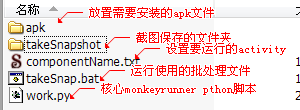
该功能需要创建以下几个文件
componentName.txt
使用约定
每一行为需要运行的activity的完整名字
例如:
kg.tom/.HandlerThreadActivity
kg.monkey/.MonkeyActivity
takeSnap.bat
@echooffrem 获取当前运行设备adb devices > devices.txtrem 获取APK文件dirapk/B> apk.txtrem 运行monkeyrunner 脚本monkeyrunner work.pyxxxx
核心运行脚本:
#导入我们需要用到的包和类并且起别名
#导入我们需要用到的包和类并且起别名importsys,time,datetimefromcom.android.monkeyrunnerimportMonkeyRunner as mrfromcom.android.monkeyrunnerimportMonkeyDevice as mdfromcom.android.monkeyrunnerimportMonkeyImage as mideviceslist=[]devices=[]snapshot=[]templist=[]f=open("devices.txt")whileTrue:line=f.readline()ifline:templist.append(line.strip())else:break;f.close()templist.pop()foriinrange(len(templist)):deviceslist.append(templist[i].split('\t'))fc=open("componentName.txt")complist=[]whileTrue:comp=fc.readline()ifcomp:complist.append(comp.strip())else:break;fc.close()fp=open("apk.txt")apklist=[]whileTrue:apk=fp.readline()ifapk:apklist.append(apk.strip())else:break;'apk list :'apklist'start componentName list :'complist'devices list:'deviceslistforiinrange(1,len(deviceslist)):'current devices:'deviceslist[i]devices.append(mr.waitForConnection(1.0,deviceslist[i][0]))#安装apk文件forjinrange(len(apklist)):devices[i-1].installPackage('apk/'+apklist[j])#启动activityforkinrange(len(complist)):'current start activity:'complist[k]devices[i-1].startActivity(component=complist[k])#设置延时秒数mr.sleep(5.0)#----------------#这里可进行一定的UI操作#----------------#mr.sleep(3.0)#进行截图snapshot.append(devices[i-1].takeSnapshot())'end snapshot'#创建时间字符串t=time.strftime("%Y-%m-%d-%X",time.localtime())t=t.replace(":","-")#保存截图package=complist[k].replace('/.','.')snapshot[0].writeToFile('takeSnapshot/'+deviceslist[i][0]+'-'+t+'-'+package+'.png','png');snapshot.pop()
由于之前毫无编写python的经验,只能写成这样了,欢迎高手补充!!!!!!

 浙公网安备 33010602011771号