
xdebug配置 不同版本
8.0.2 php 版本 配置 对应debug版本是 xdebug3.0.3
zend_extension=D:/phpstudy_pro/Extensions/php/php8.0.2nts/ext/php_xdebug.dll
xdebug.collect_return=1
;xdebug.auto_trace=Off
;xdebug.trace_output_dir=D:/phpstudy_pro/Extensions/php_log/php8.0.2nts.xdebug.trace
;xdebug.profiler_enable=Off
;xdebug.xdebug.output_dir ="D:\phpstudy_pro\Extensions\tmp\xdebug"
;xdebug.remote_enable=On
xdebug.client_enable=On
;xdebug.remote_host=127.0.0.1
xdebug.client_host=127.0.0.1
;xdebug.remote_port=9008
xdebug.client_port=9008
xdebug.remote_handler=dbgp
xdebug.idekey=IDEA
xdebug.mode=debug
php.ini 7.3.4 对应debug版本是 xdebug2.7.2
[Xdebug]
zend_extension=D:/phpstudy_pro/Extensions/php/php7.4.3nts/ext/php_xdebug.dll
xdebug.collect_params=1
xdebug.collect_return=1
xdebug.auto_trace=Off
xdebug.trace_output_dir=D:/phpstudy_pro/Extensions/php_log/php7.4.3nts.xdebug.trace
xdebug.profiler_enable=Off
xdebug.profiler_output_dir=D:/phpstudy_pro/Extensions/php_log/php7.4.3nts.xdebug.profiler
xdebug.remote_enable=1
xdebug.remote_host=localhost
xdebug.remote_port=9000
xdebug.remote_handler=dbgp
核心是xdebug 3 是用的client_port 而xdebug2 用的是remote
还有一个问题就是 自己设置 host 必须对应才行
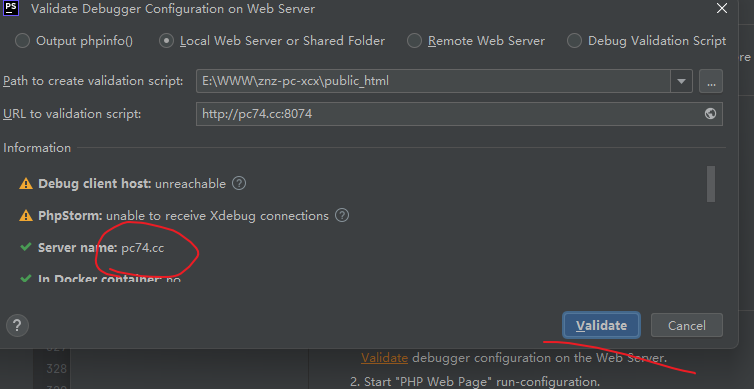
访问的地址就是
http://pc74.cc:8074/xcx/Member/memberinfo?XDEBUG_SESSION_START=PHPSTORM
必须和配置的地址匹配才能生效xdebug, 不然一边配置的127.0.0.1 一边配置的 www.testapi.cc 这样没对应上就不会生效
可以参考
phpstorm+xdebug配置踩过的坑_phpstorm xdebug 设置api接口监听-CSDN博客
https://blog.csdn.net/longjiankang/article/details/80677770

 浙公网安备 33010602011771号