打怪升级之小白的大数据之旅(二十五)<Java面向对象进阶之IO流三 其他常见流>
打怪升级之小白的大数据之旅(二十五)
Java面向对象进阶之IO流三 其他常见流
上次回顾
上一章,我们学习了常用的字节流与字符流,本章,我会将其他的一些常见的流进行分享,IO流很多,我介绍不完,就挑了几个我认为比较重要的流进行介绍了,其他的流使用方法基本类似.就如同学完Set集合学Map集合那样的轻松,好了,开始进入正题.
缓冲流
- 好了,正式介绍缓冲流,所谓缓冲流,它也叫高效流,他的基本原理是在创建流对象时,会创建一个内置的默认大小为8k的缓冲区数组,通过缓冲区读写,减少系统IO次数,从而提高读写的效率
- 缓冲流按照数据类型可以分为
- 字节缓冲流:
BufferedInputStream,BufferedOutputStream - 字符缓冲流:
BufferedReader,BufferedWriter
- 字节缓冲流:
字节缓冲流
构造方法
public BufferedInputStream(InputStream in):创建一个 新的缓冲输入流。public BufferedOutputStream(OutputStream out): 创建一个新的缓冲输出流- 示例代码:
// 创建字节缓冲输入流
BufferedInputStream bis = new BufferedInputStream(new FileInputStream("bis.txt"));
// 创建字节缓冲输出流
BufferedOutputStream bos = new BufferedOutputStream(new FileOutputStream("bos.txt"));
效率测试
- 为了更好的缓冲流的作用,下面我是用复制大文件的示例来演示缓冲流的妙用
一次读/写一个字节
- 基本流:
public class BufferedDemo { public static void main(String[] args) throws IOException { // 记录开始时间 long start = System.currentTimeMillis(); // 创建流对象 FileInputStream fis = new FileInputStream("jdk9.exe"); FileOutputStream fos = new FileOutputStream("copy.exe"); // 读写数据 int b; while ((b = fis.read()) != -1) { fos.write(b); } fos.close(); fis.close(); // 记录结束时间 long end = System.currentTimeMillis(); System.out.println("普通流复制时间:"+(end - start)+" 毫秒"); } } // 过了十几分钟了....我都快睡着了.. - 缓冲流:
public class BufferedDemo {
    public static void main(String[] args) throws IOException {
        // 记录开始时间
      	long start = System.currentTimeMillis();
		// 创建流对象
        BufferedInputStream bis = new BufferedInputStream(new FileInputStream("jdk9.exe"));
	    BufferedOutputStream bos = new BufferedOutputStream(new FileOutputStream("copy.exe"));
        // 读写数据
        int b;
        while ((b = bis.read()) != -1) {
            bos.write(b);
        }

        bos.close();
        bis.close();

		// 记录结束时间
        long end = System.currentTimeMillis();
        System.out.println("缓冲流复制时间:"+(end - start)+" 毫秒");
    }
}
// 缓冲流复制时间:8016 毫秒
上面是一个字节的效率测试,我就直接使用字节数组的缓冲流,看看效率如何:
- 缓冲流
public class BufferedDemo {
    public static void main(String[] args) throws IOException {
      	// 记录开始时间
        long start = System.currentTimeMillis();
		// 创建流对象
		BufferedInputStream bis = new BufferedInputStream(new FileInputStream("jdk9.exe"));
		BufferedOutputStream bos = new BufferedOutputStream(new FileOutputStream("copy.exe"));
          	// 读写数据
        int len;
        byte[] bytes = new byte[8*1024];
        while ((len = bis.read(bytes)) != -1) {
            bos.write(bytes, 0 , len);
        }

        bos.close();
        bis.close();
		// 记录结束时间
        long end = System.currentTimeMillis();
        System.out.println("缓冲流使用数组复制时间:"+(end - start)+" 毫秒");
    }
}
// 缓冲流使用数组复制时间:666 毫秒
根据上面的测试,我们可以得出,以后复制文件就用字节数组,要想更快就用缓冲流~飞一般的感觉
字符缓冲流
构造方法
public BufferedReader(Reader in):创建一个 新的缓冲输入流。public BufferedWriter(Writer out): 创建一个新的缓冲输出流- 示例代码
// 创建字符缓冲输入流
BufferedReader br = new BufferedReader(new FileReader("br.txt"));
// 创建字符缓冲输出流
BufferedWriter bw = new BufferedWriter(new FileWriter("bw.txt"));
特有方法
- 字符缓冲流的基本方法与普通字符流调用方式一致,不再阐述,我们来看它们具备的特有方法:
BufferedReader:public String readLine(): 读一行文字。BufferedWriter:public void newLine(): 写一行行分隔符,由系统属性定义符号- 示例代码
// readLine
public class BufferedReaderDemo {
    public static void main(String[] args) throws IOException {
      	 // 创建流对象
        BufferedReader br = new BufferedReader(new FileReader("in.txt"));
		// 定义字符串,保存读取的一行文字
        String line  = null;
      	// 循环读取,读取到最后返回null
        while ((line = br.readLine())!=null) {
            System.out.print(line);
            System.out.println("------");
        }
		// 释放资源
        br.close();
    }
}
// newline
public class BufferedWriterDemo throws IOException {
    public static void main(String[] args) throws IOException  {
      	// 创建流对象
		BufferedWriter bw = new BufferedWriter(new FileWriter("out.txt"));
      	// 写出数据
        bw.write("尚");
      	// 写出换行
        bw.newLine();
        bw.write("硅");
        bw.newLine();
        bw.write("谷");
        bw.newLine();
		// 释放资源
        bw.close();
    }
}
转换流
- 前面说过,转换流主要任务就是对字符的编码进行操作,字符编码和字符集在字符串String那里介绍过了,这里就讲一下新的知识点
- 字符的编码与解码
- 我们知道,计算机存储的顺序都是二进制数,我们将字符存储到计算机就是编码
- 将存储在计算机中的二进制数按照某种规则解析出来,就是解码
- 编码和解码的编码表必须一致,否则就会出现乱码
- 通俗的解释:
- 编码:字符(能看懂的)–字节(看不懂的)
- 解码:字节(看不懂的)–>字符(能看懂的)
InputStreamReader类
- 转换流java.io.InputStreamReader,是Reader的子类,是从字节流到字符流的桥梁。它读取字节,并使用指定的字符集将其解码为字符。它的字符集可以由名称指定,也可以接受平台的默认字符集
构造方法:
InputStreamReader(InputStream in): 创建一个使用默认字符集的字符流。InputStreamReader(InputStream in, String charsetName): 创建一个指定字符集的字符流- 示例代码:
InputStreamReader isr = new InputStreamReader(new FileInputStream("in.txt"));
InputStreamReader isr2 = new InputStreamReader(new FileInputStream("in.txt") , "GBK");
指定编码读取
public class ReaderDemo2 {
    public static void main(String[] args) throws IOException {
      	// 定义文件路径,文件为gbk编码
        String FileName = "E:\\file_gbk.txt";
      	// 创建流对象,默认UTF8编码
        InputStreamReader isr = new InputStreamReader(new FileInputStream(FileName));
      	// 创建流对象,指定GBK编码
        InputStreamReader isr2 = new InputStreamReader(new FileInputStream(FileName) , "GBK");
		// 定义变量,保存字符
        int read;
      	// 使用默认编码字符流读取,乱码
        while ((read = isr.read()) != -1) {
            System.out.print((char)read); // ��Һ�
        }
        isr.close();

      	// 使用指定编码字符流读取,正常解析
        while ((read = isr2.read()) != -1) {
            System.out.print((char)read);// 大家好
        }
        isr2.close();
    }
}
OutputStreamWriter类
- 转换流java.io.OutputStreamWriter ,是Writer的子类,是从字符流到字节流的桥梁。使用指定的字符集将字符编码为字节。它的字符集可以由名称指定,也可以接受平台的默认字符集
构造方法
OutputStreamWriter(OutputStream in): 创建一个使用默认字符集的字符流。OutputStreamWriter(OutputStream in, String charsetName): 创建一个指定字符集的字符流- 示例代码:
OutputStreamWriter isr = new OutputStreamWriter(new FileOutputStream("out.txt"));
OutputStreamWriter isr2 = new OutputStreamWriter(new FileOutputStream("out.txt") , "GBK")
指定编码写出
public class OutputDemo {
    public static void main(String[] args) throws IOException {
      	// 定义文件路径
        String FileName = "E:\\out.txt";
      	// 创建流对象,默认UTF8编码
        OutputStreamWriter osw = new OutputStreamWriter(new FileOutputStream(FileName));
        // 写出数据
      	osw.write("你好"); // 保存为6个字节
        osw.close();

		// 定义文件路径
		String FileName2 = "E:\\out2.txt";
     	// 创建流对象,指定GBK编码
        OutputStreamWriter osw2 = new OutputStreamWriter(new FileOutputStream(FileName2),"GBK");
        // 写出数据
      	osw2.write("你好");// 保存为4个字节
        osw2.close();
    }
}
数据流
- 前面学习的IO流都是对数据按照字节或者字符进行处理,那如果我想直接处理Java的基本数据类型应该怎么办?
- 此时就需要数据流DateOutputStream了,我就不再次详细按照输入输出介绍了,直接综合代码:
import java.io.DataInputStream;
import java.io.DataOutputStream;
import java.io.FileInputStream;
import java.io.FileOutputStream;
import java.io.IOException;

public class TestData {
	public void save() throws IOException{
		String name = "巫师";
		int age = 300;
		char gender = '男';
		int energy = 5000;
		double price = 75.5;
		boolean relive = true;

		DataOutputStream dos = new DataOutputStream(new FileOutputStream("game.dat"));
		dos.writeUTF(name);
		dos.writeInt(age);
		dos.writeChar(gender);
		dos.writeInt(energy);
		dos.writeDouble(price);
		dos.writeBoolean(relive);
		dos.close();
	}
	public void reload()throws IOException{
		DataInputStream dis = new DataInputStream(new FileInputStream("game.dat"));
		String name = dis.readUTF();
		int age = dis.readInt();
		char gender = dis.readChar();
		int energy = dis.readInt();
		double price = dis.readDouble();
		boolean relive = dis.readBoolean();

		System.out.println(name+"," + age + "," + gender + "," + energy + "," + price + "," + relive);

		dis.close();
	}
}
对象流
序列化
介绍对象流之前,先铺垫一下序列化的知识点,序列号是什么?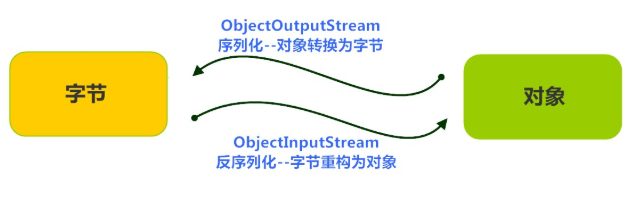
-
java 提供了一种对象序列化的机制。用字节序列可以表示一个对象,该字节序列包含该对象的类型和对象中存储的属性等信息。字节序列写出到文件之后,相当于文件中持久保存了一个对象的信息。
-
反之,该字节序列还可以从文件中读取回来,重构对象,对它进行反序列化。对象的数据、对象的类型和对象中存储的数据信息,都可以用来在内存中创建对象
-
既然Java的基本数据类型都可以进行IO操作,那么Java的对象呢?
-
此时就可以使用ObjectInputStream/ObjectOutputStream
-
唔,下面的知识点还是不能偷懒…
ObjectOutputStream类
- java.io.ObjectOutputStream 类,将Java对象的原始数据类型写出到文件,实现对象的持久存储
构造方法
public ObjectOutputStream(OutputStream out): 创建一个指定OutputStream的ObjectOutputStream- 示例代码:
FileOutputStream fileOut = new FileOutputStream("employee.txt");
ObjectOutputStream out = new ObjectOutputStream(fileOut);
序列化操作
- 该类必须实现java.io.Serializable 接口,否则会抛出
NotSerializableException - 如果不想将某一个属性序列化,就加上关键字
transient(比如网络中传输时,考虑安全因素银行卡字段可以使用transient不进行序列化) - 静态变量的值不会序列化(静态变量的值不属于某个对象的数据,而是属于类的数据)
- 示例代码:
// 定义待序列化的类
public class Employee implements java.io.Serializable {
    public static String company = "大数据";
    public String name;
    public String address;
    public transient int age; // transient瞬态修饰成员,不会被序列化
    public void addressCheck() {
      	System.out.println("Address  check : " + name + " -- " + address);
    }
}
// 序列化操作
public class SerializeDemo{
   	public static void main(String [] args)   {
    	Employee e = new Employee();
    	e.name = "zhangsan";
    	e.address = "beiqinglu";
    	e.age = 20;
    	try {
      		// 创建序列化流对象
          ObjectOutputStream out = new ObjectOutputStream(new FileOutputStream("employee.txt"));
        	// 写出对象
        	out.writeObject(e);
        	// 释放资源
        	out.close();
        	fileOut.close();
        	System.out.println("Serialized data is saved"); // 姓名,地址被序列化,年龄没有被序列化。
        } catch(IOException i)   {
            i.printStackTrace();
        }
   	}
}
ObjectInputStream类
- ObjectInputStream反序列化流,将之前使用ObjectOutputStream序列化的原始数据恢复为对象
构造方法
public ObjectInputStream(InputStream in): 创建一个指定InputStream的ObjectInputStream
反序列化操作
- 如果能找到一个对象的class文件,我们可以进行反序列化操作,调用ObjectInputStream读取对象的方法
public final Object readObject (): 读取一个对象- 示例代码
public class DeserializeDemo {
   public static void main(String [] args)   {
        Employee e = null;
        try {
             // 创建反序列化流
             FileInputStream fileIn = new FileInputStream("employee.txt");
             ObjectInputStream in = new ObjectInputStream(fileIn);
             // 读取一个对象
             e = (Employee) in.readObject();
             // 释放资源
             in.close();
             fileIn.close();
        }catch(IOException i) {
             // 捕获其他异常
             i.printStackTrace();
             return;
        }catch(ClassNotFoundException c)  {
        	// 捕获类找不到异常
             System.out.println("Employee class not found");
             c.printStackTrace();
             return;
        }
        // 无异常,直接打印输出
        System.out.println("Name: " + e.name);	// zhangsan
        System.out.println("Address: " + e.address); // beiqinglu
        System.out.println("age: " + e.age); // 0
    }
}
对象流练习:
/*1. 把若干学生对象 ,保存到集合中。
2. 把集合序列化。
3. 反序列化读取时,只需要读取一次,转换为集合类型。
4. 遍历集合,可以打印所有的学生信息*/

public class SerTest {
	public static void main(String[] args) throws Exception {
		// 创建 学生对象
		Student student = new Student("老王", "laow");
		Student student2 = new Student("老张", "laoz");
		Student student3 = new Student("老李", "laol");

		ArrayList<Student> arrayList = new ArrayList<>();
		arrayList.add(student);
		arrayList.add(student2);
		arrayList.add(student3);
		// 序列化操作
		// serializ(arrayList);

		// 反序列化
		ObjectInputStream ois  = new ObjectInputStream(new FileInputStream("list.txt"));
		// 读取对象,强转为ArrayList类型
		ArrayList<Student> list  = (ArrayList<Student>)ois.readObject();

      	for (int i = 0; i < list.size(); i++ ){
          	Student s = list.get(i);
        	System.out.println(s.getName()+"--"+ s.getPwd());
      	}
	}

	private static void serializ(ArrayList<Student> arrayList) throws Exception {
		// 创建 序列化流
		ObjectOutputStream oos = new ObjectOutputStream(new FileOutputStream("list.txt"));
		// 写出对象
		oos.writeObject(arrayList);
		// 释放资源
		oos.close();
	}
}
打印流
- 什么是打印流呢?
- 我们从第一章开始的第一个程序,打印helloworld到现在,使用了无数次的system.out.println()就是打印流和输出流的结合
- 打印流的特点是只有输出没有输入,它具体是怎么做的呢?接下来,我为大家介绍打印流的输出原理
构造方法
public PrintStream(String fileName): 使用指定的文件名创建一个新的字节打印流。public PrintWriter(String fileName):使用指定的文件名创建一个新的字符打印流。PrintWriter(OutputStream out, boolean autoFlush):基于字符输出流创建一个自动刷新的字符打印流- 示例代码:
PrintStream ps = new PrintStream("ps.txt");
PrintWriter pw = new PrintWriter("pw.txt");
PrintWriter pw2 = new PrintWriter(new FileOutputStream("pw2.txt"),true);
打印流输出
 @Test
    public void test1() {
        PrintStream ps = null;
        PrintWriter pw = null;
        try {
            ps = new PrintStream("ps.txt");
            ps.write(97);
            ps.print('b');
            ps.println("c");
            ps.close();
            pw = new PrintWriter("pw.txt");
            pw.write("aa");
            pw.print("bb");
            pw.println("cc");
            pw.close();
        } catch (FileNotFoundException e) {
            e.printStackTrace();
        }finally {//释放资源
            ps.close();
            pw.close();
        }
    }
了解了打印流的操作方法,接下来,我们去看看Syetem的源码:
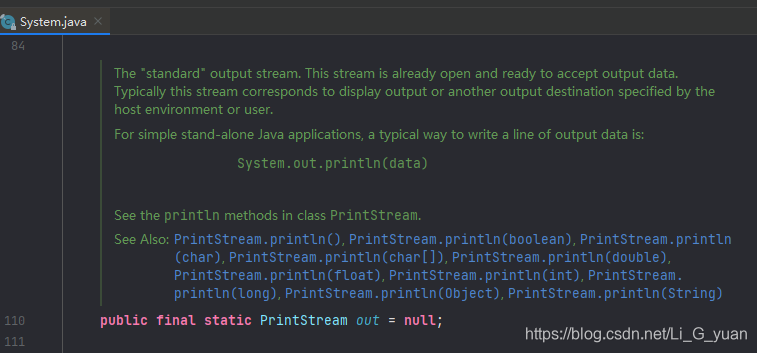
看到了吧,System的源码使用的就是打印流+输出流,因此,我们才可以很方便的在控制台输出信息
标准输入/输出流
System类中有三个属性字段
| Modifier and Type | Field and Description |
|---|---|
| static PrintStream | “标准”错误输出流 |
| static InputStream | “标准”输入流 |
| static PrintStream | “标准”输出流 |
-
System.in 标准输入流,本质是一个字节输入流,默认接受键盘录入的数据(不要用Junit单元测试,键盘录入)
-
System.out 标准输出流,本质是一个字节输出流,默认输出数据到控制台,System.out.println是打印和输出流的结合
-
我在第四章流程控制中介绍了Scanner键盘录入的类,今天来把以前留的坑填补了.
-
还记得使用Scanner类来获取用户在键盘输入数据的方式么?我们再来回顾下:
package com.test01socket;
import java.util.Scanner;
// 回顾键盘录入功能
public class ScannerTest {
    public static void main(String[] args) {
        // 创建键盘扫描器对象
        Scanner sc = new Scanner(System.in);

        // 获取用户在控制台输入的整型
        int num = sc.nextInt();
        // 获取用户在控制台输入的浮点型
        double numDouble = sc.nextDouble();
        // 获取用户在控制台输入的字符串
        String userStr = sc.next();
        String userStr2 = sc.nextLine();
    }
}
今天我们通过输入流来实现以下Scanner的功能
import java.io.BufferedReader;
import java.io.IOException;
import java.io.InputStreamReader;
import java.util.Scanner;

// 回顾键盘录入功能
public class ScannerTest {
    public static void main(String[] args) throws IOException {
        // 标准输入流: System类中的in属性,是一个标准输入流,表示从键盘接收数据
        BufferedReader br = new BufferedReader(new InputStreamReader(System.in));
        // 获取用户在控制台输入的一行字符串
        String line = br.readLine();
        // 打印倒控制台
        System.out.println(line);
    }
}
IOUtils工具类
- IOUtils是Apache出品的一个方便IO操作的工具类,简化了IO流的读、写、复制及关闭流等操作(使用前需要导包)
- 它就如同Arrays,Collections一样,针对IO操作也开发了一个三方的包,方便我们使用它,同样以复制文件进行举例:
@Test
    public void test2() throws IOException {
        IOUtils.copy(new FileInputStream("ps.txt"), new FileOutputStream("pw.txt"));//复制文件
        IOUtils.write("hello world",new FileOutputStream("ps.txt"),"UTF-8");//写数据到文件
    }
总结
- IO流的知识点基本上就介绍到这里,IO流很多,我们在实际需求中,随时查API文档即可。下面我来总结一下整个IO流的内容
- IO流通俗意义讲就是实现输入和输入的过程,输入和输出当然需要一个地点,所以IO流内部都有File类,用于对文件/文件夹的路径进行操作
- 当我们对文件中的内容进行操作时根据数据类型可以分为字节流和字符流
- 字节流用于任何数据但对中文还有其他国家的文字不够友好,因为编码的问题,我们就有了转换流,用于对不同数据的编码问题进行解决
- 并且我们针对文本文件就有了字符流
- IO操作比较耗费资源,所以我们就认识了缓冲流,用于避免重复的资源浪费以及加快IO操作的效率
- 我们保存数据除了常见的数据还会遇到编程的程序代码,所以针对基本数据类型的保存有了数据流,针对java的对象保存有了对象流
- 对象的保存时为了让计算机可以识别,就有了序列化的概念
- 我们平时的代码调试会使用System.out.println,所以,我们又了解了打印流与输入输出流
- 好了,今天的内容就是这些,下一章,我会为大家带来多线程的相关知识,有了多线程,我们的开发效率极大的提升。

 浙公网安备 33010602011771号