Java Excel导出表格样式调整工具类
需要的Maven仓库依赖如下:
<dependency>
    <groupId>org.apache.poi</groupId>
    <artifactId>poi-ooxml</artifactId>
   <version>3.17</version>
</dependency>
实现导出Excel的表格样式调整工具类代码如下:
import org.apache.poi.hssf.usermodel.HSSFCellStyle;
import org.apache.poi.hssf.usermodel.HSSFFont;
import org.apache.poi.hssf.util.HSSFColor;
import org.apache.poi.ss.usermodel.*;
import org.apache.poi.ss.util.CellRangeAddress;


public class ExcelStyleUtilFor2003 {

    /**
     * 样式居中
     */
    public static void center(CellStyle cellStyle) {
     //水平居中
        cellStyle.setAlignment(HSSFCellStyle.ALIGN_CENTER);
     //垂直居中
        cellStyle.setVerticalAlignment(HSSFCellStyle.VERTICAL_CENTER);
    }

    /**
     * 单元格合并
     * firstRow :合并的开始行
     * lastRow:合并的结束行
     * firstCol: 合并的开始列
     * lastColL: 合并的结束列
     */
    public static void mergeCell(Sheet wbSheet, int firstRow, int lastRow, int firstCol, int lastCol) {
     // 合并单元格 起始行号 终止行号 起始列号 终止列号
        wbSheet.addMergedRegion(new CellRangeAddress(firstRow, lastRow, firstCol, lastCol));
    }


    /**
     * 标题样式 :加粗,垂直居中
     */
    public static CellStyle getTitleStyle(Workbook wb, Boolean isBold, int FontISize) {
        // 标题样式(加粗,垂直居中)
        CellStyle cellStyle = wb.createCellStyle();
        center(cellStyle);
        Font font = wb.createFont();
     //加粗
        font.setBoldweight(HSSFFont.BOLDWEIGHT_BOLD);
     //设置标题字体大小
        font.setFontHeightInPoints((short) FontISize);
        cellStyle.setFont(font);
        return cellStyle;
    }

    /**
     * 表头样式
     */
    public static CellStyle getHeadStyle(Workbook wb, int fontSize) {
        CellStyle cellStyle = wb.createCellStyle();
     //设置表头的背景颜色
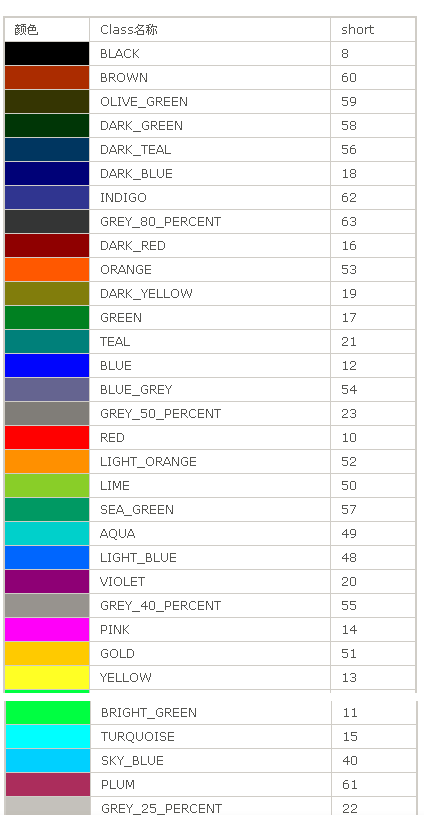
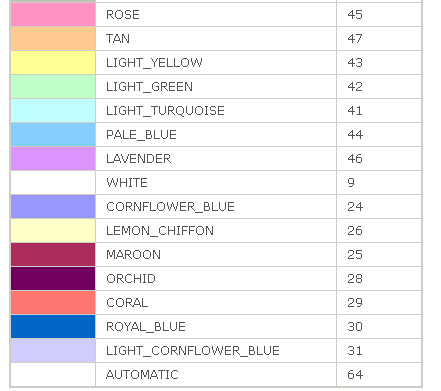
        cellStyle.setFillForegroundColor(HSSFColor.AQUA.index);
        cellStyle.setFillPattern(HSSFCellStyle.SOLID_FOREGROUND);
     //设置表头的背景颜色
        cellStyle.setFillBackgroundColor(HSSFColor.AQUA.index);
        center(cellStyle);
        //设置字体
        Font font = setFont(wb, fontSize);
        cellStyle.setFont(font);
        return cellStyle;
    }

    /**
     * 通用样式: 居中,设置字体大小
     */
    public static CellStyle getBodyStyle(Workbook wb, int fontSize) {
        CellStyle cellStyle = wb.createCellStyle();
        // 设置单元格样式
        center(cellStyle);
        Font font = setFont(wb, fontSize);
        cellStyle.setFont(font);
        return cellStyle;
    }

    /**
     * 设置单元格字体居中、并设置字体颜色
     */
    public static CellStyle getFontStyle(Workbook wb, int fontSize, short color) {
        CellStyle cellStyle = wb.createCellStyle();
        Font font = setFont(wb, fontSize, color);
        center(cellStyle);
        cellStyle.setFont(font);
        return cellStyle;
    }
/**
     * 设置单元格字体
     */
    public static Font setFont(Workbook wb, int fontSize, short color) {
        Font font = wb.createFont();
        font.setColor(color);
        font.setFontHeightInPoints((short) fontSize);
        return font;
    }

    public static Font setFont(Workbook wb, int fontSize) {
        //设置字体
        Font font = wb.createFont();
        font.setFontHeightInPoints((short) fontSize);
        return font;
    }

    /**
     * 设置cell边框*/
    public static CellStyle setCellBorder(Workbook workbook){
        CellStyle cellStyle = workbook.createCellStyle();
     //设置了边框属性 下边框
        cellStyle.setBorderBottom(HSSFCellStyle.BORDER_THIN);
     //左边框
        cellStyle.setBorderLeft(HSSFCellStyle.BORDER_THIN);
     //上边框
        cellStyle.setBorderTop(HSSFCellStyle.BORDER_THIN);
     //右边框
        cellStyle.setBorderRight(HSSFCellStyle.BORDER_THIN);//设置边框颜色黑色
        cellStyle.setTopBorderColor(HSSFColor.BLACK.index);
        cellStyle.setBottomBorderColor(HSSFColor.BLACK.index);
        cellStyle.setLeftBorderColor(HSSFColor.BLACK.index);
        cellStyle.setRightBorderColor(HSSFColor.BLACK.index);
        return cellStyle;
    }
}
不积跬步,无以至千里;不积小流,无以成江海


 浙公网安备 33010602011771号