
Flume聚合
案例需求:
hadoop102 上的 Flume-1 监控文件/opt/module/group.log,
hadoop103 上的 Flume-2 监控某一个端口的数据流,
Flume-1 与 Flume-2 将数据发送给 hadoop104 上的 Flume-3,Flume-3 将最终数据打印到控制台。
- 在module目录下分发 Flume
xsync flume
![]()
-
在/opt/module/flume/job下创建group3文件夹
mkdir group3/
![]()
-
配置 Source 用于监控 hive.log 文件,配置 Sink 输出数据到下一级 Flume。
vim flume1-logger-flume.conf
![]()
# Name the components on this agent
a1.sources = r1
a1.sinks = k1
a1.channels = c1

# Describe/configure the source
a1.sources.r1.type = exec
a1.sources.r1.command = tail -F /opt/module/group.log
a1.sources.r1.shell = /bin/bash -c

# Describe the sink
a1.sinks.k1.type = avro
a1.sinks.k1.hostname = hadoop104
a1.sinks.k1.port = 4141

# Describe the channel
a1.channels.c1.type = memory
a1.channels.c1.capacity = 1000
a1.channels.c1.transactionCapacity = 100

# Bind the source and sink to the channel
a1.sources.r1.channels = c1
a1.sinks.k1.channel = c1
- 配置 Source 监控端口 44444 数据流,配置 Sink 数据到下一级 Flume
vim flume2-netcat-flume.conf
![]()
# Name the components on this agent
a2.sources = r1
a2.sinks = k1
a2.channels = c1

# Describe/configure the source
a2.sources.r1.type = netcat
a2.sources.r1.bind = hadoop103
a2.sources.r1.port = 44444

# Describe the sink
a2.sinks.k1.type = avro
a2.sinks.k1.hostname = hadoop104
a2.sinks.k1.port = 4141

# Use a channel which buffers events in memory
a2.channels.c1.type = memory
a2.channels.c1.capacity = 1000
a2.channels.c1.transactionCapacity = 100

# Bind the source and sink to the channel
a2.sources.r1.channels = c1
a2.sinks.k1.channel = c1
- 配置 source 用于接收 flume1 与 flume2 发送过来的数据流,最终合并后 sink 到控制台。
vim flume3-flume-logger.conf
![]()
# Name the components on this agent
a3.sources = r1
a3.sinks = k1
a3.channels = c1

# Describe/configure the source
a3.sources.r1.type = avro
a3.sources.r1.bind = hadoop104
a3.sources.r1.port = 4141

# Describe the sink
a3.sinks.k1.type = logger

# Describe the channel
a3.channels.c1.type = memory
a3.channels.c1.capacity = 1000
a3.channels.c1.transactionCapacity = 100

# Bind the source and sink to the channel
a3.sources.r1.channels = c1
a3.sinks.k1.channel = c1
-
分group3文件夹
xsync group3
![]()
-
分别开启对应配置文件:flume3-flume-logger.conf,flume2-netcat-flume.conf,flume1-logger-flume.conf。在hadoop104上
bin/flume-ng agent -n a3 -c conf/ -f job/group3/flume3-flume-logger.conf -Dflume.root.logger=INFO,console
![]()
在hadoop103上
bin/flume-ng agent -n a2 -c conf/ -f job/group3/flume2-netcat-flume.conf
![]()
在hadoop102上
bin/flume-ng agent -n a1 -c conf/ -f job/group3/flume1-logger-flume.conf
![]()
-
在/opt/module 下创建 group.log
touch group.log
![]()
可以在hadoop104上看到与hadoop102,hadoop103连接成功。
![]()
-
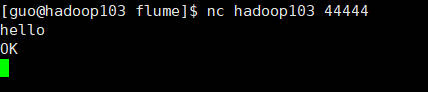
测试:在hadoop103上打开端口
nc hadoop103 44444![]()
![]()
查看hadoop104上的信息
![]()
在hadoop102上往group.log里写东西
echo flume >> group.log
![]()
查看hadoop104上的信息
![]()
-
这就实现了跨服务器的数据聚集
















 浙公网安备 33010602011771号