
Vue3使用EasyOFD.js实现ofd文件自定义展示
EasyOFD.js——一个在web端展示ofd文件的控件,该控件基于CANVAS绘制。官网提供的事例,不适合用于多页ofd文件的展示,本文基于EAYSOFD实现放大、缩小、页面跳转以及多页滚动等功能
1、安装EAYSOFD依赖和EASYOFD组件
//依赖
npm i jszip x2js jb2 opentype.js
//本程序
npm i easyofd
2、vue3中的使用方法
2.1 增加使用EASYOFD的VUE组件
<template>
      <div id="1111111"> </div>
</template>
2.2 在控件加载时初始化组件
onMounted(() => {
  let yourElement=document.getElementById("1111111");
  let ofd=new EasyOFD('myofdID', yourElement);
})
2.3 完整代码


<script setup>
import EasyOFD from "easyofd";
import { onMounted } from 'vue'

onMounted(() => {
  let yourElement=document.getElementById("1111111");
  let ofd=new EasyOFD('myofdID', yourElement);
})

</script>

<template>
      <div id="1111111"> </div>

</template>

<style >
 .OfdButton{
      padding: 10px 20px;
      background-color: #007bff;
      color: #fff;
      border: none;
      border-radius: 5px;
      cursor: pointer;
      margin-right: 10px;
    }
</style>
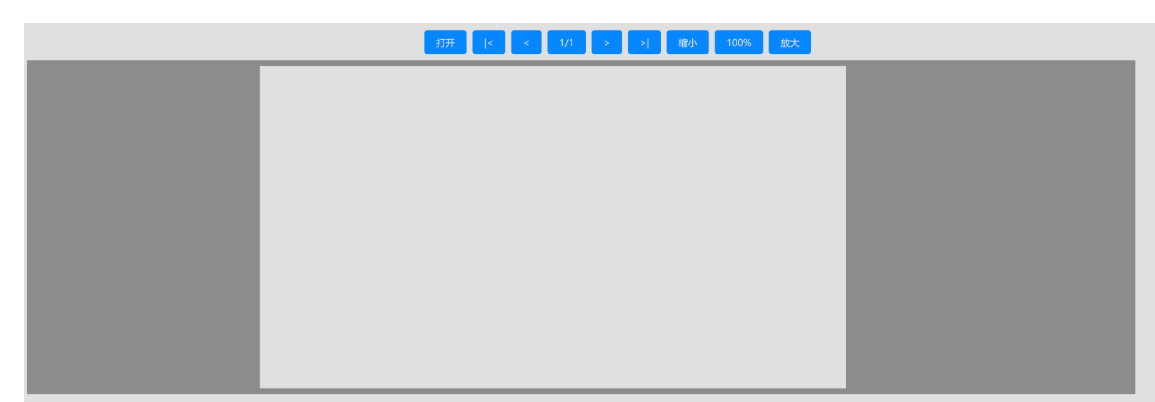
4、按以上步骤可以轻松实现ofd为文件展示、效果如下:
5、官网给的使用步骤没有给出API,打印ofd.js对象可以看到部分按钮对应的操作方法
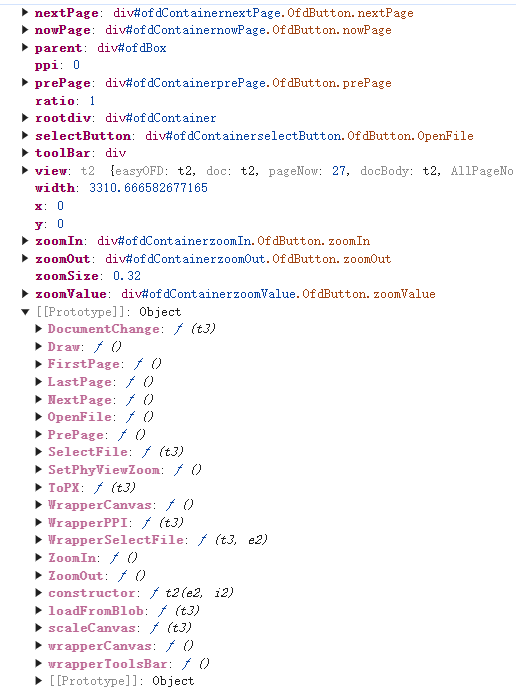
6、根据对API可以自定义放大、缩小、以及页面跳转,完整代码如下:(easyofd.js是利用canvas绘制,每次只显示一页,无法实现多页滚动)
<template>
  <div class="ofd-preview" v-loading="isShow && loading">
    <div class="ofd-tool">
      <div class="item">
        <el-icon class="zoom-btn" @click="zoomIn" title="缩小">
          <Minus />
        </el-icon>
        |
        <el-icon class="zoom-btn" @click="zoomOut" title="放大">
          <Plus />
        </el-icon>
      </div>
      <div class="item">
        <el-input
          v-model="nowPage"
          style="width: 55px; height: 28px"
          placeholder="Please input"
          class="now-page"
          @keydown.enter="getPage" />
        <span class="line">/ {{ totalPage }}</span>
      </div>
    </div>
    <div id="ofdBox"></div>
  </div>
</template>

<script setup lang="ts">
import { ref, watch, nextTick, onMounted, onUnmounted } from 'vue';
import { docFilePreview, downloadPdf } from '@/api/docLib';
import { Minus, Plus } from '@element-plus/icons-vue';
import EasyOFD from 'easyofd';
const props = withDefaults(
  defineProps<{
    docId: string;
    isShow: boolean;
  }>(),
  {
    docId: '',
    isShow: true
  }
);
const loading = ref(true);
let ofd: any = null;
const nowPage = ref(1); // 当前页;
const totalPage = ref(1); // 总页;

onMounted(() => {
  let ofdBox = document.getElementById('ofdBox');
  ofd = new EasyOFD('ofdContainer', ofdBox);
});

watch(
  () => props.docId,
  async () => {
    loading.value = true;
    if (props.docId) {
      let res = await downloadPdf(props.docId);
      if (ofd) {
        ofd.loadFromBlob(res, () => {
          console.log('加载完成');
        });
        console.log('ofd1', ofd);

        const timer = setInterval(() => {
          if (ofd.view.AllPageNo) { // 获取总页码
            loading.value = false;
            nowPage.value = ofd.view.pageNow;
            totalPage.value = ofd.view.AllPageNo;
            console.log('ofd2', ofd);
            const divEle1 = document.querySelector(
              '#ofdContainer > :nth-child(2)'
            );
            if (divEle1) {
              // 默认一屏展示
              const scale =
                Math.floor(((divEle1.clientHeight - 20) / ofd.height) * 100) /
                100;
              ofd.scaleCanvas(scale);
            }
            clearInterval(timer);
          }
        }, 500);
      }
    }
  },
  {
    immediate: true
  }
);

// 缩小
const zoomIn = () => {
  console.log('缩小', ofd.zoomSize);
  if (ofd && ofd.zoomSize > 0.1) {
    ofd.ZoomIn();
  }
};

// 放大
const zoomOut = () => {
  console.log('放大', ofd.zoomSize);
  if (ofd && ofd.zoomSize <= 2) {
    ofd.ZoomOut();
  }
};

const getPage = () => {
  console.log('当前页', nowPage.value);
  if (nowPage.value < 1) {
    nowPage.value = 1;
  } else if (nowPage.value > totalPage.value) {
    nowPage.value = totalPage.value;
  }
  ofd.view.SetPage(nowPage.value);
  ofd.scaleCanvas(ofd.zoomSize);
  ofd.Draw();
};
</script>

<style lang="scss" scoped>
.ofd-preview {
  height: 100%;
  width: 100%;
  display: flex;
  flex-direction: column;

  .ofd-tool {
    height: 36px;
    display: flex;
    justify-content: flex-end;
    align-items: center;
    background-color: #f6f7fc;
    padding-right: 10px;
    color: rgb(12, 12, 13);
    .item {
      display: flex;
      align-items: center;
    }
    .zoom-btn {
      width: 28px;
      height: 28px;
      padding: 2px 6px 0;
      border-radius: 2px;
      user-select: none;
      cursor: default;

      &:hover {
        background-color: rgb(221, 222, 223);
      }
    }

    .now-page {
      width: 55px;
      height: 28px;
      :deep(.el-input__inner) {
        text-align: right;
      }
    }
    .line {
      min-width: 16px;
      padding: 7px;
      margin: 2px;
      border-radius: 2px;
      color: var(--main-color);
      font-size: 12px;
      line-height: 14px;
      text-align: left;
    }
  }

  #ofdBox {
    height: calc(100% - 36px);
    width: 100%;
    overflow: hidden;
  }
}
</style>
<style lang="scss">
#ofdContainer {
  height: 100% !important;
  overflow-y: hidden;
  border-radius: 8px;

  > div:nth-child(1) {
    border-bottom: 1px solid #ddd;
    display: none !important; // 隐藏原按钮
  }
  > div:nth-child(2) {
    background-color: #fff !important;
    max-width: 100% !important;
    height: 100% !important;
    max-height: none !important;
    box-sizing: border-box;
  }
  #ofdContainerselectButton {
    display: none;
  }
  .OfdButton {
    padding: 6px 8px;
    background-color: var(--el-color-primary);
    color: #fff;
    border: none;
    border-radius: 5px;
    cursor: pointer;
    margin-right: 10px;
    font-size: 12px;
  }
}
</style>
7、多页文档自定义滚动,获取总页面后循环绘制每一页的canvas,并将canvas缓存为图片,然后展示图片,从而实现多页滚动,页码过多时,可以使用IndexedDB缓存文件,完整代码如下:
<template>
  <div class="ofd-preview" v-loading="isShow && loading">
    <div class="ofd-tool">
      <div class="item">
        <el-icon class="zoom-btn" @click="zoomIn" title="缩小">
          <Minus />
        </el-icon>
        |
        <el-icon class="zoom-btn" @click="zoomOut" title="放大">
          <Plus />
        </el-icon>
      </div>
      <div class="item">
        <el-input
          v-model="nowPage"
          style="width: 55px; height: 28px"
          type="number"
          placeholder="Please input"
          class="now-page"
          @keydown.enter="getPage" />
        <span class="line">/ {{ totalPage }}</span>
      </div>
    </div>
    <div id="ofdBox" v-if="loading"></div>
    <div id="ofdImageBox" v-if="!loading">
      <img
        v-for="(url, i) in dataURLs"
        :key="url"
        :src="url"
        loading="lazy"
        class="ofd-image"
        :style="`transform: scale(${imageScale});`"
        :id="`ofdImage_${i}`" />
    </div>
  </div>
</template>

<script setup lang="ts">
import { ref, watch, nextTick, onMounted, onUnmounted } from 'vue';
import { docFilePreview, downloadPdf } from '@/api/docLib';
import { Minus, Plus } from '@element-plus/icons-vue';
import EasyOFD from 'easyofd';
import ofdIndexedDB from '@/utils/ofdIndexedDB';

const props = withDefaults(
  defineProps<{
    docId: string;
    isShow: boolean;
  }>(),
  {
    docId: '',
    isShow: true
  }
);
const loading = ref(true);
let ofd: any = null;
const nowPage = ref(1); // 当前页;
const totalPage = ref(1); // 总页;
const dataURLs = ref<string[]>([]);
const imageScale = ref(1);

onMounted(() => {});

watch(
  () => props.docId,
  async () => {
    loading.value = true;
    if (props.docId) {
      let data = await ofdIndexedDB.getData('ofdImageCache', props.docId);
      console.log('ofdImageCache', data);
      if (data) {
        totalPage.value = data.totalPage;
        dataURLs.value = [];
        for (let i = 1; i <= totalPage.value; i++) {
          dataURLs.value.push(data[i]);
        }
        loading.value = false;
        nextTick(() => {
          observeOfdImageBoxAdd();
        });
        return;
      }
      let ofdBox = document.getElementById('ofdBox');
      ofd = new EasyOFD('ofdContainer', ofdBox);
      let res = await downloadPdf(props.docId);
      if (ofd) {
        ofd.loadFromBlob(res, () => {
          console.log('加载完成');
        });
        console.log('ofd1', ofd);
        const timer = setInterval(() => {
          if (ofd.view.AllPageNo) {
            nowPage.value = ofd.view.pageNow;
            totalPage.value = ofd.view.AllPageNo;
            console.log('ofd2', ofd);
            const divEle1 = document.querySelector(
              '#ofdContainer > :nth-child(2)'
            );
            dataURLs.value = [];
            if (divEle1) {
              // 默认一屏展示
              const scale =
                Math.floor((divEle1.clientHeight / ofd.height) * 100) / 100;
              if (scale < 0.4) {
                // canvas比例太大
                imageScale.value = 0.5 + scale * 2;
                ofd.scaleCanvas(scale * 2);
              } else {
                imageScale.value = scale;
              }

              // 把每一页的数据转换成图片展示
              const ofdCacheObj = {
                docId: props.docId,
                totalPage: totalPage.value
              };
              for (let i = 1; i <= totalPage.value; i++) {
                ofd.view.SetPage(i);
                ofd.scaleCanvas(ofd.zoomSize);
                ofd.Draw();
                const canvas: any = document.querySelector(
                  '#ofdContainer-ofd-canvas'
                );
                if (canvas) {
                  const dataURL = canvas.toDataURL('image/png');
                  console.log('i', i);
                  dataURLs.value.push(dataURL);
                  ofdCacheObj[i] = dataURL;
                }
                if (i === totalPage.value) {
                  loading.value = false;
                  nextTick(() => {
                    observeOfdImageBoxAdd();
                  });
                }
              }
              console.log('dataURLs', dataURLs.value);
              // 缓存数据
              // const ofdCacheObj = {
              //   docId: props.docId,
              //   totalPage: totalPage.value,
              //   dataURLs: dataURLs.value
              // };
              ofdIndexedDB.addData('ofdImageCache', props.docId, ofdCacheObj);
            }
            clearInterval(timer);
          }
        }, 500);
      }
    }
  },
  {
    immediate: true
  }
);

// 缩小
const zoomIn = () => {
  console.log('缩小', imageScale.value);
  if (imageScale.value >= 0.1) {
    imageScale.value = imageScale.value - 0.1;
  }
};

// 放大
const zoomOut = () => {
  console.log('放大', imageScale.value);
  if (imageScale.value <= 2) {
    imageScale.value = imageScale.value + 0.1;
  }
};

const getPage = () => {
  console.log('当前页', nowPage.value);
  if (nowPage.value < 1) {
    nowPage.value = 1;
  } else if (nowPage.value > totalPage.value) {
    nowPage.value = totalPage.value;
  }
  const ofdImageEle = document.getElementById(`ofdImage_${nowPage.value - 1}`);
  if (ofdImageEle) {
    ofdImageEle.scrollIntoView({
      behavior: 'smooth', // 平滑滚动
      block: 'start' // 滚动到顶部对齐
    });
  }
};

// 监听图片盒子滚动
const observeVisibilityChanges = (
  parentElement: HTMLDivElement,
  callback: Function
) => {
  const observer = new IntersectionObserver(
    (entries, observer) => {
      entries.forEach(entry => {
        if (entry.isIntersecting) {
          callback(entry.target); // 当元素进入视野时调用回调函数
        }
      });
    },
    { root: parentElement }
  );

  // 开始观察所有子元素
  Array.from(parentElement.children).forEach(child => observer.observe(child));
};
const observeOfdImageBoxAdd = () => {
  const ofdImageBox = document.getElementById('ofdImageBox') as HTMLDivElement;
  if (ofdImageBox) {
    observeVisibilityChanges(ofdImageBox, (element: HTMLImageElement) => {
      console.log(`${element.id} is now in view.`);
      if (ofdImageBox.scrollTop > 0 && element.id && element.id.includes('_')) {
        nowPage.value = +element.id.split('_')[1] + 1 || 1;
      }
    });
  }
};
</script>

<style lang="scss" scoped>
.ofd-preview {
  height: 100%;
  width: 100%;
  display: flex;
  flex-direction: column;

  .ofd-tool {
    height: 36px;
    display: flex;
    justify-content: flex-end;
    align-items: center;
    background-color: #f6f7fc;
    padding-right: 10px;
    color: rgb(12, 12, 13);
    .item {
      display: flex;
      align-items: center;
    }
    .zoom-btn {
      width: 28px;
      height: 28px;
      padding: 2px 6px 0;
      border-radius: 2px;
      user-select: none;
      cursor: default;

      &:hover {
        background-color: rgb(221, 222, 223);
      }
    }

    .now-page {
      width: 55px;
      height: 28px;
      :deep(.el-input__inner) {
        text-align: right;
      }
    }
    .line {
      min-width: 16px;
      padding: 7px;
      margin: 2px;
      border-radius: 2px;
      color: var(--main-color);
      font-size: 12px;
      line-height: 14px;
      text-align: left;
    }
  }

  #ofdBox {
    height: calc(100% - 36px);
    width: 100%;
    overflow: hidden;
  }

  #ofdImageBox {
    display: flex;
    flex-direction: column;
    height: 100%;
    overflow: auto;
    > img {
      align-self: center;
    }
  }
}
</style>
<style lang="scss">
#ofdContainer {
  height: 100% !important;
  overflow-y: hidden;
  border-radius: 8px;

  > div:nth-child(1) {
    border-bottom: 1px solid #ddd;
    display: none !important;
  }
  > div:nth-child(2) {
    background-color: #fff !important;
    max-width: 100% !important;
    height: 100% !important;
    max-height: none !important;
    box-sizing: border-box;
  }
  #ofdContainerselectButton {
    display: none;
  }
  .OfdButton {
    padding: 6px 8px;
    background-color: var(--el-color-primary);
    color: #fff;
    border: none;
    border-radius: 5px;
    cursor: pointer;
    margin-right: 10px;
    font-size: 12px;
  }
}
</style>
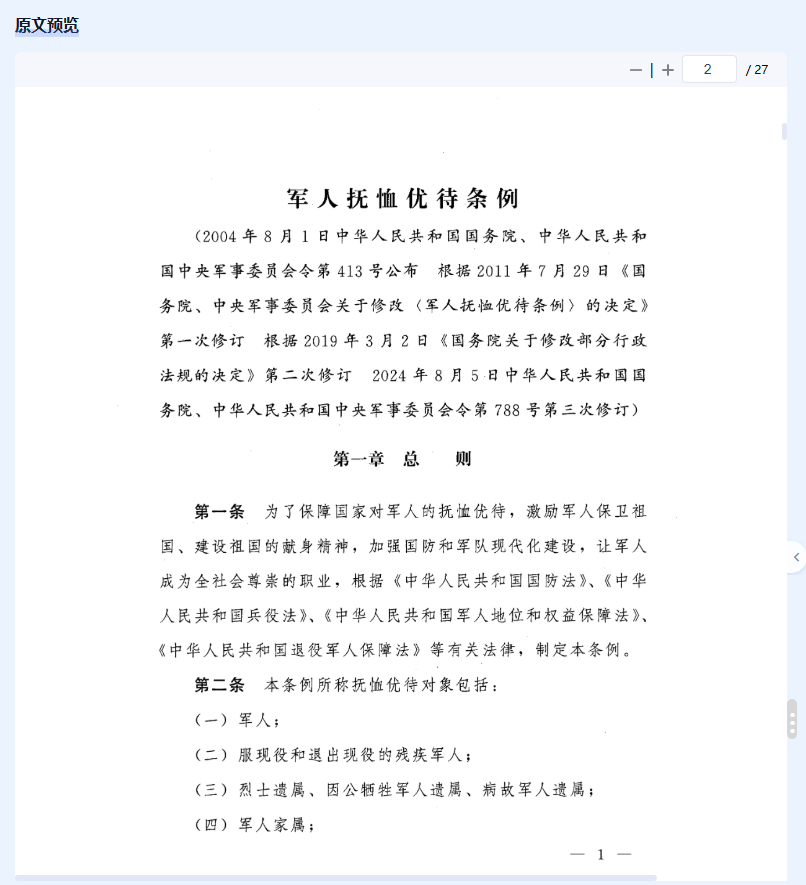
8、最终效果展示如下:

 浙公网安备 33010602011771号