
IdentityServer4客户端授权模式
- 客户端应用不代表用户,客户端应用本身就相当于资源所有者
- 通常用于机器对机器的通信
- 客户端也需要身份认证
客户端授权模式授权流程
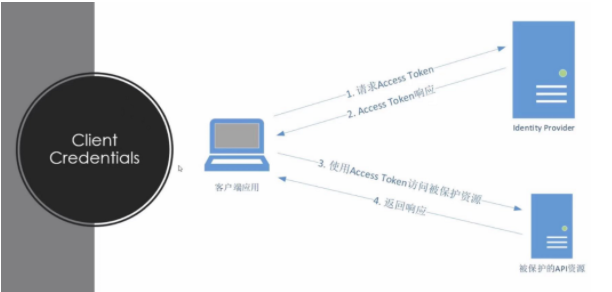
创建IdentityServer4项目
安装identityserver4模板
dotnet new -i identityserver4.templates //下载identityserver4模板
dotnet new is4inmem --name Idp //创建一个is4inmem模板的项目 名字为Idp
修改Config.cs配置类
 public class Config
    {
        public static IEnumerable<IdentityResource> IdentityResources =>
        new IdentityResource[]
        {
                 new IdentityResources.OpenId(),
        };

        //定义ApiScopes
        public static IEnumerable<ApiScope> ApiScopes =>

           new ApiScope[]
               {
                     // invoice API specific scopes
                     new ApiScope(name: "invoice_read",   displayName: "Reads your invoices."),
               };
        //定义ApiResources
        public static IEnumerable<ApiResource> ApiResources =>
           new ApiResource[]
           {
                new ApiResource("invoice", "Invoice API")
                {
                    Scopes = { "invoice_read", }
                }
           };
        //定义Clients
        public static IEnumerable<Client> Clients =>
           new Client[]
           {
                new Client
                {
                    ClientId = "Credentials_Client",
                    ClientName = "Client Credentials Client",
                    ClientSecrets = { new Secret("credentialsclientsecrets".Sha256()) },
                    AllowedGrantTypes = GrantTypes.ClientCredentials,
                    AllowedScopes = {"invoice_read"},

                }
           };
    }
注册服务
修改startup.cs中ConfigureServices方法
  public void ConfigureServices(IServiceCollection services)
        {
            services.AddControllersWithViews();
            var builder = services.AddIdentityServer(options =>
            {
                options.AccessTokenJwtType = "JWT";
                options.Events.RaiseErrorEvents = true;
                options.Events.RaiseInformationEvents = true;
                options.Events.RaiseFailureEvents = true;
                options.Events.RaiseSuccessEvents = true;
                // see https://identityserver4.readthedocs.io/en/latest/topics/resources.html
                options.EmitStaticAudienceClaim = true;
            }).AddTestUsers(TestUsers.Users);

            // in-memory, code config
            builder.AddInMemoryIdentityResources(Config.IdentityResources);
            builder.AddInMemoryApiScopes(Config.ApiScopes);
            builder.AddInMemoryClients(Config.Clients);
            builder.AddInMemoryApiResources(Config.ApiResources);
            builder.AddDeveloperSigningCredential();
        }
配置管道
修改startup.cs中Configure方法:
public void Configure(IApplicationBuilder app)
        {
            if (Environment.IsDevelopment())
            {
                app.UseDeveloperExceptionPage();
            }

            app.UseStaticFiles();
            app.UseRouting();
            app.UseIdentityServer();
            app.UseAuthorization();
            app.UseEndpoints(endpoints =>
            {
                endpoints.MapDefaultControllerRoute();
            });
        }
修改启动端口为5000
启动程序
Postman掉用接口
client_id : 比照设置的 ClientId
client_secret : 比照设置的 ClientSecrets
grant_type : 在这里使用 client_credentials
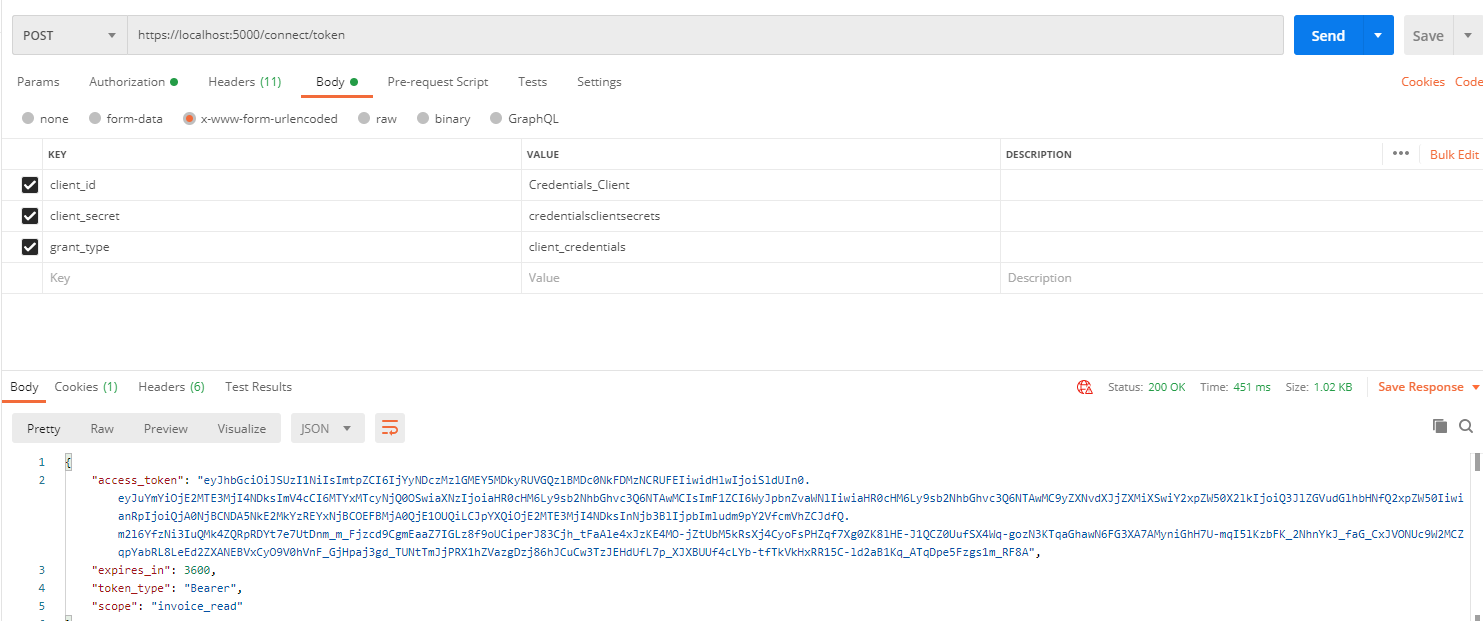
.NetCore下使用
创建WebApi项目CoreAPI
安装Nuget包
dotnet add pacakage Microsoft.AspNetCore.Authentication.JwtBearer
注册服务
在startup.cs中ConfigureServices方法添加如下代码:
Authority : 检查发行人
RequireHttpsMetadata : 忽略https 的检查
Audience : JWT 的发行对象
services.AddAuthentication(JwtBearerDefaults.AuthenticationScheme)
.AddJwtBearer(options =>
{
         //IdentityServer地址
         options.Authority = "https://localhost:5000";
         //对应Idp中ApiResource的Name
         options.Audience = "invoice";
         //不使用https
         options.RequireHttpsMetadata = false;
});
配置管道
在startup.cs中Configure方法添加如下代码:
 public void Configure(IApplicationBuilder app, IWebHostEnvironment env)
        {
            if (env.IsDevelopment())
            {
                app.UseDeveloperExceptionPage();
                app.UseSwagger();
                app.UseSwaggerUI(c => c.SwaggerEndpoint("/swagger/v1/swagger.json", "NetCoreAPI v1"));
            }
            app.UseHttpsRedirection();
            app.UseRouting();
            app.UseAuthentication();//将身份验证中间件添加到管道中
            app.UseAuthorization();//将启动授权中间件添加到管道中,以便在每次调用主机时执行身份验证授权功能。

            app.UseEndpoints(endpoints =>
            {
                endpoints.MapControllers();
            });
        }
修改WeatherForecastController
 [ApiController]
 [Route("[controller]")]
 [Authorize]
 public class WeatherForecastController : ControllerBase
 {
       [HttpGet]
       public ActionResult Get()
       {
             return new JsonResult(from c in User.Claims select new { c.Type, c.Value });
       }
}
修改启动端口为6000
运行
取得token 并放在header 后就可以正常访问api
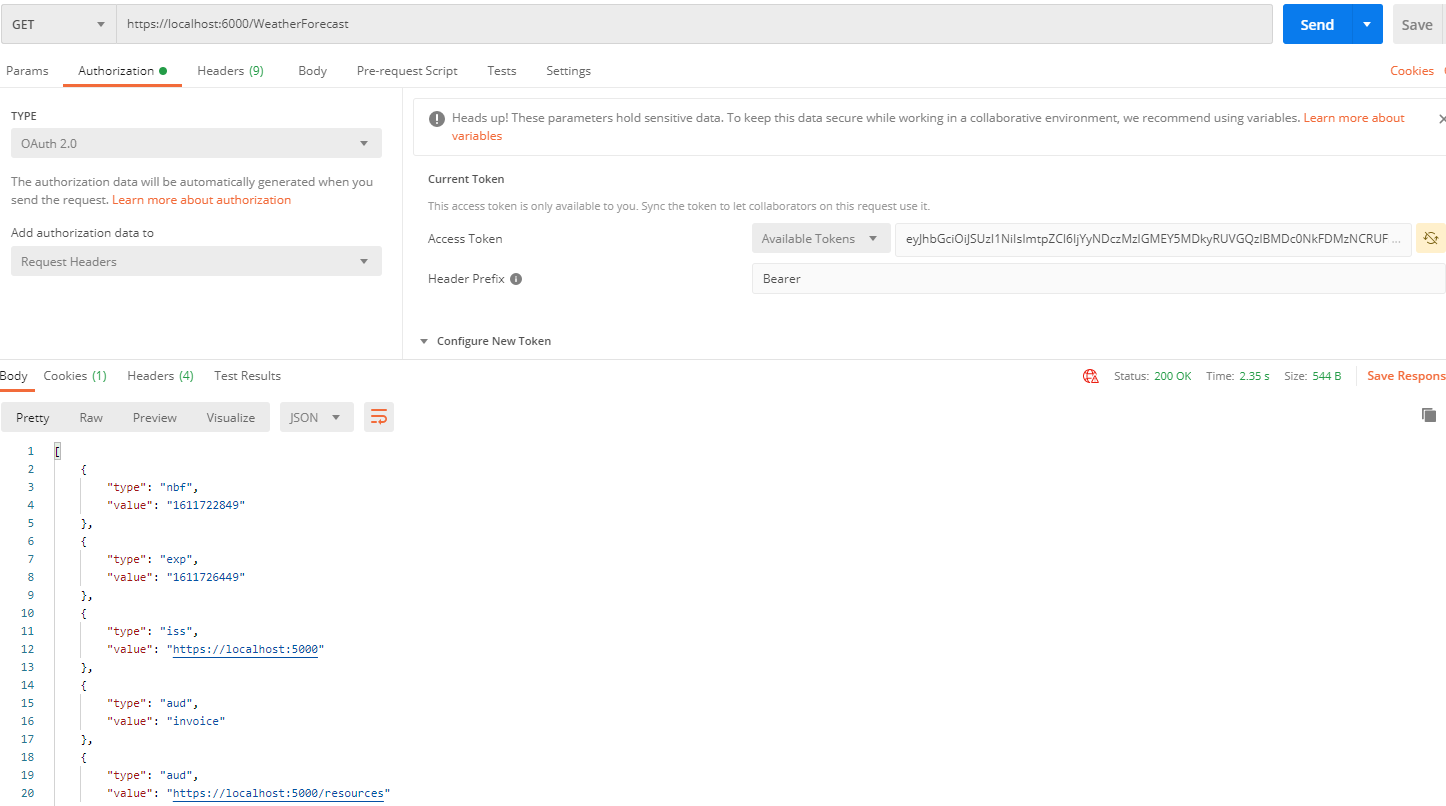
.NET Framework下使用
创建项目Net4Api(.NET Framework)
安装Nuget包
IdentitySever3.AccessTokenValidation
Microsoft.Owin.Host.SystemWeb
Microsoft.Owin.Cors
添加Startup.cs
 public void Configuration(IAppBuilder app)
        {
            JwtSecurityTokenHandler.InboundClaimTypeMap.Clear();

            app.UseIdentityServerBearerTokenAuthentication(
                new IdentityServerBearerTokenAuthenticationOptions
                {
                    Authority = "https://localhost:5000",//授权地址
                    ValidationMode = ValidationMode.Local,//验证模式
                    RequiredScopes = new[] { "invoice_read" },//
                });
        }
添加IdentityController
[HttpGet]
[Route("identity")]
[Authorize]
public IHttpActionResult Get()
{
      var principal = User as ClaimsPrincipal;
      var claims = from c in principal.Identities.First().Claims
      select new
      {
      c.Type,
      c.Value
      };
      return Json(claims);
}

 浙公网安备 33010602011771号