


实现el-table行展开可以定位到指定行功能
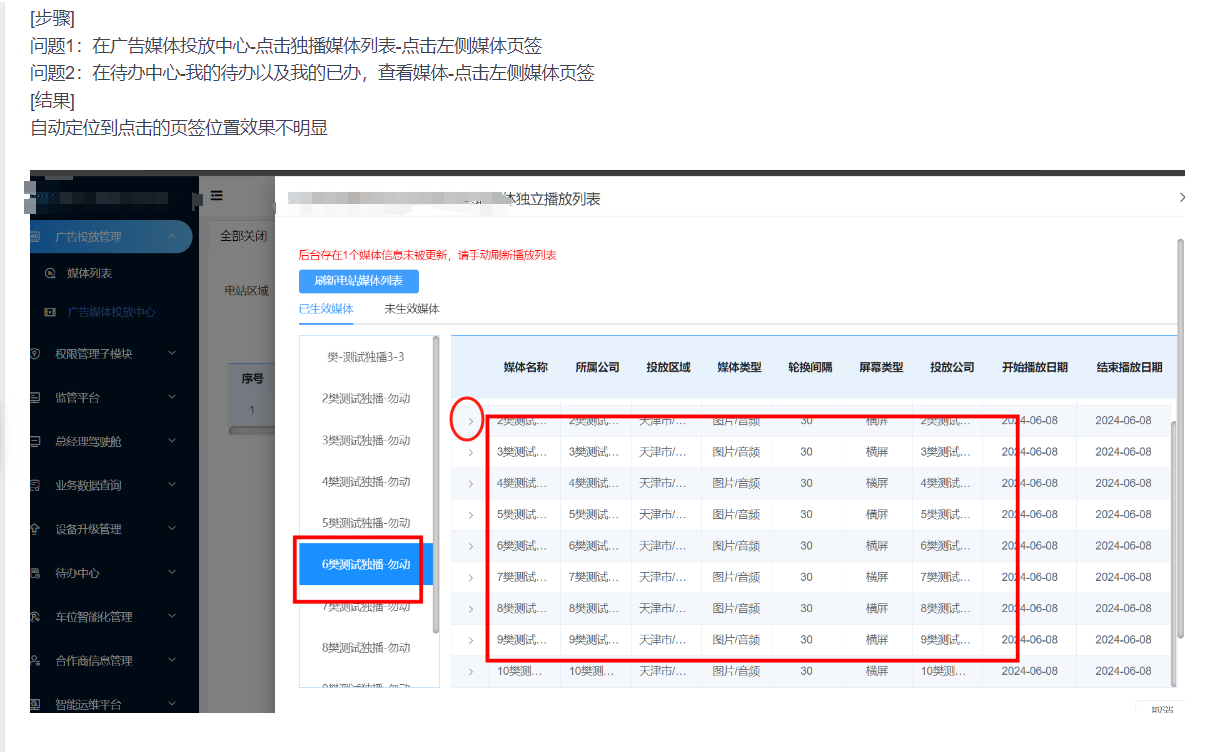
实现方法
1.拿到每一行的高度,
2.再拿到每一行展开行的高度
3.累加起来,让滚动条滚动到对应的高度
tableScrollToRow(tableElement, rowIndex) {
      const expandedRows = tableElement.bodyWrapper.querySelectorAll(".el-table__expanded-cell");
      const theTableRows = tableElement.bodyWrapper.querySelectorAll(".el-table__body tbody .el-table__row");
      let totalHeight = 0;
      // 计算特定行之前所有行的高度之和
      for (let i = 0; i < rowIndex; i++) {
        totalHeight += theTableRows[i].offsetHeight;
        // 如果当前行有展开行,累加展开行的高度
        if (expandedRows[i]) {
          totalHeight += expandedRows[i].offsetHeight;
        }
      }
      // 设置滚动条位置
      tableElement.bodyWrapper.scrollTop = totalHeight;
}
完整代码
<template>
  <div>
    <div class="flexBoxBetween">
      <div class="leftTable">
        <div
          v-for="item in mediaList"
          @click="changeLightMedia(item)"
          :class="
            lightMediaId == item.mediaId
              ? 'itemLeft backgroundBlue'
              : 'itemLeft'
          "
        >
          {{ item.mediaName }}
        </div>
      </div>
      <el-table
        ref="table"
        :data="tableData"
        class="customer-no-border-table"
        v-loading="load"
        element-loading-text="数据正在加载中..."
        :row-class-name="tableRowClassName"
        :header-cell-style="{ background: '#E7F2FD', color: '#252525' }"
        style="width: 100%; border-top: 1px solid #409eff"
        height="450"
        border
        :row-key="row => row.mediaId"
        :expand-row-keys="expandedRows"
      >
        <el-table-column>
          <el-table-column type="expand">
            <template slot-scope="{ row }">
              <el-form
                label-position="left"
                inline
                class="expand"
              >
                <el-row
                  v-for="(item, index) in row.onlyPlayList"
                  :key="index"
                >
                  <el-form-item label="独立播放开始时间">
                    <el-time-select
                      v-model="item.onlyStartTime"
                      placeholder="独立播放开始时间"
                      disabled
                      style="width: 150px"
                    >
                    </el-time-select>
                  </el-form-item>
                  <el-form-item label="独立播放结束时间">
                    <el-time-select
                      v-model="item.onlyEndTime"
                      placeholder="独立播放开始时间"
                      disabled
                      style="width: 150px"
                    >
                    </el-time-select>
                  </el-form-item>
                </el-row>
              </el-form>
            </template>
          </el-table-column>
        </el-table-column>
        <template v-for="(item, index) in columns">
          <el-table-column
            :key="index"
            :width="item.width"
            :prop="item.prop"
            :label="item.label"
            :formatter="item.formatter"
            align="center"
            show-overflow-tooltip
          >
          </el-table-column>
        </template>
        <div
          slot="empty"
          style="margin-top: 80px"
        >
          <img
            src="@/assets/noReport.png"
            alt="暂无数据"
          />
        </div>
      </el-table>
    </div>
    <!-- 分页 -->
    <div style="
        height: 80px;
        display: flex;
        justify-content: center;
        align-items: center;
      ">
      <el-pagination
        @size-change="handleSizeChange"
        @current-change="handleCurrentChange"
        :current-page="page"
        :page-sizes="[10, 20, 30, 40]"
        :page-size="size"
        layout="total, sizes, prev, pager, next, jumper"
        :total="total"
      >
      </el-pagination>
    </div>
  </div>
</template>

<script>
import { getBuildOnlyPlayMediaList } from "_config/url.js";
export default {
  props: {
    tabName: {
      type: String,
      default: "",
    },
    row: {
      type: Object,
      default: () => ({}),
    },
  },
  data() {
    return {
      load: false,

      lightMediaId: "", //高亮的媒体名称ID
      mediaList: [], //媒体名称列表
      tableData: [],
      columns: [
        {
          prop: "mediaName",
          label: "媒体名称",
        },
        { prop: "mediaBelongCompany", label: "所属公司" },
        { prop: "province", label: "投放区域" },
        {
          prop: "mediaType",
          label: "媒体类型",
          formatter: (row, column, cellValue, index) => {
            switch (cellValue) {
              case 0:
                return "视频";
              case 1:
                return "图片/音频";
            }
          },
        },
        { prop: "rotateGap", label: "轮换间隔" },
        {
          prop: "screenType",
          label: "屏幕类型",
          formatter: (row, column, cellValue, index) => {
            switch (cellValue) {
              case 0:
                return "横屏";
              case 1:
                return "全部";
            }
          },
        },
        { prop: "mediaPlayCompany", label: "投放公司" },
        { prop: "startPlay", label: "开始播放时间", width: "120px" },
        {
          prop: "endPlay",
          label: "结束播放时间",
          width: "120px",
          formatter: (row, column, cellValue, index) => {
            if (cellValue) {
              return cellValue;
            } else {
              return "无限期";
            }
          },
        },
      ],
      page: 1,
      size: 10,
      total: 0,
      expandedRows: [],
    };
  },
  mounted() {
    this.searchList("search");
  },
  methods: {
    changeLightMedia(item) {
      this.lightMediaId = item.mediaId;
      this.tableScrollToRow(this.$refs.table, item.index);
    },
    /**
     *  el-table滚动到表格某一行
     *  @param {object} tableElement  表格元素(this.$refs['表格ref值'])
     *  @param {Number} rowIndex   滚动到第几行(从0开始)
     */
    tableScrollToRow(tableElement, rowIndex) {
      const expandedRows = tableElement.bodyWrapper.querySelectorAll(".el-table__expanded-cell");
      const theTableRows = tableElement.bodyWrapper.querySelectorAll(".el-table__body tbody .el-table__row");
      let totalHeight = 0;
      // 计算特定行之前所有行的高度之和
      for (let i = 0; i < rowIndex; i++) {
        totalHeight += theTableRows[i].offsetHeight;
        // 如果当前行有展开行,累加展开行的高度
        if (expandedRows[i]) {
          totalHeight += expandedRows[i].offsetHeight;
        }
      }
      // 设置滚动条位置
      tableElement.bodyWrapper.scrollTop = totalHeight;

      // 在循环之外执行以下操作(标红选中的行)
      // for (let i = 0; i < theTableRows.length; i++) {
      //   if (i === rowIndex) {
      //     const rowEl = theTableRows[i];
      //     // 触发该行鼠标移入效果
      //     const hoverEvent = new MouseEvent('mouseenter', { bubbles: true, cancelable: true, view: window });
      //     rowEl.dispatchEvent(hoverEvent);
      //     // 选中的那一行指定背景色
      //     rowEl.style.backgroundColor = 'red';
      //   } else {
      //     theTableRows[i].style.backgroundColor = '#ffffff';
      //   }
      // }
    },
    async searchList(flag) {
      this.lightMediaId = "";
      if (flag) {
        this.page = 1;
        this.size = 10;
      }
      this.load = true;
      try {
        const res = await this.$postJson(getBuildOnlyPlayMediaList, {
          buildCode: this.row.buildCode,
          playStatus: this.tabName == "playedMedia" ? 1 : 0,
          page: this.page,
          size: this.size,
        });
        console.log("🚀 ~ searchList ~ res:", res);
        if (res.status == 0) {
          this.tableData = res.data.records;
          this.total = res.data.total;
          this.mediaList = this.tableData.map((i, index) => {
            return {
              mediaName: i.mediaName,
              index,
              mediaId: i.mediaId,
            };
          });
          this.expandedRows = this.mediaList.map((i) => i.mediaId)//默认展开所有行
          console.log(this.mediaList, "this.mediaList ");
        } else {
          this.$message.error(res.message);
        }
        this.load = false;
      } catch (err) {
        console.log("🚀 ~ searchList ~ err:", err);
        this.$message.error("网络异常,稍后请重试");
      }
    },

    handleSizeChange(val) {
      this.page = 1;
      this.size = val;
      this.searchList();
    },
    handleCurrentChange(val) {
      this.page = val;
      this.searchList();
    },
    tableRowClassName({ row, rowIndex }) {
      if (rowIndex % 2 === 1) {
        return "success-row";
      }
      return "";
    },
  },
};
</script>

<style lang="less" scoped>
.backgroundBlue {
  background: rgb(231, 244, 255);
  color: rgb(24, 144, 255);
  border-left: 3px solid rgb(24, 144, 255);
}
.leftTable {
  border: 1px solid #b7dbff;
  height: 450px;
  width: 180px;
  margin-right: 15px;
  overflow-y: auto;
  .itemLeft {
    height: 53px;
    line-height: 53px;
    font-family: Microsoft YaHei, sans-serif;
    font-weight: 400;
    font-size: 14px;
    color: #666666;
    text-align: center;
    cursor: pointer;
  }
}
.expand {
  padding: 30px 0px 30px 47px;
  /deep/ .el-form-item {
    width: 300px;
    margin-bottom: 0px !important;
  }
  /deep/.el-row {
    display: flex;
    justify-content: space-around;
  }
  /deep/ .el-form-item__label {
    font-family: Microsoft YaHei, sans-serif;
    font-weight: 400;
    color: #666666 !important;
    line-height: 34px;
  }
}
</style>

 浙公网安备 33010602011771号