OS第1次实验报告:熟悉使用Linux命令和剖析ps命令
- 林伟强
- 201821121010
- 计算1811
1. 实验环境介绍
- 操作系统: Windows10
- 平台:Cygwin
- 用户名:linweiqiang:
![]()

2. 常用命令使用
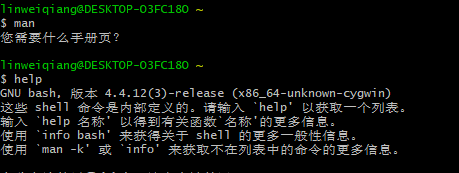
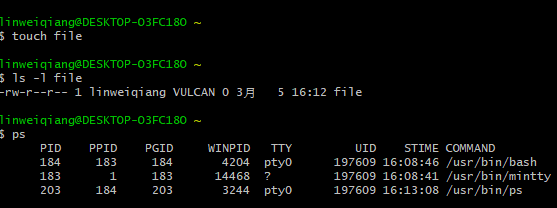
举例如下:
3. 剖析ps命令
(1)ps使用方法以及参数:
SYNOPSIS
       ps [−aA] [−defl] [−g grouplist] [−G grouplist]
           [−n namelist] [−o format]... [−p proclist] [−t termlist]
           [−u userlist] [−U userlist]

       The following options shall be supported:

       −a        Write  information  for all processes associated with termi‐
                 nals.  Implementations may omit  session  leaders  from  this
                 list.

       −A        Write information for all processes.

       −d        Write information for all processes, except session leaders.

       −e        Write information for all processes.  (Equivalent to −A.)

       −f        Generate  a  full  listing.  (See  the STDOUT section for the
                 contents of a full listing.)
       −g grouplist
                 Write  information  for processes whose session leaders are given
                 in grouplist.  The application shall ensure that the grouplist is
                 a  single  argument in the form of a <blank> or <comma>-separated
                 list.

       −G grouplist
                 Write information for processes whose real group ID  numbers  are
                 given in grouplist.  The application shall ensure that the grou‐
                 plist  is  a  single  argument  in  the  form  of  a  <blank>  or
                 <comma>-separated list.

       −l        Generate  a  long listing. (See STDOUT for the contents of a long
                 listing.)

       −n namelist
                 Specify the name of an alternative system namelist file in  place
                 of  the default. The name of the default file and the format of a
                 namelist file are unspecified.
       −o format Write information according to the format specification given  in
                 format.   This is fully described in the STDOUT section. Multiple
                 −o options can be specified; the format  specification  shall  be
                 interpreted  as  the  <space>-separated  concatenation of all the
                 format option-arguments.

       −p proclist
                 Write information for processes  whose  process  ID  numbers  are
                 given  in  proclist.  The application shall ensure that the pro‐
                 clist  is  a  single  argument  in  the  form  of  a  <blank>  or
                 <comma>-separated list.

       −t termlist
                 Write  information  for processes associated with terminals given
                 in termlist.  The application shall ensure that the termlist is a
                 single  argument  in  the  form of a <blank> or <comma>-separated
                 list. Terminal identifiers shall be given in  an  implementation-
                 defined  format.   On XSI-conformant systems, they shall be given
                 in one of two forms: the device's filename (for  example,  tty04)
                 or, if the device's filename starts with tty, just the identifier
                 following the characters tty (for example, "04").
       −u userlist
                 Write information for processes whose user ID  numbers  or  login
                 names  are  given in userlist.  The application shall ensure that
                 the userlist is a single argument in the form  of  a  <blank>  or
                 <comma>-separated  list.  In  the  listing, the numerical user ID
                 shall be written unless the −f option is used, in which case  the
                 login name shall be written.

       −U userlist
                 Write  information  for  processes  whose real user ID numbers or
                 login names are given in userlist.  The application shall  ensure
                 that  the  userlist is a single argument in the form of a <blank>
                 or <comma>-separated list.
(2)运行并解释ps命令参数:
运行命令ps -ef,系统返回结果如下:
$ ps -ef
UID PID PPID TTY STIME COMMAND
linweiqi 206 184 pty0 16:17:00 /usr/bin/ps
linweiqi 184 183 pty0 16:08:46 /usr/bin/bash
linweiqi 183 1 ? 16:08:41 /usr/bin/mintty
linweiqiang@DESKTOP-O3FC18O ~
$ ps -e
PID PPID PGID WINPID TTY UID STIME COMMAND
217 184 217 11020 pty0 197609 16:28:30 /usr/bin/ps
184 183 184 4204 pty0 197609 16:08:46 /usr/bin/bash
183 1 183 14468 ? 197609 16:08:41 /usr/bin/mintty
linweiqiang@DESKTOP-O3FC18O ~
$ ps -f
UID PID PPID TTY STIME COMMAND
linweiqi 218 184 pty0 16:28:39 /usr/bin/ps
linweiqi 184 183 pty0 16:08:46 /usr/bin/bash
linweiqi 183 1 ? 16:08:41 /usr/bin/mintty
-e :表示显示全部进程
-f :表示完整-格式,包括命令行
(3)解释返回结果中的字段:
     UID(User ID):用户ID;
     PID(Process ID):进程ID;
     PPID(Parent process ID):父进程ID;
     C:CPU使用的资源百分比;
     STIME:系统启动时间;
     PGID(Process Group ID):进程组ID号;
     TTY(TeleTYpe):终端的次要装置号码;
     TIME:使用的CPU时间;
     CMD:所下达的指令。
③运行命令ps aux,系统返回结果如下:
linweiqiang@DESKTOP-O3FC18O ~
$ ps aux
PID PPID PGID WINPID TTY UID STIME COMMAND
184 183 184 4204 pty0 197609 16:08:46 /usr/bin/bash
227 184 227 14424 pty0 197609 16:49:12 /usr/bin/ps
183 1 183 14468 ? 197609 16:08:41 /usr/bin/mintty
    参数a显示现行终端机下的所有程序,包括其他用户的程序;
    参数u以用户为主的格式来显示程序状况;
    参数x显示所有程序,不以终端机来区分。
COMMAND:所执行的指令

 浙公网安备 33010602011771号