
springboot操作redis(StringRedisTemplate)
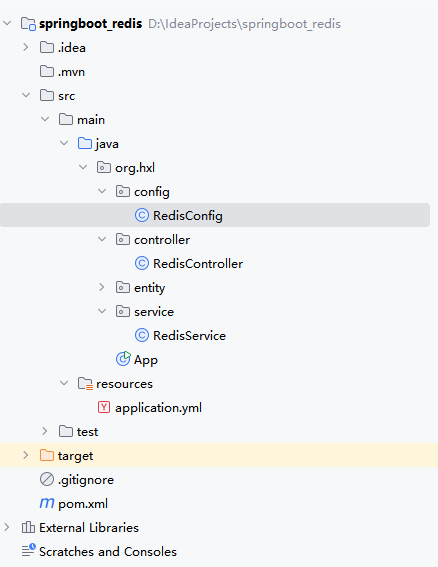
1.项目结构
2.pom.xml文件
<project xmlns="http://maven.apache.org/POM/4.0.0" xmlns:xsi="http://www.w3.org/2001/XMLSchema-instance"
  xsi:schemaLocation="http://maven.apache.org/POM/4.0.0 http://maven.apache.org/xsd/maven-4.0.0.xsd">
  <modelVersion>4.0.0</modelVersion>

  <groupId>org.hxl</groupId>
  <artifactId>springboot_redis</artifactId>
  <version>1.0-SNAPSHOT</version>
  <packaging>jar</packaging>

  <name>springboot_redis</name>
  <url>http://maven.apache.org</url>

  <properties>
    <project.build.sourceEncoding>UTF-8</project.build.sourceEncoding>
  </properties>

  <parent>
    <groupId>org.springframework.boot</groupId>
    <artifactId>spring-boot-starter-parent</artifactId>
    <version>2.7.10</version>
    <relativePath/> <!-- lookup parent from repository -->
  </parent>
  <dependencies>
    <!-- Spring Web 依赖 -->
    <dependency>
      <groupId>org.springframework.boot</groupId>
      <artifactId>spring-boot-starter-web</artifactId>
    </dependency>
    <!-- Spring Data Redis 依赖 -->
    <dependency>
      <groupId>org.springframework.boot</groupId>
      <artifactId>spring-boot-starter-data-redis</artifactId>
    </dependency>
    <!-- 连接池(可选,推荐) -->
    <dependency>
      <groupId>org.apache.commons</groupId>
      <artifactId>commons-pool2</artifactId>
    </dependency>
    <!-- lombok(可选,简化代码) -->
    <dependency>
      <groupId>org.projectlombok</groupId>
      <artifactId>lombok</artifactId>
      <version>1.18.30</version>
      <optional>true</optional>
    </dependency>
    <!-- 测试依赖 -->
    <dependency>
      <groupId>org.springframework.boot</groupId>
      <artifactId>spring-boot-starter-test</artifactId>
      <scope>test</scope>
    </dependency>
  </dependencies>

  <build>
    <plugins>
      <plugin>
        <groupId>org.springframework.boot</groupId>
        <artifactId>spring-boot-maven-plugin</artifactId>
        <configuration>
          <excludes>
            <exclude>
              <groupId>org.projectlombok</groupId>
              <artifactId>lombok</artifactId>
            </exclude>
          </excludes>
        </configuration>
      </plugin>
    </plugins>
  </build>
</project>
3.application.yml
server:
  port: 8080

spring:
  redis:
    # 从配置文件读取的 Redis 服务器 IP(核心配置)
    host: 192.168.1.14  # 替换成你的 Redis 服务器 IP
    port: 6379           # Redis 端口,默认6379
    password: "abc123"           # Redis 密码(无密码则留空)
    database: 0          # 选择的数据库编号,默认0
    timeout: 10000       # 连接超时时间(毫秒)
    # Lettuce 连接池配置(基于 GenericObjectPoolConfig)
    lettuce:
      pool:
        max-active: 8    # 最大连接数
        max-idle: 8      # 最大空闲连接数
        min-idle: 0      # 最小空闲连接数
        max-wait: -1     # 最大等待时间(-1 表示无限制)

# 必加:打印配置加载日志,确认配置是否被读取
logging:
  level:
    org.springframework.boot.autoconfigure.data.redis: DEBUG
    com.example.redis.config: DEBUG
4.RedisConfig.java
package org.hxl.config;

import org.springframework.context.annotation.Bean;
import org.springframework.context.annotation.Configuration;
import org.springframework.data.redis.connection.RedisConnectionFactory;
import org.springframework.data.redis.core.StringRedisTemplate;
import org.springframework.data.redis.serializer.StringRedisSerializer;

/**
 * Redis序列化配置类,解决redis-cli查看乱码问题
 */
@Configuration
public class RedisConfig {

    @Bean
    public StringRedisTemplate stringRedisTemplate(RedisConnectionFactory redisConnectionFactory) {
        StringRedisTemplate template = new StringRedisTemplate();
        template.setConnectionFactory(redisConnectionFactory);

        // 定义字符串序列化器
        StringRedisSerializer stringRedisSerializer = new StringRedisSerializer();

        // 设置key、value、hashKey、hashValue的序列化器为StringRedisSerializer
        template.setKeySerializer(stringRedisSerializer);
        template.setValueSerializer(stringRedisSerializer);
        template.setHashKeySerializer(stringRedisSerializer);
        template.setHashValueSerializer(stringRedisSerializer);

        // 初始化模板
        template.afterPropertiesSet();
        return template;
    }
}
5.RedisController.java
package org.hxl.controller;

import org.hxl.service.RedisService;
import lombok.RequiredArgsConstructor;
import org.springframework.web.bind.annotation.*;

import java.util.concurrent.TimeUnit;

@RestController
@RequestMapping("/redis")
@RequiredArgsConstructor
public class RedisController {

    private final RedisService redisService;

    // 设置缓存
    @PostMapping("/set")
    public String set(@RequestParam String key, @RequestParam String value) {
        redisService.set(key, value);
        return "设置成功:key=" + key + ", value=" + value;
    }

    // 设置缓存(带过期时间)
    @PostMapping("/set/expire")
    public String setWithExpire(@RequestParam String key, @RequestParam String value,
                                @RequestParam long timeout) {
        redisService.set(key, value, timeout, TimeUnit.SECONDS);
        return "设置成功(过期时间" + timeout + "秒):key=" + key + ", value=" + value;
    }

    // 获取缓存
    @GetMapping("/get")
    public Object get(@RequestParam String key) {
        Object value = redisService.get(key);
        return value == null ? "key=" + key + " 不存在" : "获取成功:key=" + key + ", value=" + value;
    }

    // 删除缓存
    @DeleteMapping("/delete")
    public String delete(@RequestParam String key) {
        Boolean result = redisService.delete(key);
        return result ? "删除成功:key=" + key : "删除失败(key不存在):key=" + key;
    }

    // 判断key是否存在
    @GetMapping("/hasKey")
    public String hasKey(@RequestParam String key) {
        Boolean result = redisService.hasKey(key);
        return "key=" + key + (result ? " 存在" : " 不存在");
    }
}
6.RedisService.java
package org.hxl.service;

import lombok.RequiredArgsConstructor;
import org.springframework.data.redis.core.StringRedisTemplate;
import org.springframework.stereotype.Service;

import java.util.concurrent.TimeUnit;

@Service
@RequiredArgsConstructor
public class RedisService {

    // 替换为 StringRedisTemplate,天然支持字符串/中文
    private final StringRedisTemplate stringRedisTemplate;

    // ========== 基本操作 ==========
    /**
     * 设置缓存(中文可读)
     * @param key 键
     * @param value 值(支持中文)
     */
    public void set(String key, String value) {
        stringRedisTemplate.opsForValue().set(key, value);
    }

    /**
     * 设置缓存(带过期时间,中文可读)
     * @param key 键
     * @param value 值(支持中文)
     * @param timeout 过期时间
     * @param unit 时间单位
     */
    public void set(String key, String value, long timeout, TimeUnit unit) {
        stringRedisTemplate.opsForValue().set(key, value, timeout, unit);
    }

    /**
     * 获取缓存
     * @param key 键
     * @return 值(中文原样返回)
     */
    public String get(String key) {
        return key == null ? null : stringRedisTemplate.opsForValue().get(key);
    }

    /**
     * 删除缓存
     * @param key 键
     * @return 是否删除成功
     */
    public Boolean delete(String key) {
        return key == null ? false : stringRedisTemplate.delete(key);
    }

    /**
     * 判断key是否存在
     * @param key 键
     * @return 是否存在
     */
    public Boolean hasKey(String key) {
        return stringRedisTemplate.hasKey(key);
    }

    /**
     * 设置过期时间
     * @param key 键
     * @param timeout 过期时间
     * @param unit 时间单位
     * @return 是否设置成功
     */
    public Boolean expire(String key, long timeout, TimeUnit unit) {
        return key == null ? false : stringRedisTemplate.expire(key, timeout, unit);
    }
}
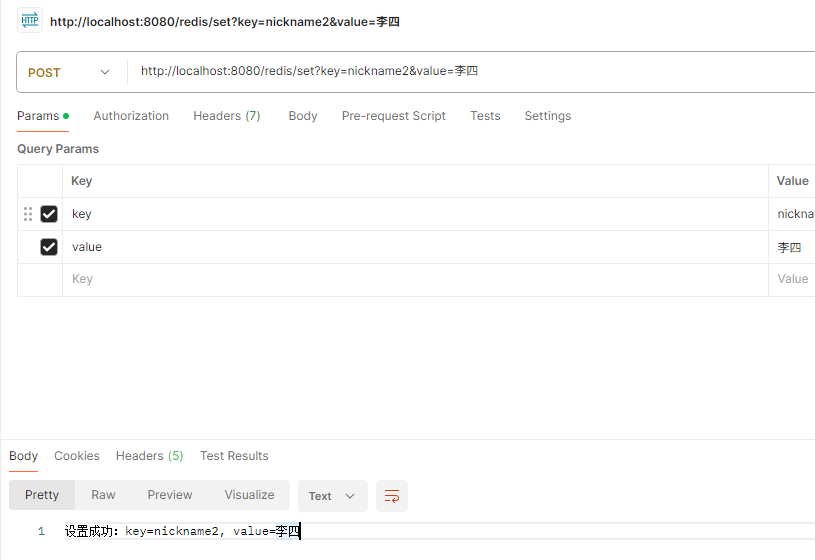
7.postman调用
http://localhost:8080/redis/set?key=nickname2&value=李四
8.redis服务器查看
[root@localhost conf]# /usr/local/services/redis/bin/redis-cli -c -h 192.168.1.14 -p 6379 -a abc123
Warning: Using a password with '-a' option on the command line interface may not be safe.
192.168.1.14:6379> get nickname2
"\xe6\x9d\x8e\xe5\x9b\x9b"
带上--raw参数
[root@localhost conf]# /usr/local/services/redis/bin/redis-cli -c -h 192.168.1.14 -p 6379 -a abc123 --raw
Warning: Using a password with '-a' option on the command line interface may not be safe.
192.168.1.14:6379> get nickname2
李四

 浙公网安备 33010602011771号