

velero安装部署
环境:
Os:Centos 7
说明:
1.在能连接到k8s集群并安装有kubectl命令行的主机上安装velero
2.需要提前安装好minio
我这里上安装在其中一个node节点上面
1.下载安装
[root@node2 velero-v1.15.2-linux-amd64]#cd /soft
[root@node2 velero-v1.15.2-linux-amd64]#wget https://github.com/vmware-tanzu/velero/releases/download/v1.15.2/velero-v1.15.2-linux-amd64.tar.gz
[root@node2 velero-v1.15.2-linux-amd64]#tar -xvf velero-v1.15.2-linux-amd64.tar.gz
[root@node2 velero-v1.15.2-linux-amd64]#cp velero-v1.15.2-linux-amd64/velero /usr/local/bin/
2.创建密钥
mkdir /root/minio
cat > /root/minio/credentials-velero <<EOF
[default]
aws_access_key_id = admin
aws_secret_access_key = admin123
EOF
这里的账号密码是连接minio的账号密码
3.安装velero
bucket要填写在minio控制台创建的名字:data
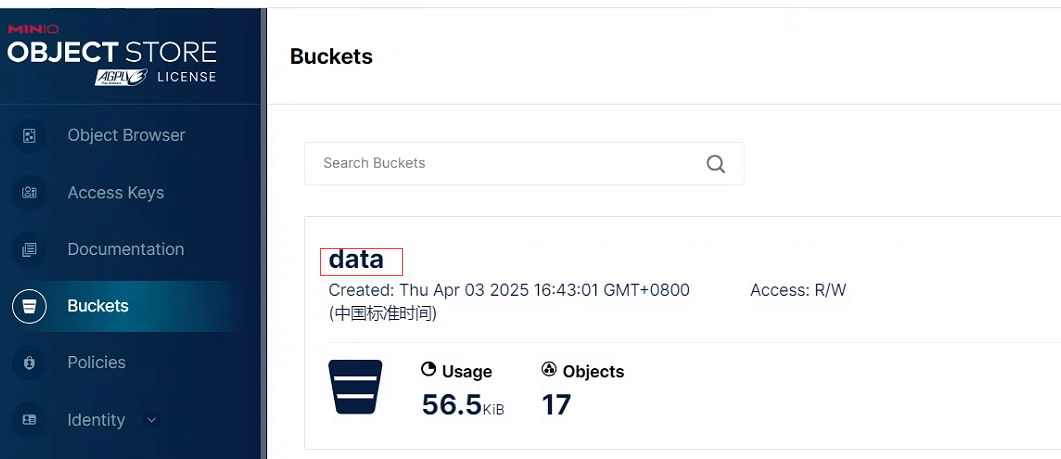
secret-file要指向前面创建的秘钥文件:/root/minio/credentials-velero
velero install \
 --image registry.cn-shenzhen.aliyuncs.com/hxlk8s/velero:v1.15.0 \
 --provider aws \
 --plugins registry.cn-shenzhen.aliyuncs.com/hxlk8s/velero-plugin-for-aws:v1.11.0 \
 --bucket data \
 --secret-file /root/minio/credentials-velero \
 --use-volume-snapshots=false \
 --backup-location-config region=minio,s3ForcePathStyle="true",s3Url=http://192.168.1.106:9000
4.查看velero安装状态
kubectl logs deployment/velero -n velero
报错误
Events:
  Type     Reason            Age   From               Message
  ----     ------            ----  ----               -------
  Warning  FailedScheduling  82s   default-scheduler  0/3 nodes are available: 1 node(s) had untolerated taint {node-role.kubernetes.io/control-plane: }, 2 Insufficient cpu. preemption: 0/3 nodes are available: 1 Preemption is not helpful for scheduling, 2 No preemption victims found for incoming pod.
提示cpu资源不够,我这里是虚拟机只分配了1核的,分配2核的重新安装
5.查看当前的pod
[root@node2 ~]# kubectl get pods -A
NAMESPACE         NAME                                             READY   STATUS    RESTARTS      AGE
cert-manager      cert-manager-bcc6fc947-g4jvd                     1/1     Running   1 (8h ago)    24h
cert-manager      cert-manager-cainjector-74b489f78f-pmh8m         1/1     Running   3 (10m ago)   24h
cert-manager      cert-manager-webhook-68dc7956b4-n2j4j            1/1     Running   2 (10m ago)   24h
kube-system       calico-kube-controllers-6b668cd977-lv54j         1/1     Running   1 (8h ago)    24h
kube-system       calico-node-gpdrp                                1/1     Running   2 (10m ago)   24h
kube-system       calico-node-klbrm                                1/1     Running   1 (8h ago)    24h
kube-system       calico-node-vtmch                                1/1     Running   1 (8h ago)    24h
kube-system       coredns-c676cc86f-6rrp4                          1/1     Running   2 (10m ago)   23h
kube-system       coredns-c676cc86f-pjl52                          1/1     Running   1 (8h ago)    23h
kube-system       etcd-master                                      1/1     Running   2 (8h ago)    23h
kube-system       kube-apiserver-master                            1/1     Running   2 (8h ago)    23h
kube-system       kube-controller-manager-master                   1/1     Running   1 (8h ago)    23h
kube-system       kube-proxy-ptb4h                                 1/1     Running   2 (10m ago)   23h
kube-system       kube-proxy-v6b8x                                 1/1     Running   1 (8h ago)    23h
kube-system       kube-proxy-xjmxk                                 1/1     Running   1 (8h ago)    23h
kube-system       kube-scheduler-master                            1/1     Running   1 (8h ago)    23h
middleware        milvus-dev-milvus-datanode-555c8859fc-nqdjw      1/1     Running   3 (10m ago)   24h
middleware        milvus-dev-milvus-indexnode-68f89cbb65-bj6p8     1/1     Running   2 (10m ago)   24h
middleware        milvus-dev-milvus-mixcoord-5879ddb6bf-zq5qb      1/1     Running   3 (10m ago)   24h
middleware        milvus-dev-milvus-proxy-6d7656657f-pwm29         1/1     Running   2 (10m ago)   24h
middleware        milvus-dev-milvus-querynode-0-5cd5fb96b6-j5xzc   1/1     Running   3 (10m ago)   24h
milvus-operator   milvus-operator-75bccd859c-gxj2j                 1/1     Running   6 (10m ago)   24h
velero            velero-75cd89cf9b-fjvcw                          1/1     Running   0             28s
6.备份名称空间middleware
#velero backup create backup-middleware --include-namespaces middleware -n velero
7.查看备份的资源
[root@node2 ~]# velero backup get
NAME                STATUS      ERRORS   WARNINGS   CREATED                         EXPIRES   STORAGE LOCATION   SELECTOR
backup-middleware   Completed   0        0          2025-04-03 17:08:40 +0800 CST   29d       default            <none>
这个时候minio里有相应的备份文件
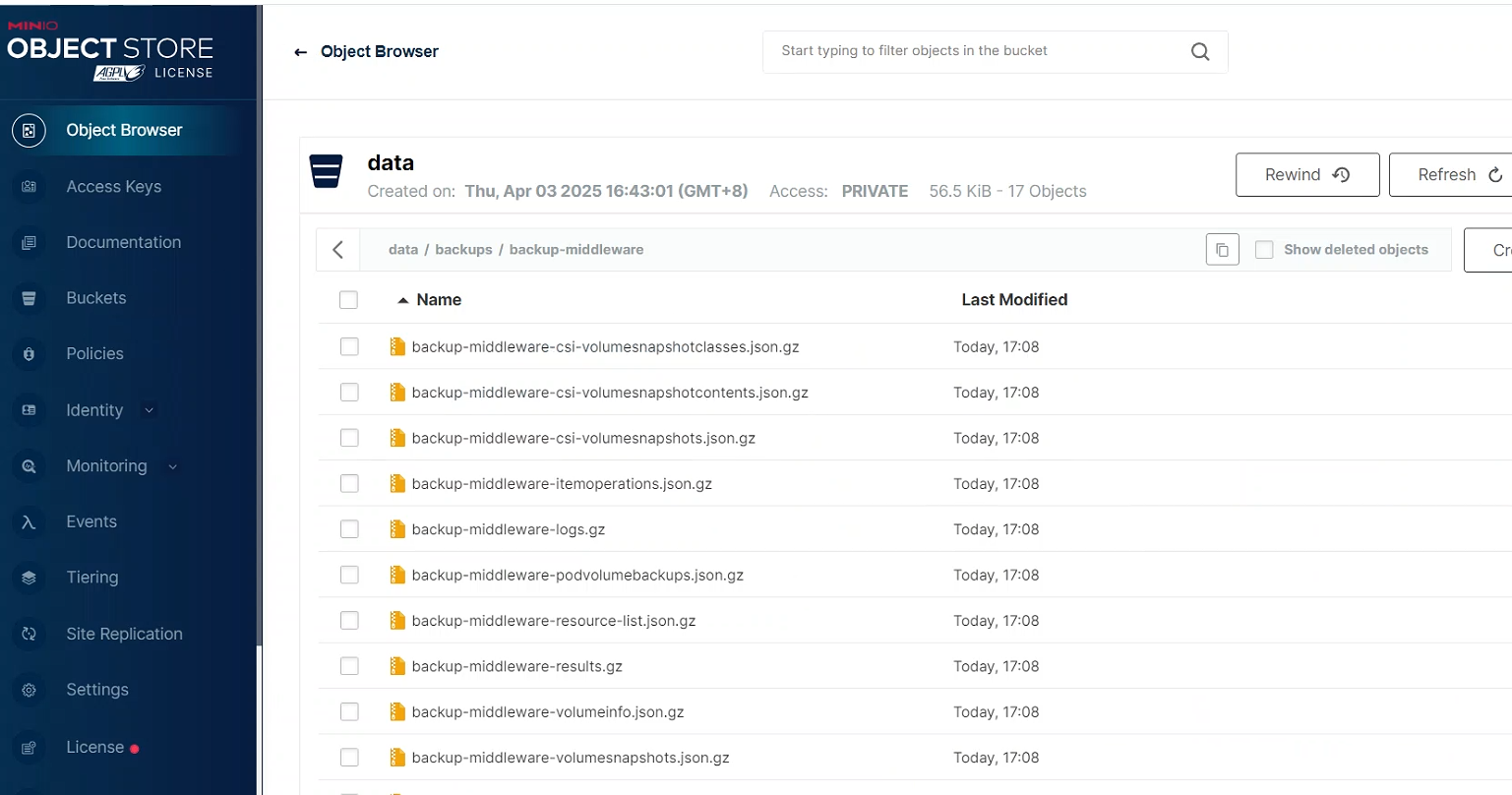
8.模拟删除名称空间middleware
[root@node2 ~]# kubectl -n middleware delete deploy --all
deployment.apps "milvus-dev-milvus-datanode" deleted
deployment.apps "milvus-dev-milvus-indexnode" deleted
deployment.apps "milvus-dev-milvus-mixcoord" deleted
deployment.apps "milvus-dev-milvus-proxy" deleted
deployment.apps "milvus-dev-milvus-querynode-0" deleted
deployment.apps "milvus-dev-milvus-querynode-1" deleted
deployment.apps "milvus-dev-milvus-standalone" deleted
好像这样删除恢自动拉起来
直接删除名称空间
[root@node2 ~]# kubectl delete namespace middleware
namespace "middleware" deleted
9.恢复
[root@node2 ~]# velero restore create --from-backup backup-middleware --wait
Restore request "backup-middleware-20250403172136" submitted successfully.
Waiting for restore to complete. You may safely press ctrl-c to stop waiting - your restore will continue in the background.
....
Restore completed with status: Completed. You may check for more information using the commands `velero restore describe backup-middleware-20250403172136` and `velero restore logs backup-middleware-20250403172136`.
10.查看恢复效果
[root@node2 ~]# kubectl get pods -A
NAMESPACE         NAME                                             READY   STATUS    RESTARTS      AGE
cert-manager      cert-manager-bcc6fc947-g4jvd                     1/1     Running   1 (8h ago)    24h
cert-manager      cert-manager-cainjector-74b489f78f-pmh8m         1/1     Running   3 (28m ago)   24h
cert-manager      cert-manager-webhook-68dc7956b4-n2j4j            1/1     Running   2 (28m ago)   24h
kube-system       calico-kube-controllers-6b668cd977-lv54j         1/1     Running   1 (8h ago)    25h
kube-system       calico-node-gpdrp                                1/1     Running   2 (28m ago)   25h
kube-system       calico-node-klbrm                                1/1     Running   1 (8h ago)    25h
kube-system       calico-node-vtmch                                1/1     Running   1 (8h ago)    25h
kube-system       coredns-c676cc86f-6rrp4                          1/1     Running   2 (28m ago)   23h
kube-system       coredns-c676cc86f-pjl52                          1/1     Running   1 (8h ago)    23h
kube-system       etcd-master                                      1/1     Running   2 (8h ago)    23h
kube-system       kube-apiserver-master                            1/1     Running   2 (8h ago)    23h
kube-system       kube-controller-manager-master                   1/1     Running   1 (8h ago)    23h
kube-system       kube-proxy-ptb4h                                 1/1     Running   2 (28m ago)   23h
kube-system       kube-proxy-v6b8x                                 1/1     Running   1 (8h ago)    23h
kube-system       kube-proxy-xjmxk                                 1/1     Running   1 (8h ago)    23h
kube-system       kube-scheduler-master                            1/1     Running   1 (8h ago)    23h
middleware        milvus-dev-milvus-datanode-555c8859fc-nqdjw      1/1     Running   0             37s
middleware        milvus-dev-milvus-indexnode-68f89cbb65-bj6p8     1/1     Running   0             37s
middleware        milvus-dev-milvus-mixcoord-5879ddb6bf-zq5qb      1/1     Running   0             37s
middleware        milvus-dev-milvus-proxy-6d7656657f-pwm29         1/1     Running   0             37s
middleware        milvus-dev-milvus-querynode-0-5cd5fb96b6-j5xzc   1/1     Running   0             37s
milvus-operator   milvus-operator-75bccd859c-gxj2j                 1/1     Running   6 (28m ago)   24h
velero            velero-75cd89cf9b-fjvcw                          1/1     Running   0             18m
11.卸载
velero uninstall
12.备份的时候指定备份保留时间
velero backup create backup-middleware01 --include-namespaces middleware --ttl=1440h -n velero
1440h=2个月,默认是1个月
13.删除备份
velero backup delete backup-middleware01

 浙公网安备 33010602011771号