

概述:
NFS,是 Network File System 的简写,即网络文件系统。网络文件系统是 FreeBSD 支持的文件系统中的一种,也被称为 NFS.NFS 允许一个系统在网络上与他人共享目录和文件。通过使用 NFS,用户和程序可以像访问本地文件一样访问远端系统上的文件
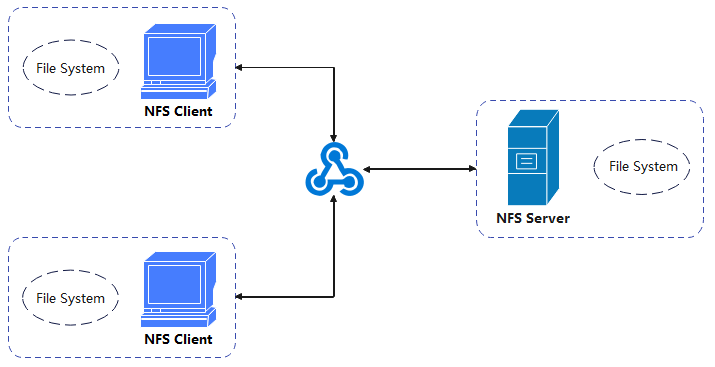
NFS选项
ro 					#只读访问。
rw 					#读写访问。
sync 				#资料同步写入到内存与硬盘当中。
async 				#资料会先暂存于内存当中,而非直接写入硬盘。
secure 				#NFS 通过 1024 以下的安全 TCP/IP 端口发送。
insecure 			#NFS 通过 1024 以上的端口发送。
wdelay 				#如果多个用户要写入 NFS 目录,则归组写入(默认)。
no_wdelay 			#如果多个用户要写入 NFS 目录,则立即写入,当使用 async 时,无需此设置。
hide 				#在 NFS 共享目录中不共享其子目录。
no_hide 			#共享 NFS 目录的子目录。
subtree_check 		#如果共享/usr/bin 之类的子目录时,强制 NFS 检查父目录的权限(默认)。
no_subtree_check 	#和上面相对,不检查父目录权限。
all_squash 			#共享文件的 UID 和 GID 映射匿名用户 anonymous,适合公用目录。
no_all_squash 		#保留共享文件的 UID 和 GID(默认)。
root_squash 		#root 用户的所有请求映射成 nfsnobody 用户的权限(默认)。
no_root_squash 		#当 NFS 客户端以 root 身份访问时,映射为 NFS 服务器的 root 用户,也就是要为超级用户保留权限。这个选项会留下安全隐患,一般不建议采用。
环境准备
NFS Server:10.0.0.13
NFS Client1:10.0.0.14
NFS Client2:10.0.0.15
# NFS-Server 操作
	yum -y install rpcbind nfs-utils
# 查看服务并启动服务
	systemctl start rpcbind
	systemctl start nfs
	systemctl status nfs
	systemctl status rpcbind

# 查询相关端口
	rpcinfo -p
[root@nfs-server ~]# rpcinfo -p
   program vers proto   port  service
    100000    4   tcp    111  portmapper
    100000    3   tcp    111  portmapper
    100000    2   tcp    111  portmapper
    100000    4   udp    111  portmapper
    100000    3   udp    111  portmapper
    100000    2   udp    111  portmapper
    100005    1   udp  20048  mountd
    100005    1   tcp  20048  mountd
    100005    2   udp  20048  mountd
    100005    2   tcp  20048  mountd
    100005    3   udp  20048  mountd
    100005    3   tcp  20048  mountd
    100003    3   tcp   2049  nfs
    100003    4   tcp   2049  nfs
    100227    3   tcp   2049  nfs_acl
    100003    3   udp   2049  nfs
    100003    4   udp   2049  nfs
    100227    3   udp   2049  nfs_acl
    100021    1   udp  45886  nlockmgr
    100021    3   udp  45886  nlockmgr
    100021    4   udp  45886  nlockmgr
    100021    1   tcp  32914  nlockmgr
    100021    3   tcp  32914  nlockmgr
    100021    4   tcp  32914  nlockmgr
[root@nfs-server ~]#

# 共享配置
mkdir /data_share_dir

# 配置 /etc/exports 文件
vim /etc/exports
# 内容如下
/data_share_dir *(rw,sync,root_squash,no_hide)

# 执行命令 exportfs -rv
[root@nfs-server ~]# exportfs -rv
exporting *:/data_share_dir
[root@nfs-server ~]#
# 客户端操作
[root@nfs-client1 ~]# showmount -e 10.0.0.13
Export list for 10.0.0.13:
/data_share_dir *
[root@nfs-client1 ~]#

[root@nfs-client2 ~]# showmount -e 10.0.0.13
Export list for 10.0.0.13:
/data_share_dir *
[root@nfs-client2 ~]#

# 创建挂载点
[root@nfs-client1 ~]# mkdir /data_client1_dir
[root@nfs-client1 ~]# mount -t nfs 10.0.0.13:/data_share_dir/ /data_client1_dir/
[root@nfs-client1 ~]#

[root@nfs-client2 ~]# mkdir /data_client2_dir
[root@nfs-client2 ~]# mount -t nfs 10.0.0.13:/data_share_dir/ /data_client1_dir/
[root@nfs-client2 ~]#
# 测试文件数据共享
# 服务端
[root@nfs-server data_share_dir]# touch nfs-server20240116.txt
[root@nfs-server data_share_dir]# ll
总用量 0
-rw-r--r-- 1 root root 0 1月  16 15:55 nfs-server20240116.txt
[root@nfs-server data_share_dir]#

# 客户端1
[root@nfs-client1 data_client1_dir]# ll
总用量 0
-rw-r--r-- 1 root root 0 1月  16 15:55 nfs-server20240116.txt
[root@nfs-client1 data_client1_dir]#

# 客户端2
[root@nfs-client2 data_client2_dir]# ll
总用量 0
-rw-r--r-- 1 root root 0 1月  16 15:55 nfs-server20240116.txt
[root@nfs-client2 data_client2_dir]#
# 客户端完成自动挂载
vim /etc/fstab
# 追加内容如下
10.0.0.13:/data_share_dir /data_client1_dir     nfs     defaults        0 0

# 测试是否能够进行开机自动挂载
[root@nfs-client1 ~]# df -TH
文件系统                类型      容量  已用  可用 已用% 挂载点
devtmpfs                devtmpfs  2.1G     0  2.1G    0% /dev
tmpfs                   tmpfs     2.1G     0  2.1G    0% /dev/shm
tmpfs                   tmpfs     2.1G   13M  2.1G    1% /run
tmpfs                   tmpfs     2.1G     0  2.1G    0% /sys/fs/cgroup
/dev/mapper/centos-root xfs        54G  2.6G   52G    5% /
/dev/sda1               xfs       1.1G  145M  920M   14% /boot
/dev/mapper/centos-home xfs        49G   34M   49G    1% /home
tmpfs                   tmpfs     413M     0  413M    0% /run/user/0
[root@nfs-client1 ~]# mount -a
[root@nfs-client1 ~]# df -TH
文件系统                  类型      容量  已用  可用 已用% 挂载点
devtmpfs                  devtmpfs  2.1G     0  2.1G    0% /dev
tmpfs                     tmpfs     2.1G     0  2.1G    0% /dev/shm
tmpfs                     tmpfs     2.1G   13M  2.1G    1% /run
tmpfs                     tmpfs     2.1G     0  2.1G    0% /sys/fs/cgroup
/dev/mapper/centos-root   xfs        54G  2.6G   52G    5% /
/dev/sda1                 xfs       1.1G  145M  920M   14% /boot
/dev/mapper/centos-home   xfs        49G   34M   49G    1% /home
tmpfs                     tmpfs     413M     0  413M    0% /run/user/0
10.0.0.13:/data_share_dir nfs4       54G  2.6G   52G    5% /data_client1_dir
[root@nfs-client1 ~]#
NFSv4 作为默认版本,NFSv4 使用 TCP 协议(端口号是 2049)和 NFS 服务器建立连接。
NFS 是通过网络进行数据传输的,传输数据的端口为 2049。但是由于文件系统非常复杂,因此NFS 还有其他程序去启动额外的端口。NFS 默认使用传输的端口是随机选择的小于 1024 的端口。将端口告知客户端是需要依赖于 RPC(remote procedure call,RPC)协议。
当 NFS 服务启动时,会随机选取数个端口,并向 RPC 注册,因此 RPC 就可以知道每个端口对应的NFS 功能。
RPC 最主要的功能就是指定每个 NFS 功能所对应的端口号,并告知客户端。以便客户端连接至正确的端口号。
# 基于一些特殊的网络云环境,需要固定NFS注册rpc服务的端口,配置 /etc/sysconfig/nfs
# 追加内容如下
RQUOTAD_PORT=30001
LOCKD_TCPPORT=30002
LOCKD_UDPPORT=30002
MOUNTD_PORT=30003
STATD_PORT=30004

# 重启服务
systemctl restart rpcbind
systemctl restart nfs

# 网络策略(客户端访问服务端)
TCP:111、30003、2049、30002
UDP:111、30003、2049、30002

# 可以看到mountd服务已经使用了配置的端口,但是nlockmgr的端口还是随机的,还需在/etc/modprobe.d/lockd.conf中添加以下设置:
options lockd nlm_tcpport=30002
options lockd nlm_udpport=30002

# 重新加载NFS配置和服务
systemctl restart nfs-config
systemctl restart nfs-idmap
systemctl restart nfs-lock
systemctl restart nfs-server

 浙公网安备 33010602011771号