在c++中使用GameMode
GameMode
在蓝图视图中,可以直接在下拉框中进行GameMode的设置。在本节中,进行在c++中的GameMode的设置。
创建GameMode类及其设置类
创建各个类,如下图所示
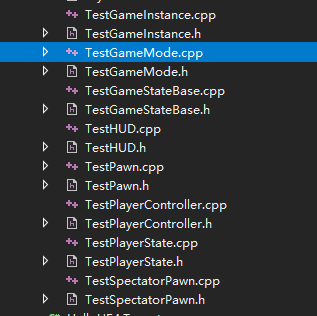
GameMode在C++中的设置
设置如代码所示
TestGameMode.h文件
在TestGameMode.h文件中声明了构造函数ATestGameMode()
// Fill out your copyright notice in the Description page of Project Settings.

#pragma once

#include "CoreMinimal.h"
#include "GameFramework/GameModeBase.h"
#include "TestGameMode.generated.h"

/**
 *
 */
UCLASS()
class HELLOUE4_API ATestGameMode : public AGameModeBase
{
	GENERATED_BODY()
public:
	ATestGameMode();

};
在TestGameMode.cpp文件中实现了构造函数ATestGameMode()
// Fill out your copyright notice in the Description page of Project Settings.


#include "TestGameMode.h"
#include "TestGameStateBase.h"
#include "TestPlayerController.h"
#include "TestPlayerState.h"
#include "TestPawn.h"
#include "TestHUD.h"
#include "TestSpectatorPawn.h"

ATestGameMode::ATestGameMode() {

	//使用类的静态引用进行赋值
	GameStateClass = ATestGameStateBase::StaticClass();

	PlayerControllerClass = ATestPlayerController::StaticClass();

	PlayerStateClass = ATestPlayerState::StaticClass();

	DefaultPawnClass = ATestPawn::StaticClass();

	HUDClass = ATestHUD::StaticClass();

	SpectatorClass = ATestSpectatorPawn::StaticClass();

	//经过上述赋值操作,就完成了相应的配置问题,然后就可以在相应的类中构建逻辑

}
代码编译后,在UE4中GameMode选择创建的TestGameMode,下面的各个设置如图所示:
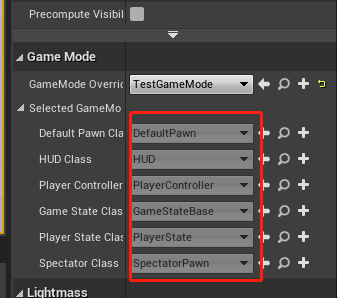
各个设置是灰色的,不可修改
想在c++中写逻辑,然后在蓝图中构建业务上的东西,就可以在UE4中构建蓝图类并继承自本类。

 浙公网安备 33010602011771号