
ArrayList详解
ArrayList类和它的常见方法
public class ArrayList<E> extends AbstractList<E>
        implements List<E>, RandomAccess, Cloneable, java.io.Serializable
{// 继承AbstractList类,实现List接口和Serializable序列话接口

    private static final int DEFAULT_CAPACITY = 10; //初始大小,也就是集合的容量
    transient Object[] elementData; // 元素的存放数组
    private int size; // 实际存放元素的数量

    // 直接获取ArrayList的元素数量
    public int size() {
        return size;
    }

    // 判断集合内元素是否为空
    public boolean isEmpty() {
        return size == 0;
    }

    // 集合中是否存在该元素 indexOf方法中循环数组用equals比较元素是否相同相同则返回改元素的下标
    public boolean contains(Object o) {
        return indexOf(o) >= 0;
    }

    // 将集合转为数组
    public Object[] toArray() {
        return Arrays.copyOf(elementData, size);
    }

    // 检查下标是否超出数组界限
    private void rangeCheck(int index) {
        if (index >= size)
            throw new IndexOutOfBoundsException(outOfBoundsMsg(index));
    }

    // 通过下标获取元素
    public E get(int index) {
        rangeCheck(index);
        return elementData(index);
    }

    // 修改指定下标的值为element算做替换,返回之前的元素值
    public E set(int index, E element) {
        rangeCheck(index);

        E oldValue = elementData(index);
        elementData[index] = element;
        return oldValue;
    }

    // 添加新元素
    public boolean add(E e) {
        ensureCapacityInternal(size + 1);  // Increments modCount!!
        elementData[size++] = e;
        return true;
    }

    // 插入添加,把元素添加到指定的下标,之后的下标开始后的元素向后移一位
    public void add(int index, E element) {
        rangeCheckForAdd(index);

        ensureCapacityInternal(size + 1);  // Increments modCount!!
        System.arraycopy(elementData, index, elementData, index + 1,
                         size - index);
        elementData[index] = element;
        size++;
    }

    // 通过下标移除元素
    public E remove(int index) {
        rangeCheck(index);

        modCount++;
        E oldValue = elementData(index);

        int numMoved = size - index - 1;
        if (numMoved > 0)
            System.arraycopy(elementData, index+1, elementData, index,
                             numMoved);
        elementData[--size] = null; // clear to let GC do its work

        return oldValue;
    }

    // 移除集合o元素
    public boolean remove(Object o) {
        if (o == null) {
            for (int index = 0; index < size; index++)
                if (elementData[index] == null) {
                    fastRemove(index);
                    return true;
                }
        } else {
            for (int index = 0; index < size; index++)
                if (o.equals(elementData[index])) {
                    fastRemove(index);
                    return true;
                }
        }
        return false;
    }

    // 移除集合第一个元素
    // 清空集合
    // 合并集合
    ...

}
实例ArrayList
ArrayList<String> arr = new ArrayList<>();// 只能放String类型对象,在添加第一个值的时候初始容量为10

ArrayList arr = new ArrayList<>();// 可以放任意类型Object

ArrayList<String> arr = new ArrayList<>(5);// 限制集合的类型,并设置集合的初始容量5
通过反射获取集合内存放元素的数组
        Class<? extends List> aClass = arr.getClass();
        Field elementData = aClass.getDeclaredField("elementData");
        elementData.setAccessible(true);
        Object[] o = (Object[]) elementData.get(arr);
System.out.println(o.length);// 数组的长度也就是集合的容量第一种方式创建的集合输出为0(说明在没有设置集合长度和添加元素的时候集合的长度为零)
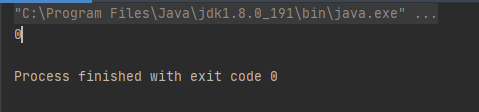
当给集合添加第一个值后(数组的长度变成了10)
arr.add("arr");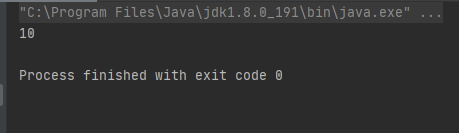
当元素增加到11为时数组的长度再次发生变化
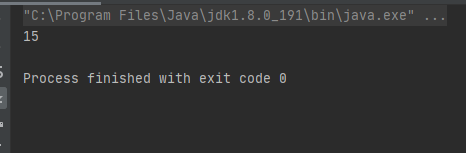
当元素增加到16时数组长度又发生了变化
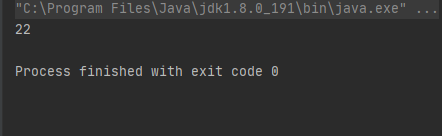
三次变化可以得到一个结论:在元素超过当前数组的长度时,会有一个新的数组替换原来的数组。而新数组的长度为原数组长度加原数组长度的1/2.
那么这么判断是新的数组呢?
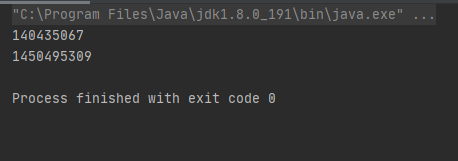
通过获取这个数组的hashcode值来判断集合中数组长度变化前和变化后的是否一致

 浙公网安备 33010602011771号