cetnos7中mysql5.7忘记密码解决方案
// 修改配置文件
vim /etc/my.cnf
// 在[mysqld]的末尾添加下面这一行
skip-grant-tables
// 重启mysql
systemctl restart mysql
// 直接输入mysql就能够进入mysql
mysql
// 修改密码
use mysql
UPDATE user SET password=PASSWORD(‘[your new password]’)WHERE user='root’;

//5.7之后password字段发生了变化
grant all privileges on *.* to root@'localhost' identified by "123456";
flush privileges;
// 退出mysql并重启
systemctl restart mysql
// 此时输入 接口重新成功进入
mysql -u root -p
navicat连接centos7 MySQL失败(1130问题 需要权限修改)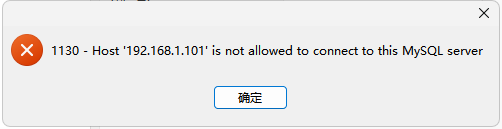
// 首先登录mysql
mysql -u root -p
// 然后输入一下命令即可
use mysql;
update user set host='%' where user = 'root';


 浙公网安备 33010602011771号