wordpress博客系统
wordpress博客系统
LNMP:Linux+nginx+mysql+php
一个操作系统+web网站+一个数据库存放数据+后端编程语言
基于红帽操作系统来搭建
1.需要一个本地yum仓库
[root@server yum.repos.d]# vim local.repo

[local]
name=local
baseurl=file:///media
enabled=1
gpgcheck=0

[root@server yum.repos.d]# yum clean all
Loaded plugins: langpacks, product-id, search-disabled-repos, subscription-manager
This system is not registered to Red Hat Subscription Management. You can use subscription-manager to register.
Cleaning repos: local
Cleaning up everything
[root@server yum.repos.d]# yum repolist
Loaded plugins: langpacks, product-id, search-disabled-repos, subscription-manager
This system is not registered to Red Hat Subscription Management. You can use subscription-manager to register.
local                                                                                                    | 4.1 kB  00:00:00
(1/2): local/group_gz                                                                                    | 136 kB  00:00:00
(2/2): local/primary_db                                                                                  | 3.9 MB  00:00:00
repo id                                                       repo name                                                   status
local                                                         local                                                       4,751
repolist: 4,751
[root@server yum.repos.d]#
2.安装需要软件包,windows的软件包拖入需要进行解压
[root@server ~]# ls
anaconda-ks.cfg  initial-setup-ks.cfg  lnmp.zip  tlsweb.csr  wordpress-4.7.3-zh_CN.zip
[root@server ~]# unzip lnmp.zip
Archive:  lnmp.zip
   creating: lnmp/
   creating: lnmp/lnmp/
  inflating: lnmp/lnmp/alsa-lib-1.1.8-1.el7.x86_64.rpm
  inflating: lnmp/lnmp/apr-1.4.8-5.el7.x86_64.rpm
  inflating: lnmp/lnmp/apr-util-1.5.2-6.el7.x86_64.rpm
  inflating: lnmp/lnmp/atk-2.28.1-1.el7.x86_64.rpm
  inflating: lnmp/lnmp/autoconf-2.69-11.el7.noarch.rpm
  inflating: lnmp/lnmp/automake-1.13.4-3.el7.noarch.rpm
  inflating: lnmp/lnmp/avahi-libs-0.6.31-19.el7.x86_64.rpm
  inflating: lnmp/lnmp/boost-filesystem-1.53.0-25.el7.x86_64.rpm
  ......
  inflating: lnmp/lnmp/xorg-x11-fonts-Type1-7.5-9.el7.noarch.rpm
  inflating: lnmp/lnmp/yaml-cpp-0.5.1-6.el7.x86_64.rpm
[root@server ~]#
3.基于软件包新建一个yum本地仓库
[root@server yum.repos.d]# vim lnmp
[lnmp]
name=lnmp
baseurl=file://root/lnmp/lnmp
gpgcheck=0
enabled=1
[root@server yum.repos.d]# yum clean all
Loaded plugins: langpacks, product-id, search-disabled-repos, subscription-manager
This system is not registered to Red Hat Subscription Management. You can use subscription-manager to register.
Cleaning repos: local
Cleaning up everything
[root@server yum.repos.d]# yum repolist
Loaded plugins: langpacks, product-id, search-disabled-repos, subscription-manager
This system is not registered to Red Hat Subscription Management. You can use subscription-manager to register.
local                                                                                                    | 4.1 kB  00:00:00
(1/2): local/group_gz                                                                                    | 136 kB  00:00:00
(2/2): local/primary_db                                                                                  | 3.9 MB  00:00:00
repo id                                                       repo name                                                   status
local                                                         local                                                       4,751
repolist: 4,751
4.安装软件
yum -y install nginx mariadb-server php php-mysql php-fpm
5.解压wordpress.zip
[root@server ~]# unzip wordpress-4.7.3-zh_CN.zip
6.配置nginx
[root@server html]# cat /etc/nginx/conf.d/default.conf
server {
    listen       80;
    server_name  localhost;

    #charset koi8-r;
    #access_log  /var/log/nginx/host.access.log  main;

    location / {
        root   /usr/share/nginx/html;
        index  index.php index.html index.htm;
    }

    #error_page  404              /404.html;

    # redirect server error pages to the static page /50x.html
    #
    error_page   500 502 503 504  /50x.html;
    location = /50x.html {
        root   /usr/share/nginx/html;
    }

    # proxy the PHP scripts to Apache listening on 127.0.0.1:80
    #
    #location ~ \.php$ {
    #    proxy_pass   http://127.0.0.1;
    #}

    # pass the PHP scripts to FastCGI server listening on 127.0.0.1:9000
    #
    location ~ \.php$ {
        root           /usr/share/nginx/html;
        fastcgi_pass   127.0.0.1:9000;
        fastcgi_index  index.php;
        fastcgi_param  SCRIPT_FILENAME  $document_root$fastcgi_script_name;
        include        fastcgi_params;
    }

    # deny access to .htaccess files, if Apache's document root
    # concurs with nginx's one
    #
    #location ~ /\.ht {
    #    deny  all;
    #}
}
7.配置数据库初始化
[root@server html]# systemctl  start mariadb
[root@server html]# mysql_secure_installation

NOTE: RUNNING ALL PARTS OF THIS SCRIPT IS RECOMMENDED FOR ALL MariaDB
      SERVERS IN PRODUCTION USE!  PLEASE READ EACH STEP CAREFULLY!

In order to log into MariaDB to secure it, we'll need the current
password for the root user.  If you've just installed MariaDB, and
you haven't set the root password yet, the password will be blank,
so you should just press enter here.

Enter current password for root (enter for none):
OK, successfully used password, moving on...

Setting the root password ensures that nobody can log into the MariaDB
root user without the proper authorisation.

Set root password? [Y/n] y
New password:
Re-enter new password:
Password updated successfully!
Reloading privilege tables..
 ... Success!


By default, a MariaDB installation has an anonymous user, allowing anyone
to log into MariaDB without having to have a user account created for
them.  This is intended only for testing, and to make the installation
go a bit smoother.  You should remove them before moving into a
production environment.

Remove anonymous users? [Y/n] y
 ... Success!

Normally, root should only be allowed to connect from 'localhost'.  This
ensures that someone cannot guess at the root password from the network.

Disallow root login remotely? [Y/n] n
 ... skipping.

By default, MariaDB comes with a database named 'test' that anyone can
access.  This is also intended only for testing, and should be removed
before moving into a production environment.

Remove test database and access to it? [Y/n] y
 - Dropping test database...
 ... Success!
 - Removing privileges on test database...
 ... Success!

Reloading the privilege tables will ensure that all changes made so far
will take effect immediately.

Reload privilege tables now? [Y/n] y
 ... Success!

Cleaning up...

All done!  If you've completed all of the above steps, your MariaDB
installation should now be secure.

Thanks for using MariaDB!

mysql  -uroot -p000000
->  create  database  wordpress;
->  show databases;
->  exit
#进入数据库,创建一个WordPress的数据库
8.将wordpress的页面文件导入
 [root@server html]#semanage fcontext -a -t httpd_sys_content_t '/root/wordpress/(/.*)?'
[root@server html]#  mv /root/wordpress/*  .
[root@server html]# ll -Z
-rwxrwxrwx. root root system_u:object_r:httpd_sys_content_t:s0 50x.html
-rwxrwxrwx. root root system_u:object_r:httpd_sys_content_t:s0 index.html
-rw-r--r--. root root system_u:object_r:httpd_sys_content_t:s0 index.php
-rw-r--r--. root root system_u:object_r:httpd_sys_content_t:s0 license.txt
-rw-r--r--. root root system_u:object_r:httpd_sys_content_t:s0 readme.html
-rw-r--r--. root root system_u:object_r:httpd_sys_content_t:s0 wp-activate.php
drwxr-xr-x. root root system_u:object_r:httpd_sys_content_t:s0 wp-admin
-rw-r--r--. root root system_u:object_r:httpd_sys_content_t:s0 wp-blog-header.php
-rw-r--r--. root root system_u:object_r:httpd_sys_content_t:s0 wp-comments-post.php
-rw-r--r--. root root system_u:object_r:httpd_sys_content_t:s0 wp-config-sample.php
drwxr-xr-x. root root system_u:object_r:httpd_sys_content_t:s0 wp-content
-rw-r--r--. root root system_u:object_r:httpd_sys_content_t:s0 wp-cron.php
drwxr-xr-x. root root system_u:object_r:httpd_sys_content_t:s0 wp-includes
-rw-r--r--. root root system_u:object_r:httpd_sys_content_t:s0 wp-links-opml.php
-rw-r--r--. root root system_u:object_r:httpd_sys_content_t:s0 wp-load.php
-rw-r--r--. root root system_u:object_r:httpd_sys_content_t:s0 wp-login.php
-rw-r--r--. root root system_u:object_r:httpd_sys_content_t:s0 wp-mail.php
-rw-r--r--. root root system_u:object_r:httpd_sys_content_t:s0 wp-settings.php
-rw-r--r--. root root system_u:object_r:httpd_sys_content_t:s0 wp-signup.php
-rw-r--r--. root root system_u:object_r:httpd_sys_content_t:s0 wp-trackback.php
-rw-r--r--. root root system_u:object_r:httpd_sys_content_t:s0 xmlrpc.php
[root@server html]# chmod -R 777 .
[root@server html]# ll
total 192
-rwxrwxrwx.  1 root root   494 Aug 13  2019 50x.html
-rwxrwxrwx.  1 root root   612 Aug 13  2019 index.html
-rwxrwxrwx.  1 root root   418 Sep 25  2013 index.php
-rwxrwxrwx.  1 root root 19935 Jan  3  2017 license.txt
-rwxrwxrwx.  1 root root  6956 Mar  7  2017 readme.html
-rwxrwxrwx.  1 root root  5447 Sep 28  2016 wp-activate.php
drwxrwxrwx.  9 root root  4096 Mar  7  2017 wp-admin
-rwxrwxrwx.  1 root root   364 Dec 19  2015 wp-blog-header.php
-rwxrwxrwx.  1 root root  1627 Aug 29  2016 wp-comments-post.php
-rwxrwxrwx.  1 root root  2930 Mar  7  2017 wp-config-sample.php
drwxrwxrwx.  5 root root    69 Mar  7  2017 wp-content
-rwxrwxrwx.  1 root root  3286 May 25  2015 wp-cron.php
drwxrwxrwx. 18 root root  8192 Mar  7  2017 wp-includes
-rwxrwxrwx.  1 root root  2422 Nov 21  2016 wp-links-opml.php
-rwxrwxrwx.  1 root root  3301 Oct 25  2016 wp-load.php
-rwxrwxrwx.  1 root root 33939 Nov 21  2016 wp-login.php
-rwxrwxrwx.  1 root root  8048 Jan 11  2017 wp-mail.php
-rwxrwxrwx.  1 root root 16250 Nov 29  2016 wp-settings.php
-rwxrwxrwx.  1 root root 29896 Oct 19  2016 wp-signup.php
-rwxrwxrwx.  1 root root  4513 Oct 15  2016 wp-trackback.php
-rwxrwxrwx.  1 root root  3065 Sep  1  2016 xmlrpc.php
[root@server html]#
10.配置权限(三步)
(1)文件权限
chmod -R 777 ./
(2)防火墙权限
  firewall-cmd  --permanent  --add-service=http
  firewall-cmd  --permanent  --add-service=mysql
 firewall-cmd  --reload
(3)selinux文件的上下文
semanage fcontext -a -t httpd_sys_content_t '/usr/share/nginx/html/(/.*)?'
  restorecon -RFv .
11.开启服务并设置开机自启
  systemctl enable php-fpm
  systemctl enable mariadb.service
  systemctl enable nginx
    systemctl start php-fpm
  systemctl start mariadb.service
  systemctl start nginx
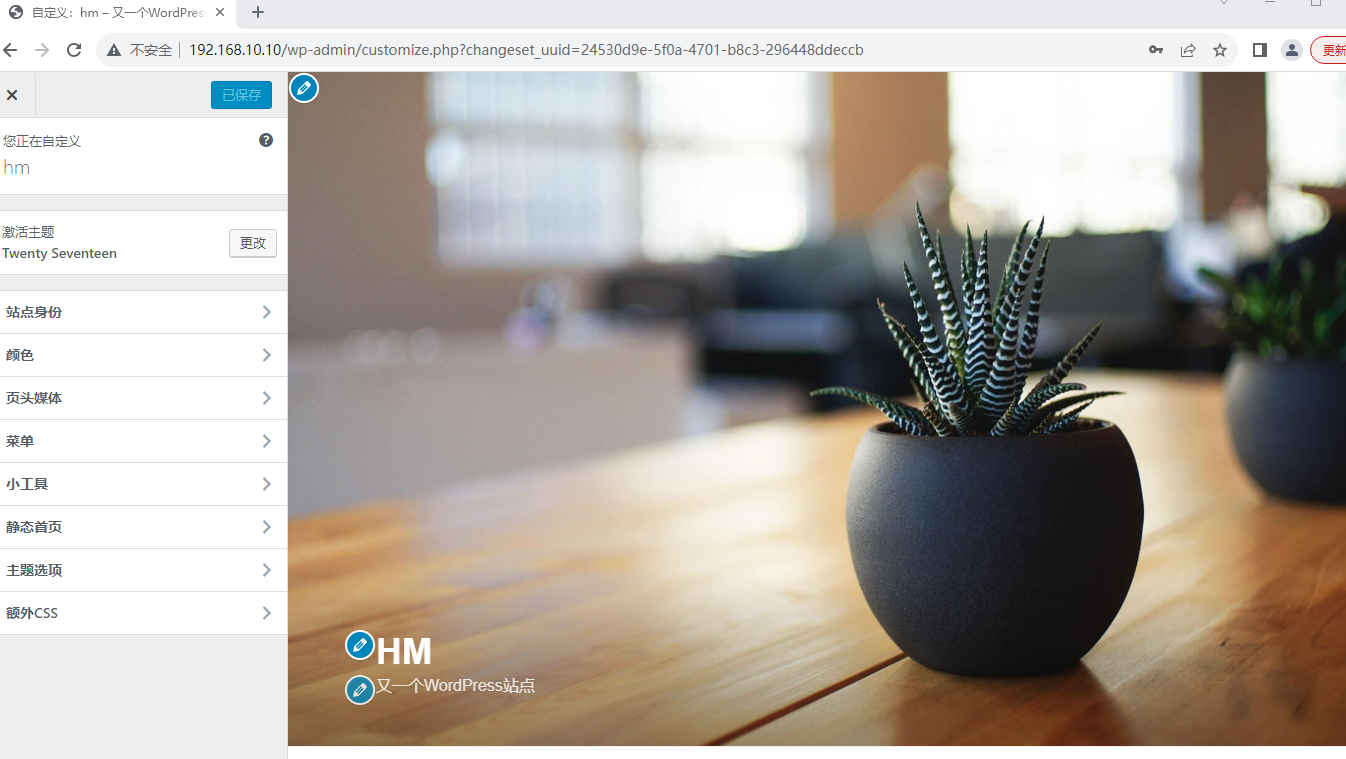
12.访问http://192.168.10.10

 浙公网安备 33010602011771号