

java实现Excel模板导出
【Easyexcel】根据模板导出excel
使用 com.alibaba的easyexcel根据模板导出excel文件
       <dependency>
            <groupId>com.alibaba</groupId>
            <artifactId>easyexcel</artifactId>
            <version>3.3.2</version>
        </dependency>
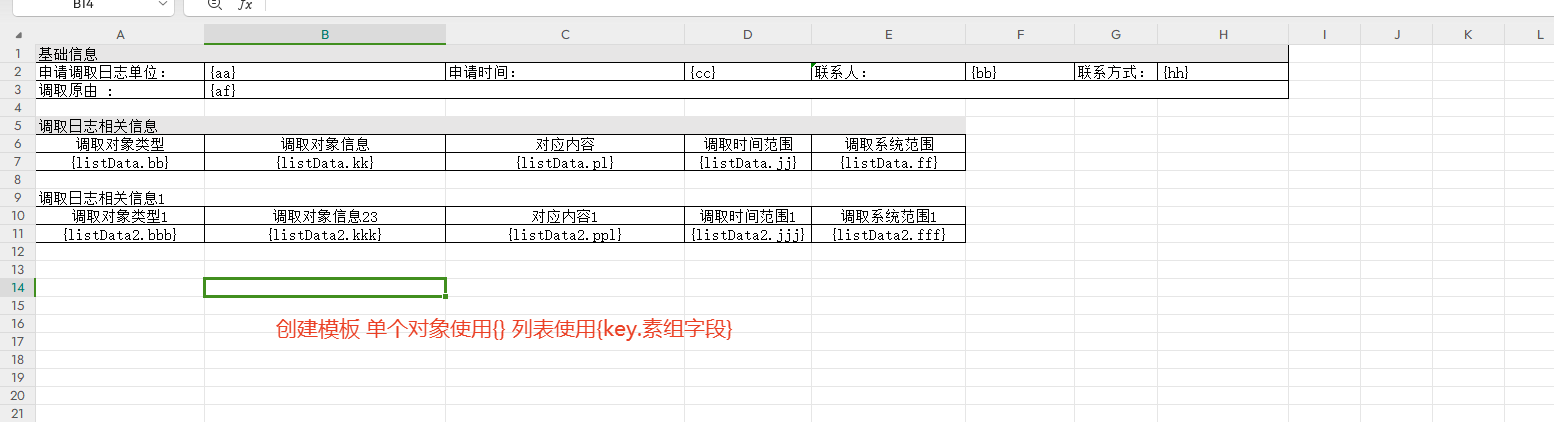
相关代码如下:
public static void main(String[] args) {
        // 2. 准备输出文件路径
        String outputPath = "output_with_template.xlsx";
        // 3. 准备数据
        Map<String, Object> singleData = new HashMap<>();
        singleData.put("aa", "2023年度销售报表");
        singleData.put("cc", new Date());
        singleData.put("bb", "张三");
        singleData.put("hh", "1500000000");
        singleData.put("af", "这是一次测试水水水水水水水水");

        List<Map<String, Object>> listData = new ArrayList<>();
        for (int i = 1; i <= 9; i++) {
            Map<String, Object> item = new HashMap<>();
            item.put("bb", "产品" + i);
            item.put("kk", 10000 * i);
            item.put("pl", 100 * i);
            item.put("jj", "15%");
            item.put("ff", "xx%");
            listData.add(item);
        }

        List<Map<String, Object>> listData2 = new ArrayList<>();
        for (int i = 1; i <= 9; i++) {
            Map<String, Object> item = new HashMap<>();
            item.put("bbb", "产品" + i);
            item.put("kkk", 10000 * i);
            item.put("ppl", 100 * i);
            item.put("jjj", "15%");
            item.put("fff", "xx%");
            listData2.add(item);
        }
        // 4. 执行导出
//        try (InputStream template = InvestigationController.class.getResourceAsStream("C:\\Users\\150\\Desktop\\case_template.xlsx")) {
        String templateFilePath = "C:\\Users\\150\\Desktop\\case_template.xlsx"; // 替换为实际绝对路径
        try (InputStream template = new FileInputStream(new File(templateFilePath))) {
//            EasyExcel.write(outputPath).withTemplate(template).sheet().doFill(listData);//单个对象写法
            ExcelWriter excelWriter = EasyExcel.write(outputPath)
                    .withTemplate(template)
                    .build();
            // 构建工作表(默认第一个sheet)
            WriteSheet writeSheet = EasyExcel.writerSheet().build();
            // 2. 填充列表数据(表格数据),配置纵向填充(默认纵向,可根据需要改为横向)
            FillConfig fillConfig = FillConfig.builder()
                    .direction(WriteDirectionEnum.VERTICAL) // 纵向填充
                    .forceNewRow(Boolean.TRUE)//强制为每个列表元素插入新行,不覆盖原有行(注意:必须时Boolean.TRUE 不能直接填true否则不生效)
                    .build();
            // 1. 填充单个数据(如标题、日期等)
            excelWriter.fill(singleData,fillConfig, writeSheet);
            excelWriter.fill(new FillWrapper("listData", listData), fillConfig, writeSheet);
            excelWriter.fill(new FillWrapper("listData2", listData2) , fillConfig, writeSheet);
            // 完成填充,释放资源
            excelWriter.finish();
            System.out.println("导出成功,文件路径: " + new File(outputPath).getAbsolutePath());
        } catch (Exception e) {
            System.err.println("导出失败: " + e.getMessage());
            e.printStackTrace();
        }
    }
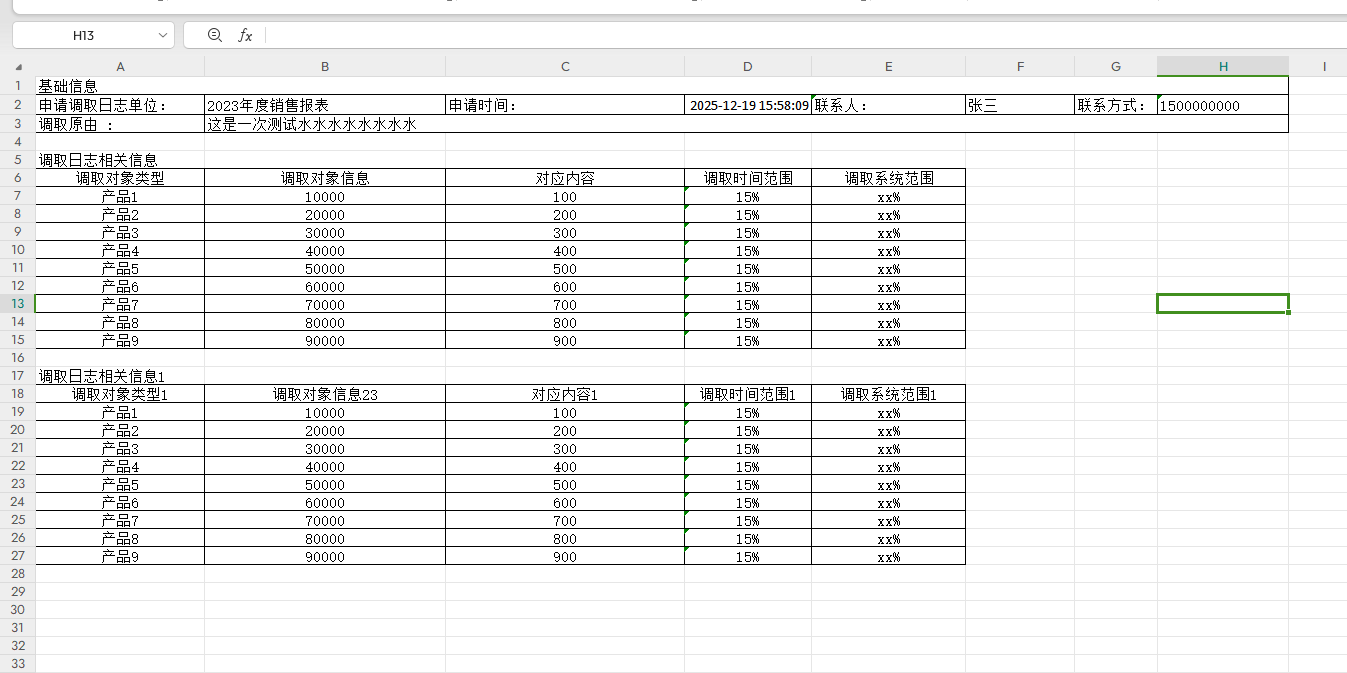
效果示例:

 浙公网安备 33010602011771号