
springboot学习之路30 (swagger2教程)
swagger2 教程
1.介绍
- swagger2 是一款让你更好的书写API文档的规范且完整框架。
- 提供描述、生产、消费和可视化RESTful Web Service。
- 是由庞大工具集合支撑的形式化规范。这个集合涵盖了从终端用户接口、底层代码库到商业API管理的方方面面。
swagger是前后端对接的一款利器。
2. 搭建环境
swagger的环境搭建主要是指与springboot,springcloud.springmvc进行整合使用,在这我以springboot环境搭建为例,其他类似
- 引入swagger jar包
<dependency>
     <groupId>io.springfox</groupId>
     <artifactId>springfox-swagger2</artifactId>
     <version>2.8.0</version>
</dependency>
<dependency>
     <groupId>io.springfox</groupId>
     <artifactId>springfox-swagger-ui</artifactId>
     <version>2.8.0</version>
</dependency>
2.swagger配置类
/**
 * @author: huhy
 * @project-name:
 * @create: 2018-08-11
 * @description: swagger配置类
 *
    通过@Configuration 让spring来扫描这个类
    通过@EnableSwagger2 来启动swagger2  也可以放到项目启动类上
 */
@Configuration
@EnableSwagger2
//当存在该属性并且值为true时配置bean才生成
@ConditionalOnProperty(name = "swagger.enable",havingValue = "true")
public class SwaggerConfig {

    @Value("${spring.application.name}")
    private String springApplicationName;

    /**
     * 接口api信息构造   apiInfo  后面会注入到Docket的apiinfo方法
     * @return
     */
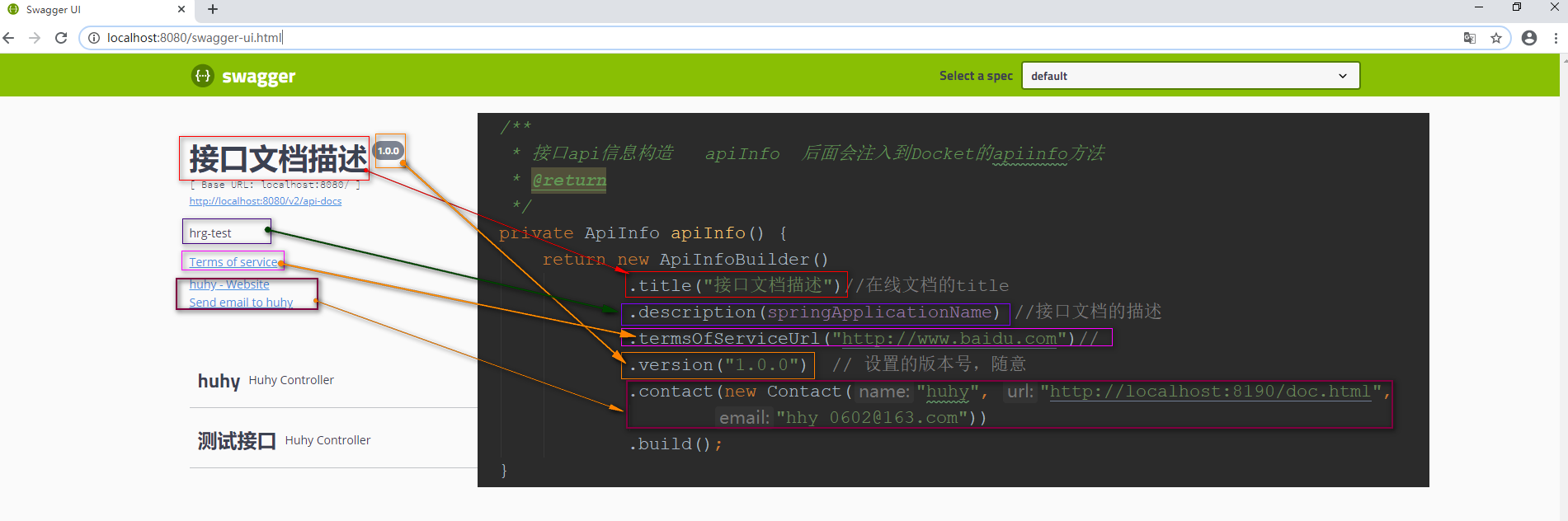
    private ApiInfo apiInfo() {
        return new ApiInfoBuilder()
                .title("接口文档描述")//在线文档的title
                .description(springApplicationName) //接口文档的描述
                .termsOfServiceUrl("http://www.baidu.com")//
                .version("1.0.0")  // 设置的版本号,随意
                .contact(new Contact("huhy", "http://localhost:8190/doc.html",
                        "hhy_0602@163.com"))
                .build();
    }

    /**
     * 默认创建api接口文档
     * @return
     */
    @Bean
    public Docket createRestApi() {
        //添加token
        ParameterBuilder ticketPar = new ParameterBuilder();
        List<Parameter> pars = new ArrayList<Parameter>();
        ticketPar.name("Authorization") // token的字段名
                .description("user token") // 字段的描述
                .defaultValue("Bearer ")  // 默认值
                .modelRef(new ModelRef("string"))
                .parameterType("header") //哪种方式提交参数  header  body等
                .required(false)  // 是否必须
                .build(); //header中的ticket参数非必填,传空也可以
        pars.add(ticketPar.build());

        return new Docket(DocumentationType.SWAGGER_2)
                //apiinfo 生成
                .apiInfo(apiInfo())
                // 选择那些路径和api会生成document
                .select()
                /**
                 * RequestHandlerSelectors
                 *      basePackage:  扫描配置包 需要多个,需要再写个apis进行添加,
                 *          如: .apis(RequestHandlerSelectors.basePackage("com.huhy"))
                 *               .apis(RequestHandlerSelectors.basePackage("com.yang"))
                 *      withClassAnnotation: 扫描类上带有指定注解的
                 *          如:apis(RequestHandlerSelectors.withClassAnnotation(Api.class))
                 *              这是扫描类上指定@Api
                 *      withMethodAnnotation: 扫描方法上带有指定注解的,案例如上
                 *      any():对所以api生效
                 *      none: 忽略所以api
                 */
                .apis(RequestHandlerSelectors.basePackage("com.huhy"))
                .paths(PathSelectors.any())//扫描接口的路径,PathSelectors下有四种方法
                .build()
                // 把参数加入到api中
                .globalOperationParameters(pars);

    }
}
-
访问测试 http://ip:port/swagger-ui.html
本地我的测试是http://localhost:8080/swagger-ui.html
3. 常用注解
常用注解:
- @Api()用于类;
  表示标识这个类是swagger的资源
    tags–表示说明
    value–也是说明,可以使用tags替代
    但是tags如果有多个值,会生成多个list
- @ApiOperation()用于方法;
  表示一个http请求的操作
    value用于方法描述
    notes用于提示内容
    tags可以重新分组(视情况而用)
- @ApiParam()用于方法,参数,字段说明;
  表示对参数的添加元数据(说明或是否必填等)
    name–参数名
    value–参数说明
    required–是否必填
- @ApiModel()用于类
  表示对类进行说明,用于参数用实体类接收
    value–表示对象名
    description–描述
- @ApiModelProperty()用于方法,字段
  表示对model属性的说明或者数据操作更改
    value–字段说明
    name–重写属性名字
    dataType–重写属性类型
    required–是否必填
    example–举例说明
    hidden–隐藏
- @ApiIgnore()用于类,方法,方法参数
  表示这个方法或者类被忽略
- @ApiImplicitParam() 用于方法
  表示单独的请求参数
- @ApiImplicitParams() 用于方法,包含多个 @ApiImplicitParam
    name–参数名
    value–参数说明
    dataType–数据类型
    paramType–参数类型
    example–举例说明
- @ApiResponse: 用于方法,描述单个出参信息
- @ApiResponses: 用于方法,包含多个@ApiResponse
- @ApiError: 用于方法,接口错误所返回的信息
4. 案例
@RestController
/**
 * tags可以生成多系列接口
 */
@Api(tags = {"huhy","测试接口"},value = "yang")
public class HuhyController {

    /**
     * 测试swagger的@ApiImplicitParam
     * @param name
     * @return
     */
    @ApiOperation("测试ApiImplicitParam")
    @ApiImplicitParam(value = "插入name",name = "name",defaultValue = "huhy",required = true)
    @GetMapping("getIndex")
    public String getIndex(String name){
        return "this is author : "+name;
    }

    /**
     *  测试ApiParam
     * @ApiParam  @ApiParam 修饰的参数,要指定接收类型
     * @return
     */
    @ApiOperation(value = "测试ApiParam")
    @GetMapping(value = "getIndex2")
    public String edit(
            @ApiParam(name = "title", value = "公告标题", required = true) @RequestParam("title") String title,
            @ApiParam(name = "content", value = "公告内容", required = true) @RequestParam("content") String content){
        return "this is " + title + " and "+content;
    }

    @ApiOperation("测试ApiModel")
    @PostMapping("add")
    public String addUser(User user){
        return "ok";
    }

}
knife4j教程
knife4j是swagger2的增强,大致用法相同,个别熟悉需注意接口
本文来自博客园,作者:huhy,转载请注明原文链接:https://www.cnblogs.com/huhongy/p/13490536.html

 浙公网安备 33010602011771号