在vue项目中,将juery设置为全局变量的方法
1.首先执行:npm install jQuery --save-dev,在package.json里加入jQuery。
2.修改build下的webpack.base.conf.js
方法一:
首先加入:
|
1
|
const webpack = require("webpack") |
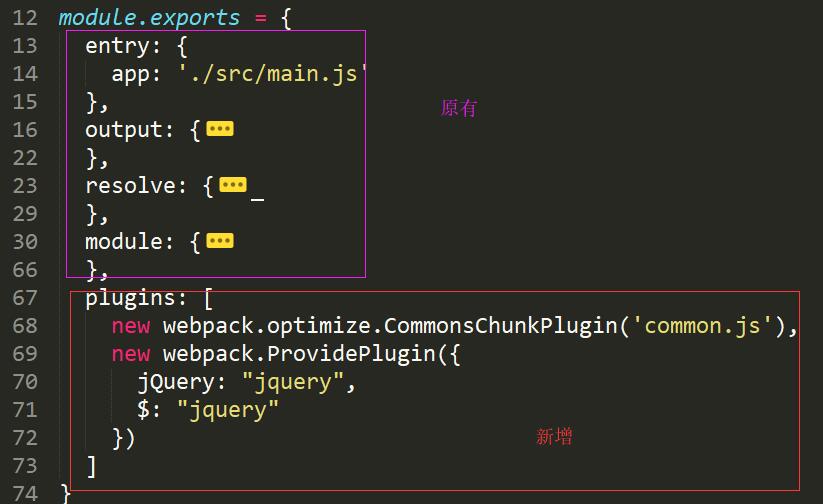
然后在module.exports 对象中加入:
前端精品教程:百度网盘下载
|
1
2
3
4
5
6
7
|
plugins: [ new webpack.optimize.CommonsChunkPlugin('common.js'), new webpack.ProvidePlugin({ jQuery: "jquery", $: "jquery" }) ] |
方法二:
先加入:
前端精品教程:百度网盘下载
|
1
|
const webpack = require("webpack") |
然后:
|
1
2
3
4
5
6
7
8
|
resolve: {extensions: ['.js', '.vue', '.json'],alias: { 'vue$': 'vue/dist/vue.esm.js', '@': resolve('src'), 'jquery': 'jquery'}}, |
最后:
|
1
2
3
4
5
6
|
plugins: [new webpack.ProvidePlugin({ jQuery: "jquery", $: "jquery"})] |
3.在app.vue中调用jquery
前端精品教程:百度网盘下载
|
1
2
3
4
|
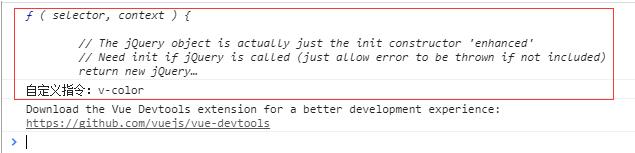
mounted: function() {console.log($);console.log($('#ss')[0].innerHTML);}, |
打印结果:
posted on 2018-10-18 21:25 hudayang2008 阅读(482) 评论(0) 收藏 举报


 浙公网安备 33010602011771号