
redis持久化
1.RDB
通过快照的方式保存数据库数据到磁盘中
1.1通过配置文件设置保存目录自动触发
redis.conf关于保存数据的触发方式
################################ SNAPSHOTTING  ################################

# Save the DB to disk.
#
# save <seconds> <changes> [<seconds> <changes> ...]
#
# Redis will save the DB if the given number of seconds elapsed and it
# surpassed the given number of write operations against the DB.
#
# Snapshotting can be completely disabled with a single empty string argument
# as in following example:
#
# save ""
#
# Unless specified otherwise, by default Redis will save the DB:
#   * After 3600 seconds (an hour) if at least 1 change was performed
#   * After 300 seconds (5 minutes) if at least 100 changes were performed
#   * After 60 seconds if at least 10000 changes were performed
#
# You can set these explicitly by uncommenting the following line.
#
# save 3600 1 300 100 60 10000
save 后参数的含义是指每过多少秒钟数据发生多少次变化就触发RDB数据库保存
比如:
save 3600 1 每过3600秒至少触发一次数据变化就生成rdb文件
save 300 100 每过300秒至少触发100次数据变化就生成rdb文件
save 60 10000 每过60秒至少触发10000次数据变化就生成rdb文件
# Enables or disables full sanitization checks for ziplist and listpack etc when
# loading an RDB or RESTORE payload. This reduces the chances of a assertion or
# crash later on while processing commands.
# Options:
#   no         - Never perform full sanitization
#   yes        - Always perform full sanitization
#   clients    - Perform full sanitization only for user connections.
#                Excludes: RDB files, RESTORE commands received from the master
#                connection, and client connections which have the
#                skip-sanitize-payload ACL flag.
# The default should be 'clients' but since it currently affects cluster
# resharding via MIGRATE, it is temporarily set to 'no' by default.
#
# sanitize-dump-payload no

# The filename where to dump the DB
dbfilename dump.rdb

# Remove RDB files used by replication in instances without persistence
# enabled. By default this option is disabled, however there are environments
# where for regulations or other security concerns, RDB files persisted on
# disk by masters in order to feed replicas, or stored on disk by replicas
# in order to load them for the initial synchronization, should be deleted
# ASAP. Note that this option ONLY WORKS in instances that have both AOF
# and RDB persistence disabled, otherwise is completely ignored.
#
# An alternative (and sometimes better) way to obtain the same effect is
# to use diskless replication on both master and replicas instances. However
# in the case of replicas, diskless is not always an option.
rdb-del-sync-files no

# The working directory.
#
# The DB will be written inside this directory, with the filename specified
# above using the 'dbfilename' configuration directive.
#
# The Append Only File will also be created inside this directory.
#
# Note that you must specify a directory here, not a file name.
dir ./
dirname 持久化生成的rdb文件名
dir 文件保存的目录
1.2.手动触发
redis命令save和bgsave
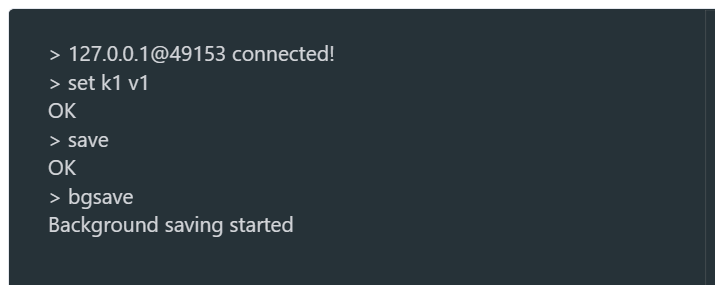
bgsave 在后台保存数据,不会阻塞
save为同步方式会造成阻塞,生产环境禁用!!!
1.3.RDB优化配置项
stop-writes-on-bagssave-error
默认yes
如果配置程no,表示你不在乎数据不一致或者有其他手段发现和控制这种不一致,在快照写入失败时,也能确保redis继续接收新的写请求(后台的bagsave出现error时候是否继续接收新的写请求)
rdbcompression
默认yes
对于存贮在磁盘中的快照,可以设置会后进行压缩存储
rdbchecksum
默认yes
在存储快照后,还可以让redis使用CRC64算法进行数据校验,如果希望胡渠道最大的性能提升,可以关闭此功能
rdb-del-sync-files
在没有持久性的情况下删除复制中使用的RDB文件启用,默认情况为no,此选项禁用
2.aof
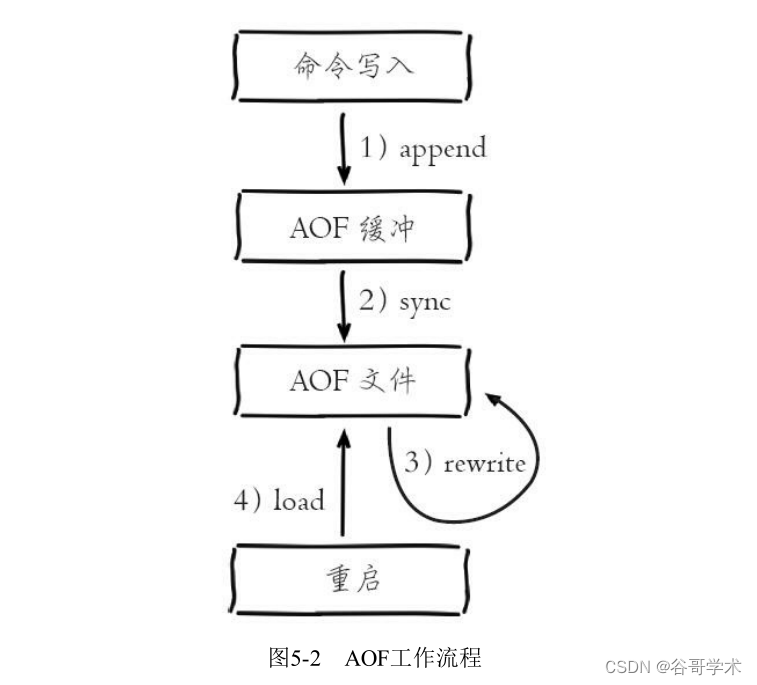
通过将redis命令写入磁盘的方式,实现数据的持久化
2.1 aof的配置
# By default Redis asynchronously dumps the dataset on disk. This mode is
# good enough in many applications, but an issue with the Redis process or
# a power outage may result into a few minutes of writes lost (depending on
# the configured save points).
#
# The Append Only File is an alternative persistence mode that provides
# much better durability. For instance using the default data fsync policy
# (see later in the config file) Redis can lose just one second of writes in a
# dramatic event like a server power outage, or a single write if something
# wrong with the Redis process itself happens, but the operating system is
# still running correctly.
#
# AOF and RDB persistence can be enabled at the same time without problems.
# If the AOF is enabled on startup Redis will load the AOF, that is the file
# with the better durability guarantees.
#
# Please check https://redis.io/topics/persistence for more information.

appendonly yes
appendonly 默认为no,yes表示开始aof
# The base name of the append only file.
#
# Redis 7 and newer use a set of append-only files to persist the dataset
# and changes applied to it. There are two basic types of files in use:
#
# - Base files, which are a snapshot representing the complete state of the
#   dataset at the time the file was created. Base files can be either in
#   the form of RDB (binary serialized) or AOF (textual commands).
# - Incremental files, which contain additional commands that were applied
#   to the dataset following the previous file.
#
# In addition, manifest files are used to track the files and the order in
# which they were created and should be applied.
#
# Append-only file names are created by Redis following a specific pattern.
# The file name's prefix is based on the 'appendfilename' configuration
# parameter, followed by additional information about the sequence and type.
#
# For example, if appendfilename is set to appendonly.aof, the following file
# names could be derived:
#
# - appendonly.aof.1.base.rdb as a base file.
# - appendonly.aof.1.incr.aof, appendonly.aof.2.incr.aof as incremental files.
# - appendonly.aof.manifest as a manifest file.

appendfilename "appendonly.aof"

# For convenience, Redis stores all persistent append-only files in a dedicated
# directory. The name of the directory is determined by the appenddirname
# configuration parameter.

appenddirname "appendonlydir"
appendfilename aof文件的文件名
appenddirname redis7.0之后才有的新参数,在dir参数的目录下,aof文件所在的路径名
# The fsync() call tells the Operating System to actually write data on disk
# instead of waiting for more data in the output buffer. Some OS will really flush
# data on disk, some other OS will just try to do it ASAP.
#
# Redis supports three different modes:
#
# no: don't fsync, just let the OS flush the data when it wants. Faster.
# always: fsync after every write to the append only log. Slow, Safest.
# everysec: fsync only one time every second. Compromise.
#
# The default is "everysec", as that's usually the right compromise between
# speed and data safety. It's up to you to understand if you can relax this to
# "no" that will let the operating system flush the output buffer when
# it wants, for better performances (but if you can live with the idea of
# some data loss consider the default persistence mode that's snapshotting),
# or on the contrary, use "always" that's very slow but a bit safer than
# everysec.
#
# More details please check the following article:
# http://antirez.com/post/redis-persistence-demystified.html
#
# If unsure, use "everysec".

# appendfsync always
appendfsync everysec
# appendfsync no
appendfsync aof的触发策略
always 只要有命令执行就触发
everysec 每秒触发
no 不触发
2.1 手动触发aof

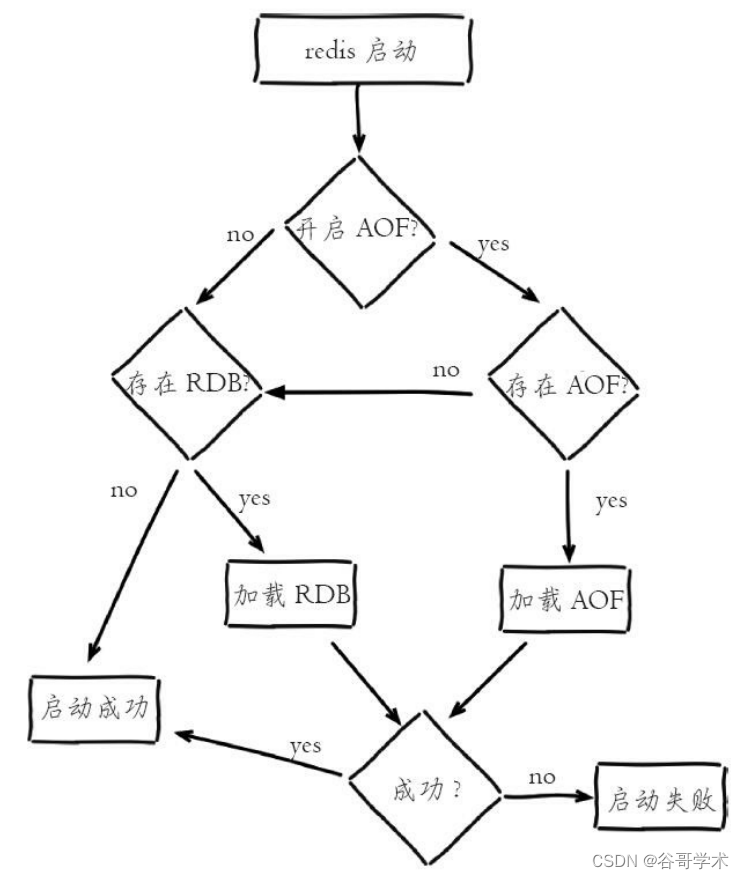
redis在同时开启RDB和AOF的情况,两种持久化方式的优先级关系

 浙公网安备 33010602011771号