


JavaWeb学习内容
javaWeb
1、基本概念
web开发:
- web,网页的意思,www.baidu.com
- 静态web
- html ,css
- 提供给所有人看到数据始终不会发生变化!
- 动态web
- 淘宝,几乎所有的网站
- 提供给所有人看到数据始终会发生变化,每个人在不同的时间,不同的地点砍价不同的内容
- 技术栈:Servlet/JSP,ASP,PHP
在java中,动态web资源开发的技术统称为javaweb;
1.2、web应用程序
web应用程序:可以提供浏览器访问的程序;
- a.html , b.html.......多个web资源,这些web资源可以被外界访问,对外界提供服务
- 能访问到任何一个页面或者资源,都存在于中国世界的某一个角落的狄计算机上
- URL:
- 这些统一的web资源会被放在同一个文件夹下,web应用程序->Tomcat:服务器
- 一个web应用由多个部分组成(静态web,动态web)
- html,css,js
- jsp,servlet
- java程序
- jar包
- 配置文件(Properties)
web应用程序编写完毕后,若想提供给外界访问,需要一个服务器来统一管理
1.3、静态web
- *.hem, *.html,这些都是网页的后缀,如果服务器上一直存在这些东西,我们就可以直接进行读取,通络
- 静态web存在的缺点
- web页面无法动态更新,所有用户看到都是同一个页面
- 轮播图,点击特性:伪动态
- JavaScript
- vbscript
- 他无法和数据库交互
- web页面无法动态更新,所有用户看到都是同一个页面
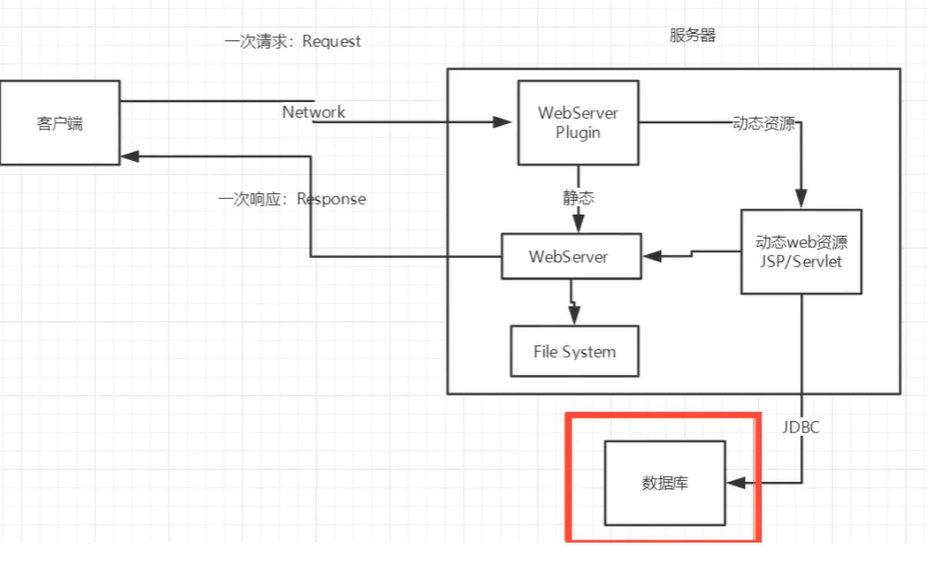
1.4、动态web
页面动态展示
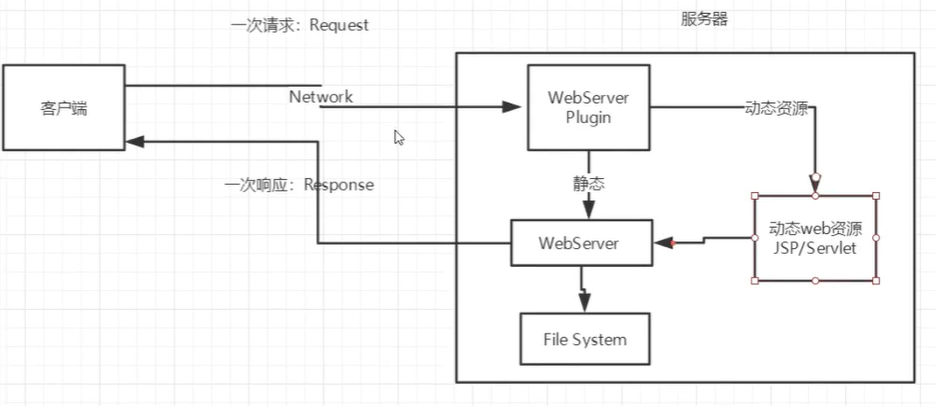
缺点:
- 假如服务器动态web资源出现了错误,我们需要重新编写我们的后台程序,重新发布
- 停机维护
优点:
- web页面可以动态更新,所有用户看到不同一个页面
- 他可以和数据库交互
2、web服务器
2.1、技术讲解
ASP
-
微软:国内最早流行的就是ASP
-
在HTML中嵌入了VB的脚本,ASP+COM;
-
在ASP开发中,基本上一个页面都有几千行业务代码,页面及其凌乱
-
维护成功极高
-
C#
-
IIS
-
<h1>
    <h1>
        <h1>
            <%
               sout
              /%>
        </h1>
    </h1>
</h1>
PHP
- PHP开发速度很快,功能很强大,跨平台,代码很简单(70%网站的都是,WP)
- 无法承载大访问量的情况(局限性)
JSP/Servlet:
B/S:浏览器和服务器
C/S:客户端和服务器
- sun公司主推的B/S架构
- 基于Java语言(所有的大公司,或者一些开源的组件,都是用java写的)
- 可以承载三高问题带来的影响;
- 语法像ASP,ASP->JSP,加强市场强度
2.2、web服务器
服务器是一种被动的操作,用来处理用户的一些请求和给用户一些响应信息;
IIS
微软的;ASP....,
Tomcat
Tomcat是Apache 软件基金会(Apache Software Foundation)的Jakarta 项目中的一个核心项目,由Apache、Sun 和其他一些公司及个人共同开发而成。由于有了Sun 的参与和支持,最新的Servlet 和JSP 规范总是能在Tomcat 中得到体现,Tomcat 5支持最新的Servlet 2.4 和JSP 2.0 规范。因为Tomcat 技术先进、性能稳定,而且免费,因而深受Java 爱好者的喜爱并得到了部分软件开发商的认可,成为目前比较流行的Web 应用服务器。
Tomcat 服务器是一个免费的开放源代码的Web 应用服务器,属于轻量级应用服务器,在中小型系统和并发访问用户不是很多的场合下被普遍使用,是开发和调试JSP 程序的首选。对于一个初学者来说,可以这样认为,当在一台机器上配置好Apache 服务器,可利用它响应HTML(标准通用标记语言下的一个应用)页面的访问请求。实际上Tomcat是Apache 服务器的扩展,但运行时它是独立运行的,所以当你运行tomcat 时,它实际上作为一个与Apache 独立的进程单独运行的。
诀窍是,当配置正确时,Apache 为HTML页面服务,而Tomcat 实际上运行JSP 页面和Servlet。另外,Tomcat和IIS等Web服务器一样,具有处理HTML页面的功能,另外它还是一个Servlet和JSP容器,独立的Servlet容器是Tomcat的默认模式。不过,Tomcat处理静态HTML的能力不如Apache服务器。目前Tomcat最新版本为9.0.41。
高难度面试题:
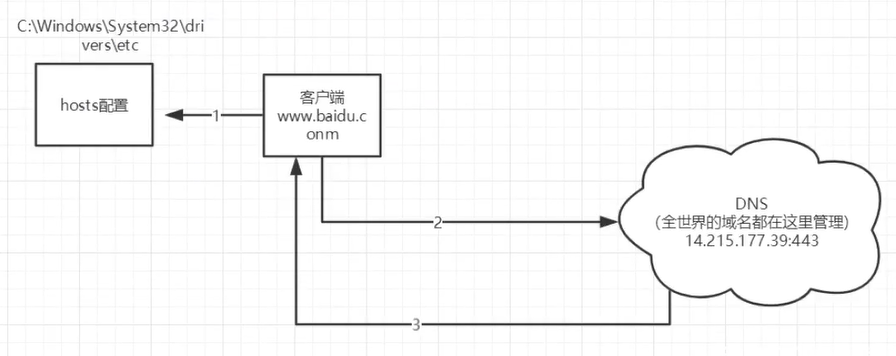
请你谈谈网站是如何访问的?
-
输入一个域名,回车
-
检查本机的hosts配置文件下有没有域名映射
-
有,直接返回对应的ip地址,这个地址中,有我们需要访问的web程序,可以直接访问
127.0.0.1 localhos
-
没有,就去DNS服务器找,找到就返回,找不到就返回找不到
![]()
-
3.2、发布网站
-
将自己写的网站,放到服务器(tomcat)中指定的web应该的文件夹(webapps)下,就可以访问了
-
网站结构
-- webapps : tomcat服务器web目录
    -- root
    -- baidu :网站目录名
    -- WEB-INF
    	- classes :java程序
    	- lib :web应用所依赖的jar包
    	- web.xml:网站配置文件
    	- index.html 默认的首页
    	-static
    		-css
    			-style.css
    		-js
    		-img
    	-.....
4、HTTP
4.1、http是什么
超文本传输协议(Hypertext Transfer Protocol,HTTP)是一个简单的请求-响应协议,它通常运行在TCP之上。
- 文本:html,字符串,~
- 超文本:图片,音乐,视频,定位,地图。。。
- 默认端口:80
https:安全的
- 默认端口:443
4.2、两个时代
-
http1.0
- HTTP/1.0 :客户端可以与web服务器连接后,只能获得一个web资源,断开连接
-
http2.0
- HTTP/1.1:客户端可以与web服务器连接后,可以获得多个web资源
4.3、http请求
- 客户端--发请求--服务器
百度
Request URL: https://www.baidu.com/  请求地址
Request Method: GET   get方法/post方法
Status Code: 200 OK  状态码:200
Remote(远程) Address: 14.215.177.38:443
Referrer Policy: no-referrer-when-downgrade
Accept: text/html;
Accept-Encoding: gzip, deflate, br
Accept-Language: zh-CN,zh;q=0.9
Cache-Control: max-age=0
Connection: keep-alive
-
请求行
- 请求行中的请求方式:GET
- 请求方式:CET,POST
- get:请求能够携带的参数比较少,大小有限制,会在浏览器的URL地址栏显示数据内容,不安全,但是高效
- post:请求能够携带的参数没有限制,大小没有限制,不会在浏览器的URL地址栏显示数据内容,安全,但是不高效
-
消息头
Accept: 告诉浏览器,他所支持的数据类型
Accept-Encoding: 支持那种编码格式 GBK UTF-8 GB2312
Accept-Language:告诉浏览器它的语言环境
Cache-Control:缓存控制
Connection: 告诉浏览器,请求完成是断开连接还是保持连接
HOST:主机
4.4、http响应
- 服务器--响应--客户端
百度:
Cache-Control: private  // 缓存控制
Connection: keep-alive   // 连接:保持
Content-Encoding: gzip  //编码类型
Content-Type: text/html;charset=utf-8
1、响应体
Accept: 告诉浏览器,他所支持的数据类型
Accept-Encoding: 支持那种编码格式 GBK UTF-8 GB2312
Accept-Language:告诉浏览器它的语言环境
Cache-Control:缓存控制
Connection: 告诉浏览器,请求完成是断开连接还是保持连接
HOST:主机
Refresh:高数客户端,多久刷新一次
Location:让网页重新定位
2、响应状态码
200:请求响应成功
3**:请求重定向
- 重定向:重新到新的位置去
404:找不到资源
- 资源不存在
5XX:服务器代码错误 500
502:网关错误
常见面试题:
当你的浏览器中地址栏输入地址并回车的一瞬间并能够展示回来,经历了什么?
5、Maven
6、Servlet
6.1、Servlet简介
- Servlet就是sun公司开发动态web的一门技术
- sun在这些API中提供一个接口叫做:servlet如果想开发一个servlet程序,只需要
- 编写一个类,实现servlet接口
- 把开发好的javalei部署到web服务器中
把实现了servlet接口程序叫做,servlet
6.2、helloservlet
Servlet接口在sun公司有两个默认实现类,HttpServlet,GenericServlet
-
构件一个Maven项目,删掉类名的src目录,以后我们的 学习就在这个项目里面建立项目,这个空的工程就是maven的主工程
-
关于maven父子工程的理解:
父项目会有
<modules>
    <module>servlet-01</module>
    </modules>
子项目会有
<parent> <artifactId>javaweb-02-servlet</artifactId> <groupId>com.bing</groupId> <version>1.0-SNAPSHOT</version> </parent> -
Maven环境优化
-
修改web.xml
<?xml version="1.0" encoding="UTF-8"?> <web-app xmlns="http://xmlns.jcp.org/xml/ns/javaee" xmlns:xsi="http://www.w3.org/2001/XMLSchema-instance" xsi:schemaLocation="http://xmlns.jcp.org/xml/ns/javaee http://xmlns.jcp.org/xml/ns/javaee/web-app_4_0.xsd" version="4.0" metadata-complete="true"> </web-app> -
将maven的结构搭建
-
-
编写一个Servlet程序
-
编写一个普通类
-
实现Servlet接口类,这里我们直接继承HttpServlet
public class HelloServlet extends HttpServlet {

    //由于get或者post只是请求实现的不同方式,可以相互调用,业务逻辑都一样

    @Override
    protected void doGet(HttpServletRequest req, HttpServletResponse resp) throws ServletException, IOException {

        PrintWriter writer = resp.getWriter();  //响应溜

        writer.print("Hello Servlet");
    }

    @Override
    protected void doPost(HttpServletRequest req, HttpServletResponse resp) throws ServletException, IOException {
        super.doPost(req, resp);
    }
}
-
-
编写Servlet的映射
为什么需要映射:我们写的是java程序,但是要通过浏览器访问,而浏览器需要连接web服务器,所以我们需要再web服务器中注册我们写的Servlet,还需要给他一个浏览器能够找到的路径
    <servlet>
        <servlet-name>hello</servlet-name>
        <servlet-class>com.peng.servlet.HelloServlet</servlet-class>
    </servlet>
    <servlet-mapping>
        <servlet-name>hello</servlet-name>
        <url-pattern>/hello</url-pattern>
    </servlet-mapping>
6.配置Tomca
注意:配置项目发布路径
7.启动测试 OK!
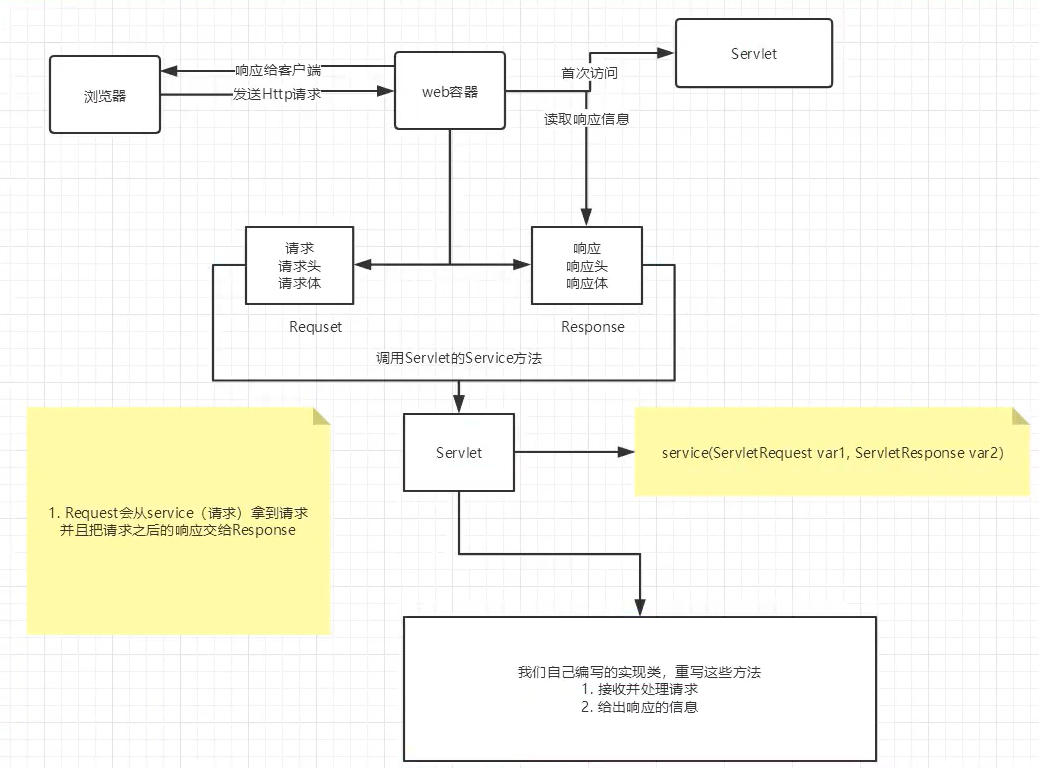
6.3 Servlet原理
6.4、mapping问题
-
一个Servlet请求可以指定一个映射路径
<servlet-mapping> <servlet-name>hello</servlet-name> <url-pattern>/hello</url-pattern> </servlet-mapping> -
一个Servlet请求可以指定多个映射路径
<servlet-mapping> <servlet-name>hello</servlet-name> <url-pattern>/hello</url-pattern> </servlet-mapping> <servlet-mapping> <servlet-name>hello</servlet-name> <url-pattern>/hello1</url-pattern> </servlet-mapping> <servlet-mapping> <servlet-name>hello</servlet-name> <url-pattern>/hello2</url-pattern> </servlet-mapping> <servlet-mapping> <servlet-name>hello</servlet-name> <url-pattern>/hello3</url-pattern> </servlet-mapping> -
一个Servlet请求可以指定通用个映射路径
  <servlet-mapping>
        <servlet-name>hello</servlet-name>
        <url-pattern>/hello/*</url-pattern>
    </servlet-mapping>
4.默认请求路径
  <servlet-mapping>
        <servlet-name>hello</servlet-name>
        <url-pattern>/*</url-pattern>
    </servlet-mapping>
5.优先级问题
指定了固有的映射路径优先级最高,找不到就会走默认的处理;
6.5、getServletContext
1、共享数据
web容器在启动的时候,它会为每个web程序都创建以对应的servletcontext对象,它代表了当前的web应用:
-
共享数据
-
我在这个servlet中保存的数据,可以在另一个servlet对象中找到
public class HelloServlet extends HttpServlet {
    @Override
    protected void doGet(HttpServletRequest req, HttpServletResponse resp) throws ServletException, IOException {

//        this.getInitParameter();  初始化参数
//        this.getServletConfig();  Servlet配置
//        this.getServletContext(); servlet上下文
        ServletContext servletContext = this.getServletContext();

        String username = "北五";

        servletContext.setAttribute("username",username); //将一个数据保存在了ServletContext中,名字为username 指为username


        System.out.println("hello");
    }
}
public class Getservlet extends HttpServlet { @Override protected void doGet(HttpServletRequest req, HttpServletResponse resp) throws ServletException, IOException { ServletContext context = this.getServletContext(); String username = (String) context.getAttribute("username"); resp.setContentType("text/html"); resp.setCharacterEncoding("UTF-8"); resp.getWriter().print("名字 :"+username); } @Override protected void doPost(HttpServletRequest req, HttpServletResponse resp) throws ServletException, IOException { doGet(req, resp); } }<servlet> <servlet-name>hello</servlet-name> <servlet-class>com.peng.servlet.HelloServlet</servlet-class> </servlet> <servlet-mapping> <servlet-name>hello</servlet-name> <url-pattern>/hello</url-pattern> </servlet-mapping> <servlet> <servlet-name>getc</servlet-name> <servlet-class>com.peng.servlet.Getservlet</servlet-class> </servlet> <servlet-mapping> <servlet-name>getc</servlet-name> <url-pattern>/getc</url-pattern> </servlet-mapping>测试结果
-
2、 获取初始化参数
 <!--    配置一些web应用初始化参数-->
    <context-param>
        <param-name>url</param-name>
        <param-value>jdbc:mysql://localhost:3306/mybatis</param-value>
    </context-param>
public class ServletDemo03 extends HttpServlet {

    @Override
    protected void doGet(HttpServletRequest req, HttpServletResponse resp) throws ServletException, IOException {
        ServletContext servletContext = this.getServletContext();

        String url = servletContext.getInitParameter("url");

        resp.getWriter().print(url);
    }

    @Override
    protected void doPost(HttpServletRequest req, HttpServletResponse resp) throws ServletException, IOException {
        doGet(req, resp);
    }
}
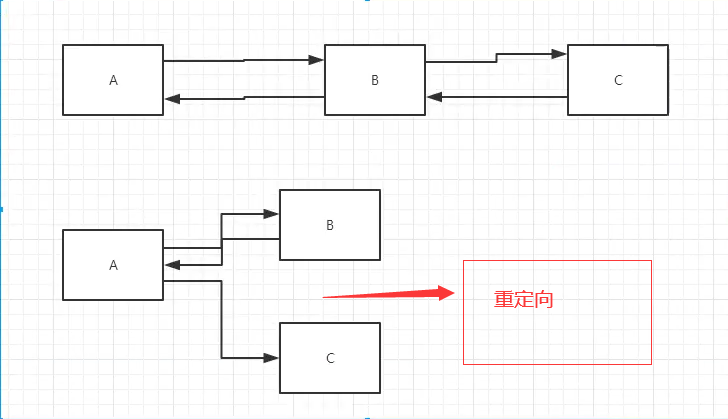
3、请求转发
    protected void doGet(HttpServletRequest req, HttpServletResponse resp) throws ServletException, IOException {
        ServletContext context = this.getServletContext();

//        RequestDispatcher requestDispatcher;
//        requestDispatcher = context.getRequestDispatcher("/Demo");
//        requestDispatcher.forward(req, resp);  //调用forward实现请求转发

        context.getRequestDispatcher("/Demo3").forward(req, resp);
4、读取资源文件
Properties
- 在java目录下新建properties
- 在ersources目录下新建properties
发现:都被打包到了一个同一个路径下:classes,这个路径我们俗称classpath
思路:需要一个文件流;
username=beiwu
password=123456
  @Override
    protected void doGet(HttpServletRequest req, HttpServletResponse resp) throws ServletException, IOException {
        InputStream is = this.getServletContext().getResourceAsStream("/WEB-INF/classes/db.properties");

        Properties properties = new Properties();
        properties.load(is);
        String user = properties.getProperty("username");
        String password = properties.getProperty("password");

        resp.getWriter().print(user + ":" + password);
    }
访问测试OK!
6.6、HttpServletResponse
web服务器接收到客户端的http请求,针对这个请求,分别创建一个代表请求HttpServletRequest对象,代表响应的一个HttpServletResponse对象:
- 如果要获取客户端请求过来的参数:找HttpServletRequest
- 如歌要给客户响应一些信息:找HttpServletResponse
1、简单分类
负责向浏览器发送数据的方法:
public ServletOutputStream getOutputStream() throws IOException;
public PrintWriter getWriter() throws IOException;
负责向浏览器发送一些响应头
public void setCharacterEncoding(String charset);
public void setContentLength(int len);
public void setContentLengthLong(long len);
public void setContentType(String type);
public void setDateHeader(String name, long date);
public void addDateHeader(String name, long date);
public void setHeader(String name, String value);
public void addHeader(String name, String value);
public void setIntHeader(String name, int value);
public void addIntHeader(String name, int value);
响应状态码
    /**
     * Status code (100) indicating the client can continue.
     */
    public static final int SC_CONTINUE = 100;

    /**
     * Status code (101) indicating the server is switching protocols
     * according to Upgrade header.
     */
    public static final int SC_SWITCHING_PROTOCOLS = 101;

    /**
     * Status code (200) indicating the request succeeded normally.
     */
    public static final int SC_OK = 200;

    /**
     * Status code (201) indicating the request succeeded and created
     * a new resource on the server.
     */
    public static final int SC_CREATED = 201;

    /**
     * Status code (202) indicating that a request was accepted for
     * processing, but was not completed.
     */
    public static final int SC_ACCEPTED = 202;

    /**
     * Status code (203) indicating that the meta information presented
     * by the client did not originate from the server.
     */
    public static final int SC_NON_AUTHORITATIVE_INFORMATION = 203;

    /**
     * Status code (204) indicating that the request succeeded but that
     * there was no new information to return.
     */
    public static final int SC_NO_CONTENT = 204;

    /**
     * Status code (205) indicating that the agent <em>SHOULD</em> reset
     * the document view which caused the request to be sent.
     */
    public static final int SC_RESET_CONTENT = 205;

    /**
     * Status code (206) indicating that the server has fulfilled
     * the partial GET request for the resource.
     */
    public static final int SC_PARTIAL_CONTENT = 206;

    /**
     * Status code (300) indicating that the requested resource
     * corresponds to any one of a set of representations, each with
     * its own specific location.
     */
    public static final int SC_MULTIPLE_CHOICES = 300;

    /**
     * Status code (301) indicating that the resource has permanently
     * moved to a new location, and that future references should use a
     * new URI with their requests.
     */
    public static final int SC_MOVED_PERMANENTLY = 301;

    /**
     * Status code (302) indicating that the resource has temporarily
     * moved to another location, but that future references should
     * still use the original URI to access the resource.
     *
     * This definition is being retained for backwards compatibility.
     * SC_FOUND is now the preferred definition.
     */
    public static final int SC_MOVED_TEMPORARILY = 302;

    /**
    * Status code (302) indicating that the resource reside
    * temporarily under a different URI. Since the redirection might
    * be altered on occasion, the client should continue to use the
    * Request-URI for future requests.(HTTP/1.1) To represent the
    * status code (302), it is recommended to use this variable.
    */
    public static final int SC_FOUND = 302;

    /**
     * Status code (303) indicating that the response to the request
     * can be found under a different URI.
     */
    public static final int SC_SEE_OTHER = 303;

    /**
     * Status code (304) indicating that a conditional GET operation
     * found that the resource was available and not modified.
     */
    public static final int SC_NOT_MODIFIED = 304;

    /**
     * Status code (305) indicating that the requested resource
     * <em>MUST</em> be accessed through the proxy given by the
     * <code><em>Location</em></code> field.
     */
    public static final int SC_USE_PROXY = 305;

     /**
     * Status code (307) indicating that the requested resource
     * resides temporarily under a different URI. The temporary URI
     * <em>SHOULD</em> be given by the <code><em>Location</em></code>
     * field in the response.
     */
    public static final int SC_TEMPORARY_REDIRECT = 307;

    /**
     * Status code (400) indicating the request sent by the client was
     * syntactically incorrect.
     */
    public static final int SC_BAD_REQUEST = 400;

    /**
     * Status code (401) indicating that the request requires HTTP
     * authentication.
     */
    public static final int SC_UNAUTHORIZED = 401;

    /**
     * Status code (402) reserved for future use.
     */
    public static final int SC_PAYMENT_REQUIRED = 402;

    /**
     * Status code (403) indicating the server understood the request
     * but refused to fulfill it.
     */
    public static final int SC_FORBIDDEN = 403;

    /**
     * Status code (404) indicating that the requested resource is not
     * available.
     */
    public static final int SC_NOT_FOUND = 404;

    /**
     * Status code (405) indicating that the method specified in the
     * <code><em>Request-Line</em></code> is not allowed for the resource
     * identified by the <code><em>Request-URI</em></code>.
     */
    public static final int SC_METHOD_NOT_ALLOWED = 405;

    /**
     * Status code (406) indicating that the resource identified by the
     * request is only capable of generating response entities which have
     * content characteristics not acceptable according to the accept
     * headers sent in the request.
     */
    public static final int SC_NOT_ACCEPTABLE = 406;

    /**
     * Status code (407) indicating that the client <em>MUST</em> first
     * authenticate itself with the proxy.
     */
    public static final int SC_PROXY_AUTHENTICATION_REQUIRED = 407;

    /**
     * Status code (408) indicating that the client did not produce a
     * request within the time that the server was prepared to wait.
     */
    public static final int SC_REQUEST_TIMEOUT = 408;

    /**
     * Status code (409) indicating that the request could not be
     * completed due to a conflict with the current state of the
     * resource.
     */
    public static final int SC_CONFLICT = 409;

    /**
     * Status code (410) indicating that the resource is no longer
     * available at the server and no forwarding address is known.
     * This condition <em>SHOULD</em> be considered permanent.
     */
    public static final int SC_GONE = 410;

    /**
     * Status code (411) indicating that the request cannot be handled
     * without a defined <code><em>Content-Length</em></code>.
     */
    public static final int SC_LENGTH_REQUIRED = 411;

    /**
     * Status code (412) indicating that the precondition given in one
     * or more of the request-header fields evaluated to false when it
     * was tested on the server.
     */
    public static final int SC_PRECONDITION_FAILED = 412;

    /**
     * Status code (413) indicating that the server is refusing to process
     * the request because the request entity is larger than the server is
     * willing or able to process.
     */
    public static final int SC_REQUEST_ENTITY_TOO_LARGE = 413;

    /**
     * Status code (414) indicating that the server is refusing to service
     * the request because the <code><em>Request-URI</em></code> is longer
     * than the server is willing to interpret.
     */
    public static final int SC_REQUEST_URI_TOO_LONG = 414;

    /**
     * Status code (415) indicating that the server is refusing to service
     * the request because the entity of the request is in a format not
     * supported by the requested resource for the requested method.
     */
    public static final int SC_UNSUPPORTED_MEDIA_TYPE = 415;

    /**
     * Status code (416) indicating that the server cannot serve the
     * requested byte range.
     */
    public static final int SC_REQUESTED_RANGE_NOT_SATISFIABLE = 416;

    /**
     * Status code (417) indicating that the server could not meet the
     * expectation given in the Expect request header.
     */
    public static final int SC_EXPECTATION_FAILED = 417;

    /**
     * Status code (500) indicating an error inside the HTTP server
     * which prevented it from fulfilling the request.
     */
    public static final int SC_INTERNAL_SERVER_ERROR = 500;

    /**
     * Status code (501) indicating the HTTP server does not support
     * the functionality needed to fulfill the request.
     */
    public static final int SC_NOT_IMPLEMENTED = 501;

    /**
     * Status code (502) indicating that the HTTP server received an
     * invalid response from a server it consulted when acting as a
     * proxy or gateway.
     */
    public static final int SC_BAD_GATEWAY = 502;

    /**
     * Status code (503) indicating that the HTTP server is
     * temporarily overloaded, and unable to handle the request.
     */
    public static final int SC_SERVICE_UNAVAILABLE = 503;

    /**
     * Status code (504) indicating that the server did not receive
     * a timely response from the upstream server while acting as
     * a gateway or proxy.
     */
    public static final int SC_GATEWAY_TIMEOUT = 504;

    /**
     * Status code (505) indicating that the server does not support
     * or refuses to support the HTTP protocol version that was used
     * in the request message.
     */
    public static final int SC_HTTP_VERSION_NOT_SUPPORTED = 505;
2、常见应用
1.向浏览器输出信息
2、下载文件
- 要获取下载文件的路径
- 下载文件名是啥?
- 设置想办法让浏览器能够支持我们需要的东西
- 获取下载文件的输入流
- 创建缓冲区
- 通过获得OutputStream对象
- 将FileOutputStream流写入到buffer缓冲区
- 使用OutputStream将缓冲区中的数据输出到客户端
@Override
    protected void doGet(HttpServletRequest req, HttpServletResponse resp) throws ServletException, IOException {
//        1. 要获取下载文件的路径
        String path = "E:\\java\\web\\javaweb-01-servlet\\response\\target\\response\\WEB-INF\\classes\\1.png";
        System.out.println("下载文件的路径:" + path);
//        2. 下载文件名是啥?
        String fileName = path.substring(path.lastIndexOf("\\") + 1);

//        3. 设置想办法让浏览器能够支持我们需要的东西
        resp.setHeader("Content-Disposition","attachment;filename="+fileName);
//        4. 获取下载文件的输入流
        FileInputStream in = new FileInputStream(path);
//        5. 创建缓冲区
        int len = 0;
        byte[] buffer = new byte[1024];
//        6. 通过获得OutputStream对象
        ServletOutputStream outputStream = resp.getOutputStream();
//        7. 将FileOutputStream流写入到buffer缓冲区
        while ((len=in.read(buffer))>0){
            outputStream.write(buffer,0,len);
        }
        in.close();
        outputStream.close();
//        8. 使用OutputStream将缓冲区中的数据输出到客户端
    }
3、验证码功能
验证码怎么来的?
- 前端实现
- 后端实现,需要用到ava的图片类,生成一个图片
public class ImageServlet extends HttpServlet {
    @Override
    protected void doGet(HttpServletRequest req, HttpServletResponse resp) throws IOException {
        //如何让浏览器5秒刷新一次
        resp.setHeader("refresh", "5");

        //在内存中创建图片
        BufferedImage image = new BufferedImage(65, 22, BufferedImage.TYPE_INT_RGB);
        //等到图片
        Graphics2D graphics = (Graphics2D) image.getGraphics();//🖊
        //设置图片的背景颜色
        graphics.setColor(Color.YELLOW);
        graphics.fillRect(0, 0, 65, 22);

        //给图片写数据
        graphics.setColor(Color.BLUE);
        graphics.setFont(new Font(null, Font.BOLD, 20));
        graphics.drawString(makeNum(), 0, 22);

        //告诉浏览器用图片的方式打开
        resp.setContentType("image/jpeg");

        //网站存在缓存,不让浏览器缓存
        resp.setDateHeader("expires", -1);
        resp.setHeader("Cache-Control", "no-cache");
        resp.setHeader("Pragma", "no-cache");

        //把图片写给浏览器
//        ImageIO.write(image, "jpg", resp.getOutputStream());
        JPEGImageEncoder encoder = JPEGCodec.createJPEGEncoder(resp.getOutputStream());
        encoder.encode(image);

    }

    //生成随机数
    private String makeNum() {
        Random random = new Random();
        String num = random.nextInt(999999) + "";
        StringBuffer buffer = new StringBuffer();
        for (int i = 0; i < 6 - num.length(); i++) {
            buffer.append("0");
        }
        num = buffer.toString() + num;
        return num;
    }


    @Override
    protected void doPost(HttpServletRequest req, HttpServletResponse resp) throws ServletException, IOException {
        doGet(req, resp);
    }
}
4、重定向
public void sendRedirect(String location) throws IOException;
 @Override
    protected void doGet(HttpServletRequest req, HttpServletResponse resp) throws ServletException, IOException {


//        resp.setHeader("Location","/i/img");
//        resp.setStatus(302);
        resp.sendRedirect("/i/img"); //重定向
    }
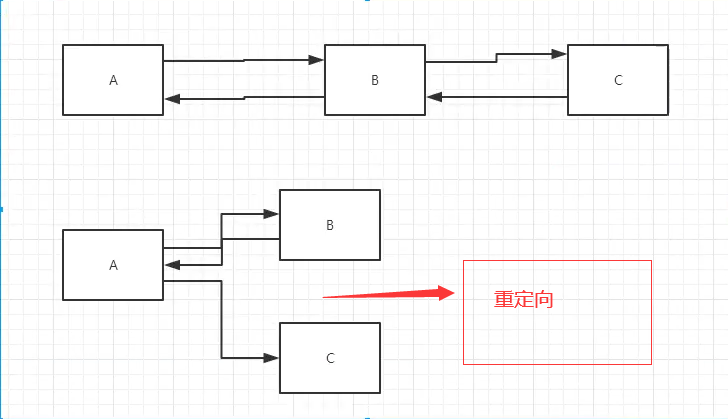
面试题:请你聊聊重定向和转发的区别
相同点
- 页面都会实现跳转
不同点
- 请求转发的时候URL不会产生变化 307
- 重定向的时候URL地址栏会发生变化; 302
<html>
<body>
<h2>Hello World!</h2>

<%--这里提交的路径,需要寻找到项目的路径--%>
<%--${pageContext.request.contextPath}代表当前项目--%>
<form action="${pageContext.request.contextPath}/login" method="get">
    用户名:<input type="text" name="username"> <br>
    密码:<input type="password" name="password"> <br>
    <input type="submit">
</form>

</body>
</html>
  @Override
    protected void doGet(HttpServletRequest req, HttpServletResponse resp) throws ServletException, IOException {
        //处理请求
        String username = req.getParameter("username");
        String password = req.getParameter("password");

        System.out.println(username + ":" + password);
        resp.sendRedirect("/i/success.jsp");
    }
6.7、HttpServletRequest
HttpServletRequest代表客户端的请求,用户通过HTTP协议访问服务器,HTTP请求种的所有信息都被封装到HttpServletRequest,通过这个HttpServletRequest的方法可以获得客户端的所有信息
1、获取前端传递的参数
2、请求转发
<%--
  Created by IntelliJ IDEA.
  User: 79925
  Date: 2021/3/1
  Time: 21:17
  To change this template use File | Settings | File Templates.
--%>
<%@ page contentType="text/html;charset=UTF-8" language="java" %>
<html>
<head>
    <title>登录</title>
</head>
<body>
<h1>登录</h1>

<div style="text-align: center">
    <form action="${pageContext.request.contextPath}/login" method="post">
        用户名:<input type="text" name="username"> <br>
        密码:<input type="password" name="password"><br>
        爱好:
        <input type="checkbox" name="hobby" value="女孩">女孩
        <input type="checkbox" name="hobby" value="代码">代码
        <input type="checkbox" name="hobby" value="唱歌">唱歌
        <input type="checkbox" name="hobby" value="电影">电影
        <br>
        <input type="submit">
    </form>

</div>
</body>
</html>
public class LoginServlet extends HttpServlet {
    @Override
    protected void doGet(HttpServletRequest req, HttpServletResponse resp) throws ServletException, IOException {
        req.setCharacterEncoding("utf-8");
        resp.setCharacterEncoding("utf-8");
        String username = req.getParameter("username");
        String password = req.getParameter("password");
        String[] hobbies = req.getParameterValues("hobby");

        System.out.println("=========================");
        System.out.println(username);
        System.out.println(password);
        System.out.println(Arrays.toString(hobbies));

        //
//        resp.sendRedirect("/r/success.jsp");
		//	这里的/代表web应用
        req.getRequestDispatcher(" /success.jsp").forward(req, resp);

    }
}
7、Cookie、Session
7.1、会话
会话:用户打开一个浏览器,点击了很多超链接,访问多个web资源,关闭浏览器,这个过程可以称之为会话
有状态的会话:
一个网站,怎么证明你来过?
客户端 服务端
1、服务端给客户端一个信件,客户端下次访问服务端带上信件就可以了cooick
2、服务器登记你来过,下次你来的时候我来匹配你 seesion
7.2、保持会话的两种技术
cookoe
- 客户端技术(请求,响应)
session
- 服务器技术,利用这个技术,可以保持用户的会话信息,我们可以把信息或者数据放在session中
常见:网站登录之后,第二次访问就无需登录
7.3、cookie
1.从请求中拿到cookie信息
2.服务端响应给客户端cookie
Cookie[] cookies = req.getCookies();//返回数组,说明cookie可能有多个
cookie.getName();//获取cookie中的key
cookie.getValue()://获取cookie中的value
Cookie cookie = new Cookie("name", System.currentTimeMillis() + "");//新建一个cookie
cookie.setMaxAge(20*60*60);//设置cookie有效期
resp.addCookie(cookie);//响应给客户端
cookie:一般会保存在本地文件
一个网站cookie存在上线
- 一个cookie只能保存一个信息
- 一个web站点可以给浏览器发送多个cookie,最多存放20个cookie
- cookie大小有限制4kb
- 300个cookie浏览器上线
删除cookie
- 不设置有效期,关闭浏览器,自动失效
protected void doGet(HttpServletRequest req, HttpServletResponse resp) throws ServletException, IOException {
        //服务器告诉你来的时间,把这个信件带着,我就知道是你来了

        //解决中文乱码
        req.setCharacterEncoding("utf-8");
        resp.setCharacterEncoding("utf-8");
        PrintWriter out = resp.getWriter();
        //Cookie ,服务端从客户端获取
        Cookie[] cookies = req.getCookies();//返回数组,说明cookie可能有多个

        //判断cookie是否存在
        if (cookies != null) {
            //如果存在怎么办
            out.write("上一次访问的时间");
            for (int i = 0; i < cookies.length; i++) {
                Cookie cookie = cookies[i];
                if (cookie.getName().equals("name")) {
                    //获取cookie中的值
                    long aLong = Long.parseLong(cookie.getValue());
                    Date date = new Date(aLong);
                    out.write(date.toLocaleString());
                }
            }
        } else {
            out.write("这是您第一次访问");
        }

        //服务器给客户端响应一个cookie
        Cookie cookie = new Cookie("name", System.currentTimeMillis() + "");

        cookie.setMaxAge(20*60*60);//设置cookie有效期
        resp.addCookie(cookie);//响应给客户端

    }

   protected void doGet(HttpServletRequest req, HttpServletResponse resp) throws ServletException, IOException {
        //服务器告诉你来的时间,把这个信件带着,我就知道是你来了

        //服务器给客户端响应一个cookie
        Cookie cookie = new Cookie("name", System.currentTimeMillis() + "");

        cookie.setMaxAge(0);//设置cookie有效期
        resp.addCookie(cookie);//响应给客户端

    }


    protected void doGet(HttpServletRequest req, HttpServletResponse resp) throws ServletException, IOException {

        //解决中文乱码
        req.setCharacterEncoding("utf-8");
        resp.setCharacterEncoding("utf-8");
        PrintWriter out = resp.getWriter();
        Cookie[] cookies = req.getCookies();
        if (cookies != null) {
            out.write("你上次访问的名称是:");
            for (int i = 0; i < cookies.length; i++) {
                Cookie cookie = cookies[i];
                if (cookie.getName().equals("name")) {
                    System.out.println(cookie.getValue());
                    out.write(cookie.getValue());
                }

            }
        } else {
            out.write("这是你第一次访问!");
        }
        Cookie cookie = new Cookie("name", "北五");

        resp.addCookie(cookie);

    }
7.4、Session
什么是sessio:
- 服务器会给用户(浏览器)创建一个session对象
- 一个session独占一个浏览器,只要浏览器没有关闭,这个session就存在
- 用户登录之后,整个网站他都可以访问!-->保存用户信息,保存购物车信息
Session和Cookie的区别:
- Cookie是把用户的数据写给用户的浏览器,浏览器保存
- Session把用户的数据写到用户独占Session中,服务端保存
- Session对象由服务器创建;
使用场景:
- 保存用户登录信息
- 购物车信息
- 在整个网站中经常会使用的数据,我们将他保存在Session中
使用Sessio
 protected void doGet(HttpServletRequest req, HttpServletResponse resp) throws ServletException, IOException {
        resp.setCharacterEncoding("utf-8");
        req.setCharacterEncoding("utf-8");
        resp.setContentType("text/html;charset=utf-8");

        //等到session
        HttpSession session = req.getSession();
        session.setAttribute("name", new Person("北五", 19));

        String id = session.getId();
        if (session.isNew()) {
            resp.getWriter().write("session创建成功,ID:" + id);
        } else {
            resp.getWriter().write("session已存在,ID:" + id);
        }


protected void doGet(HttpServletRequest req, HttpServletResponse resp) throws ServletException, IOException {
        resp.setCharacterEncoding("utf-8");
        req.setCharacterEncoding("utf-8");
        resp.setContentType("text/html;charset=utf-8");

        //等到session
        HttpSession session = req.getSession();
        Person name = (Person) session.getAttribute("name");
        System.out.println(name);
    }

     HttpSession session = req.getSession();
        session.removeAttribute("name"); //
        session.invalidate();//注销
会话自动过期web.xml配置
    <session-config>
        <!--设置十分钟后session自动失效-->
        <session-timeout>10</session-timeout>
    </session-config>
8、JSP
8.1、什么是JSP
java Server Pages:java服务器端页面,也和Servlet一样,用于静态web技术
最大的特点:
- 写JSP就像在写HTML
- 区别:
- HTML只给用户提供静态的数据
- JSP页面可以嵌套JAVA代码,为用户提供了动态服务
8.2、JSP原理
思路:JSP到底怎么执行的
8.3、JSP基础语法
任何语言都有自己的语法,JAVA有,JSP作为JAVA技术的一种应用,它拥有一些自己扩充的语法,Java所有的语法都支持
JSP表达式
<%--JSP表达式
作用:用来将程序的输出,输出到客户端
<%= 变量或者表达式%>
--%>

<%=new java.util.Date()%>
JSP脚本片段
<%--JSP表达式
作用:用来将程序的输出,输出到客户端
<%= 变量或者表达式%>
--%>

<%=new java.util.Date()%>
脚本片段
<% int x = 10;
    out.println(x);
%>
<p>这是一个JSP文档</p>
<%

    int y = 2;
    out.println(y);
%>

<hr>

<%
    for (int i = 0; i < 5; i++) {
%>
<h1>hello  <%=i%> </h1>
<%
    }
%>
JSP声明
<%!

static {
  System.out.println("加载中。。。。");
}

private int globalvar = 0;

public void c() {
  System.out.println("c");
}
%>
会被编译到JSP生成的Java的类中,其他的就会被生成到_jspService方法中!
在JSP中嵌入JAVA代码即可
8.4、JSP指令
%@include

<%@include file="common/header.jsp" %>
<h1>网页主体</h1>
<%@include file="common/footer.jsp" %>

<hr>

<%--JSP标签--%>
<jsp:include page="common/header.jsp"/>
<h1>网页主体</h1>
<jsp:include page="common/footer.jsp"/>
8.5、九大内置对象
- PageContext 存东西
- Request 存东西
- Respone
- Session 存东西
- Application [SerlvetContext] 存东西
- config [SerlvetConfig]
- out
- page
- exception
request.setAttribute("name2", "2号");  //保存的数据只在一次请求中有效,请求转发会携带这个数据
session.setAttribute("name3", "3号");    //保存的数只在一次会话中有效,从浏览器打开到关闭
application.setAttribute("name4", "4号");    //保存的数据只在服务器中,从服务器到关闭
request:客户端向服务器发送请求,产生的数据,用户看完了就没用了,例如:看新闻

session:客户端向服务器发送请求,产生的数据,用户用完一会还有用,比如购物车

8.6、JSP标签、JSTL标签、EL表达式

```xml
 <!-- https://mvnrepository.com/artifact/taglibs/standard -->
        <dependency>
            <groupId>taglibs</groupId>
            <artifactId>standard</artifactId>
            <version>1.1.2</version>
        </dependency>
        <!-- https://mvnrepository.com/artifact/javax.servlet.jsp.jstl/jstl -->
        <dependency>
            <groupId>javax.servlet.jsp.jstl</groupId>
            <artifactId>jstl</artifactId>
            <version>1.2</version>
        </dependency>
EL表达式:${}
- 获取数据
- 执行运算
- 获取web开方的常用对象
JSP标签
<jsp:forward page="jsptag2.jsp">
    <jsp:param name="value1" value="1"/>
    <jsp:param name="value2" value="2"/>
</jsp:forward>


键:<%=request.getParameter("value1")%>
值:<%=request.getParameter("1")%>
JSTL标签
JSTL标签库的使用就是为了弥补HTML标签的不足,它自定义了许多标签,可以供我们使用,标签的功能和java代码一样
<body>

<c:set value="89" var="score"/>
<c:choose>
    <c:when test="${score>=90}">
        你的成绩优秀
    </c:when>
    <c:when test="${score>=80}">
        <c:out value="你的成绩良好"/> <br>
    </c:when>
</c:choose>

<%

    ArrayList<String> strings = new ArrayList<>();

    strings.add(0, "张三");
    strings.add(1, "李四");
    strings.add(2, "王五");
    strings.add(3, "赵六");
    strings.add(4, "田七");
    request.setAttribute("list", strings);
%>
<%--
    var :每次遍历出来的变量
    items:要遍历的对象
    begin:从哪里开始
    end:结束位置
    step:步长
    --%>
<c:forEach var="strings" items="${list}">
    <c:out value="${strings}"/> <br>
</c:forEach>
<hr>
<c:forEach var="strings" items="${list}" begin="0" end="3" step="1">
    <c:out value="${strings}"/> <br>
</c:forEach>

</body>
核心标签
格式化标签
SQL标签
9、JavaBean
实体类
JavaBean有特写的写法:
- 必须要有一个无参构造
- 属性必须私有化
- 必须有对应的get/set方法
一般用来和数据的字段做映射 ORM
ORM:对象关系映射
- 表---->类
- 字段---->属性
- 行记录--->对象
| i | name | age | address |
|---|---|---|---|
| 1 | 北五 | 10 | 成都 |
| 2 | 行三 | 17 | 成都 |
| 3 | 一品 | 29 | 成都 |
class Peopel{
    private int id;
    private String name;
    private int age;
    private String address;
}

class A{
    new Peopel(1,"北五",10,"成都");
    new Peopel(2,"行三",13,"成都");

}
10、MCV三层架构
什么是MVC:Model view Controller 模型 、视图、控制器
10.1、
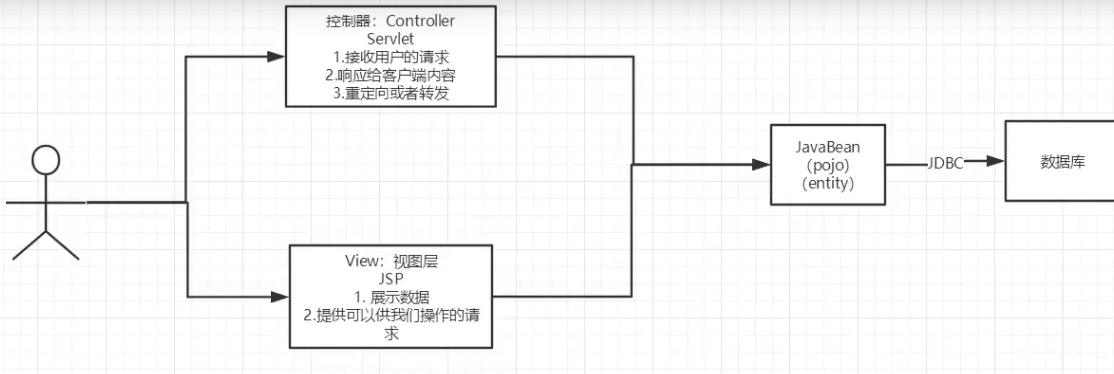
用户直接访问控制层,控制层就可以直接操作数据库
10.2、MVC三层架构
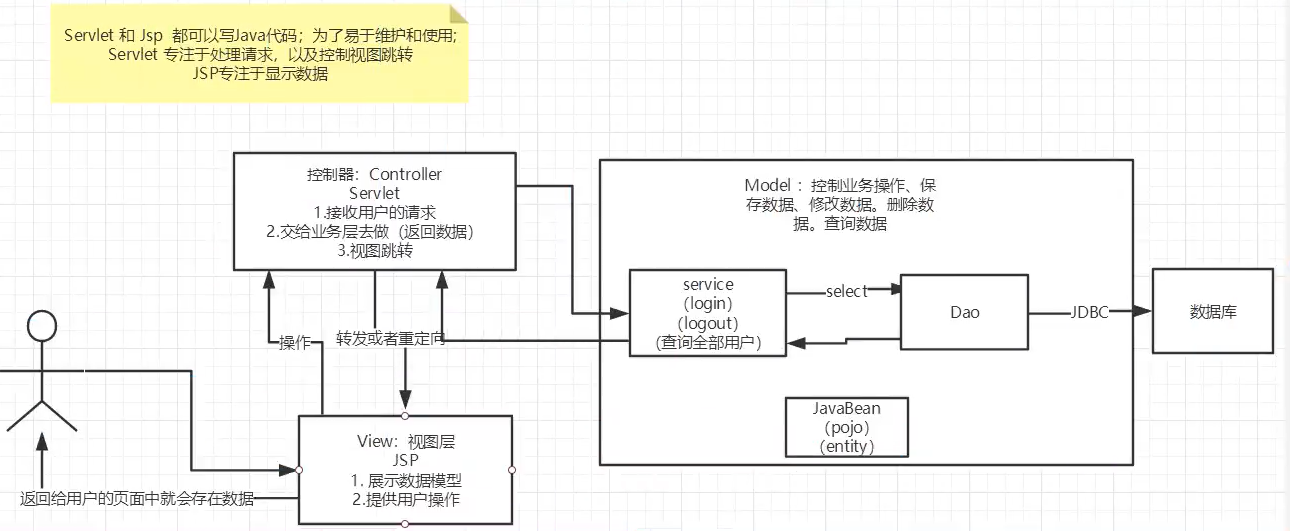
Model
- 业务处理:业务逻辑(service)
- 数据持久层:CRUD(Dao)
View
- 展示数据
- 提供连接发起Servlet请求
Controller
-
接收用户请求(req:请求参数,Session信息)
-
交给业务层处理对于代码
-
控制视图的跳转
-
登录-->接收用户的登录请求-->处理用户请求(获取用户登录参数,username,password)-->交给业务层处理登录业务(判断用户名密码是否正确,事务)-->Dao层查询用户名和密码是否正确-->查询数据库
11、Filter
Filter:用来过滤网站的数据,过滤器
- 处理中文乱码
- 登录验证
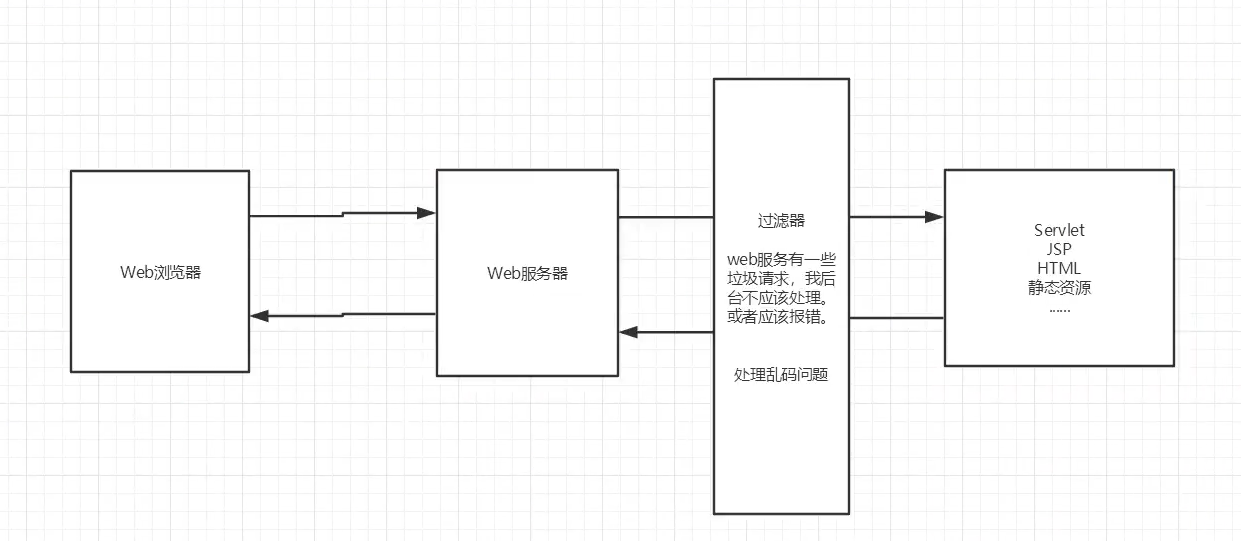
Filter步骤
-
导包
-
public class CharacterEncodingFilter implements Filter { //初始化 @Override public void init(FilterConfig filterConfig) throws ServletException { System.out.println("CharacterEncodingFilter初始化"); } // filterChain :链 // 过滤器中的所有代码,再过来特定请求的时候会执行 // 必须 @Override public void doFilter(ServletRequest servletRequest, ServletResponse servletResponse, FilterChain filterChain) throws IOException, ServletException { servletRequest.setCharacterEncoding("UTF-8"); servletResponse.setCharacterEncoding("UTF-8"); servletResponse.setContentType("text/html;charset=UTF-8"); System.out.println("CharacterEncodingFilter执行前。。。。"); filterChain.doFilter(servletRequest,servletResponse); //如果不写直接被拦截了,下面的不会被执行 System.out.println("CharacterEncodingFilter执行后。。。"); } //销毁 @Override public void destroy() { System.out.println("CharacterEncodingFilter销毁"); } } -
在web.xml中配置过滤器
-
<servlet>
        <servlet-name>ShowServlet</servlet-name>
        <servlet-class>com.bin.servlet.ShowServlet</servlet-class>
    </servlet>
    <servlet-mapping>
        <servlet-name>ShowServlet</servlet-name>
        <url-pattern>/servlet/show</url-pattern>
    </servlet-mapping>
    <filter>
        <filter-name>CharacterEncodingFilter</filter-name>
        <filter-class>com.bin.filter.CharacterEncodingFilter</filter-class>
    </filter>
    <!--    /*代码servlet下面所有的都会被过滤-->
    <filter-mapping>
        <filter-name>CharacterEncodingFilter</filter-name>
        <url-pattern>/servlet/*</url-pattern>
    </filter-mapping>
12、监听器
实现一个监听器的接口
-
编写一个监听器
-
实现一个接口,重写方法
//统计网站在线人数 public class OnlineCountListener implements HttpSessionListener { //创建session监听:看你的一举一动 //一旦创建session就会触发一次这个事件 @Override public void sessionCreated(HttpSessionEvent httpSessionEvent) { ServletContext context = httpSessionEvent.getSession().getServletContext(); Integer onlineCount = (Integer) context.getAttribute("OnlineCount"); if (onlineCount == null) { onlineCount = new Integer(1); } else { int count = onlineCount.intValue(); onlineCount = new Integer(count + 1); } context.setAttribute("OnlineCount", onlineCount); } @Override public void sessionDestroyed(HttpSessionEvent httpSessionEvent) { ServletContext context = httpSessionEvent.getSession().getServletContext(); Integer onlineCount = (Integer) context.getAttribute("OnlineCount" ); if (onlineCount == null) { onlineCount = new Integer(0); } else { int count = onlineCount.intValue(); onlineCount = new Integer(count - 1); } context.setAttribute("OnlineCount", onlineCount); } } -
配置web.xml
    <listener>
        <listener-class>com.bin.listener.OnlineCountListener</listener-class>
    </listener>
13、JDBC
    public static void main(String[] args) throws ClassNotFoundException, SQLException {


        //配置信息
        //解决中文乱码useUnicode=true&characterEncoding=utf8
        String url = "jdbc:mysql://localhost:3306/jdbc?useUnicode=true&characterEncoding=utf8";
        String username = "root";
        String password = "123456";
        //加载驱动
        Class.forName("com.mysql.jdbc.Driver");
        //连接数据库
        Connection connection = DriverManager.getConnection(url, username, password);
        //向数据库发送SQL的对象Statement
        Statement statement = connection.createStatement();

        //编写sql语句
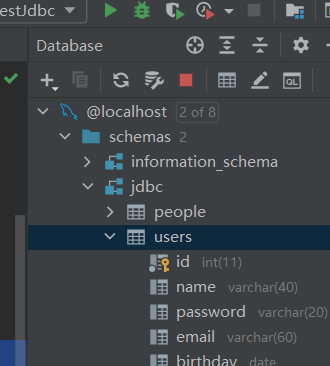
        String sql = "select * from users";
        //执行查询sql
        ResultSet resultSet = statement.executeQuery(sql);

        while (resultSet.next()){
            System.out.println("ID:"+resultSet.getObject("id"));
            System.out.println("name:"+resultSet.getObject("name"));
            System.out.println("password:"+resultSet.getObject("password"));
            System.out.println("email:"+resultSet.getObject("email"));
            System.out.println("birthday:"+resultSet.getObject("birthday"));
        }

        //关闭连接
        resultSet.close();
        statement.cancel();
        connection.close();


    }
导入Sql依赖
  <dependency>
            <groupId>mysql</groupId>
            <artifactId>mysql-connector-java</artifactId>
            <version>5.1.49</version>
        </dependency>
连接数据库
        //配置信息
        //解决中文乱码useUnicode=true&characterEncoding=utf8
        String url = "jdbc:mysql://localhost:3306/jdbc?useUnicode=true&characterEncoding=utf8";
        String username = "root";
        String password = "123456";
        //加载驱动
        Class.forName("com.mysql.jdbc.Driver");
        //连接数据库
        Connection connection = DriverManager.getConnection(url, username, password);
JDBC固定步骤
- 加载驱动
- 连接数据库
- 向数据库发送SQL的对象Statement
- 编写SQL语句
- 执行SQL语句
- 关闭(先开后关)
如果世界真的这么简单就好了

 浙公网安备 33010602011771号