
Linux命令之ethtool命令
Linux命令之ethtool命令
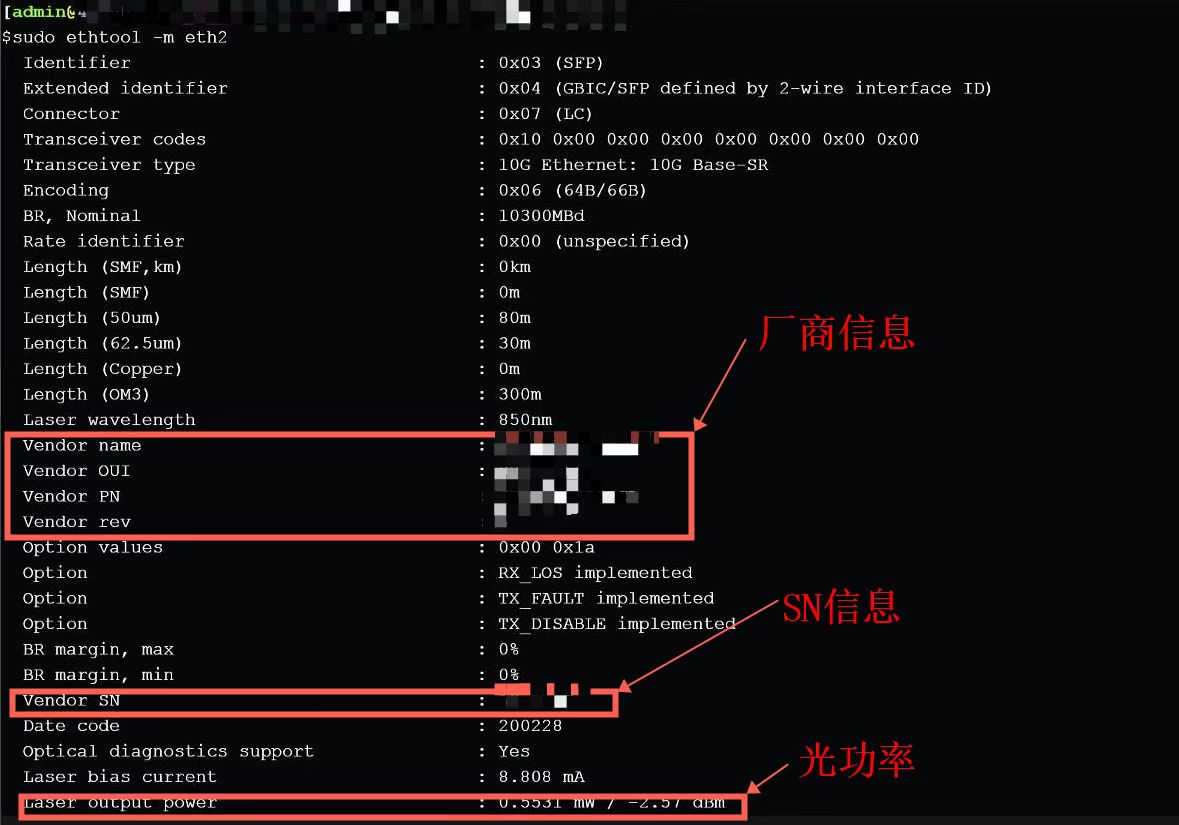
前几天老大让查一下物理机光模块网卡的SN序列号,百度了一会儿没有找到。打浪潮厂家的电话,厂家也说没有相关的命令。我知道可以在交换机上用dis命令查,物理机上还真是不清楚。最后老大说是用ethtool
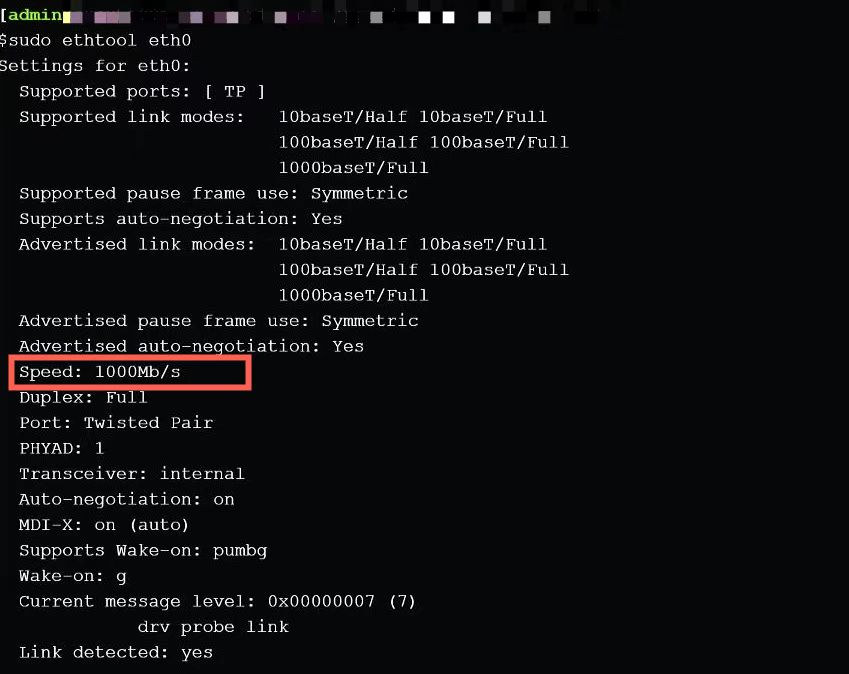
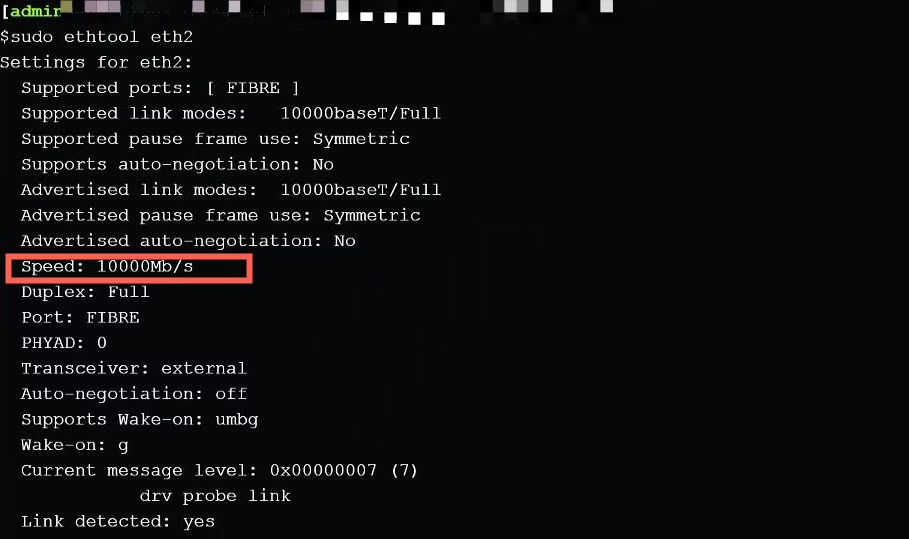
1、查看网卡速率等信息
| ethtool eth0 |
| ethtool eth2 |
2、查看光模块网卡SN序列号,厂商信息、光功率、光纤长度等信息
| ethtool -m eth2 |
| ethtool -m eth2|grep -i sn |
| ethtool -m eth2|grep Vendor |
3、ethtool命令详解
| -a 查看网卡中 接收模块RX、发送模块TX和Autonegotiate模块的状态:启动on 或 停用off。 |
| -A 修改网卡中 接收模块RX、发送模块TX和Autonegotiate模块的状态:启动on 或 停用off。 |
| -c display the Coalesce information of the specified ethernet card。 |
| -C Change the Coalesce setting of the specified ethernet card。 |
| -g Display the rx/tx ring parameter information of the specified ethernet card。 |
| -G change the rx/tx ring setting of the specified ethernet card。 |
| -i 显示网卡驱动的信息,如驱动的名称、版本等。 |
| -d 显示register dump信息, 部分网卡驱动不支持该选项。 |
| -e 显示EEPROM dump信息,部分网卡驱动不支持该选项。 |
| -E 修改网卡EEPROM byte。 |
| -k 显示网卡Offload参数的状态:on 或 off,包括rx-checksumming、tx-checksumming等。 |
| -K 修改网卡Offload参数的状态。 |
| -p 用于区别不同ethX对应网卡的物理位置,常用的方法是使网卡port上的led不断的闪;N指示了网卡闪的持续时间,以秒为单位。 |
| -r 如果auto-negotiation模块的状态为on,则restarts auto-negotiation。 |
| -S 显示NIC- and driver-specific 的统计参数,如网卡接收/发送的字节数、接收/发送的广播包个数等。 |
| -t 让网卡执行自我检测,有两种模式:offline or online。 |
| -s 修改网卡的部分配置,包括网卡速度、单工/全双工模式、mac地址等。 |
4、小例子
查看机器上网卡的速度:百兆还是千兆
| ethool eth0 |
| 操作完毕后,输出信息中Speed:这一项就指示了网卡的速度。 |
停止网卡的发送模块TX
| ethool eth0 |
| 操作完毕后,输出信息中Speed:这一项就指示了网卡的速度。 |
停止网卡的发送模块TX
| ethtool -A tx off eth0 |
| 操作完毕后,可输入ethtool -a eth0,查看tx模块是否已被停止。 |
查看网卡eth0采用了何种驱动
| ethtool -i eth0 |
| 操作完毕后,显示 driver: bnx2;version: 1.4.30 等信息。 |
关闭网卡对收到的数据包的校验功能
| ethtool -K eth0 rx off |
| 操作完毕后,可输入ethtool –k eth0,查看校验功能是否已被停止。 |
如果机器上安装了两块网卡,那么eth0对应着哪块网卡呢?
| ethtool -p eth0 10 |
| 操作完毕后,看哪块网卡的led灯在闪,eth0就对应着哪块网卡。 |
查看网卡,在接收/发送数据时,有没有出错?
| ethtool –S eth0 |
将千兆网卡的速度降为百兆
| ethtool -s eth0 speed 100 |
获取命令帮助
| ethtool -h |
查看命令版本
| ethtool --version |
安装命令
| yum install -y ethtool |

 浙公网安备 33010602011771号