

wordcount
1.github 地址:
https://github.com/huangjianmin/wc
2.PSP表格:
|
PSP2.1 |
PSP阶段 |
预估耗时 (分钟) |
实际耗时 (分钟) |
|
Planning |
计划 |
30 |
30 |
|
· Estimate |
· 估计这个任务需要多少时间 |
10 |
5 |
|
Development |
开发 |
120 |
360 |
|
· Analysis |
· 需求分析 (包括学习新技术) |
360 |
0 |
|
· Design Spec |
· 生成设计文档 |
30 |
0 |
|
· Design Review |
· 设计复审 (和同事审核设计文档) |
30 |
0 |
|
· Coding Standard |
· 代码规范 (为目前的开发制定合适的规范) |
5 |
10 |
|
· Design |
· 具体设计 |
10 |
100 |
|
· Coding |
· 具体编码 |
720 |
540 |
|
· Code Review |
· 代码复审 |
60 |
240 |
|
· Test |
· 测试(自我测试,修改代码,提交修改) |
40 |
120 |
|
Reporting |
报告 |
120 |
120 |
|
· Test Report |
· 测试报告 |
120 |
120 |
|
· Size Measurement |
· 计算工作量 |
40 |
10 |
|
· Postmortem & Process Improvement Plan |
· 事后总结, 并提出过程改进计划 |
30 |
0 |
|
|
合计 |
1725 |
1655 |
3.解题思路:
拿到题目时,我选择了用C语言解决这个项目。实现基本功能时,用getopt()函数获得-c -w -l -o命令,然后用几个子程序countchar()、countword()、countline()以及输出函数writeoutput()分别实现-c -w -l -o 命令,实现扩展功能时,添加对应的子程序实现 -a -s 命令。
4.程序设计实现过程:
我的代码分为5个部分,分别是对应 -c -w 与 -l 命令的countChar()、countWord()与countLine()函数,对应 -o 的writeOutput()函数,以及main()函数。
int countChar(char *file) {	  //统计字符数
	FILE *fp = fopen(file,"r");   //打开文件
	char a;
	while (!feof(fp))  //遍历整个文件,每有一个字符,字符数+1
	{
		a = fgetc(fp);
		charNum++;
	}
	fclose(fp);  //关闭文件
}
这是countChar()的代码,通过while循环遍历整个文件,每判断一个字符,charNum++,其中,charNum是全局变量。countWord()函数与countLine()函数与之类似,wordNum与lineNum是全局变量。全局变量charNum,wordNum,lineNum在main函数与writeOutout()中被引用。
此外,main函数中给全局变量o,l,w,c赋值,在wrieOutput函数中引用。通过全局变量charNum,wordNum,lineNum来实现行数、字符数、单词数的统计,同样,通过全局变量o,l,w,c来实现文档的输出。
5.代码说明:
int countChar(char *file) {	  //统计字符数
	FILE *fp = fopen(file,"r");   //打开文件
	char a;
	while (!feof(fp))  //遍历整个文件,每有一个字符,字符数+1
	{
		a = fgetc(fp);
		charNum++;
	}
	fclose(fp);  //关闭文件
}
这是字符数统计的子程序,每判断一个字符,charNum加一。
int countWord(char *file) {	  //统计单词数
	FILE *fp = fopen(file,"r");
	char a,b;
	while (!feof(fp))  //遍历文件
	{
		a = fgetc(fp);   //a存储所得文件字符
		if ((a==' '||a==','||a==';'||a==':'||a=='\n'||a=='\t'||a=='('||a==')')&&((b>'A'&&b<'Z')||(b>'a'&&b<'z')))  //分隔单词
		{
			wordNum++;
		}
		b=a;    //用b存储上一个字符

	}
	fclose(fp);
}
这是单词数统计的子程序,判断单词的方法为:
判断当前字符是否为空格、逗号、分号、冒号、换行、回车、左括号、右括号、'\t',以及前一个字符是否为字母:若是,则为一个单词,wordNum加一;若不是,则将当前字符a的值传递给上一个字符b,a继续读下一个字符的值。
int countLine(char *file) {	  //统计行数
	FILE *fp = fopen(file,"r");
	char a;
	while (!feof(fp))     //每遇到一个'\n',行数就+1
	{
		a = fgetc(fp);
		if(a=='\n')
			lineNum++;
	}
	fclose(fp);
}
统计行的方法为检测回车换行的个数。
while((opt=getopt(argc,argv,"l:w:c:o:")) != -1)  //获取控制台命令
    {
        switch(opt)
        {

            case 'l':    //获取命令为l,l=1,且输出行数
            	l=1;
				strcpy(inFile,optarg);
           		countLine(inFile);
				printf("Lines: %d\n", lineNum);
           		break;
    		case 'w':   //获取命令为w,w=1,且输出单词数
        		w=1;
           	 	strcpy(inFile,optarg);
				countWord(inFile);
				printf("Words: %d\n", wordNum);
     		    break;
           	case 'c':   //获取命令为c,c=1,且输出字符数
            	c=1;
				strcpy(inFile,optarg);
				countChar(inFile);
             	printf("Chars: %d\n", charNum-1);
            	break;
            case 'o':  //获取命令为o,o为1,输出文档
            	o = 1;
             	strcpy(outFile,optarg);
        }
	}
    if (o)
        writeOutput(outFile);
	else
	{
		char *fp="result.txt";

		//FILE *fp=fopen("result.txt","w");
		//strcpy(fp,optarg);
		writeOutput(fp);
	}
这是main函数的主要部分,用getopt()函数获取控制台的命令"-c -w -l -o",对比获取的命令,执行不同的子函数,若获取的命令里包含”-o”,则执行writeOutput(outFile)函数,否则生成result.txt文件,再输出数据到result.txt文档。writeOutput(outFile)函数如下:
int writeOutput(char *filename)  //输出信息到指定文档
{
    FILE *fpWrite = fopen(filename,"w");
    if (fpWrite == NULL)    //打开文件失败,返回-1
    {
		return -1;
	}
	if (l)     //根据l、w、c的值来输出指定文件的行、单词、字符数目
    {
        fprintf(fpWrite, "Lines: %d\n", lineNum);
    }
    if (w)
    {
        fprintf(fpWrite, "Words: %d\n", wordNum);
    }
    if (c)
    {
        fprintf(fpWrite, "Chars: %d\n", charNum);
    }
    //fprintf(fpWrite, "Lines: %d\n", lineNum);
    //fprintf(fpWrite, "Words: %d\n", wordNum);
    //fprintf(fpWrite, "Chars: %d\n", charNum);
    fclose(fpWrite);
}
根据main函数里修改的全局变量l、w、c的值,来确定输出哪几项。
6.测试设计过程:
wordcount单个参数(‘o’ 不算)时的运行路径如下:
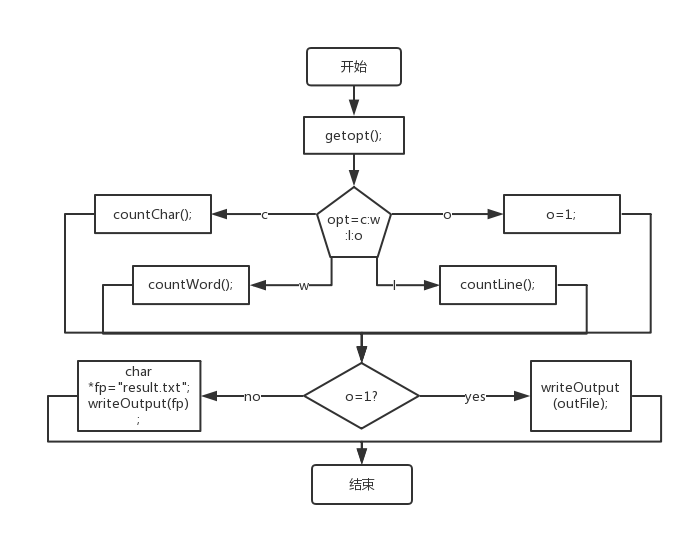
单个参数运行时共有8条路径,根据输入参数的个数不同可以组建成8n条路径,其中-o -o ……为错误路径,所以共有6n+2条路径。
可以设置10个测试用例为:
1. wc.exe -c test.txt 2. wc.exe -l test.txt 3. wc.exe -w test.txt 4. wc.exe -o test.txt 5. wc.exe -c test.txt -o output.txt 6. wc.exe -w test.txt -o output.txt
7. wc.exe -l test.txt -o output.txt 8. wc.exe -o test.txt -o output.txt 9. wc.exe -c -l test.txt -o output.txt 10. wc.exe -c -l -w test.txt -o output.txt
测试结果:
1、2、3、5、6、7、9、10正常输出;1、2、3的输出结果保持在文档result.txt中;5、6、7、9、10的结果保存在新建的文档output.txt中;
4能正常运行,但输出空白;
8不能正常运行。
7.参考文献链接:
本次项目查询了大量网上代码,其中比较重要的有:
http://blog.csdn.net/zhq651/article/details/8494324 (getopt函数的使用)
http://blog.csdn.net/zhq651/article/details/8494324 (读写文件)

 浙公网安备 33010602011771号