
Linux密钥认证及Windows使用密钥连接Linux
概述
Linux中我们要连接主机,输入用户名密码然后连接,我们发现每次连接都要输入密码,对于一些批量操作不方便
我们需要一种新的认证方式,每次连接不需要输入密码,这个方法就叫密钥认证
密钥认证原理
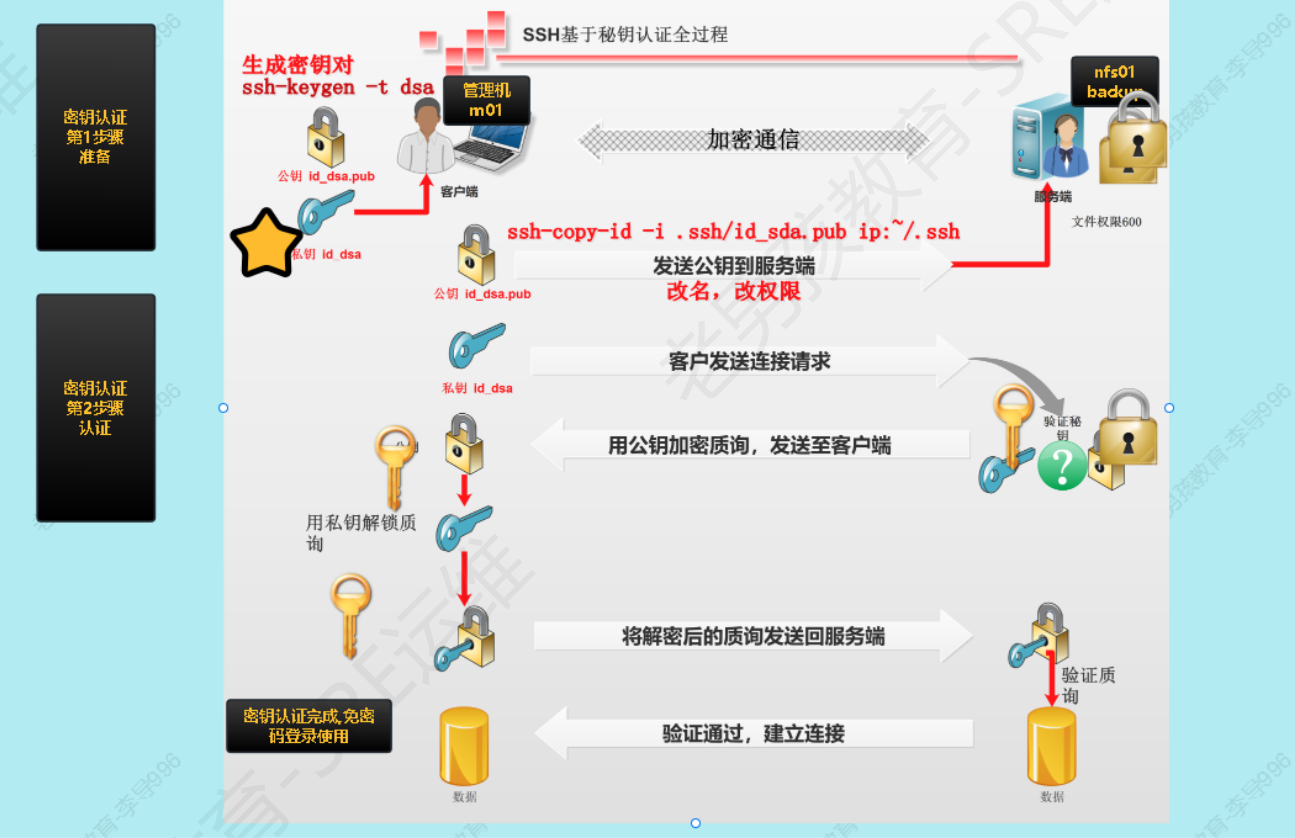
原理详解:
- 使用ssh-keygen命令生成私钥和公钥。
- 使用ssh-copy-id命令将公钥发送到目标服务器端。
- 本地发送连接请求至目标服务器
- 目标服务器携带公钥加密询问发送至本地
- 本地用私钥解密发送会目标服务器
- 目标服务器进行验证,验证通过建立连接
创建密钥及分发密钥
创建密钥
使用ssh-keygen命令创建
root@master-01:~# ssh-keygen #输入该命令之后,连续三个回车即可
Generating public/private rsa key pair.
Enter file in which to save the key (/root/.ssh/id_rsa):
Enter passphrase (empty for no passphrase):
Enter same passphrase again:
Your identification has been saved in /root/.ssh/id_rsa.
Your public key has been saved in /root/.ssh/id_rsa.pub.
The key fingerprint is:
SHA256:k3DbjIYDG3PPlfVgCdTgae4WvtIcLI5mlvyfGGohn6E root@master-01
The key's randomart image is:
+---[RSA 2048]----+
|         .+++.   |
|         . =oo   |
|    + o . *   .  |
|     * * X       |
|    . o S.=      |
|    . oo.+o.     |
|     = B.++.     |
|    E @.o+oo     |
|     =..oo+      |
+----[SHA256]-----+

#创建好的私钥和公钥默认存储在/root/.ssh/目录下
root@master-01:~# ll /root/.ssh/
total 12
-rw------- 1 root root    0 Feb 17 10:31 authorized_keys
-rw------- 1 root root 1823 Mar 31 15:38 id_rsa
-rw-r--r-- 1 root root  396 Mar 31 15:38 id_rsa.pub
-rw-r--r-- 1 root root  888 Mar 14 15:23 known_hosts

root@master-01:~#
上面演示的为创建密钥,输入ssh-keygen命令之后,连续三个回车即可,创建好的密钥保存在/root/.ssh目录下面,id_rsa为私钥,id_rsa.pub为公钥
一键创建密钥对
ssh-keygen -f /root/.ssh/id_rsa -P ''

-f 指定密钥文件位置和文件名
-P 指定密码短语,''或者""表示设置为空
分发密钥
使用ssh-copy-id命令进行分发
语法:ssh-copy-id [-i [identity_file]] [user@]machine
#分发密钥
root@master-01:~# ssh-copy-id -i /root/.ssh/id_rsa.pub root@10.3.0.85
/usr/bin/ssh-copy-id: INFO: Source of key(s) to be installed: "/root/.ssh/id_rsa.pub"
/usr/bin/ssh-copy-id: INFO: attempting to log in with the new key(s), to filter out any that are already installed
/usr/bin/ssh-copy-id: INFO: 1 key(s) remain to be installed -- if you are prompted now it is to install the new keys
root@10.3.0.85's password:

Number of key(s) added: 1

Now try logging into the machine, with:   "ssh 'root@10.3.0.85'"
and check to make sure that only the key(s) you wanted were added.
windows中使用密钥连接Linux
Windows使用密钥连接Linux很简单,我们生成密钥之后,将公钥(id_rsa.pub)写入到authorized_keys文件中,然后将私钥(id_rsa)保存到Windows本地,Windows连接Linux时使用该私钥即可
#将公钥写入到authorized_keys文件中
root@master-01:~/.ssh# cat /root/.ssh/id_rsa.pub >> authorized_keys
本文来自博客园,作者:huangSir-devops,转载请注明原文链接:https://www.cnblogs.com/huangSir-devops/p/18802242,微信Vac6666666,欢迎交流

 浙公网安备 33010602011771号