
到目前为止我们主要是使用廷克图来进行我们的实验。廷克图没有提供对于事务的支持。对于 适合廷克图的那些情况来说,廷克图是一个不错的方案,没有事务的支持不是一个问题。然而,杰森图的典型的使用场景,可能是存储和更新大型的图,它有一个的端系统来进行存储。在这样的环境中,对于事务的支持就变得更加重要了。如果您以前使用过其它提供事务支持的数据库,就像杰森图的文档指出来的,您不能指望杰森图的事务是完全原子的,一致的、隔离的,持久的。对于ACID的支持程度取决于用端存储的使用。我们将在“为杰森图选择一种持久化技术”这一节中,看一些后端存储的方案。
So far we have been mainly using a TinkerGraph to perform our experiments. TinkerGraph does
not provide support for transactions. To be fair, for the type of use cases where TinkerGraph is a
good solution this is not really an issue. However, a typical use case for JanusGraph might be
storing and mutating (updating) a very large graph persisted by a back end store. In such an
environment, support for transactions becomes a lot more important. If you are used to other
databases that offer transactional support, and as the JanusGraph documentation points out, you
should not rely on JanusGraph transactions being fully Atomic, Consistent, Isolated and Durable
(ACID). The amount of ACID support will depend on the backend store being used. We will take a
look at some of the backend storage options in the "Choosing a persistent storage technology for
JanusGraph section".
杰森图的官方文档包含了事务如何处理,以及基于不同使用场景的技术,您总是可以从这找到最新的版本。
The official JanusGraph documentation includes detailed coverage of how
transactions are processed and techniques to use based on different usage
scenarios. You will always find the latest version here: http://docs.janusgraph.org/
latest/tx.html
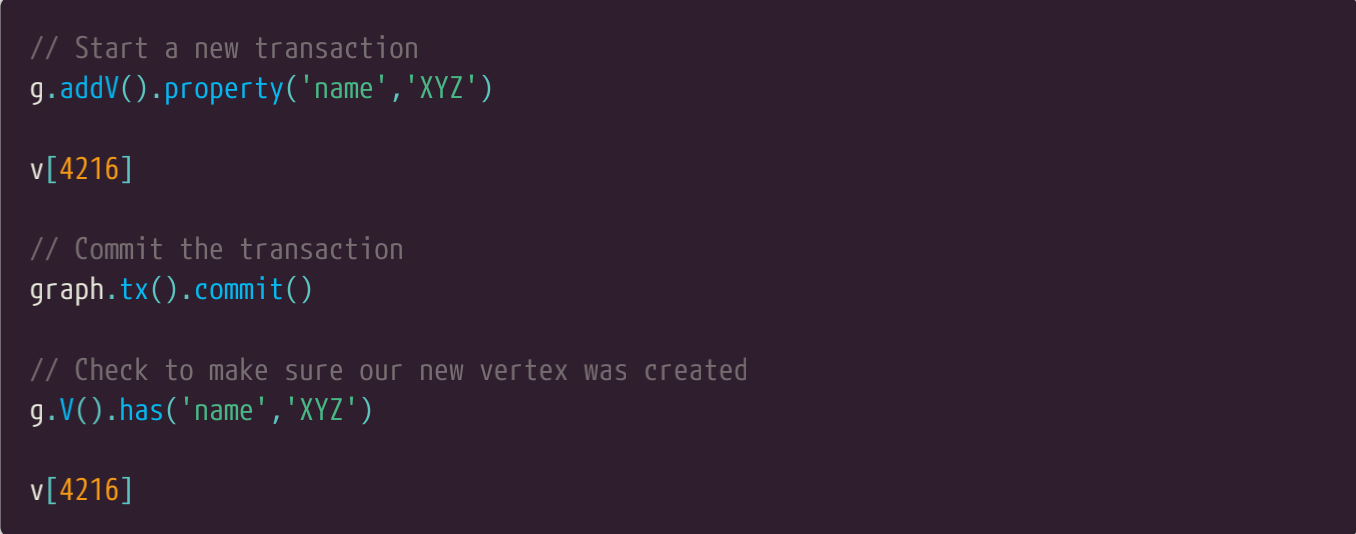
在很多情况下,使用杰森图,您就不需明确打开一个事务,事实上,如果需要它将为您打开。看下面的例子。事务是打开的,当调用addVertex时,事务一直打开着,直到commit被调用。注意为了访问杰森图的事务能力,我们用tx方法与我们的图实例相关联。下面的例子假设您通过小精灵控制台连接到了杰森图的实例。这个我们已创建的内存模式的杰森图将在这些情况下很好的工作,即使是使用内存模式的杰森图实例,数据库事务也是支持的。注意笔者没有显示警告消息,杰森图将会提醒我们还没有为我们新的属性创建过索引。我们将在“杰森图的索引”这一节中探究如何创建索引。
In many cases, when using JanusGraph, you do not have to explicitly open a new transaction.
Instead, it will be opened for you as needed. Take a look at the example below. A transaction is
opened when addVertex is called and remains open until commit is called. Note also that in order to
access the JanusGraph transaction capabilities, we use the tx method associated with our graph
instance. The examples below assume you have the Gremlin Console connected to a JanusGraph
instance. The inmemory JanusGraph we created earlier will work fine for these examples as
transactions are supported even with inmemory JanusGraph instances. Note that I have not shown
the warning message that JanusGraph will display reminding us that we have not created an index
for our new property. We will explore how to create an index in the "JanusGraph indexes" section.

上面的例子用图对象来增加一个顶点。就像本书前边讨论的,廷克图的文档不推荐这样做。相反它推荐将增加顶点做为遍历的一部分,如下所示。注意图对象仍用于提交事务。
The example above used the graph object to add a vertex. As discussed earlier in this book, the
TinkerPop documentation recommends against this. Instead it recommends adding vertices as part
of a traversal as shown below. Note that the graph object is still used to commit the transaction.
有时,需要重做或回滚我们已做的处理,而不是继续提交事务。这个可以通过调用rollback方法来实现,如下所示。
Sometimes, it may be necessary to undo or rollback what we have done rather than continue and
commit the transaction. This can be achieved calling the rollback method as shown below.

注意:杰森图的管理系统,这是下一节的主题。它有事务系统用于创建数据库模式或者进行其它的图的配置。
Note that the JanusGraph Management system, that is the subject of the next section, has its own
transaction system that is used when creating schema entries and otherwise configuring a graph.
6.3.5. 杰森图管理API The JanusGraph management API
杰森图包含一个管理API,它是通过 ManagementSystem类来实现的。您可以使用管理API进行各种各样重要的功能,包括查询图的元数据,定义边、顶点、属性模式类型和创建、更新索引。
JanusGraph includes a management API that is made available via the ManagementSystem class.
You can use the management API to perform various important functions that include querying
metadata about the graph, defining the edge, vertex and property schema types and creating and
updating the index.您可以使用 openManagement 方法调用来创建管理系统对象实例,如下所示:
You can create an instance of the ManagementSystem object using the openManagement method
call as shown below.

在下面的小节中我们将看到如何使用管理API来为航线图创建模式和索引,并加载它。在这之前,我们要花几分钟介绍杰森图管理API。假设我们已创建了一个内存模式的杰森图实例并把航线图加载到了实例中,但是还没有定义索引或者模式。在这种情况,杰森图给了我们最佳的默认处理,它会加载图的模式类型。
In the following sections we will show how to use the management API to create both a schema and
an index for the air-routes graph and then load it. Before we do that we should take a few minutes
to introduce the JanusGraph Management API. For the time being, assume we have created an in
memory JanusGraph instance and loaded the air-routes graph into it but have not defined an index
or a schema. In this situation, JanusGraph will give us the best defaults it can as it loads the graph
for schema types.
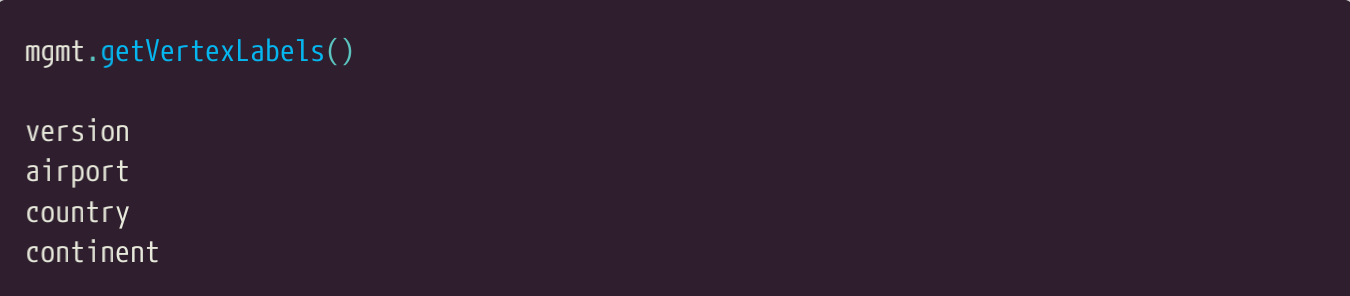
下面的例子用管理API得到了图中已定义的所有的顶点的列表。
The example below uses the Management API to get a list of all the vertex labels currently defined
in graph.
这个查询找出来所有已定义的边的标签。
This query similarly finds all of the currently defined edge labels.

这个查询将会找出所有已定义的属性键。注意这个列表包含了顶点和边的属性键的名称。
This query will find all of the currently defined property keys. Note that this list will include both
vertex and edge property key names

我们可以查询属性的基类型。
We can query the cardinality of a property.

注意,到目前为止我们还没有为航线图定义模式。如果我们查询已加载的属性的数据类型,我们将得到Object类,杰森图将会在缺失模式定义的情况下默认使用它。
Note that as we have not so far defined a schema for the air-routes graph. if we query the dataType
for any of the already loaded properties we will get back Object.class and by default that is what
JanusGraph will use in the absence of a schema having been defined.

我们也可以测试图中已存在的标签的定义。
We can also test for the existence of a label definition in the graph.


 浙公网安备 33010602011771号