


vue-devtools,超简单的安装方式(备份自用)
1. 创建一个空文件夹,名称需要为英文 eg: vue-tools.
2.通过终端打开Vue-tools:
- windows打开方式: 打开vue-tools文件夹,选中地址栏输入cmd直接打开.
- Mac打开方式:直接拖动vue-tools去文件夹到终端打开.
3.终端中输入:npm install vue-devtools
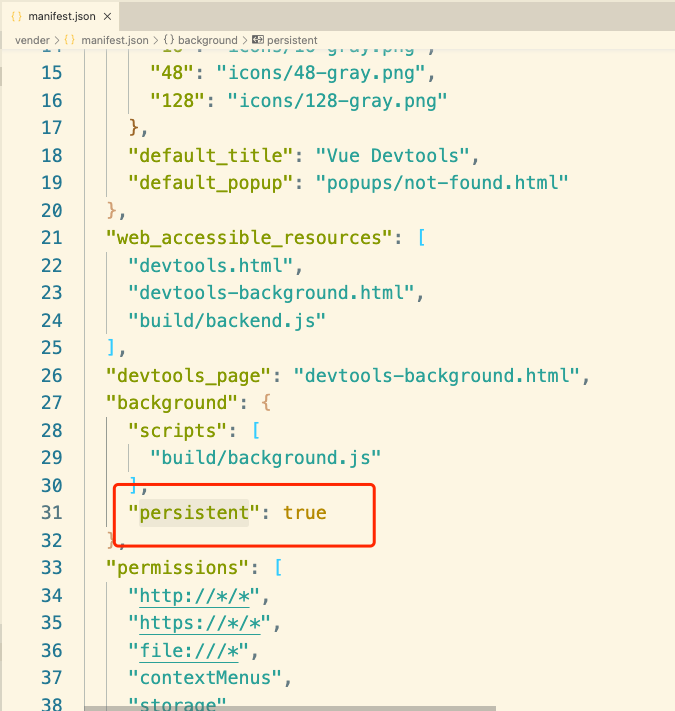
4.打开vue-tools/node_modules/vue-devtools/vender/manifest.json, 修改"persistent" 为true.
5.Chrome添加扩展应用
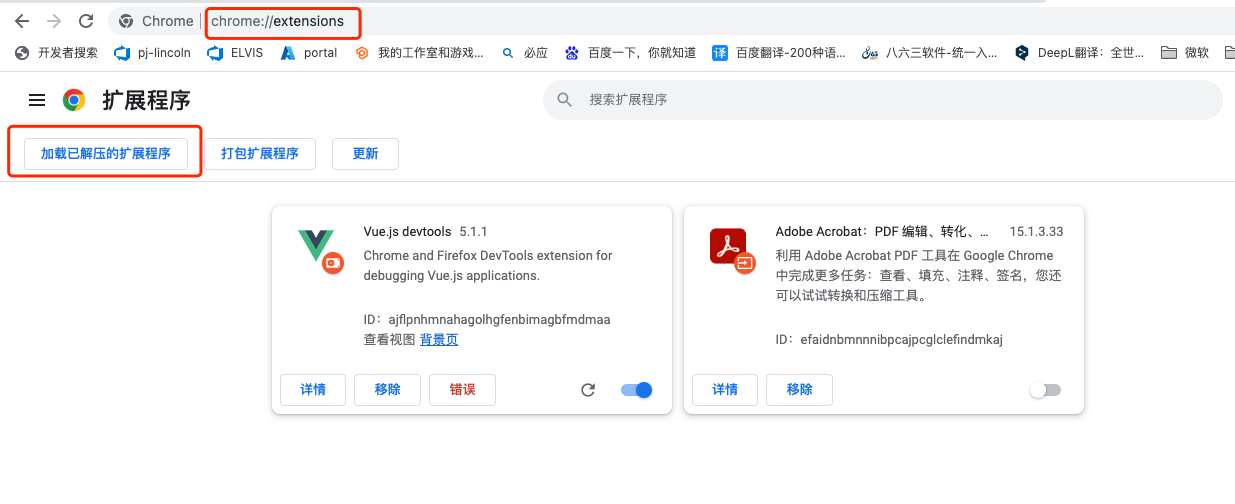
- 浏览器中输入: chrome://extensions 打开如下界面,点击 加载已解压的扩展程序 选择vue-tools/node_modules/vue-devtools路径下的vender文件进行添加
![]()
- 重新启动浏览器,
- 至此基本上就可以进行测试了,打开vue的应用看看扩展程序图标是否点亮.
6,附带简单的vue代码.
- 创建html文件CV下面代码,浏览器打开html文件即可进行测试扩展程序(前提是需要联网哦!)
-
<!DOCTYPE html>
<html lang="en">

<head>
  <meta charset="utf-8">
  <title>Vue benchmark</title>
</head>

<body>
  <script src="https://cdn.jsdelivr.net/lodash/4.10.0/lodash.min.js"></script>
  <script src="https://cdn.jsdelivr.net/npm/vue@2.7.14/dist/vue.js"></script>
  <style>
    .danger {
      background-color: red;
    }
  </style>

  <script type="text/x-template" id="t">
      <div>
        <h1>{{ items.length }} Components</h1>
        <p>{{ action }} took {{time}}ms.</p>
        <button @click="shuffle">shuffle</button>
        <button @click="add">add</button>
        <table class="table table-hover table-striped test-data">
          <row v-for="item in items" :key="item.id"
            :class="{ danger: item.id === selected }"
            :item="item"
            @select="select(item)"
            @remove="remove(item)">
          </row>
        </table>
      </div>
    </script>

  <script type="text/x-template" id="row">
      <tr>
        <td class="col-md-1">{{item.id}}</td>
        <td class="col-md-4">
            <a @click="$emit('select')">{{item.label}}</a>
        </td>
        <td class="col-md-1">
          <button @click="$emit('remove')">remove</button>
        </td>
      </tr>
    </script>

  <div id="el">
  </div>

  <script>
    var total = 1000
    var items = []
    for (var i = 0; i < total; i++) {
      items.push({
        id: i,
        label: String(Math.random()).slice(0, 5)
      })
    }

    var s = window.performance.now()
    console.profile('render')
    var vm = new Vue({
      el: '#el',
      template: '#t',
      data: {
        total: total,
        time: 0,
        action: 'Render',
        items: items,
        selected: null
      },
      methods: {
        shuffle: monitor('shuffle', function () {
          this.items = _.shuffle(this.items)
        }),
        add: monitor('add', function () {
          this.items.push({
            id: total++,
            label: String(Math.random()).slice(0, 5)
          })
        }),
        select: monitor('select', function (item) {
          this.selected = item.id
        }),
        remove: monitor('remove', function (item) {
          this.items.splice(this.items.indexOf(item), 1)
        })
      },
      components: {
        row: {
          props: ['item'],
          template: '#row'
        }
      }
    })
    setTimeout(function () {
      vm.time = window.performance.now() - s
      console.profileEnd('render')
    }, 0)

    function monitor(action, fn) {
      return function () {
        var s = window.performance.now()
        fn.apply(this, arguments)
        Vue.nextTick(function () {
          vm.action = action
          vm.time = window.performance.now() - s
        })
      }
    }
  </script>
</body>

</html>

 浙公网安备 33010602011771号