CSS字体
CSS 字体
font-family 属性
font-family 属性应包含多个字体名称作为“后备”系统,以确保浏览器/操作系统之间的最大兼容性。请以您需要的字体开始,并以通用系列结束(如果没有其他可用字体,则让浏览器选择通用系列中的相似字体)。字体名称应以逗号分隔。
代码
<!DOCTYPE html>
<html lang="en">
<head>
<meta charset="UTF-8">
<meta http-equiv="X-UA-Compatible" content="IE=edge">
<meta name="viewport" content="width=device-width, initial-scale=1.0">
<title>Document</title>
<style>
div {
font-family: '微软雅黑';
}
</style>
</head>
<body>
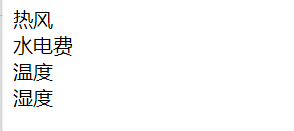
<div >热风</div>
<div >水电费</div>
<div >温度</div>
<div >湿度</div>
</body>
</html>
结果
CSS 字体大小
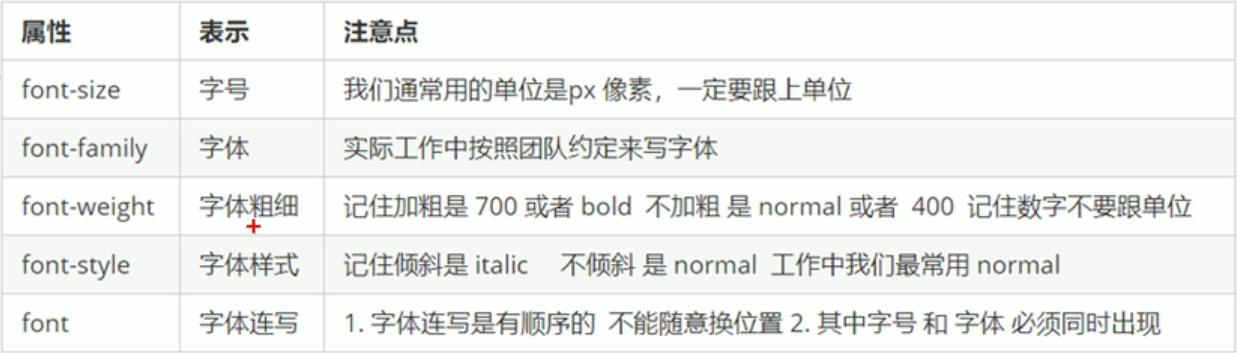
font-size 属性
在网页设计中,能够管理文本大小很重要。但是,不应使用调整字体大小来使段落看起来像标题,或是使标题看起来像段落。
请始终使用正确的 HTML 标签,例如 <h1> - <h6> 用于标题,单独定义,而 <p> 仅用于段落。
h1 {
  font-size: 40px;
}

h2 {
  font-size: 30px;
}

p {
  font-size: 14px;
}
font-weight字体粗细
font-weight 属性指定字体的粗细:
400=normal 700=bold;通常font-weight:数字;数字后面没单位
font-style 字体样式
font-style 属性主要用于指定斜体文本。
此属性可设置三个值:
- normal - 文字正常显示
- italic - 文本以斜体显示
- oblique - 文本为“倾斜”(倾斜与斜体非常相似,但支持较少)
复合属性(顺序不能变)
font:font-style font-weight font-size/line-height font-family;
      字体样式    字体粗细      大小/行高               属性
里面的字体大小和字体属性必须要有
如
p {
  font:italic 400 16px "微软雅黑";加粗的两个必须有!!!
}
![]()

 浙公网安备 33010602011771号