客车网上售票系统(分解十一)
1、今日完成任务:
(1)订单统计
2、核心源码:
(1)订单统计前台页面效果
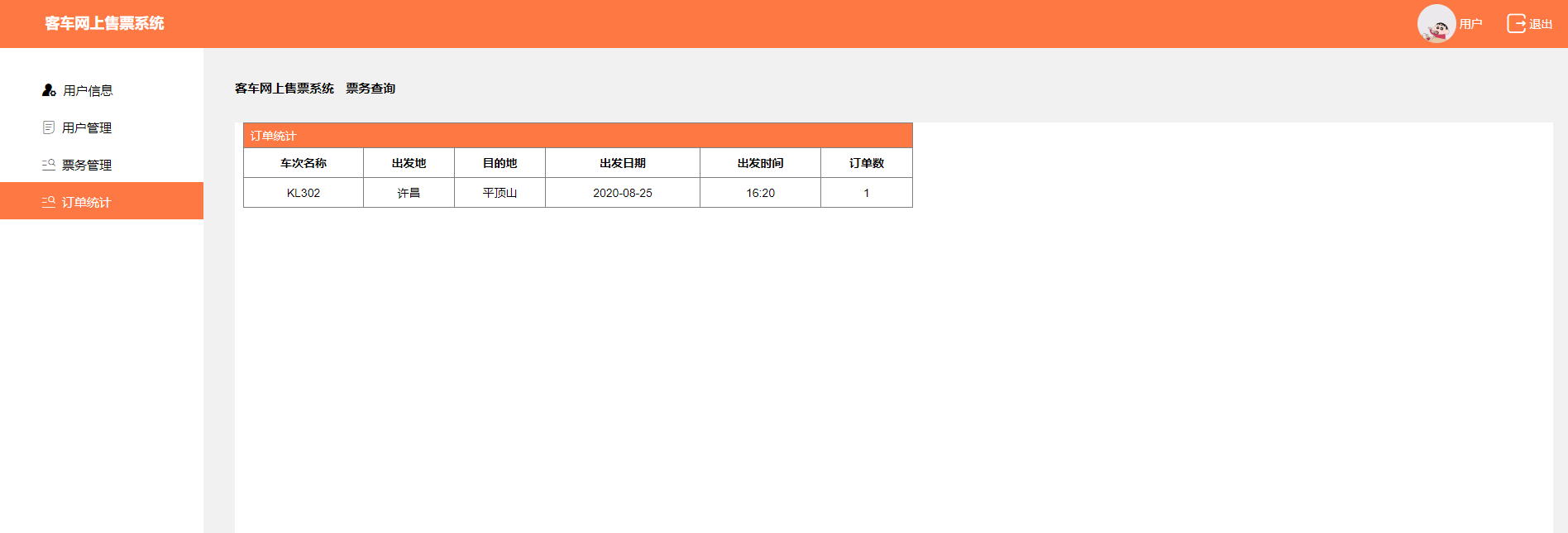
(2)订单统计前台页面代码
<!DOCTYPE html>
<html>
<head>
<meta charset="utf-8" />
<meta name="viewport" content="width=device-width,initial-scale=1.0,maximum-scale=1.0,user-scalable=0">
<meta http-equiv="X-UA-Compatible" content="ie=edge" />
<link href="../css/reset.css" rel="stylesheet" />
<link href="../css/iconfont.css" rel="stylesheet" />
<link href="../css/aa.css" rel="stylesheet" />
<script src="../js/jquery-1.9.1.min.js"></script>
<script src="../js/f.js"></script>
<script src="../js/laydate/laydate.js"></script>
<script>
//执行一个laydate实例
laydate.render({
elem: '#test1' //指定元素
});
</script>
<style type="text/css">
.icon-weibiaoti1:before {
content: "\e695";
}
.icon-xinxiliulan:before {
content: "\e614";
}
#test1 {
clear: both;
border: 1px solid #ccc;
height: 25px;
position: relative;
left: 50px;
bottom: 20px;
}
.InputDiv {
border: none;
}
#txtCfd, #txtMdd {
border: 1px solid #ccc;
height: 25px;
}
#btnSelect {
color: #fff;
}
.auto-style1 {
background: #fff;
margin-left: 40px;
}
.headboxtext {
height: 30px;
line-height: 30px;
}
#GridView1 {
text-align: center;
}
table {
width: 800px;
border-collapse: collapse;
text-align: center;
}
table tr td {
border: 1px solid #000;
}
.auto-style2 {
width: 812px;
height: 134px;
}
.auto-style3 {
width: 810px;
height: 80px;
}
#ts{
border:1px solid #000;
}
#ts tr td{
border:1px solid #808080;
}
.auto-style4 {
height: 35px;
}
#btnSubmit{
color: #fff;
background-color:#fd4c4c;
height:30px;
width:100px;
margin-left:710px;
margin-top:50px;
}
#btnGQ{
color: #fff;
background-color:#fd4c4c;
height:30px;
width:100px;
margin-left:710px;
}
</style>
<title>产品管理</title>
</head>
<body>
<form id="form1" runat="server">
<div class="PublicHead clearfix">
<div class="leftBox clearfix">
<!--<div class="companyLogo">
<img src="images/logo.jpg" />
</div>-->
<!--<i class="iconfont icon-caidan"></i>-->
<div class="companyText">
客车网上售票系统
</div>
</div>
<div class="RightBox clearfix">
<div class="UserPhotoBox">
<div class="UserPic">
<img src="../Images/user.jpg" />
</div>
<div class="UserName">
用户
</div>
</div>
<a href="Login.aspx">
<div class="dropOutBox">
<i class="iconfont icon-app_icons--"></i>
<span>退出</span>
</div>
</a>
</div>
</div>
<div class="PublicDownWhole clearfix">
<!--左侧-->
<div class="leftBox">
<ul>
<a href="UserManagement.html">
<li class=""><i class="iconfont icon-yonghuguanli"></i><span>用户管理</span></li>
</a>
<a href="SelectTicket.aspx">
<li class="Select"><i class="iconfont icon-tubiao_dingdan"></i><span>票务查询</span></li>
</a>
<a href="MyOrder.aspx">
<li><i class="iconfont icon-fenlei"></i><span>我的订单</span></li>
</a>
<a href="ProductManagement.html">
<li><i class="iconfont icon-weibiaoti1"></i><span>留言板</span></li>
</a>
<a href="ProductManagement.html">
<li><i class="iconfont icon-xinxiliulan"></i><span>信息浏览</span></li>
</a>
</ul>
</div>
<!--右侧-->
<div class="RightBox">
<div class="PublicContentBox">
<!--公用指向页面名字-->
<div class="PublicPointToAgeText">
<span class="span1">客车网上售票系统 </span><span class="span2">票务查询</span>
</div>
<!--表修改-->
<div class="auto-style1" style="margin-left: 0px; height: 700px;">
<!--查询到的表格-->
<div style="width:810px;margin-left:10px; ">
<table class="auto-style3" id="ts">
<tr style="background-color: #fe7844; height: 30px; color: #fff; text-align: left;">
<td colspan="6"> 订单统计</td>
</tr>
<tr style="font-weight:bolder;">
<td class="auto-style4">
车次名称
</td>
<td class="auto-style4">
出发地
</td>
<td class="auto-style4">
目的地
</td>
<td class="auto-style4">
出发日期
</td>
<td class="auto-style4">
出发时间
</td>
<td class="auto-style4">
订单数
</td>
</tr>
<tr>
<td class="auto-style4">
<asp:Label ID="lblTname" runat="server" Text="Label"></asp:Label>
</td>
<td class="auto-style4">
<asp:Label ID="lblBegin_sta" runat="server" Text="Label"></asp:Label>
<td class="auto-style4">
<asp:Label ID="lblEnd_sta" runat="server" Text="Label"></asp:Label>
</td>
<td class="auto-style4">
<asp:Label ID="lblStart_date" runat="server" Text="Label"></asp:Label>
</td>
<td class="auto-style4">
<asp:Label ID="lblStart_time" runat="server" Text="Label"></asp:Label>
</td>
<td class="auto-style4">
<asp:Label ID="lblCount" runat="server" Text="Label"></asp:Label>
</td>
</tr>
</table>
</div>
</div>
</div>
</div>
</div>
</form>
</body>
</html>
(3)订单统计后台页面代码
public partial class OrderStatistics : System.Web.UI.Page
    {
        OrderinfoManager bll = new OrderinfoManager();
        protected void Page_Load(object sender, EventArgs e)
        {
            if (!IsPostBack)
            {
                DataSet ds = bll.GetData();
                for (int i = 0; i < ds.Tables[0].Rows.Count; i++)
                {
                    this.lblTname.Text = ds.Tables[0].Rows[0]["Tname"].ToString();
                    this.lblBegin_sta.Text = ds.Tables[0].Rows[0]["Begin_sta"].ToString();
                    this.lblEnd_sta.Text = ds.Tables[0].Rows[0]["End_sta"].ToString();
                    this.lblStart_date.Text = ds.Tables[0].Rows[0]["Start_date"].ToString();
                    this.lblStart_time.Text = ds.Tables[0].Rows[0]["Start_time"].ToString();
                    this.lblCount.Text = ds.Tables[0].Rows[0][5].ToString();
                }
            }
        }
    }
DAL层:
  public DataSet GetData()
        {
            string sql = $"select Tname,Begin_sta,End_sta,Start_date,Start_time, COUNT(*) from Traininfo inner join Carinfo on Traininfo.Tid=Carinfo.Tid inner join Orderinfo on Carinfo.Cid=Orderinfo.Cid group by Tname,Begin_sta,End_sta,Start_date,Start_time";
            return dbHelper.GetData(sql);
        }
3、遇到的问题:
(1)涉及到多表联查
(2)很多想实现的效果因为能力有限没办法实现,需要前端技术
4、解决的方法:
(2)技术能力方面需要利用这个暑假做提升
5、项目燃尽图更新(此内容一周已更新)


 浙公网安备 33010602011771号