


重写GridView
效果
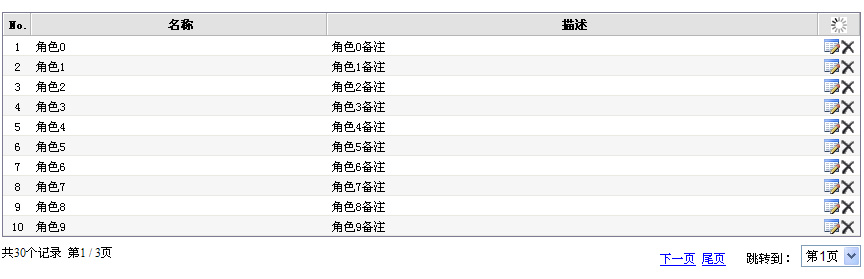
使用中遇到的问题:
1. 不便于使用CSS控制样式,特别是border-collapse: separate属性总是在border=0时自动出现。
2. 分页样式过于单调,喜欢aspnetPager的样式,也就是用一个DropDownList。
3. 当DataSource为null的时候,虽然可以显示EmptyDataText或EmptyDataTemplate,但不显示Header。
解决方法:
1. 使用WebControlAdapter重写GridView的输出。
2. 重写CreateChildControls方法,生成自定义的PagerRow。
3. 重写CreateChildControls方法,即使没有数据,也生成Header或Footer;同时使用WebControlAdapter重写输出。
细节:
1. 如何使用WebControlAdapter重写GridView的输出。
这个问题大家可以参考微软的CssAdapters,我稍微修改了一下,添加了对AutoGenerateColumns==true的情况的考虑。详细就不多说了,具体见Demo的代码。
生成的Html代码好多了。
<table cellspacing="0" summary="">
<thead>
<tr class="headRow">
<th class="listNo" scope="col">No.</th>
<th class="name" scope="col">名称</th>
<th class="desc" scope="col">描述</th>
<th class="listOp" scope="col"> </th>
</tr>
</thead>
<tbody>
<tr class="row">
<td class="listNo">1</td>
<td class="name">角色0</td>
<td class="desc">角色0备注</td>
<td class="listOp"><a id="GvRole_ctl02_HLEdit" title="编辑" class="opEdit" href="#"><img title="编辑" src="App_Themes/Default/opEdit.gif" style="border-width:0px;" /></a><input type="image" name="GvRole$ctl02$IBtnDelete" id="GvRole_ctl02_IBtnDelete" title="删除" class="opDel" src="App_Themes/Default/opDel.gif" alt="删除" style="border-width:0px;" /></td>
</tr>
<tr class="alternatingRow">
<td class="listNo">2</td>
<td class="name">角色1</td>
<td class="desc">角色1备注</td>
<td class="listOp"><a id="GvRole_ctl03_HLEdit" title="编辑" class="opEdit" href="#"><img title="编辑" src="App_Themes/Default/opEdit.gif" style="border-width:0px;" /></a><input type="image" name="GvRole$ctl03$IBtnDelete" id="GvRole_ctl03_IBtnDelete" title="删除" class="opDel" src="App_Themes/Default/opDel.gif" alt="删除" style="border-width:0px;" /></td>
</tr>
............................
<tr class="alternatingRow">
<td class="listNo">10</td>
<td class="name">角色9</td>
<td class="desc">角色9备注</td>
<td class="listOp"><a id="GvRole_ctl11_HLEdit" title="编辑" class="opEdit" href="#"><img title="编辑" src="App_Themes/Default/opEdit.gif" style="border-width:0px;" /></a><input type="image" name="GvRole$ctl11$IBtnDelete" id="GvRole_ctl11_IBtnDelete" title="删除" class="opDel" src="App_Themes/Default/opDel.gif" alt="删除" style="border-width:0px;" /></td>
</tr>
</tbody>
</table>
<div class="pagination bottom"><div class="hint">
共30个记录 第1 / 3页 </div><div class="op">
<a href="javascript:__doPostBack('GvRole','Page$Next')">下一页</a>
<a href="javascript:__doPostBack('GvRole','Page$Last')">尾页</a>
<span>跳转到:</span>
<select name="GvRole$ctl13$PageList" onchange="javascript:setTimeout('__doPostBack(\'GvRole$ctl13$PageList\',\'\')', 0)" id="GvRole_ctl13_PageList">
<option selected="selected" value="0">第1页</option>
<option value="1">第2页</option>
<option value="2">第3页</option></select></div>
</div>
2. 如何实现自定义分页
在CreateChildControls方法中,清除PagerRow中的Controls,添加自己需要的Controls。别的不多说,关键是DropDownList的事件如何处理。我的办法是利用反射,调用GridView的HandleEvent方法处理翻页事件。(虽然不太好,只怪HandleEvent是private的)
private void PageList_Click(Object sender, EventArgs e)
{
int i = int.Parse(((DropDownList)sender).SelectedValue);
GridViewCommandEventArgs gce = new GridViewCommandEventArgs(sender, new CommandEventArgs("Page", (i+1).ToString()));
MethodInfo method = typeof(System.Web.UI.WebControls.GridView).GetMethod("HandleEvent", BindingFlags.NonPublic | BindingFlags.Instance);
if (method != null)
{
object[] args = new object[3];
args[0] = gce;
args[1] = false;
args[2] = String.Empty;
method.Invoke(this, args);
}
}
3. 如何在DataSource为null显示Header或Footer
这个稍微复杂一点,但也不困难。在CreateChildControls方法中,不论是否有数据,初始化HeaderRow或FooterRow,然后用反射,设置其中的Cell,最后添加到Table中。
DataControlField[] fieldArray = this.Fields;
if (fieldArray != null && fieldArray.Length > 0)
{
if (this.ShowHeader && (this.HeaderRow == null || addHeaderAndFooter) && this.ShowHeaderAlways)
{
GridViewRow headerRow = null;
GridViewRowEventArgs args;
if (this.HeaderRow == null)
{
headerRow = this.CreateRow(-1, -1, DataControlRowType.Header, DataControlRowState.Normal);
this.InitializeRow(headerRow, fieldArray);
FieldInfo field = typeof(System.Web.UI.WebControls.GridView).GetField("_headerRow", BindingFlags.NonPublic | BindingFlags.Instance);
if (field != null)
{
field.SetValue(this, headerRow);
}
((Table)this.Controls[0]).Rows.Add(headerRow);
this.addHeaderAndFooter = true;
}
else
{
headerRow = this.HeaderRow;
}
args = new GridViewRowEventArgs(headerRow);
this.OnRowCreated(args);
if (dataBinding)
{
headerRow.DataBind();
this.OnRowDataBound(args);
headerRow.DataItem = null;
}
}
}
----------------------------------
[转自:http://www.cnblogs.com/webabcd/archive/2007/02/04/639793.aspx]
扩展GridView控件(十)——扩展分页功能
作者:webabcd
介绍
用着GridView自带的分页样式总觉得不太习惯,我们可以在PagerTemplate中来写一些自定义的样式,但是也挺麻烦的,其实我们可以扩展一下GridView,给它再增加一种分页样式
控件开发
1、新建一个继承自GridView的类。
 /// <summary>
 /// 继承自GridView
 /// </summary>
 [ToolboxData(@"<{0}:SmartGridView runat='server'></{0}:SmartGridView>")]public class SmartGridView : GridView{
 }
}
2、新建一个Paging类,定义一个分页样式的枚举
using System;using System.Collections.Generic;using System.Text;using System.ComponentModel;namespace YYControls.SmartGridView{ /// <summary>
 /// 自定义分页相关
 /// </summary> public class Paging { /// <summary> /// 自定义分页样式 /// </summary> public enum PagingStyleCollection { /// <summary> /// 不用自定义分页样式 /// </summary> None, /// <summary> /// 默认自定义分页样式 /// </summary> Default } }}
3、在继承自GridView的类中加一个上面定义的枚举属性
private Paging.PagingStyleCollection _pagingStyle; /// <summary> /// 自定义分页样式 /// </summary> [Description("自定义分页样式"), DefaultValue(""), Category("扩展")] public Paging.PagingStyleCollection PagingStyle { get { return _pagingStyle; } set { _pagingStyle = value; } }
4、如果GridView使用的是数据源控件的话,计算总记录数
/// <summary> /// OnLoad /// </summary> /// <param name="e"></param> protected override void OnLoad(EventArgs e) { // 查找ObjectDataSource ObjectDataSource ods = Parent.FindControl(this.DataSourceID) as ObjectDataSource; if (ods != null) { ods.Selected += new ObjectDataSourceStatusEventHandler(ods_Selected); } base.OnLoad(e); } private int? _recordCount = null; /// <summary> /// 计算总记录数 /// </summary> /// <param name="sender"></param> /// <param name="e"></param> private void ods_Selected(object sender, ObjectDataSourceStatusEventArgs e) { if (e.ReturnValue is IListSource) { _recordCount = ((IListSource)e.ReturnValue).GetList().Count; } }
5、重写OnRowCreated以实现自定义分页样式
/// <summary> /// OnRowCreated /// </summary> /// <param name="e"></param> protected override void OnRowCreated(GridViewRowEventArgs e) { if (e.Row.RowType == DataControlRowType.Pager && PagingStyle == Paging.PagingStyleCollection.Default) { LinkButton First = new LinkButton(); LinkButton Prev = new LinkButton(); LinkButton Next = new LinkButton(); LinkButton Last = new LinkButton(); TableCell tc = new TableCell(); e.Row.Controls.Clear(); tc.Controls.Add(new LiteralControl(" ")); if (_recordCount.HasValue) { tc.Controls.Add(new LiteralControl(_recordCount.ToString())); tc.Controls.Add(new LiteralControl(" ")); tc.Controls.Add(new LiteralControl(PageSize.ToString())); tc.Controls.Add(new LiteralControl(" ")); } tc.Controls.Add(new LiteralControl((PageIndex + 1).ToString())); tc.Controls.Add(new LiteralControl("/")); tc.Controls.Add(new LiteralControl(PageCount.ToString())); tc.Controls.Add(new LiteralControl(" ")); if (!String.IsNullOrEmpty(PagerSettings.FirstPageImageUrl)) { First.Text = "<img src='" + ResolveUrl(PagerSettings.FirstPageImageUrl) + "' border='0'/>"; } else { First.Text = PagerSettings.FirstPageText; } First.CommandName = "Page"; First.CommandArgument = "First"; First.Font.Underline = false; if (!String.IsNullOrEmpty(PagerSettings.PreviousPageImageUrl)) { Prev.Text = "<img src='" + ResolveUrl(PagerSettings.PreviousPageImageUrl) + "' border='0'/>"; } else { Prev.Text = PagerSettings.PreviousPageText; } Prev.CommandName = "Page"; Prev.CommandArgument = "Prev"; Prev.Font.Underline = false; if (!String.IsNullOrEmpty(PagerSettings.NextPageImageUrl)) { Next.Text = "<img src='" + ResolveUrl(PagerSettings.NextPageImageUrl) + "' border='0'/>"; } else { Next.Text = PagerSettings.NextPageText; } Next.CommandName = "Page"; Next.CommandArgument = "Next"; Next.Font.Underline = false; if (!String.IsNullOrEmpty(PagerSettings.LastPageImageUrl)) { Last.Text = "<img src='" + ResolveUrl(PagerSettings.LastPageImageUrl) + "' border='0'/>"; } else { Last.Text = PagerSettings.LastPageText; } Last.CommandName = "Page"; Last.CommandArgument = "Last"; Last.Font.Underline = false; if (this.PageIndex <= 0) { First.Enabled = Prev.Enabled = false; } else { First.Enabled = Prev.Enabled = true; } tc.Controls.Add(First); tc.Controls.Add(new LiteralControl(" ")); tc.Controls.Add(Prev); tc.Controls.Add(new LiteralControl(" ")); // 当前页左边显示的数字分页按钮的数量 int rightCount = (int)(PagerSettings.PageButtonCount / 2); // 当前页右边显示的数字分页按钮的数量 int leftCount = PagerSettings.PageButtonCount % 2 == 0 ? rightCount - 1 : rightCount; for (int i = 0; i < PageCount; i++) { if (PageCount > PagerSettings.PageButtonCount) { if (i < PageIndex - leftCount && PageCount - 1 - i > PagerSettings.PageButtonCount - 1) { continue; } else if (i > PageIndex + rightCount && i > PagerSettings.PageButtonCount - 1) { continue; } } if (i == PageIndex) { tc.Controls.Add(new LiteralControl("<span style='color:red;font-weight:bold'>" + (i + 1).ToString() + "</span>")); } else { LinkButton lb = new LinkButton(); lb.Text = (i + 1).ToString(); lb.CommandName = "Page"; lb.CommandArgument = (i + 1).ToString(); tc.Controls.Add(lb); } tc.Controls.Add(new LiteralControl(" ")); } if (this.PageIndex >= PageCount - 1) { Next.Enabled = Last.Enabled = false; } else { Next.Enabled = Last.Enabled = true; } tc.Controls.Add(Next); tc.Controls.Add(new LiteralControl(" ")); tc.Controls.Add(Last); tc.Controls.Add(new LiteralControl(" ")); tc.ColumnSpan = this.Columns.Count; e.Row.Controls.Add(tc); } base.OnRowCreated(e); }
控件使用
添加这个控件到工具箱里,然后拖拽到webform上,设置PagingStyle属性为Default,同时设置GridView的原有属性PageButtonCount,FirstPageText,PreviousPageText,NextPageText,LastPageText,FirstPageImageUrl,PreviousPageImageUrl,NextPageImageUrl,LastPageImageUrl
ObjData.cs
using System;using System.Data;using System.Configuration;using System.Web;using System.Web.Security;using System.Web.UI;using System.Web.UI.WebControls;using System.Web.UI.WebControls.WebParts;using System.Web.UI.HtmlControls;using System.ComponentModel;/// <summary>/// OjbData 的摘要说明/// </summary>public class OjbData{ public OjbData() { // // TODO: 在此处添加构造函数逻辑 // } [DataObjectMethod(DataObjectMethodType.Select, true)] public DataTable Select() { DataTable dt = new DataTable(); dt.Columns.Add("no", typeof(string)); dt.Columns.Add("name", typeof(string)); for (int i = 0; i < 30; i++) { DataRow dr = dt.NewRow(); dr[0] = "no" + i.ToString().PadLeft(2, '0'); dr[1] = "name" + i.ToString().PadLeft(2, '0'); dt.Rows.Add(dr); } return dt; }}
Default.aspx
<%@ Page Language="C#" AutoEventWireup="true" CodeFile="Default.aspx.cs" Inherits="_Default" %><!DOCTYPE html PUBLIC "-//W3C//DTD XHTML 1.0 Transitional//EN" "http://www.w3.org/TR/xhtml1/DTD/xhtml1-transitional.dtd"><html xmlns="http://www.w3.org/1999/xhtml"><head runat="server"> <title>SmartGridView测试</title></head><body> <form id="form1" runat="server"> <div> <yyc:SmartGridView ID="SmartGridView1" runat="server" DataSourceID="ObjectDataSource1" AutoGenerateColumns="False" AllowPaging="true" PagingStyle="Default"> <Columns> <asp:BoundField DataField="no" HeaderText="序号" SortExpression="no" ItemStyle-Width="100px" /> <asp:BoundField DataField="name" HeaderText="名称" SortExpression="name" ItemStyle-Width="100px" /> <asp:BoundField DataField="no" HeaderText="序号" SortExpression="no" ItemStyle-Width="100px" /> <asp:BoundField DataField="name" HeaderText="名称" SortExpression="name" ItemStyle-Width="100px" /> <asp:BoundField DataField="no" HeaderText="序号" SortExpression="no" ItemStyle-Width="100px" /> <asp:BoundField DataField="name" HeaderText="名称" SortExpression="name" ItemStyle-Width="100px" /> </Columns> </yyc:SmartGridView> <asp:ObjectDataSource ID="ObjectDataSource1" runat="server" SelectMethod="Select" TypeName="OjbData"></asp:ObjectDataSource> </div> </form></body></html>------------------------
[转自:http://www.cnblogs.com/weiweictgu/archive/2007/04/16/714993.html]
用ObjectDataSource实现自定义分页的心得总结
在Web应用开发中列表的分页是难免要遇到的问题,在ASP.NET 2.0中微软为我们提供了很多数据源控件,如SqlDataSource、ObjectDataSource等,它们都可以实现默认分页,但是默认分页是在内存中实现的,用户量增大时Web服务器的负担会急剧增大,在多层体系结构程序开发中,往往把分页和排序的工作交给数据库服务器来完成,在网上也能找到很多能够快速实现分页的控件,但是做为一个程序员对分页的实现还是有一定的了解比较好,如果过渡的依赖于控件,你说写出的代码独立性就很差,一般在多层web应用开发中建议尽量使用ObjectDataSource,而不要使用SqlDataSource,因为ObjectDataSource有一下有点:
1、SqlDataSource是针对Sql Server的,对其他的数据库支持不够,例如在访问Oracle数据库时,要用存储过程返回结构集合SqlDataSource显得无能为力。
2、ObjectDataSource 提供一个 TypeName 属性(而不是 ConnectionString属性),该属性指定用于执行数据操作的业务逻辑类的类名,ObjectDataSource可以通过TypeName 属性直接调用业务层的类,在多层应用中ObjectDataSource 显得很实用,而SqlDataSource要在页面上指定ConnectionString、Command,系统的层次结构被搞乱,不便于系统的维护工作。
3、ObjectDataSource 控件提供了EnablePaging属性、SelectCountMethod属性、StartRowIndexParameterName属性和MaximumRowsParameterName属性专门支持数据源分页。 SelectCountMethod属性指定的是获取数据项总数的方法。StartRowIndexParameterName属性用于指定一个参数的名称,如程序中不特别设定,其默认参数名为startRowIndex,该参数代表该页数据项的开始行索引;MaximumRowsParameterName属性也用于指定一个参数名称,其默认参数名为maximumRows,该参数代表一页中容纳的数据项总数。SqlDataSource完全没有提供这些功能。
4、SqlDataSource只支持内存分页,而不支持数据库分页,ObjectDataSource 两者都支持,内存分页每次都检索出所有数据并将其绑定到数据绑定控件中,虽然该控件只能一页一页显示这些数据,但是所有数据其实都已经被绑定到控件上了。而数据库分页的含义是显示到哪一页就检索并绑定哪一页的数据。显然在大数据量的情况下,数据库分页的效率会高很多。
关于分页方法
很多人写分页的方法喜欢创建临时表,虽然这是一个快捷的实现方法,但这样做效率肯定很低,其实在SQL Server和Oracle中分别使用Top和ROWNUM可以很方便的使用排序,充分利用数据库服务器来做计算可以降低web服务的负担。
SQL Server的分页代码:
1
SET QUOTED_IDENTIFIER ON 2
GO3
SET ANSI_NULLS ON 4
GO5
6
7
8
ALTER proc SelectByPage(@startRowIndex int,@maximumRows int,@SortBy varchar(50))9
as10
declare @TotalCnt int11
declare @sql varchar(8000)12
begin13
select @TotalCnt = count(*) from sys_user14
15
set @sql = 'select top ' + convert(varchar(20),@maximumRows) + ' * from '16
set @sql = @sql + '('17
set @sql = @sql + ' select top ' + convert(varchar(20),(@TotalCnt-@startRowIndex)) + ' * from sys_user a '18
set @sql = @sql + ' order by a.' + @SortBy + ' desc '19
set @sql = @sql + ') b'20
set @sql = @sql + ' order by b.' + @SortBy21
exec(@sql)22
--print @sql23
end24
25
26
27
GO28
SET QUOTED_IDENTIFIER OFF 29
GO30
SET ANSI_NULLS ON 31
GO32
33
Oracle中的分页方法:
1
/* Formatted on 2007/04/16 11:16 (Formatter Plus v4.8.8) */2
CREATE OR REPLACE PROCEDURE diswebuser.select_by_page (3
p_start_page NUMBER,4
p_page_size NUMBER,5
p_sort_by VARCHAR26
)7
AS8
v_cnt INTEGER;9
v_sql VARCHAR2 (4000);10
v_start_index INTEGER;11
v_end_index INTEGER;12
BEGIN13
SELECT COUNT (*)14
INTO v_cnt15
FROM side_slope;16
17
--v_start_index := (p_start_page - 1) * p_page_size + 1;18
v_start_index := p_start_page + 1;19
v_end_index := p_start_page + p_page_size;20
v_sql := v_sql || 'SELECT * ';21
v_sql := v_sql || ' FROM (SELECT ROWNUM AS row_id, a.* ';22
v_sql := v_sql || ' FROM side_slope a ';23
v_sql := v_sql || ' ORDER BY side_slope_id) ';24
v_sql :=25
v_sql26
|| ' WHERE row_id BETWEEN '27
|| TO_CHAR (v_start_index)28
|| ' AND '29
|| TO_CHAR (v_end_index)30
|| ' ';31
v_sql := v_sql || 'ORDER BY side_slope_id ';32
DBMS_OUTPUT.put_line (v_sql);33
END;34
/
当然在Oracle存储中返回结构集要使用ref cursor,使用Oracle的朋友一定很清楚,我在这里就不罗嗦了,那样写还得创建包,麻烦^_^,上面只是打印出了sql语句。
还望高手指点
------------------------------
转自:http://www.cnblogs.com/lovecherry/archive/2006/09/05/494998.html
排序自定义分页数据
和默认翻页方式相比,自定义分页能提高几个数量级的效率。当我们的需要对大量数据分页的时候就需要考虑自定义分页,然而实现自定义分页相比默认分页需要做更多工作。对于排序自定义分页数据也是这样,在本教程中我们就会扩展前面的例子来实现自定义分页数据的排序。
注意:既然本教程是基于前一个的,因此我们需要把前面教程示例页面EfficientPaging.aspx的<asp:Content>元素中的代码复制到本教程SortParameter.aspx示例页面中。关于如何进行这样的复制操作请参看为删除数据添加客户端确认
Step 1: 回顾自定义分页技术
要实现自定义分页,我们需要使用一些方法根据开始行索引和最大行参数返回一个记录的子集。在前面的教程中,我们看了如何使用微软SQL SERVER 2005的ROW_NUMBER()来实现。简而言之,ROW_NUMBER()为每一个查询返回的行分配一个行号。下面这个查询演示了如何使用这个技术按照ProductName排序获取的11至20的产品数据。
|
SQL |
|
|
1 2 3 4 5 |
SELECT ProductID, ProductName, ... (SELECT ProductID, ProductName, ..., ROW_NUMBER() OVER (ORDER BY ProductName) AS RowRank |
对于按照一种固定的排序规则进行分页,上述技术就能满足了(比如按照ProductName排序),但是如果我们希望获取按照不同的排序表达式排序后的记录,理想地,我们应该在OVER子句中使用参数重写上述查询,代码如下:
|
SQL |
|
|
1 2 3 4 5 |
SELECT ProductID, ProductName, ... (SELECT ProductID, ProductName, ..., ROW_NUMBER() OVER (ORDER BY @sortExpression) AS RowRank |
可惜,ORDER BY子句中不能使用参数。而我们只能创建存储过程来接受@sortExpression输入参数,使用如下任意一种方法:
- 为所有的排序表达式硬编码查询,使用IF/ELSE T-SQL语句来决定执行哪个查询
- 使用CASE语句来根据输入参数@sortExpression实现动态ORDER BY表达式,详细请看The Power of SQL CASE Statements中的Used to Dynamically Sort Query Results部分。
- 使用字符串来保存查询语句然后使用sp_executesql系统存储过程来动态执行查询
上述每一种实现方法都有各自的缺点。第一个方案和其余两个相比可维护性比较差,因为它需要为每一个可能的查新表达式创建一句查询。因此,如果你又在GridView中加入了一个允许排序的字段,还需要去修改存储过程。对于第二个方案如果我们的数据库列不是字符串类型的话,排序就会引发一定的效率问题,而且可维护性和第一种一个一样也不是很好。至于最后一个动态组合SQL语句的方案,如果你允许用户自己输入参数并传入存储过程的话则可能带来SQL注入攻击的危害。
虽然没有一种方案是完美的,但是我认识第三种是这三个方案中最佳的。因为它是使用动态SQL语句的,所以灵活性比前两者都好。而且,只有当攻击者能随意把参数传入存储过程才能进行SQL注入攻击。既然DAL使用参数化查询,ADO.NET会防止这些恶意参数传入数据库,也就是说只有当攻击者人直接执行存储过程的时候才会有SQL注入的隐患。
要实现这个功能,让我们在Northwind数据库中新建称作GetProductsPagedAndSorted的一个存储过程。这个存储过程接受三个参数:@sortExpression,nvarchar(100)类型的输入参数,用来指定排序方式,它会直接拼接在ORDER BY子句后面。@startRowIndex 和 @maximumRows都是整数输入参数,和前面教程中的一样。你可以参考下面的脚本建立GetProductsPagedAndSorted存储过程:
|
SQL |
|
|
1 2 3 4 5 6 7 8 9 10 11 12 13 14 15 16 17 18 19 20 21 22 23 24 25 26 27 28 29 |
CREATE PROCEDURE dbo.GetProductsPagedAndSorted ( @sortExpression nvarchar(100), @startRowIndex int, @maximumRows int )
-- 确保指定了 @sortExpression IF LEN(@sortExpression) = 0 SET @sortExpression = 'ProductID'
-- 组合查询 SET @sql = 'SELECT ProductID, ProductName, SupplierID, CategoryID, QuantityPerUnit, UnitPrice, UnitsInStock, UnitsOnOrder, ReorderLevel, Discontinued, CategoryName, SupplierName FROM (SELECT ProductID, ProductName, p.SupplierID, p.CategoryID, QuantityPerUnit, UnitPrice, UnitsInStock, UnitsOnOrder, ReorderLevel, Discontinued, c.CategoryName, s.CompanyName AS SupplierName, ROW_NUMBER() OVER (ORDER BY ' + @sortExpression + ') AS RowRank c.CategoryID = p.CategoryID s.SupplierID = p.SupplierID) AS ProductsWithRowNumbers WHERE RowRank > ' + CONVERT(nvarchar(10), @startRowIndex) + ' AND RowRank <= (' + CONVERT(nvarchar(10), @startRowIndex) + ' + ' + CONVERT(nvarchar(10), @maximumRows) + ')'
-- 执行SQL查询 |
存储过程一开始先确保@sortExpression参数的值已经被指定。如果未被指定则按照ProductID排序。接下来,开始构建动态的SQL查询。注意到,在这里的动态SQL查询和前面的用来从Products表获取所有行的查询有些不同。在前面的例子中,我们使用子查询获取每一个产品关联的分类和供应商名。在GetProductsPagedAndSorted中我们只能使用JOINS因为结果需要根据分类或者供应商名来排序。
我们通过连接静态的查询语句和@sortExpression, @startRowIndex, @maximumRows参数来组成动态查询。因为@startRowIndex和@maximumRows是整数参数,所以必须在连接前把它们转化为nvarchar类型。在动态SQL查询连接完毕后就可以使用sp_executesql来执行。
先来花一些时间使用各种@sortExpression、@startRowIndex和@maximumRows参数的值来测试存储过程。在服务器资源管理器中右键点击存储过程然后选择执行。IDE会启动运行存储过程对话框,我们输入各种输入参数(见图1)。比如,要让结果按照分类名排序,就把@sortExpression参数的值设置为CategoryName;如果要按照公司名排序就用CompanyName。所有参数的值都正确设置后点击OK。结果就会在输出窗口中显示。图2显示了按照UnitPrice倒序,从11到20的记录。

图1:试着设置存储过程的三个输入参数
图2:存储过程的结果显示在了输入窗口中
Step 2: 添加数据访问和业务逻辑层
既然我们已经建立了GetProductsPagedAndSorted存储过程,下一步就是要通过我们的应用程序构架来执行它。我们需要为DAL和BLL添加一个正确的方法。首先让我们为DAL添加一个方法。打开Northwind.xsd强类型DataSet,右键点击ProductsTableAdapter,从菜单中选择添加查询选项。和前面教程中做的一样,我们需要配置一个新的DAL方法来使用建立的存储过程-GetProductsPagedAndSorted。选择使用已有存储过程选项。

图3:选择一个已有的存储过程
在下一步中,我们通过从下拉列表中选择GetProductsPagedAndSorted存储过程来使用它。

图4:使用GetProductsPagedAndSorted存储过程
在下一屏幕中,我们选择它返回表格信息。

图5:指示存储过程返回表格信息
最后,我们创建DAL方法来填充DataTable和返回DataTable,分别命名为FillPagedAndSorted和GetProductsPagedAndSorted。
图6:选择方法名
现在,我们已经扩展了DAL,让我们来看看BLL吧。打开ProductsBLL类文件并且新增一个方法GetProductsPagedAndSorted。这个方法接受三个参数-sortExpression,startRowIndex和maximumRows。仅仅是简单地调用DAL的GetProductsPagedAndSorted方法,代码如下:
|
C# |
|
|
1 2 3 4 5 |
[System.ComponentModel.DataObjectMethodAttribute(System.ComponentModel.DataObjectMethodType.Select, false)] public Northwind.ProductsDataTable GetProductsPagedAndSorted(string sortExpression, int startRowIndex, int maximumRows) { return Adapter.GetProductsPagedAndSorted(sortExpression, startRowIndex, maximumRows); } |
Step 3: 配置ObjectDataSource来传入SortExpression参数
好了,我们已经为DAL和BLL添加了方法来调用GetProductsPagedAndSorted存储过程。剩下的工作就是配置SortParameter.aspx页面的ObjectDataSource来根据用户请求的排序为新的BLL方法传入SortExpression参数。
首先,我们把ObjectDataSource的SelectMethod从GetProductsPaged修改为GetProductsPagedAndSorted。可以通过配置数据源向导的属性窗口来修改或者直接在声明代码中修改。下一步,我们需要提供ObjectDataSource的SortParameterName 属性。属性设置后,ObjectDataSource才会把GridView的SortExpression属性传入SelectMethod。特别地,ObjectDataSource会根据SortParameterName的值来寻找输入仓储,既然BLL中GetProductsPagedAndSorted方法的输入参数叫做sortExpression,我们这里的ObjectDataSource的SortExpression属性也应该设置为“sortExpression”。
在这两步修改后,ObjectDataSource的声明应该如下:
|
ASP.NET |
|
|
1 2 3 |
<asp:ObjectDataSource ID="ObjectDataSource1" runat="server" OldValuesParameterFormatString="original_{0}" SelectMethod="GetProductsPagedAndSorted" TypeName="ProductsBLL" EnablePaging="True" SelectCountMethod="TotalNumberOfProducts" SortParameterName="sortExpression"> </asp:ObjectDataSource> |
注意:和前面教程说的一样,请确保ObjectDataSource的SelectParameters集合中sortExpression、startRowIndex和maximumRows输入参数。
要让GridView开启排序,请首先检查Sorting多选框是否已经选中。把GridView的AllowSorting属性设置为true以后就能让每列的标题文字呈现为LinkButton。用户点击标题的LinkButton就会引发如下几个步骤:
1. GridView把它的SortExpression 属性的值修改为当前点击的标题所在列的SortExpression的值。
2. ObjectDataSource调用BLL的GetProductsPagedAndSorted方法,把GridView的SortExpression属性的值作为sortExpression参数传入方法(还有正确的startRowIndex、maximumRows输入参数的值)。
3. BLL调用DAL的GetProductsPagedAndSorted方法。
4. DAL执行GetProductsPagedAndSorted存储过程并传入@sortExpression参数(和@startRowIndex、@maximumRows输入参数)。
5. 存储过程把正确的记录子集数据返回BLL,BLL返回到ObjectDataSource;数据被绑定到GridView之后渲染成HTML显示给用户。
图7显示了按照UnitPrice正序排列地第一页记录集。
图7:按照UnitPrice排列的果
虽然现在我们的程序能正确按照产品名、分类名、位数量和价格进行排序,但是如果我们选择按照供应商名来排序会得到一个运行时异常,如图8。

图8:按照供应商名排序会得到一个运行时异常
之所以会引发这个异常时因为GridView的SupplierName BoundField绑定列的SortExpression设置为SupplierName。然而,这列在供应商表中实际叫做CompanyName,SupplierName是我们为这个列起的别名。因为ROW_NUMBER()功能只能使用真实列名,所以,我们需要把BoundField的SortExpression从“SupplierName”修改为“CompanyName”(如图9),图10显示了修改后按照供应商排序的记录。
图9:把SupplierName BoundField的SortExpression修改为“CompanyName” (译者注:图片可能不对)
图10:结果现在能按照供应商名排序了
总结
前面教程中我们实现了自定义分页,只能在设计时固定一种排序方式。简单来说要想又自定义分页又提供自定义排序实现不了。在本教程中,我们通过引入@sortExpression来扩展存储过程解决了这个限制。
在创建了存储过程和DAL、BLL中的新方法后,我们就能通过配置ObjectDataSource把GridView当前SortExpression的值传入BLL的SelectMethod中来实现排序和自定义分页。
编程快乐!
关于作者
Scott Mitchell,著有六本ASP/ASP.NET方面的书,是4GuysFromRolla.com的创始人,自1998年以来一直应用微软Web技术。Scott是个独立的技 术咨询顾问,培训师,作家,最近完成了将由Sams出版社出版的新作,24小时内精通ASP.NET 2.0。他的联系电邮为mitchell@4guysfromrolla.com,也可以通过他的博客http://ScottOnWriting.NET与他联系。

 浙公网安备 33010602011771号