
天下布武之微博爬虫
微博搜索+视频下载脚本
关注公众号[喵先生课堂] 并回复 微博爬虫,获取源码
最近刷微博发现很多有意思的视频,想着给保存下来;所以就写了这个爬虫脚本来爬取微博的视频保存至本地。
我们先来分析一下微博的视频请求:
首先微博搜索搞笑视频,可以看到页面上出现了很多搞笑视频
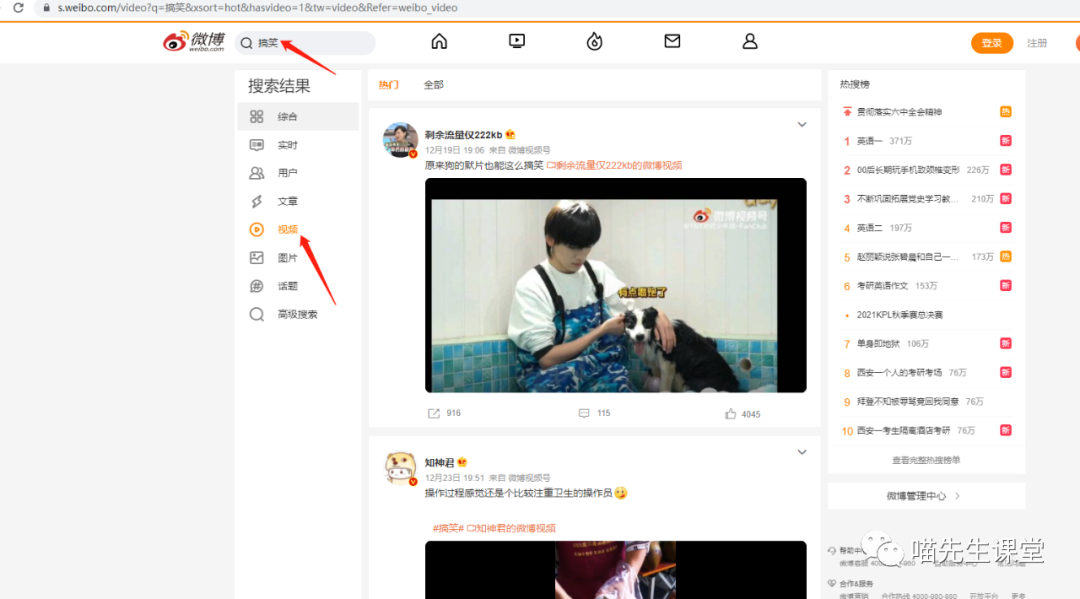
我们来抓一下这个请求信息:
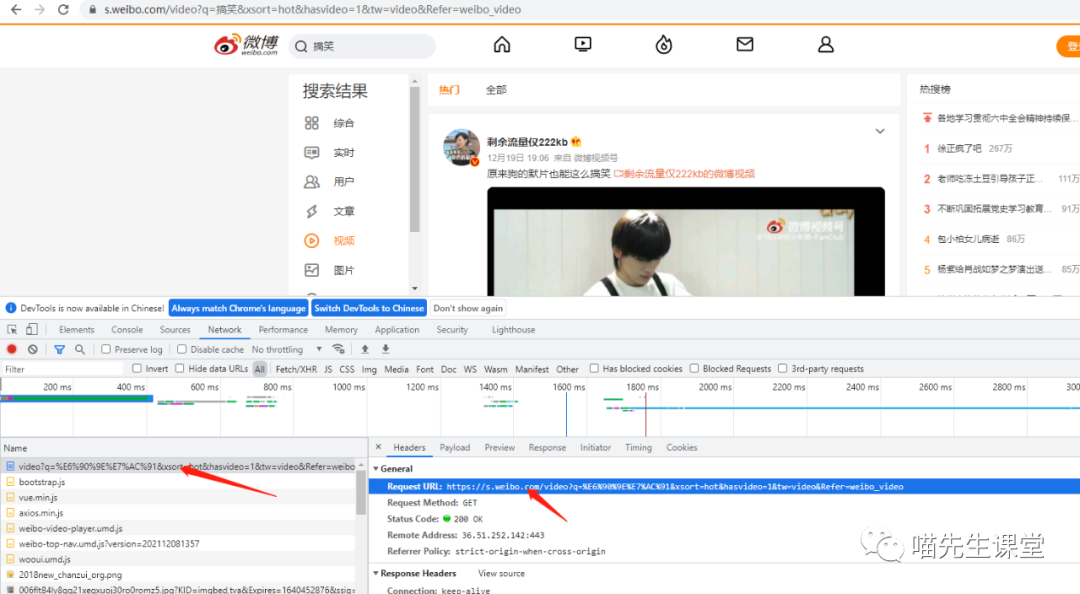
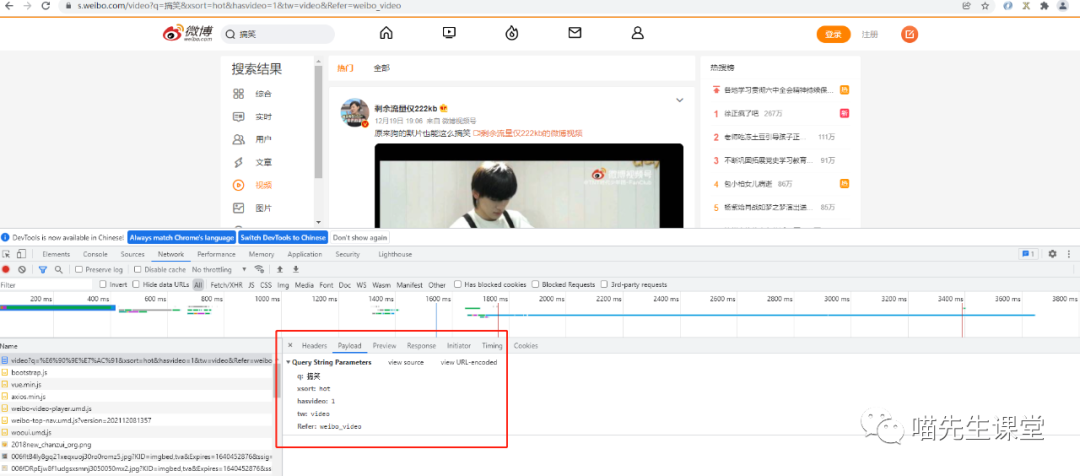
可以看到:url地址为:
https://s.weibo.com/video
请求参数为:
q: 搞笑
xsort: hot
hasvideo: 1
tw: video
Refer: weibo_video
请求方式为get请求:
接下来编写代码模拟该请求:
#!/usr/bin/env python3
# -*- coding: utf-8 -*-
#date:  2021/12/25 0025

import requests
import re

url="https://s.weibo.com/video"

headers={
    "Cookie": "SINAGLOBAL=5368335151060.244.1537454986653; _s_tentry=tech.ifeng.com; Apache=4205256620046.838.1556033439919; login_sid_t=4c10f210b7075a4d1c000c30c4280d97; cross_origin_proto=SSL; WBtopGlobal_register_version=2021010523; ULV=1624064619755:1:1:1:4205256620046.838.1556033439919:; UOR=www.takefoto.cn,widget.weibo.com,login.sina.com.cn; webim_unReadCount=%7B%22time%22%3A1640359830110%2C%22dm_pub_total%22%3A0%2C%22chat_group_client%22%3A0%2C%22chat_group_notice%22%3A0%2C%22allcountNum%22%3A1%2C%22msgbox%22%3A0%7D; SCF=AgxKd7RDxLEJwec35Tuj5xX5_cMdNntktJMEt-4mPvbuLJtVcu6koR4j2fDsemuANXbjsAkauf-X5Ia_ZexbO2k.; SUB=_2AkMWmmV-dcPxrAVQmv4XyWjma4tH-jylTwyIAn7uJhMyAxh77g5fqSVutBF-XNK6ZcQ0sRFScgA1pHjFjqDy9sht; SUBP=0033WrSXqPxfM72wWs9jqgMF55529P9D9WWV70eWxMJeg_gnRnEcBZmy5JpVF02NSo571hnEeh.f",
    "User-Agent": "Mozilla/5.0 (Windows NT 10.0; Win64; x64) AppleWebKit/537.36 (KHTML, like Gecko) Chrome/96.0.4664.110 Safari/537.36"
}

data={
    "q":" 搞笑",
    "xsort": "hot",
    "hasvideo": "1",
    "tw": "video",
    "Refer": "weibo_video"
}

resp=requests.get(url=url,params=data,headers=headers)
print(resp.text)
打印结果如图:
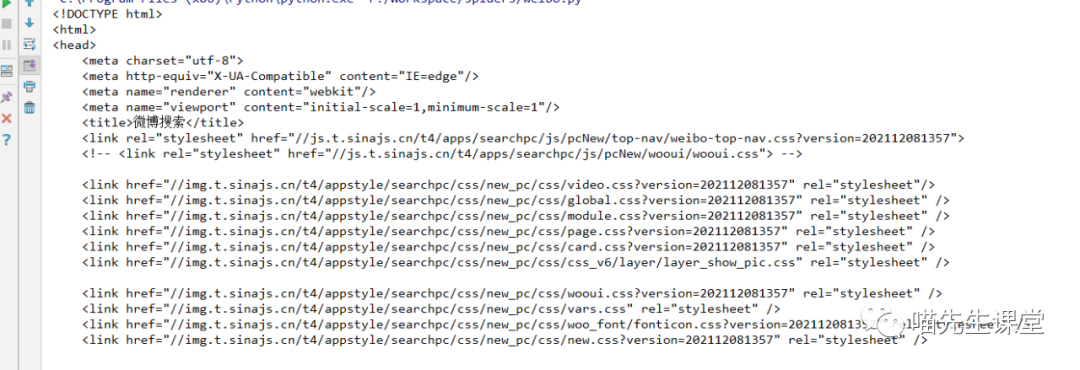
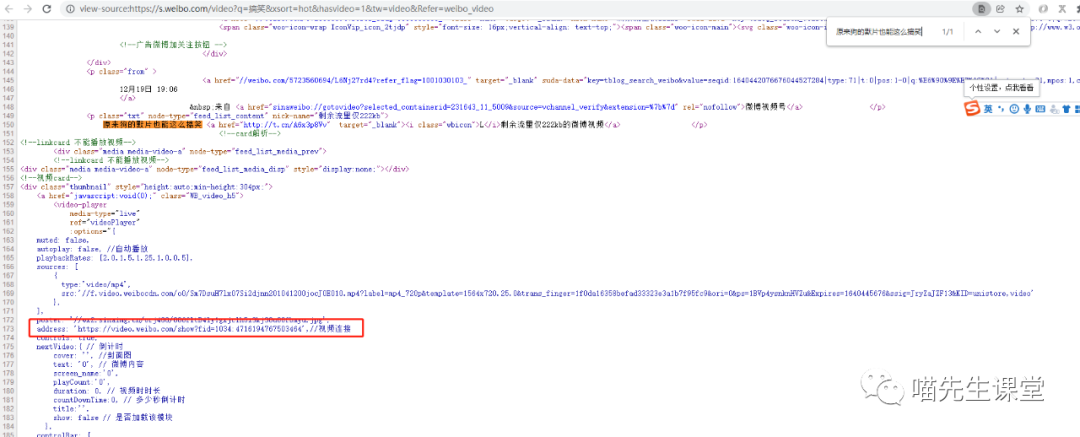
返回内容也就是搜索结果的这个页面(图1),我们直接在图1右键->检查源代码,经过分析可以发现,每个视频都会有一个 address地址。
示例:
address: 'https://video.weibo.com/show?fid=1034:4716194767503464',//视频连接
address: 'https://video.weibo.com/show?fid=1034:4717917775003665',//视频连接
这个address就是视频的播放地址,可以直接在浏览器中打开;通过分析这个地址可以发现,每个视频的唯一id就是1034:后面的数字只要获取到这个视频id,再动态的拼接成address地址,就可以得到每个视频的播放地址。
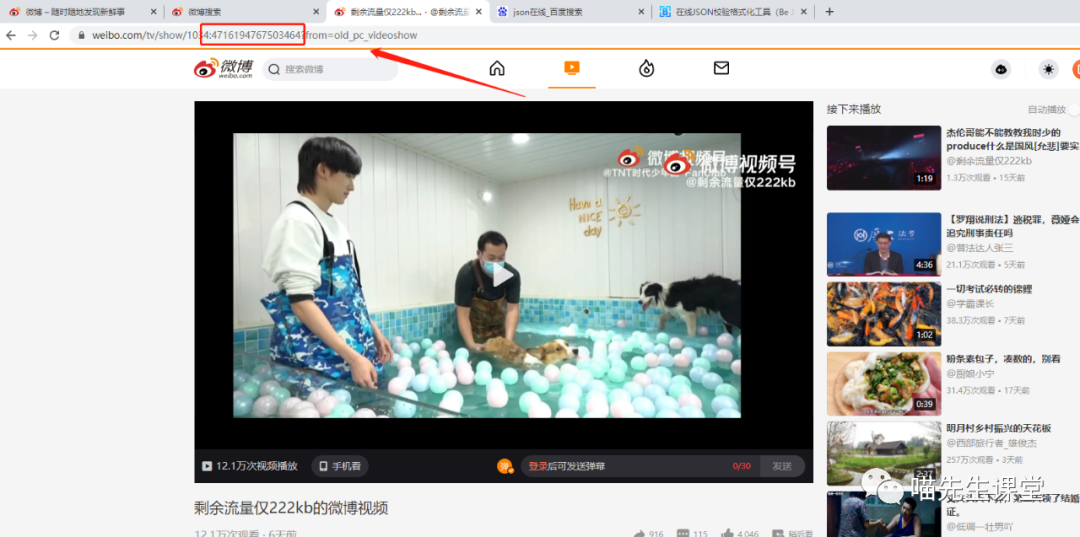
代码实现:
"""
在上面代码中我们已经拿到了resp,通过resp.text来获取返回页面内容
在通过正则进行匹配,如下
"""
pattern =re.compile(r"1034:\d+")
video_id_list=pattern .findall(resp.text)

for id in video_id_list:
    video_id=id.split(":")[1]

    show_tv="https://weibo.com/tv/show/1034:{}?from=old_pc_videoshow".format(video_id)
    print(show_tv)
输出:
  "C:\Program Files (x86)\Python\python.exe" F:/Workspace/spiders/weibo.py
https://weibo.com/tv/show/1034:4712571304083508?from=old_pc_videoshow
https://weibo.com/tv/show/1034:4716194767503464?from=old_pc_videoshow
https://weibo.com/tv/show/1034:4717648601350151?from=old_pc_videoshow
https://weibo.com/tv/show/1034:4714647111270421?from=old_pc_videoshow
https://weibo.com/tv/show/1034:4713347984326731?from=old_pc_videoshow
https://weibo.com/tv/show/1034:4712978864603191?from=old_pc_videoshow
https://weibo.com/tv/show/1034:4717759846875142?from=old_pc_videoshow
https://weibo.com/tv/show/1034:4715167938969737?from=old_pc_videoshow
https://weibo.com/tv/show/1034:4717620461764692?from=old_pc_videoshow
https://weibo.com/tv/show/1034:4717643714986125?from=old_pc_videoshow
https://weibo.com/tv/show/1034:4714366063542357?from=old_pc_videoshow
https://weibo.com/tv/show/1034:4712187453964419?from=old_pc_videoshow
https://weibo.com/tv/show/1034:4715394980839451?from=old_pc_videoshow
https://weibo.com/tv/show/1034:4717194802823227?from=old_pc_videoshow
https://weibo.com/tv/show/1034:4717917775003665?from=old_pc_videoshow
https://weibo.com/tv/show/1034:4716768430850076?from=old_pc_videoshow
https://weibo.com/tv/show/1034:4712445797924993?from=old_pc_videoshow
https://weibo.com/tv/show/1034:4712580254728253?from=old_pc_videoshow
到这里我们已经能够通过接口获取到视频播放地址;接下来开始分析视频播放页面请求。
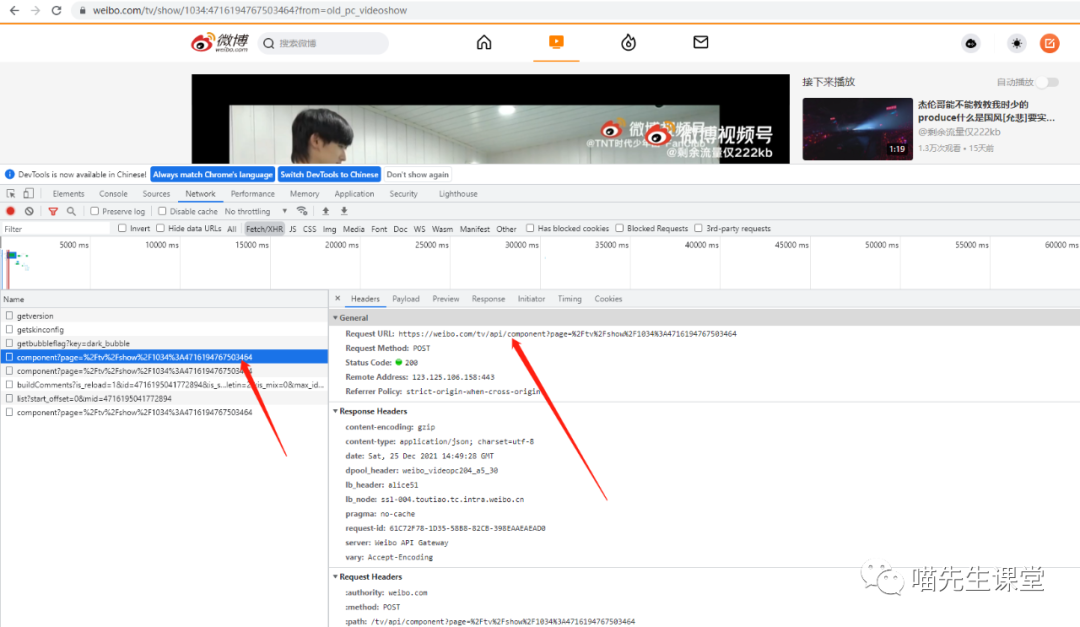
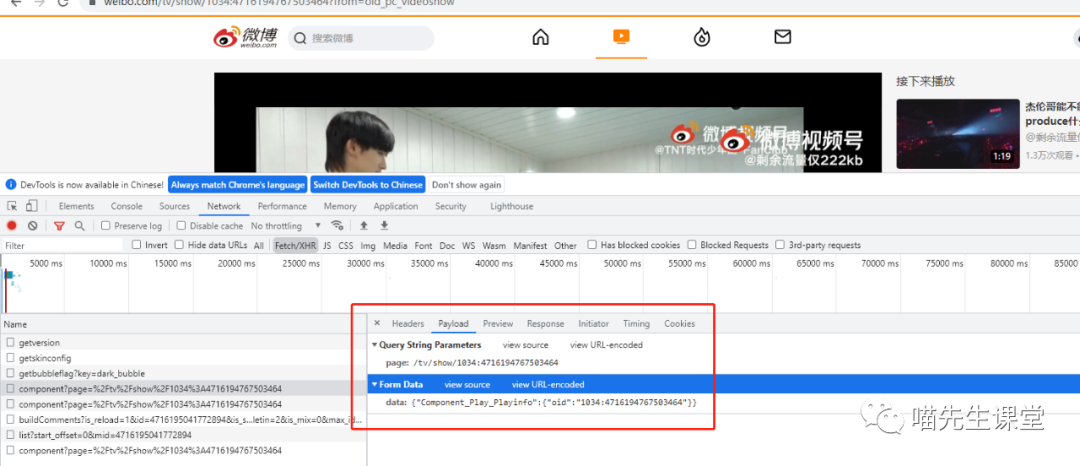
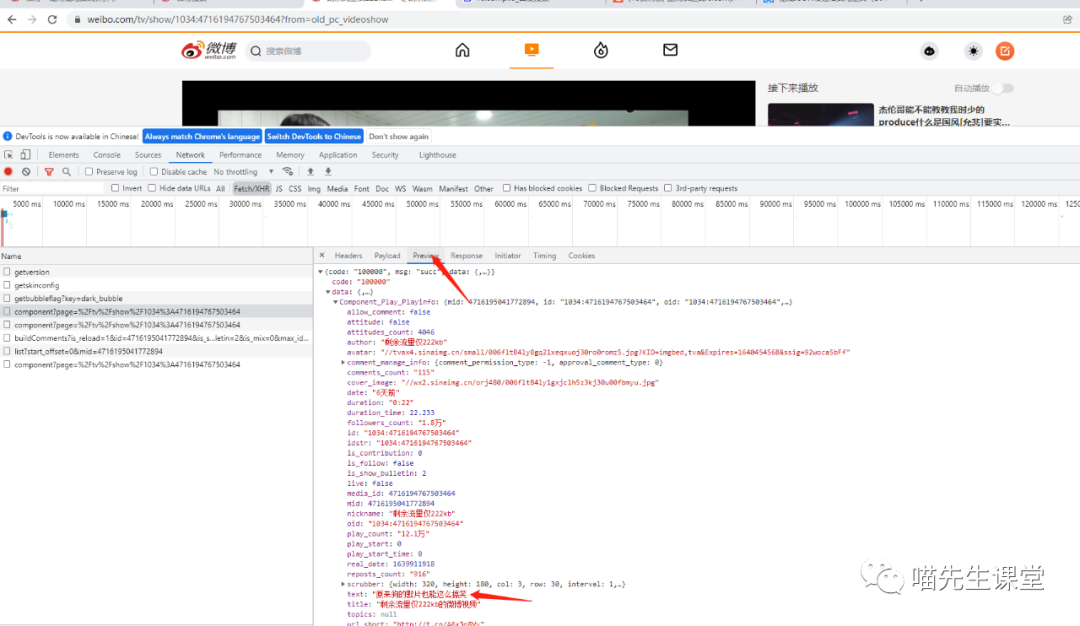
请求url为:
https://weibo.com/tv/api/component
请求参数:
params={
       "page": "/tv/show/1034:{}".format(video_id)
    }
data={
       "data": '{"Component_Play_Playinfo": {"oid": "1034:%s"}}'%video_id
    }
请求方式为post
响应数据如下:
{
  "code": "100000",
  "msg": "succ",
  "data": {
    "Component_Play_Playinfo": {
      "mid": 4716195041772894,
      "id": "1034:4716194767503464",
      "oid": "1034:4716194767503464",
      "media_id": 4716194767503464,
      "user": {
        "id": 5723560694
      },
      "is_follow": false,
      "attitude": false,
      "date": "6天前",
      "real_date": 1639911918,
      "idstr": "1034:4716194767503464",
      "author": "剩余流量仅222kb",
      "nickname": "剩余流量仅222kb",
      "verified": true,
      "verified_type": 0,
      "verified_type_ext": 1,
      "verified_reason": "娱乐博主",
      "avatar": "\/\/tvax4.sinaimg.cn\/small\/006fltB4ly8gq21xeqxuoj30ro0romz5.jpg?KID=imgbed,tva&Expires=1640454568&ssig=92woca5bFf",
      "followers_count": "1.8万",
      "reposts_count": "916",
      "comments_count": "115",
      "attitudes_count": 4046,
      "title": "剩余流量仅222kb的微博视频",
      "urls": {
        "高清 1080P": "\/\/f.video.weibocdn.com\/o0\/LH7wDGhOlx07Si2eDqvm01041200y3zs0E010.mp4?label=mp4_1080p&template=2348x1080.25.0&trans_finger=0bde055d9aa01b9f6bc04ccac8f0b471&media_id=4716194767503464&tp=8x8A3El:YTkl0eM8&us=0&ori=1&bf=4&ot=h&ps=3lckmu&uid=5Bm3J8&ab=3915-g1,6377-g0,1192-g0,1191-g0,1046-g2,1258-g0,3601-g15&Expires=1640447368&ssig=bB0uinecyb&KID=unistore,video",
        "高清 720P": "\/\/f.video.weibocdn.com\/o0\/Sm7DsuH7lx07Si2djnn201041200jocJ0E010.mp4?label=mp4_720p&template=1564x720.25.0&trans_finger=1f0da16358befad33323e3a1b7f95fc9&media_id=4716194767503464&tp=8x8A3El:YTkl0eM8&us=0&ori=1&bf=4&ot=h&ps=3lckmu&uid=5Bm3J8&ab=3915-g1,6377-g0,1192-g0,1191-g0,1046-g2,1258-g0,3601-g15&Expires=1640447368&ssig=Ah9KckVwKV&KID=unistore,video",
        "标清 480P": "\/\/f.video.weibocdn.com\/o0\/FujoaHUTlx07Si2cFBF601041200aPsT0E010.mp4?label=mp4_hd&template=1040x480.25.0&trans_finger=62b30a3f061b162e421008955c73f536&media_id=4716194767503464&tp=8x8A3El:YTkl0eM8&us=0&ori=1&bf=4&ot=h&ps=3lckmu&uid=5Bm3J8&ab=3915-g1,6377-g0,1192-g0,1191-g0,1046-g2,1258-g0,3601-g15&Expires=1640447368&ssig=%2Bxbvc0pHXj&KID=unistore,video",
        "流畅 360P": "\/\/f.video.weibocdn.com\/o0\/EtLadHeflx07Si2cfYsM010412007nqJ0E010.mp4?label=mp4_ld&template=780x360.25.0&trans_finger=40a32e8439c5409a63ccf853562a60ef&media_id=4716194767503464&tp=8x8A3El:YTkl0eM8&us=0&ori=1&bf=4&ot=h&ps=3lckmu&uid=5Bm3J8&ab=3915-g1,6377-g0,1192-g0,1191-g0,1046-g2,1258-g0,3601-g15&Expires=1640447368&ssig=N5CL%2BjBA4e&KID=unistore,video"
      },
      "cover_image": "\/\/wx2.sinaimg.cn\/orj480\/006fltB4ly1gxjclh5z3kj30u00fbmyu.jpg",
      "duration": "0:22",
      "duration_time": 22.233000000000000540012479177676141262054443359375,
      "play_start": 0,
      "play_start_time": 0,
      "play_count": "12.1万",
      "topics": null,
      "uuid": "4716194887368729",
      "text": "原来狗的默片也能这么搞笑  ",
      "url_short": "http:\/\/t.cn\/A6x3p8Vv",
      "is_show_bulletin": 2,
      "comment_manage_info": {
        "comment_permission_type": -1,
        "approval_comment_type": 0
      },
      "video_orientation": "horizontal",
      "is_contribution": 0,
      "live": false,
      "scrubber": {
        "width": 320,
        "height": 180,
        "col": 3,
        "row": 30,
        "interval": 1,
        "urls": ["\/\/wx4.sinaimg.cn\/large\/006fltB4ly1gxjcmg7j44j30qo460djg.jpg"]
      },
      "user_video_count": 2,
      "allow_comment": false
    }
  }
}
可以看到,在 data ->Component_Play_Playinfo>urls 中存放的便是视频的真正请求地址,我们在for循环中继续添加几行代码,随后运行脚本。
for id in video_id_list:
    video_id=id.split(":")[1]
    show_tv="https://weibo.com/tv/show/1034:{}?from=old_pc_videoshow".format(video_id)
    url_tv="https://weibo.com/tv/api/component"
   """
   经测试,referer为必填参数,否则请求失败
   """
    headers["referer"]=show_tv

    params={
       "page": "/tv/show/1034:{}".format(video_id)
    }

    data={
        "data": '{"Component_Play_Playinfo": {"oid": "1034:%s"}}'%video_id
    }
    video_resp=requests.post(url=url_tv,params=params,data=data,headers=headers).json()["data"]["Component_Play_Playinfo"]['urls']

    download_url="http:"
    for i in video_resp:
        download_url=download_url+video_resp[i]
        break


    download_resp=requests.get(url=download_url,headers=headers).content

    filename='./%s'%video_id+".mp4"
    print(filename)
    with open(filename,mode="wb")as f:
        f.write(download_resp)
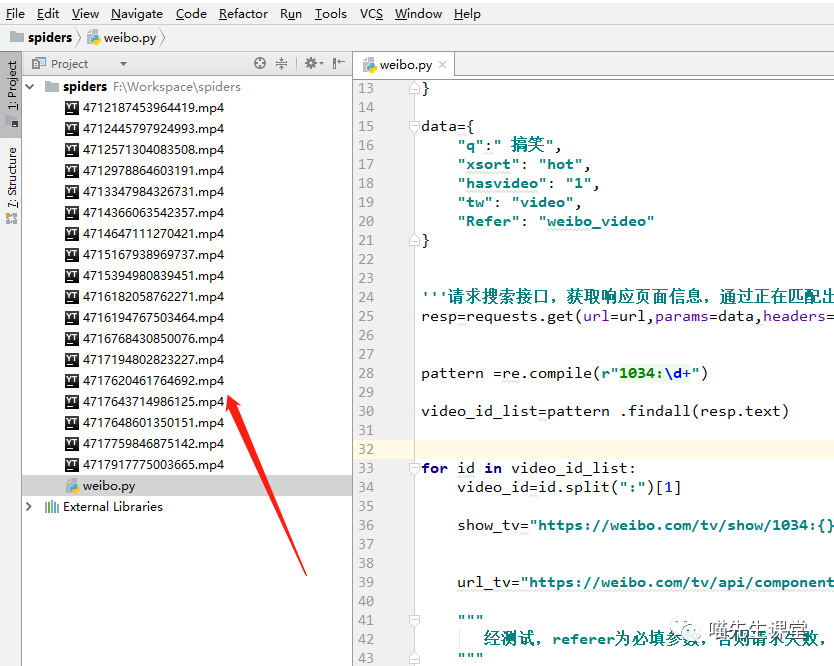
运行后视频下载成功:
完整demo代码如下:
#!/usr/bin/env python3
# -*- coding: utf-8 -*-
# date:  2021/12/25 0025

import requests
import re

url = "https://s.weibo.com/video"

headers = {
    "Cookie": "SINAGLOBAL=5368335151060.244.1537454986653; _s_tentry=tech.ifeng.com; Apache=4205256620046.838.1556033439919; login_sid_t=4c10f210b7075a4d1c000c30c4280d97; cross_origin_proto=SSL; WBtopGlobal_register_version=2021010523; ULV=1624064619755:1:1:1:4205256620046.838.1556033439919:; UOR=www.takefoto.cn,widget.weibo.com,login.sina.com.cn; webim_unReadCount=%7B%22time%22%3A1640359830110%2C%22dm_pub_total%22%3A0%2C%22chat_group_client%22%3A0%2C%22chat_group_notice%22%3A0%2C%22allcountNum%22%3A1%2C%22msgbox%22%3A0%7D; SCF=AgxKd7RDxLEJwec35Tuj5xX5_cMdNntktJMEt-4mPvbuLJtVcu6koR4j2fDsemuANXbjsAkauf-X5Ia_ZexbO2k.; SUB=_2AkMWmmV-dcPxrAVQmv4XyWjma4tH-jylTwyIAn7uJhMyAxh77g5fqSVutBF-XNK6ZcQ0sRFScgA1pHjFjqDy9sht; SUBP=0033WrSXqPxfM72wWs9jqgMF55529P9D9WWV70eWxMJeg_gnRnEcBZmy5JpVF02NSo571hnEeh.f",
    "User-Agent": "Mozilla/5.0 (Windows NT 10.0; Win64; x64) AppleWebKit/537.36 (KHTML, like Gecko) Chrome/96.0.4664.110 Safari/537.36"
}

data = {
    "q": " 搞笑",
    "xsort": "hot",
    "hasvideo": "1",
    "tw": "video",
    "Refer": "weibo_video"
}

'''请求搜索接口,获取响应页面信息,通过正在匹配出视频id'''
resp = requests.get(url=url, params=data, headers=headers)

pattern = re.compile(r"1034:\d+")

video_id_list = pattern.findall(resp.text)

for id in video_id_list:
    video_id = id.split(":")[1]

    show_tv = "https://weibo.com/tv/show/1034:{}?from=old_pc_videoshow".format(video_id)

    url_tv = "https://weibo.com/tv/api/component"

    """
       经测试,referer为必填参数,否则请求失败,
    """
    headers["referer"] = show_tv

    params = {
        "page": "/tv/show/1034:{}".format(video_id)
    }

    data = {
        "data": '{"Component_Play_Playinfo": {"oid": "1034:%s"}}' % video_id
    }
    video_resp = \
    requests.post(url=url_tv, params=params, data=data, headers=headers).json()["data"]["Component_Play_Playinfo"][
        'urls']

    """获取urls下第一个视频连接"""
    download_url = "http:"
    for i in video_resp:
        download_url = download_url + video_resp[i]
        break

    """
    请求视频数据,保存到本地
    """
    download_resp = requests.get(url=download_url, headers=headers).content

    filename = './%s' % video_id + ".mp4"
    print(filename)
    with open(filename, mode="wb")as f:
        f.write(download_resp)

 浙公网安备 33010602011771号