

React Native分析(index.ios.js)
定义创建组件MyComponent(index.ios.js):
'use strict'

var React = require('react-native');
var {
    AppRegistry,
    StyleSheet,
    Text,
    View,
} = React;

var MyComponent = React.createClass({
    render: function(){
        return (
            <View style={styles.container}>
                <Text style={styles.welcome}>
                    Welcome to React Native!
                </Text>
                <Text style={styles.instructions}>
                    To get started, edit index.ios.js
                </Text>
                <Text style={styles.instructions}>
                    Press Cmd+R to reload, {'\n'}
                    Cmd+D or shake for dev menu
                 </Text>
                </View>
        );
     }
});

var styles = StyleSheet.create({
    container: {
            flex: 1,
            justifyContent: 'center',
            alignItems: ' ',
            backgroundColor: '#F5FCFF',
},
    welcome: {
            fontSize:20,
            textAlign: 'center',
            margin: 10,
},
    instructions: {
            textAlign: 'center',
            color: '#333333",
            marginBottom: 5,
},
});

AppRegistry.registerComponent('MyComponent',() => MyComponent);
效果图:
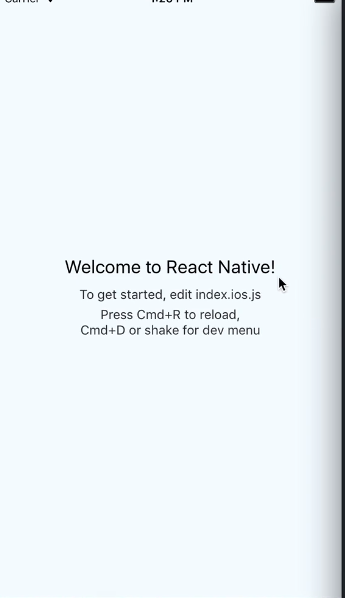
分析:
导入react-native,并命名为React:
var React = require('react-native');
要使用的一些东西(class)。React requires :
var {
    AppRegistry,
    StyleSheet,
    Text,
    View,
} = React;
显示开始定义MyComponent,调用React库创建(createClass)。
render函数是自动调用的,state变化时也会自动调用。
然后就是return中可以定义你的组件。
var MyComponent = React.createClass({
    render: function(){
        return (
            <View style={styles.container}>
                <Text style={styles.welcome}>
                    Welcome to React Native!
                </Text>
                <Text style={styles.instructions}>
                    To get started, edit index.ios.js
                </Text>
                <Text style={styles.instructions}>
                    Press Cmd+R to reload, {'\n'}
                    Cmd+D or shake for dev menu
                 </Text>
                </View>
        );
     }
});
是应用在组件中的一些属性定义,类似CSS:
var styles = StyleSheet.create({
    container: {
            flex: 1,
            justifyContent: 'center',
            alignItems: ' ',
            backgroundColor: '#F5FCFF',
},
    welcome: {
            fontSize:20,
            textAlign: 'center',
            margin: 10,
},
    instructions: {
            textAlign: 'center',
            color: '#333333",
            marginBottom: 5,
},
});
style应用参考如下:
<Text style={styles.welcome}>
然后让你的APP注册刚创建的组件(MyComponent):
AppRegistry.registerComponent('MyComponent',() => MyComponent);

 浙公网安备 33010602011771号