红黑树
上一篇博客我们介绍了二叉搜索树,二叉搜索树对于某个节点而言,其左子树的节点关键值都小于该节点关键值,右子树的所有节点关键值都大于该节点关键值。二叉搜索树作为一种数据结构,其查找、插入和删除操作的时间复杂度都为O(logn),底数为2。但是我们说这个时间复杂度是在平衡的二叉搜索树上体现的,也就是如果插入的数据是随机的,则效率很高,但是如果插入的数据是有序的,比如从小到大的顺序【10,20,30,40,50】插入到二叉搜索树中:
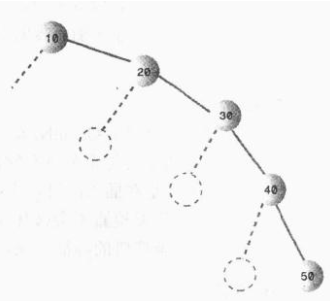
从大到小就是全部在左边,这和链表没有任何区别了,这种情况下查找的时间复杂度为O(N),而不是O(logN)。当然这是在最不平衡的条件下,实际情况下,二叉搜索树的效率应该在O(N)和O(logN)之间,这取决于树的不平衡程度。
那么为了能够以较快的时间O(logN)来搜索一棵树,我们需要保证树总是平衡的(或者大部分是平衡的),也就是说每个节点的左子树节点个数和右子树节点个数尽量相等。红-黑树的就是这样的一棵平衡树,对一个要插入的数据项(删除也是),插入例程要检查会不会破坏树的特征,如果破坏了,程序就会进行纠正,根据需要改变树的结构,从而保持树的平衡。
1、红-黑树的特征
有如下两个特征:
①、节点都有颜色;
②、在插入和删除的过程中,要遵循保持这些颜色的不同排列规则。
第一个很好理解,在红-黑树中,每个节点的颜色或者是黑色或者是红色的。当然也可以是任意别的两种颜色,这里的颜色用于标记,我们可以在节点类Node中增加一个boolean型变量isRed,以此来表示颜色的信息。
第二点,在插入或者删除一个节点时,必须要遵守的规则称为红-黑规则:
1.每个节点不是红色就是黑色的;
2.根节点总是黑色的;
3.如果节点是红色的,则它的子节点必须是黑色的(反之不一定),(也就是从每个叶子到根的所有路径上不能有两个连续的红色节点);
4.从根节点到叶节点或空子节点的每条路径,必须包含相同数目的黑色节点(即相同的黑色高度)。
从根节点到叶节点的路径上的黑色节点的数目称为黑色高度,规则 4 另一种表示就是从根到叶节点路径上的黑色高度必须相同。
注意:新插入的节点颜色总是红色的,这是因为插入一个红色节点比插入一个黑色节点违背红-黑规则的可能性更小,原因是插入黑色节点总会改变黑色高度(违背规则4),但是插入红色节点只有一半的机会会违背规则3(因为父节点是黑色的没事,父节点是红色的就违背规则3)。另外违背规则3比违背规则4要更容易修正。当插入一个新的节点时,可能会破坏这种平衡性,那么红-黑树是如何修正的呢?
2、红-黑树的自我修正
红-黑树主要通过三种方式对平衡进行修正,改变节点颜色、左旋和右旋。
①、改变节点颜色
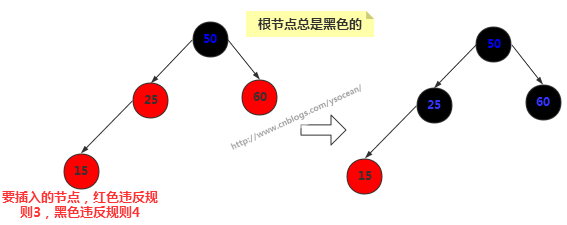
新插入的节点为15,一般新插入颜色都为红色,那么我们发现直接插入会违反规则3,改为黑色却发现违反规则4。这时候我们将其父节点颜色改为黑色,父节点的兄弟节点颜色也改为黑色。通常其祖父节点50颜色会由黑色变为红色,但是由于50是根节点,所以我们这里不能改变根节点颜色。
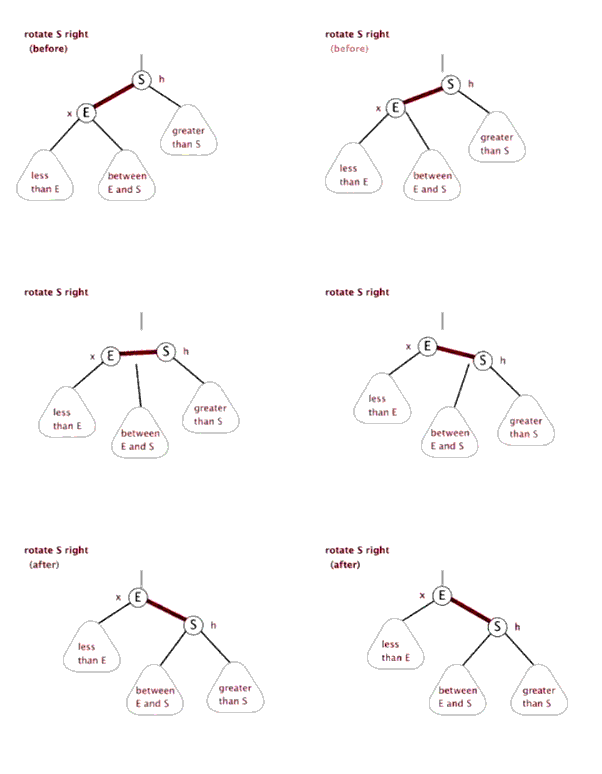
②、右旋
首先要说明的是节点本身是不会旋转的,旋转改变的是节点之间的关系,选择一个节点作为旋转的顶端,如果做一次右旋,这个顶端节点会向下和向右移动到它右子节点的位置,它的左子节点会上移到它原来的位置。右旋的顶端节点必须要有左子节点。
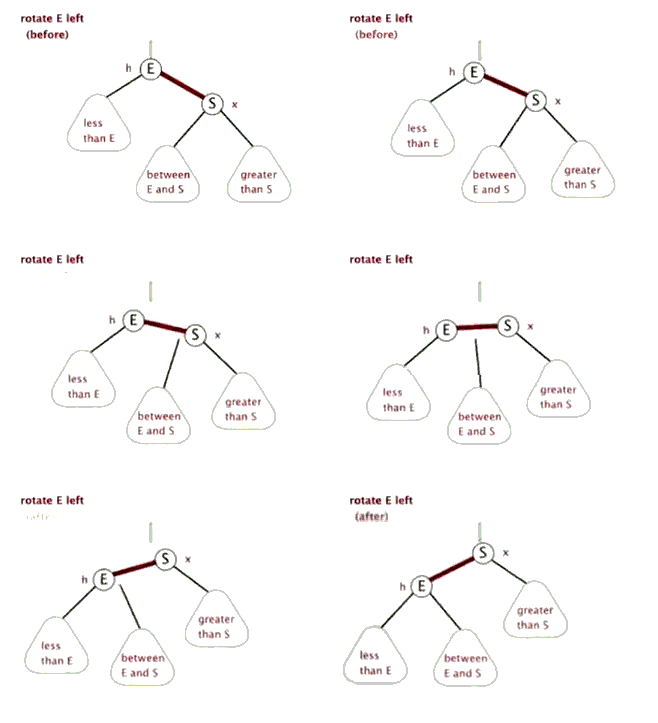
③、左旋
左旋的顶端节点必须要有右子节点。
注意:我们改变颜色也是为了帮助我们判断何时执行什么旋转,而旋转是为了保证树的平衡。光改变节点颜色是不能起到任何作用的,旋转才是关键的操作,在新增节点或者删除节点之后,可能会破坏二叉树的平衡,那么何时执行旋转以及执行什么旋转,这是我们需要重点关注的。
3、左旋和右旋代码
①、节点类
节点类和二叉树的节点类差不多,只不过在其基础上增加了一个 boolean 类型的变量来表示节点的颜色。
|
1
2
3
4
5
6
7
8
9
10
11
12
13
14
15
16
17
18
19
20
21
22
23
24
|
public class RBNode<T extends Comparable<T>> { boolean color;//颜色 T key;//关键值 RBNode<T> left;//左子节点 RBNode<T> right;//右子节点 RBNode<T> parent;//父节点 public RBNode(boolean color,T key,RBNode<T> parent,RBNode<T> left,RBNode<T> right){ this.color = color; this.key = key; this.parent = parent; this.left = left; this.right = right; } //获得节点的关键值 public T getKey(){ return key; } //打印节点的关键值和颜色信息 public String toString(){ return ""+key+(this.color == RED ? "R":"B"); }} |
②、左旋的具体实现
|
1
2
3
4
5
6
7
8
9
10
11
12
13
14
15
16
17
18
19
20
21
22
23
24
25
26
27
28
29
30
31
32
33
34
35
36
37
38
39
|
/*************对红黑树节点x进行左旋操作 ******************//* * 左旋示意图:对节点x进行左旋 * p p * / / * x y * / \ / \ * lx y -----> x ry * / \ / \ * ly ry lx ly * 左旋做了三件事: * 1. 将y的左子节点赋给x的右子节点,并将x赋给y左子节点的父节点(y左子节点非空时) * 2. 将x的父节点p(非空时)赋给y的父节点,同时更新p的子节点为y(左或右) * 3. 将y的左子节点设为x,将x的父节点设为y */private void leftRotate(RBNode<T> x){ //1. 将y的左子节点赋给x的右子节点,并将x赋给y左子节点的父节点(y左子节点非空时) RBNode<T> y = x.right; x.right = y.left; if(y.left != null){ y.left.parent = x; } //2. 将x的父节点p(非空时)赋给y的父节点,同时更新p的子节点为y(左或右) y.parent = x.parent; if(x.parent == null){ this.root = y;//如果x的父节点为空(即x为根节点),则将y设为根节点 }else{ if(x == x.parent.left){//如果x是左子节点 x.parent.left = y;//则也将y设为左子节点 }else{ x.parent.right = y;//否则将y设为右子节点 } } //3. 将y的左子节点设为x,将x的父节点设为y y.left = x; x.parent = y;} |
③、右旋的具体实现
|
1
2
3
4
5
6
7
8
9
10
11
12
13
14
15
16
17
18
19
20
21
22
23
24
25
26
27
28
29
30
31
32
33
34
35
36
37
38
39
|
/*************对红黑树节点y进行右旋操作 ******************/ /* * 左旋示意图:对节点y进行右旋 * p p * / / * y x * / \ / \ * x ry -----> lx y * / \ / \ * lx rx rx ry * 右旋做了三件事: * 1. 将x的右子节点赋给y的左子节点,并将y赋给x右子节点的父节点(x右子节点非空时) * 2. 将y的父节点p(非空时)赋给x的父节点,同时更新p的子节点为x(左或右) * 3. 将x的右子节点设为y,将y的父节点设为x */private void rightRotate(RBNode<T> y){ //1. 将y的左子节点赋给x的右子节点,并将x赋给y左子节点的父节点(y左子节点非空时) RBNode<T> x = y.left; y.left = x.right; if(x.right != null){ x.right.parent = y; } //2. 将x的父节点p(非空时)赋给y的父节点,同时更新p的子节点为y(左或右) x.parent = y.parent; if(y.parent == null){ this.root = x;//如果y的父节点为空(即y为根节点),则旋转后将x设为根节点 }else{ if(y == y.parent.left){//如果y是左子节点 y.parent.left = x;//则将x也设置为左子节点 }else{ y.parent.right = x;//否则将x设置为右子节点 } } //3. 将x的左子节点设为y,将y的父节点设为y x.right = y; y.parent = x;} |
4、插入操作
和二叉树的插入操作一样,都是得先找到插入的位置,然后再将节点插入。先看看插入的前段代码:
|
1
2
3
4
5
6
7
8
9
10
11
12
13
14
15
16
17
18
19
20
21
22
23
24
25
26
27
28
29
30
31
32
33
34
35
36
37
38
|
/*********************** 向红黑树中插入节点 **********************/public void insert(T key){ RBNode<T> node = new RBNode<T>(RED, key, null, null, null); if(node != null){ insert(node); }}public void insert(RBNode<T> node){ RBNode<T> current = null;//表示最后node的父节点 RBNode<T> x = this.root;//用来向下搜索 //1.找到插入位置 while(x != null){ current = x; int cmp = node.key.compareTo(x.key); if(cmp < 0){ x = x.left; }else{ x = x.right; } } node.parent = current;//找到了插入的位置,将当前current作为node的父节点 //2.接下来判断node是左子节点还是右子节点 if(current != null){ int cmp = node.key.compareTo(current.key); if(cmp < 0){ current.left = node; }else{ current.right = node; } }else{ this.root = node; } //3.利用旋转操作将其修正为一颗红黑树 insertFixUp(node);} |
这与二叉搜索树中实现的思路一样,这里不再赘述,主要看看方法里面最后一步insertFixUp(node)操作。因为插入后可能会导致树的不平衡,insertFixUp(node) 方法里主要是分情况讨论,分析何时变色,何时左旋,何时右旋。我们先从理论上分析具体的情况,然后再看insertFixUp(node) 的具体实现。
如果是第一次插入,由于原树为空,所以只会违反红-黑树的规则2,所以只要把根节点涂黑即可;如果插入节点的父节点是黑色的,那不会违背红-黑树的规则,什么也不需要做;但是遇到如下三种情况,我们就要开始变色和旋转了:
①、插入节点的父节点和其叔叔节点(祖父节点的另一个子节点)均为红色。
②、插入节点的父节点是红色的,叔叔节点是黑色的,且插入节点是其父节点的右子节点。
③、插入节点的父节点是红色的,叔叔节点是黑色的,且插入节点是其父节点的左子节点。
下面我们挨个分析这三种情况都需要如何操作,然后给出实现代码。
在下面的讨论中,使用N,P,G,U表示关联的节点。N(now)表示当前节点,P(parent)表示N的父节点,U(uncle)表示N的叔叔节点,G(grandfather)表示N的祖父节点,也就是P和U的父节点。
对于情况1:插入节点的父节点和其叔叔节点(祖父节点的另一个子节点)均为红色。此时,肯定存在祖父节点,但是不知道父节点是其左子节点还是右子节点,但是由于对称性,我们只要讨论出一边的情况,另一种情况自然也与之对应。这里考虑父节点是其祖父节点的左子节点的情况,如下左图所示:
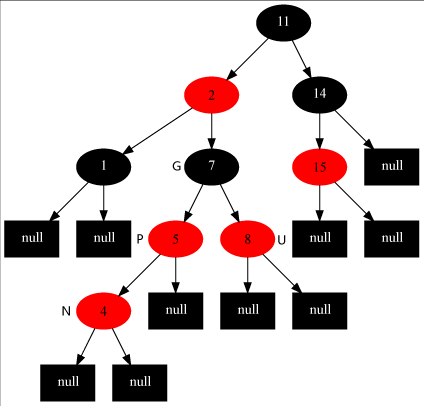
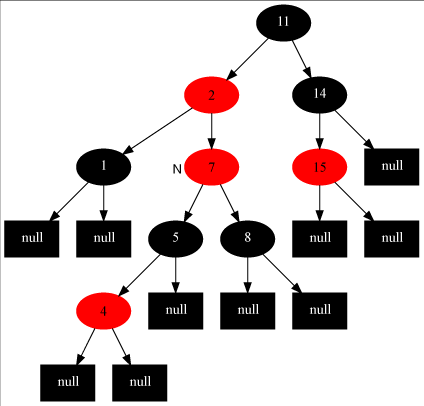
对于这种情况,我们要做的操作有:将当前节点(4) 的父节点(5) 和叔叔节点(8) 涂黑,将祖父节点(7)涂红,变成了上有图所示的情况。再将当前节点指向其祖父节点,再次从新的当前节点开始算法(具体看下面的步骤)。这样上右图就变成情况2了。
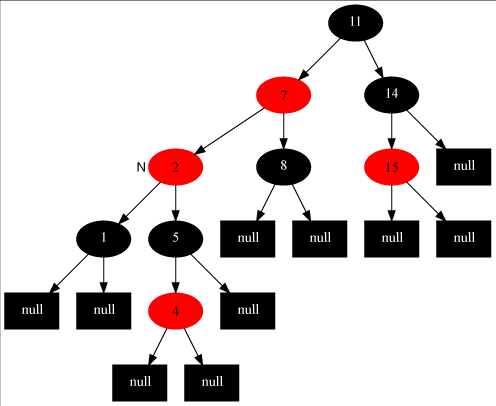
对于情况2:插入节点的父节点是红色的,叔叔节点是黑色的,且插入节点是其父节点的右子节点。我们要做的操作有:将当前节点(7)的父节点(2)作为新的节点,以新的当前节点为支点做左旋操作。完成后如左下图所示,这样左下图就变成情况3了。
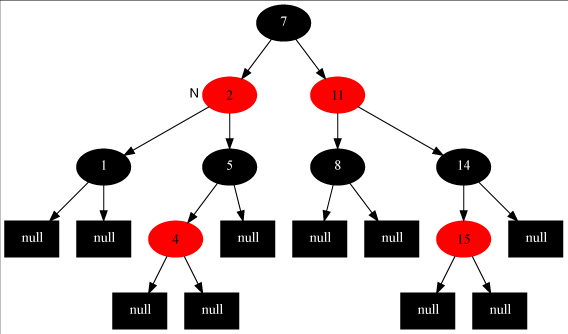
对于情况3:插入节点的父节点是红色,叔叔节点是黑色,且插入节点是其父节点的左子节点。我们要做的操作有:将当前节点的父节点(7)涂黑,将祖父节点(11)涂红,在祖父节点为支点做右旋操作。最后把根节点涂黑,整个红-黑树重新恢复了平衡,如右上图所示。至此,插入操作完成!
我们可以看出,如果是从情况1开始发生的,必然会走完情况2和3,也就是说这是一整个流程,当然咯,实际中可能不一定会从情况1发生,如果从情况2开始发生,那再走个情况3即可完成调整,如果直接只要调整情况3,那么前两种情况均不需要调整了。故变色和旋转之间的先后关系可以表示为:变色->左旋->右旋。
至此,我们完成了全部的插入操作。下面我们看看insertFixUp方法中的具体实现(可以结合上面的分析图,更加利与理解):
|
1
2
3
4
5
6
7
8
9
10
11
12
13
14
15
16
17
18
19
20
21
22
23
24
25
26
27
28
29
30
31
32
33
34
35
36
37
38
39
40
41
42
43
44
45
46
47
48
49
50
51
52
53
54
55
56
57
58
59
60
|
private void insertFixUp(RBNode<T> node){ RBNode<T> parent,gparent;//定义父节点和祖父节点 //需要修正的条件:父节点存在,且父节点的颜色是红色 while(((parent = parentOf(node)) != null) && isRed(parent)){ gparent = parentOf(parent);//获得祖父节点 //若父节点是祖父节点的左子节点,下面的else相反 if(parent == gparent.left){ RBNode<T> uncle = gparent.right;//获得叔叔节点 //case1:叔叔节点也是红色 if(uncle != null && isRed(uncle)){ setBlack(parent);//把父节点和叔叔节点涂黑 setBlack(gparent); setRed(gparent);//把祖父节点涂红 node = gparent;//把位置放到祖父节点处 continue;//继续while循环,重新判断 } //case2:叔叔节点是黑色,且当前节点是右子节点 if(node == parent.right){ leftRotate(parent);//从父节点出左旋 RBNode<T> tmp = parent;//然后将父节点和自己调换一下,为下面右旋做准备 parent = node; node = tmp; } //case3:叔叔节点是黑色,且当前节点是左子节点 setBlack(parent); setRed(gparent); rightRotate(gparent); }else{//若父节点是祖父节点的右子节点,与上面的情况完全相反,本质是一样的 RBNode<T> uncle = gparent.left; //case1:叔叔节点也是红色的 if(uncle != null && isRed(uncle)){ setBlack(parent); setBlack(uncle); setRed(gparent); node = gparent; continue; } //case2:叔叔节点是黑色的,且当前节点是左子节点 if(node == parent.left){ rightRotate(parent); RBNode<T> tmp = parent; parent = node; node = tmp; } //case3:叔叔节点是黑色的,且当前节点是右子节点 setBlack(parent); setRed(gparent); leftRotate(gparent); } } setBlack(root);//将根节点设置为黑色} |
5、删除操作
上面探讨完了红-黑树的插入操作,接下来讨论删除,红-黑树的删除和二叉查找树的删除是一样的,只不过删除后多了个平衡的修复而已。我们先来回忆一下二叉搜索树的删除:
①、如果待删除的节点没有子节点,那么直接删除即可。
②、如果待删除的节点只有一个子节点,那么直接删掉,并用其子节点去顶替它。
③、如果待删除的节点有两个子节点,这种情况比较复杂:首先找出它的后继节点,然后处理“后继节点”和“被删除节点的父节点”之间的关系,最后处理“后继节点的子节点”和“被删除节点的子节点”之间的关系。每一步中也会有不同的情况。
实际上,删除过程太复杂了,很多情况下会采用在节点类中添加一个删除标记,并不是真正的删除节点。详细的删除我们这里不做讨论。
6、红黑树的效率
红黑树的查找、插入和删除时间复杂度都为O(log2N),额外的开销是每个节点的存储空间都稍微增加了一点,因为一个存储红黑树节点的颜色变量。插入和删除的时间要增加一个常数因子,因为要进行旋转,平均一次插入大约需要一次旋转,因此插入的时间复杂度还是O(log2N),(时间复杂度的计算要省略常数),但实际上比普通的二叉树是要慢的。
大多数应用中,查找的次数比插入和删除的次数多,所以应用红黑树取代普通的二叉搜索树总体上不会有太多的时间开销。而且红黑树的优点是对于有序数据的操作不会慢到O(N)的时间复杂度。
参考文档:http://blog.csdn.net/eson_15/article/details/51144079
4.完整源码
终于分析完了插入和删除操作的所有东西。另外,红-黑树还有一些其他操作,比如:查找特定值、遍历、返回最值、销毁树等操作我将放到源码中给大家呈现出来,详见下面红-黑树的完整代码。
package tree;
/**
* @description implementation of Red-Black Tree by Java
* @author eson_15
* @param <T>
* @date 2016-4-18 19:27:28
*/
public class RBTree<T extends Comparable<T>> {
private RBNode<T> root; //根节点
private static final boolean RED = false; //定义红黑树标志
private static final boolean BLACK = true;
//内部类:节点类
public class RBNode<T extends Comparable<T>>{
boolean color; //颜色
T key; //关键字(键值)
RBNode<T> left; //左子节点
RBNode<T> right; //右子节点
RBNode<T> parent; //父节点
public RBNode(T key, boolean color, RBNode<T> parent, RBNode<T> left, RBNode<T> right) {
this.key = key;
this.color = color;
this.parent = parent;
this.left = left;
this.right = right;
}
public T getKey() {
return key;
}
public String toString() {
return "" + key + (this.color == RED? "R" : "B");
}
}
public RBTree() {
root = null;
}
public RBNode<T> parentOf(RBNode<T> node) { //获得父节点
return node != null? node.parent : null;
}
public void setParent(RBNode<T> node, RBNode<T> parent) { //设置父节点
if(node != null)
node.parent = parent;
}
public boolean colorOf(RBNode<T> node) { //获得节点的颜色
return node != null? node.color : BLACK;
}
public boolean isRed(RBNode<T> node) { //判断节点的颜色
return (node != null)&&(node.color == RED)? true : false;
}
public boolean isBlack(RBNode<T> node) {
return !isRed(node);
}
public void setRed(RBNode<T> node) { //设置节点的颜色
if(node != null)
node.color = RED;
}
public void setBlack(RBNode<T> node) {
if(node != null) {
node.color = BLACK;
}
}
public void setColor(RBNode<T> node, boolean color) {
if(node != null)
node.color = color;
}
/***************** 前序遍历红黑树 *********************/
public void preOrder() {
preOrder(root);
}
private void preOrder(RBNode<T> tree) {
if(tree != null) {
System.out.print(tree.key + " ");
preOrder(tree.left);
preOrder(tree.right);
}
}
/***************** 中序遍历红黑树 *********************/
public void inOrder() {
inOrder(root);
}
private void inOrder(RBNode<T> tree) {
if(tree != null) {
preOrder(tree.left);
System.out.print(tree.key + " ");
preOrder(tree.right);
}
}
/***************** 后序遍历红黑树 *********************/
public void postOrder() {
postOrder(root);
}
private void postOrder(RBNode<T> tree) {
if(tree != null) {
preOrder(tree.left);
preOrder(tree.right);
System.out.print(tree.key + " ");
}
}
/**************** 查找红黑树中键值为key的节点 ***************/
public RBNode<T> search(T key) {
return search(root, key);
// return search2(root, key); //使用递归的方法,本质一样的
}
private RBNode<T> search(RBNode<T> x, T key) {
while(x != null) {
int cmp = key.compareTo(x.key);
if(cmp < 0)
x = x.left;
else if(cmp > 0)
x = x.right;
else
return x;
}
return x;
}
//使用递归
private RBNode<T> search2(RBNode<T> x, T key) {
if(x == null)
return x;
int cmp = key.compareTo(x.key);
if(cmp < 0)
return search2(x.left, key);
else if(cmp > 0)
return search2(x.right, key);
else
return x;
}
/**************** 查找最小节点的值 **********************/
public T minValue() {
RBNode<T> node = minNode(root);
if(node != null)
return node.key;
return null;
}
private RBNode<T> minNode(RBNode<T> tree) {
if(tree == null)
return null;
while(tree.left != null) {
tree = tree.left;
}
return tree;
}
/******************** 查找最大节点的值 *******************/
public T maxValue() {
RBNode<T> node = maxNode(root);
if(node != null)
return node.key;
return null;
}
private RBNode<T> maxNode(RBNode<T> tree) {
if(tree == null)
return null;
while(tree.right != null)
tree = tree.right;
return tree;
}
/********* 查找节点x的后继节点,即大于节点x的最小节点 ***********/
public RBNode<T> successor(RBNode<T> x) {
//如果x有右子节点,那么后继节点为“以右子节点为根的子树的最小节点”
if(x.right != null)
return minNode(x.right);
//如果x没有右子节点,会出现以下两种情况:
//1. x是其父节点的左子节点,则x的后继节点为它的父节点
//2. x是其父节点的右子节点,则先查找x的父节点p,然后对p再次进行这两个条件的判断
RBNode<T> p = x.parent;
while((p != null) && (x == p.right)) { //对应情况2
x = p;
p = x.parent;
}
return p; //对应情况1
}
/********* 查找节点x的前驱节点,即小于节点x的最大节点 ************/
public RBNode<T> predecessor(RBNode<T> x) {
//如果x有左子节点,那么前驱结点为“左子节点为根的子树的最大节点”
if(x.left != null)
return maxNode(x.left);
//如果x没有左子节点,会出现以下两种情况:
//1. x是其父节点的右子节点,则x的前驱节点是它的父节点
//2. x是其父节点的左子节点,则先查找x的父节点p,然后对p再次进行这两个条件的判断
RBNode<T> p = x.parent;
while((p != null) && (x == p.left)) { //对应情况2
x = p;
p = x.parent;
}
return p; //对应情况1
}
/*************对红黑树节点x进行左旋操作 ******************/
/*
* 左旋示意图:对节点x进行左旋
* p p
* / /
* x y
* / \ / \
* lx y -----> x ry
* / \ / \
* ly ry lx ly
* 左旋做了三件事:
* 1. 将y的左子节点赋给x的右子节点,并将x赋给y左子节点的父节点(y左子节点非空时)
* 2. 将x的父节点p(非空时)赋给y的父节点,同时更新p的子节点为y(左或右)
* 3. 将y的左子节点设为x,将x的父节点设为y
*/
private void leftRotate(RBNode<T> x) {
//1. 将y的左子节点赋给x的右子节点,并将x赋给y左子节点的父节点(y左子节点非空时)
RBNode<T> y = x.right;
x.right = y.left;
if(y.left != null)
y.left.parent = x;
//2. 将x的父节点p(非空时)赋给y的父节点,同时更新p的子节点为y(左或右)
y.parent = x.parent;
if(x.parent == null) {
this.root = y; //如果x的父节点为空,则将y设为父节点
} else {
if(x == x.parent.left) //如果x是左子节点
x.parent.left = y; //则也将y设为左子节点
else
x.parent.right = y;//否则将y设为右子节点
}
//3. 将y的左子节点设为x,将x的父节点设为y
y.left = x;
x.parent = y;
}
/*************对红黑树节点y进行右旋操作 ******************/
/*
* 左旋示意图:对节点y进行右旋
* p p
* / /
* y x
* / \ / \
* x ry -----> lx y
* / \ / \
* lx rx rx ry
* 右旋做了三件事:
* 1. 将x的右子节点赋给y的左子节点,并将y赋给x右子节点的父节点(x右子节点非空时)
* 2. 将y的父节点p(非空时)赋给x的父节点,同时更新p的子节点为x(左或右)
* 3. 将x的右子节点设为y,将y的父节点设为x
*/
private void rightRotate(RBNode<T> y) {
//1. 将y的左子节点赋给x的右子节点,并将x赋给y左子节点的父节点(y左子节点非空时)
RBNode<T> x = y.left;
y.left = x.right;
if(x.right != null)
x.right.parent = y;
//2. 将x的父节点p(非空时)赋给y的父节点,同时更新p的子节点为y(左或右)
x.parent = y.parent;
if(y.parent == null) {
this.root = x; //如果x的父节点为空,则将y设为父节点
} else {
if(y == y.parent.right) //如果x是左子节点
y.parent.right = x; //则也将y设为左子节点
else
y.parent.left = x;//否则将y设为右子节点
}
//3. 将y的左子节点设为x,将x的父节点设为y
x.right = y;
y.parent = x;
}
/*********************** 向红黑树中插入节点 **********************/
public void insert(T key) {
RBNode<T> node = new RBNode<T>(key, RED, null, null, null);
if(node != null)
insert(node);
}
//将节点插入到红黑树中,这个过程与二叉搜索树是一样的
private void insert(RBNode<T> node) {
RBNode<T> current = null; //表示最后node的父节点
RBNode<T> x = this.root; //用来向下搜索用的
//1. 找到插入的位置
while(x != null) {
current = x;
int cmp = node.key.compareTo(x.key);
if(cmp < 0)
x = x.left;
else
x = x.right;
}
node.parent = current; //找到了位置,将当前current作为node的父节点
//2. 接下来判断node是插在左子节点还是右子节点
if(current != null) {
int cmp = node.key.compareTo(current.key);
if(cmp < 0)
current.left = node;
else
current.right = node;
} else {
this.root = node;
}
//3. 将它重新修整为一颗红黑树
insertFixUp(node);
}
private void insertFixUp(RBNode<T> node) {
RBNode<T> parent, gparent; //定义父节点和祖父节点
//需要修整的条件:父节点存在,且父节点的颜色是红色
while(((parent = parentOf(node)) != null) && isRed(parent)) {
gparent = parentOf(parent);//获得祖父节点
//若父节点是祖父节点的左子节点,下面else与其相反
if(parent == gparent.left) {
RBNode<T> uncle = gparent.right; //获得叔叔节点
//case1: 叔叔节点也是红色
if(uncle != null && isRed(uncle)) {
setBlack(parent); //把父节点和叔叔节点涂黑
setBlack(uncle);
setRed(gparent); //把祖父节点涂红
node = gparent; //将位置放到祖父节点处
continue; //继续while,重新判断
}
//case2: 叔叔节点是黑色,且当前节点是右子节点
if(node == parent.right) {
leftRotate(parent); //从父节点处左旋
RBNode<T> tmp = parent; //然后将父节点和自己调换一下,为下面右旋做准备
parent = node;
node = tmp;
}
//case3: 叔叔节点是黑色,且当前节点是左子节点
setBlack(parent);
setRed(gparent);
rightRotate(gparent);
} else { //若父节点是祖父节点的右子节点,与上面的完全相反,本质一样的
RBNode<T> uncle = gparent.left;
//case1: 叔叔节点也是红色
if(uncle != null & isRed(uncle)) {
setBlack(parent);
setBlack(uncle);
setRed(gparent);
node = gparent;
continue;
}
//case2: 叔叔节点是黑色的,且当前节点是左子节点
if(node == parent.left) {
rightRotate(parent);
RBNode<T> tmp = parent;
parent = node;
node = tmp;
}
//case3: 叔叔节点是黑色的,且当前节点是右子节点
setBlack(parent);
setRed(gparent);
leftRotate(gparent);
}
}
//将根节点设置为黑色
setBlack(this.root);
}
/*********************** 删除红黑树中的节点 **********************/
public void remove(T key) {
RBNode<T> node;
if((node = search(root, key)) != null)
remove(node);
}
private void remove(RBNode<T> node) {
RBNode<T> child, parent;
boolean color;
//1. 被删除的节点“左右子节点都不为空”的情况
if((node.left != null) && (node.right != null)) {
//先找到被删除节点的后继节点,用它来取代被删除节点的位置
RBNode<T> replace = node;
// 1). 获取后继节点
replace = replace.right;
while(replace.left != null)
replace = replace.left;
// 2). 处理“后继节点”和“被删除节点的父节点”之间的关系
if(parentOf(node) != null) { //要删除的节点不是根节点
if(node == parentOf(node).left)
parentOf(node).left = replace;
else
parentOf(node).right = replace;
} else { //否则
this.root = replace;
}
// 3). 处理“后继节点的子节点”和“被删除节点的子节点”之间的关系
child = replace.right; //后继节点肯定不存在左子节点!
parent = parentOf(replace);
color = colorOf(replace);//保存后继节点的颜色
if(parent == node) { //后继节点是被删除节点的子节点
parent = replace;
} else { //否则
if(child != null)
setParent(child, parent);
parent.left = child;
replace.right = node.right;
setParent(node.right, replace);
}
replace.parent = node.parent;
replace.color = node.color; //保持原来位置的颜色
replace.left = node.left;
node.left.parent = replace;
if(color == BLACK) { //4. 如果移走的后继节点颜色是黑色,重新修整红黑树
removeFixUp(child, parent);//将后继节点的child和parent传进去
}
node = null;
return;
}
}
//node表示待修正的节点,即后继节点的子节点(因为后继节点被挪到删除节点的位置去了)
private void removeFixUp(RBNode<T> node, RBNode<T> parent) {
RBNode<T> other;
while((node == null || isBlack(node)) && (node != this.root)) {
if(parent.left == node) { //node是左子节点,下面else与这里的刚好相反
other = parent.right; //node的兄弟节点
if(isRed(other)) { //case1: node的兄弟节点other是红色的
setBlack(other);
setRed(parent);
leftRotate(parent);
other = parent.right;
}
//case2: node的兄弟节点other是黑色的,且other的两个子节点也都是黑色的
if((other.left == null || isBlack(other.left)) &&
(other.right == null || isBlack(other.right))) {
setRed(other);
node = parent;
parent = parentOf(node);
} else {
//case3: node的兄弟节点other是黑色的,且other的左子节点是红色,右子节点是黑色
if(other.right == null || isBlack(other.right)) {
setBlack(other.left);
setRed(other);
rightRotate(other);
other = parent.right;
}
//case4: node的兄弟节点other是黑色的,且other的右子节点是红色,左子节点任意颜色
setColor(other, colorOf(parent));
setBlack(parent);
setBlack(other.right);
leftRotate(parent);
node = this.root;
break;
}
} else { //与上面的对称
other = parent.left;
if (isRed(other)) {
// Case 1: node的兄弟other是红色的
setBlack(other);
setRed(parent);
rightRotate(parent);
other = parent.left;
}
if ((other.left==null || isBlack(other.left)) &&
(other.right==null || isBlack(other.right))) {
// Case 2: node的兄弟other是黑色,且other的俩个子节点都是黑色的
setRed(other);
node = parent;
parent = parentOf(node);
} else {
if (other.left==null || isBlack(other.left)) {
// Case 3: node的兄弟other是黑色的,并且other的左子节点是红色,右子节点为黑色。
setBlack(other.right);
setRed(other);
leftRotate(other);
other = parent.left;
}
// Case 4: node的兄弟other是黑色的;并且other的左子节点是红色的,右子节点任意颜色
setColor(other, colorOf(parent));
setBlack(parent);
setBlack(other.left);
rightRotate(parent);
node = this.root;
break;
}
}
}
if (node!=null)
setBlack(node);
}
/****************** 销毁红黑树 *********************/
public void clear() {
destroy(root);
root = null;
}
private void destroy(RBNode<T> tree) {
if(tree == null)
return;
if(tree.left != null)
destroy(tree.left);
if(tree.right != null)
destroy(tree.right);
tree = null;
}
/******************* 打印红黑树 *********************/
public void print() {
if(root != null) {
print(root, root.key, 0);
}
}
/*
* key---节点的键值
* direction--- 0:表示该节点是根节点
* 1:表示该节点是它的父节点的左子节点
* 2:表示该节点是它的父节点的右子节点
*/
private void print(RBNode<T> tree, T key, int direction) {
if(tree != null) {
if(0 == direction)
System.out.printf("%2d(B) is root\n", tree.key);
else
System.out.printf("%2d(%s) is %2d's %6s child\n",
tree.key, isRed(tree)?"R":"b", key, direction == 1?"right":"left");
print(tree.left, tree.key, -1);
print(tree.right, tree.key, 1);
}
}
}
下面附上测试程序吧:
package test;
import tree.RBTree;
public class RBTreeTest {
private static final int a[] = {10, 40, 30, 60, 90, 70, 20, 50, 80};
private static final boolean mDebugInsert = true; // "插入"动作的检测开关(false,关闭;true,打开)
private static final boolean mDebugDelete = true; // "删除"动作的检测开关(false,关闭;true,打开)
public static void main(String[] args) {
int i, ilen = a.length;
RBTree<Integer> tree = new RBTree<Integer>();
System.out.printf("== 原始数据: ");
for(i=0; i<ilen; i++)
System.out.printf("%d ", a[i]);
System.out.printf("\n");
for(i=0; i<ilen; i++) {
tree.insert(a[i]);
// 设置mDebugInsert=true,测试"添加函数"
if (mDebugInsert) {
System.out.printf("== 添加节点: %d\n", a[i]);
System.out.printf("== 树的详细信息: \n");
tree.print();
System.out.printf("\n");
}
}
System.out.printf("== 前序遍历: ");
tree.preOrder();
System.out.printf("\n== 中序遍历: ");
tree.inOrder();
System.out.printf("\n== 后序遍历: ");
tree.postOrder();
System.out.printf("\n");
System.out.printf("== 最小值: %s\n", tree.minValue());
System.out.printf("== 最大值: %s\n", tree.maxValue());
System.out.printf("== 树的详细信息: \n");
tree.print();
System.out.printf("\n");
// 设置mDebugDelete=true,测试"删除函数"
if (mDebugDelete) {
for(i=0; i<ilen; i++)
{
tree.remove(a[i]);
System.out.printf("== 删除节点: %d\n", a[i]);
System.out.printf("== 树的详细信息: \n");
tree.print();
System.out.printf("\n");
}
}
}
}
5.红-黑树的复杂度
前面也说了,当数据以升序或降序插入时,二叉搜索树的性能就会下降到最低,但是红-黑树的自我修复功能保证了即使在最坏的情况下,也能保证时间复杂度在O(logN)的级别上。
---------------------
作者:eson_15
来源:CSDN
原文:https://blog.csdn.net/eson_15/article/details/51144079
版权声明:本文为博主原创文章,转载请附上博文链接!

 浙公网安备 33010602011771号